Lorawan-stack: Revisit documentation strategy of forms in the Console
Summary
After adding a lot of content to our documentation recently, as well as a glossary, it's time to revisit the way we assist users with documentation in our forms.
Why do we need this?
- Entity creation forms are quite complex (e.g. Gateways, End Devices, Webhooks, etc)
- We received quite some feedback about questions that arose while filling forms in the Console
- Having to research answers for road-blocks while using forms disrupts the UX and puts users off
- Increase the value and accessibility of our documentation
What is already there? What do you see now?
- A lot of documentation content
- A glossary for common and complex LoRaWAN or TTS related terminology #2425
- A react component that allows us to reference documentation from within the Console #2397
What is missing? What do you want to see?
- A strategy that informs us how to assist users with documentation content when filling out forms
- Applying that strategy to the console
How do you propose to implement this?
I have already created an issue for displaying glossary entries in the console. I think this will already assist users a lot as it allows them to obtain additional information right in place without having to disrupt the process.
That will give us three different way to assist users with documentation:
- Inline field descriptions (currently the only thing we use)
- Glossary tooltips for field names
- Referencing the documentation (mostly as part of the field description)
There is also an <InfoField /> component which can be used to display longer text and documentation links. It might be useful in some situations where important information has to be shown inline and it would not fit into field descriptions. Generally, I would suggest avoiding using this element.
I propose the following usage strategy for these three distinct types:
Inline field descriptions
- Should provide information about the particular property/field in context of the current process
- Should avoid to explain the general/overall meaning of the field/property; leave this to the glossary tooltip
- E.g. for
LoRaWAN Version->The LoRaWAN version (MAC), as provided by the device manufacturer
- This is a good and relevant description because it informs how the field relates to the end device (and hence the creation of the end device)
Glossary tooltips
- Are attached to the field title (see #2663)
- Provide general information about the meaning of a field/property/term in relation to TTS or LoRaWAN
- Should be written concisely, in a way that the most important information can be understood from the first 30 words.
- Keeping in mind that we might have to abbreviate longer glossary content with an ellipsis
…, to not run into display issues
- Keeping in mind that we might have to abbreviate longer glossary content with an ellipsis
Documentation links
- Should be attached to the end of field descriptions
- Should reference detailed guides, information that cannot be explained in the brevity of a field description
- if possible it should use hashes to point to specific positions within a documentation page
- Should not reference the glossary; use glossary tooltip instead
Can you do this yourself and submit a Pull Request?
Should be a joint effort between @benolayinka, me and/or @pgalic96
Please let me know your thoughts.
I think the next actionable step would be @benolayinka going through the forms and writing up action/improvement points, in line with my suggested strategy above. That is, unless you have any suggestions for a different strategy of course.
 kschiffer
All 10 comments
I'm walking though the device wizard now.
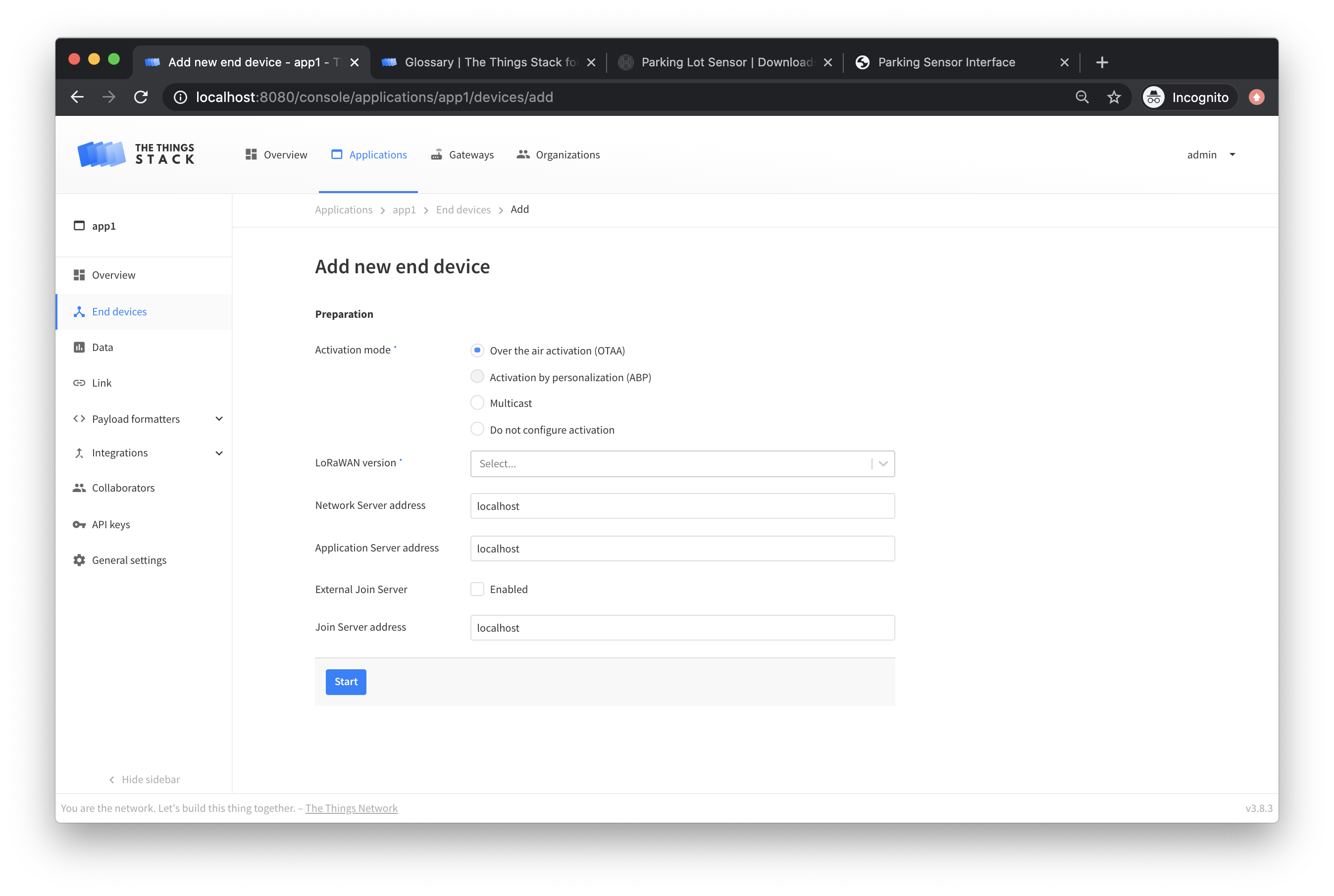
On page one let's use a hover-over tooltip to answer 'what is this' and 'where do I find this' for Activation Mode and LoRaWAN Version
Let's take the description from the glossary, and a small snippet from a product description like this with circles or arrows for LoRaWAN version
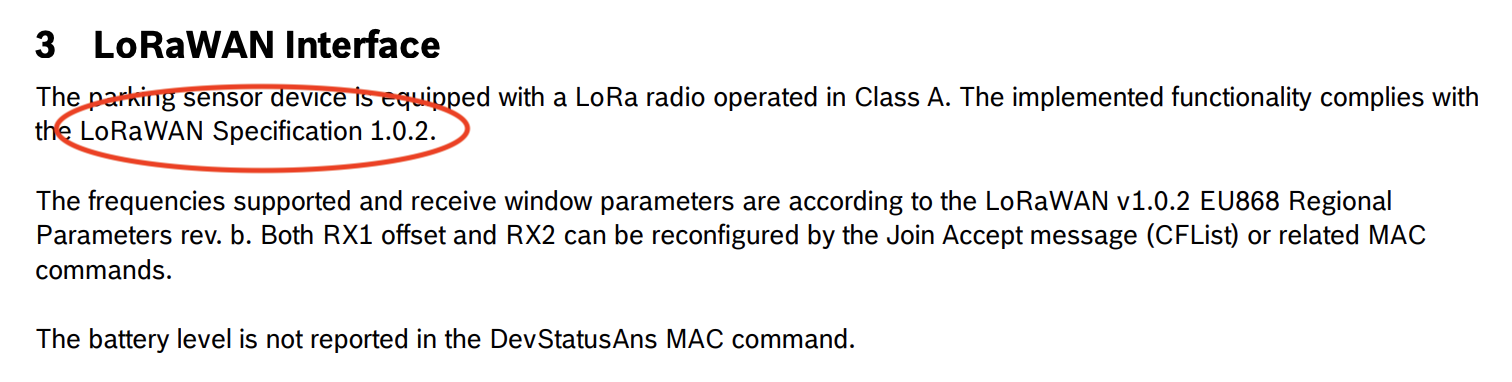
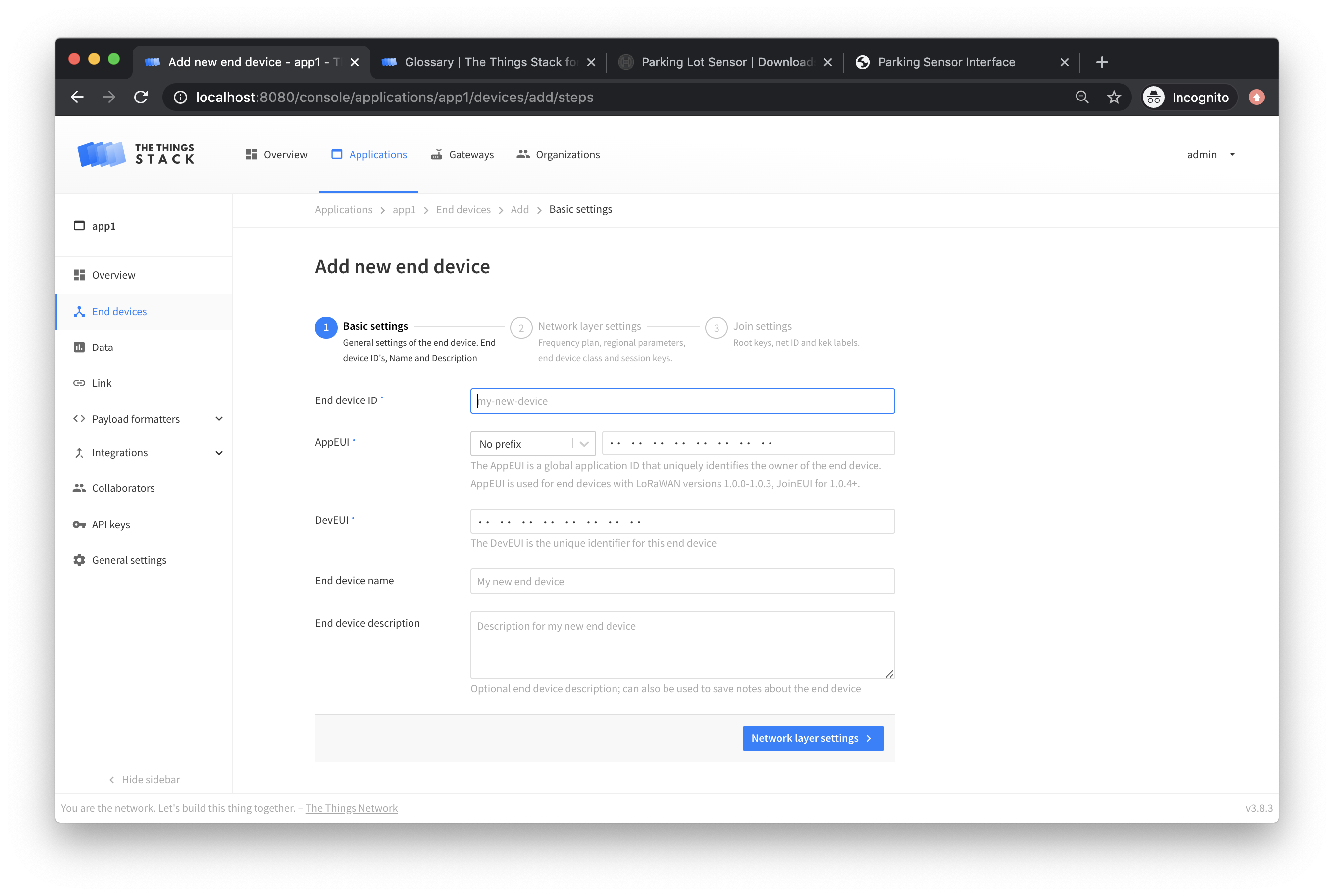
On Basic Settings, same thing for AppEUI and DevEUI
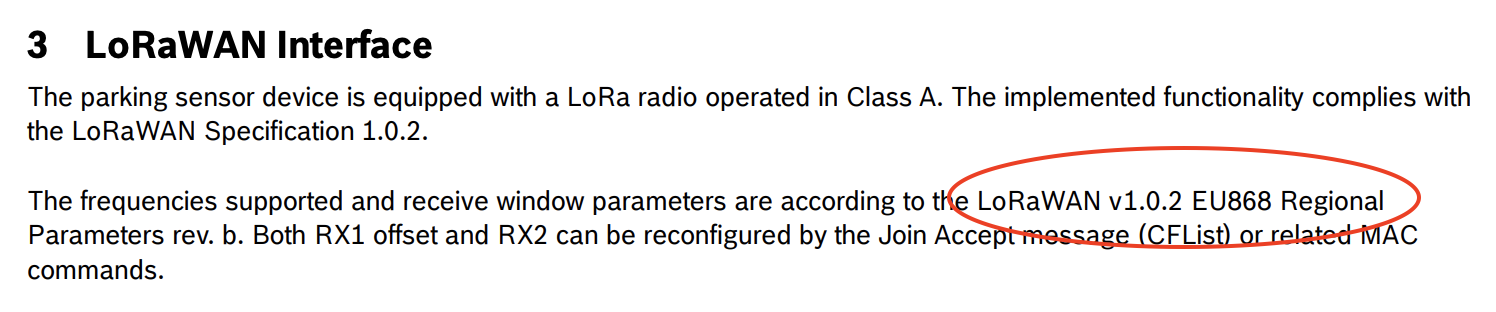
On Network Settings, a 'what is this' for Frequency Plans, and then the same 'how do I find this' for Regional Parameters with a snippet from some product info

On join settings, I'm not sure what any of these mean except AppKey, so I will add them to the glossary and we can do 'what is this' and 'where to find it' for stuff that comes from the device mfr
I'll post inline field descriptions in another comment.
 benolayinka
on 15 Jun 2020
benolayinka
on 15 Jun 2020
For the descriptions, instead of inline, maybe we just put a question mark next to the field term, and pop up this information in a tooltip like so:
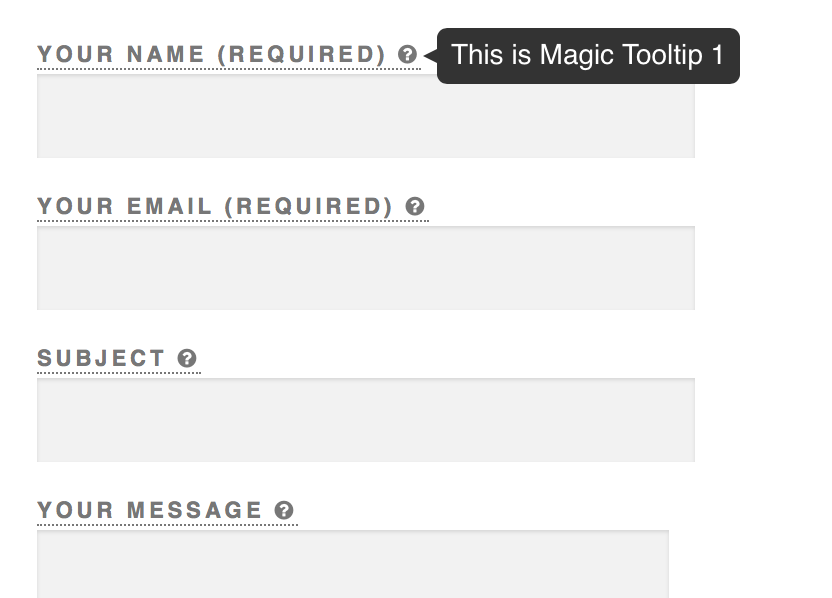
I'm going to update the glossary with exactly these definitions, so we can pull this info from there.
Activation mode:
Over-the-Air Activation (OTAA) is the preferred and most secure way to connect a device. Devices perform a join-procedure with the network, during which a dynamic DevAddr is assigned and security keys are negotiated with the device.
Activation by Personalization (ABP) requires hardcoding the DevAddr as well as the security keys in the device. This strategy might seem simpler, because you skip the join procedure, but it has downsides related to security.
Multicast is a virtual group of ABP devices which allows all devices to receive the same downlinks. Multicast groups do not support uplinks.
LoRaWAN version: The LoRaWAN version is the LoRa Alliance LoRaWAN specification your device conforms to, which defines which MAC features it supports.
End Device ID: A unique, human-readable identifier for your device. You make it up, so be creative. Device IDs can not be reused.
JoinEUI: The Join EUI (formerly called Application EUI) is a 64 bit extended unique identifier used to identify the join server during activation. This should be provided by the device manufacturer for pre-provisioned devices, or by the owner of the join server you will use.
DevEUI: A 64 bit extended unique identifier for your device. This is programmed by the manufacturer and should not be changed. It should be provided to you by the manufacturer, or printed on the device.
Frequency Plan: A Frequency Plan defines data rates and channels which comply with the LoRaWAN Regional Parameters for a band or geographical area. Devices are configured for a particular Frequency Plan as part of activation, and can use any Frequency Plan within a supported band.
Regional Parameters version: The Regional Parameters specify frequency, dwell time, and other communication settings for different geographical areas. The Regional Parameters version is the version of the LoRa Alliance specification which your device supports. This should be provided by the device manufacturer in a datasheet.
Supports Class C: Class C devices extend Class A by keeping the receive windows open unless they are transmitting. This allows for low-latency communication but is many times more energy consuming than Class A devices. Not all devices support Class C, this information should be provided by the device manufacturer in a datasheet.
benolayinka
on 15 Jun 2020
Setting blocking/release since we need to get some of these changes/improvements in together with the release of the end device wizard (#2663 ).
I'll follow up ASAP.
kschiffer
on 25 Jun 2020
Thanks @benolayinka for these descriptions.
After looking at it again I think it's better to use a documentation strategy like this:
- Use glossary tooltips when
- it is helpful to inform about unfamiliar, complex terms in more detail (not limited to LoRaWAN related terms)
- it is helpful to inform about where certain information can be found
- Use field descriptions only when
- there is concrete, concise information that will help the user filling the field, such as:
- field constraints or info about what is considered a valid input (e.g.
The north-south position in degrees, where 0 is the equator) - quick notices about where the required information can be found (e.g.
The LoRaWAN version (MAC), as provided by the device manufacturer) - information as to what is likely the desired input (e.g.
Recommended for all gateways in order to respect spectrum regulations) - no glossary entry is available and it is possible (and necessary) to clarify field usage and/or meaning in a few words (otherwise create a glossary entry)
- it does not repeat information that can already easily be derived from the field name and placeholder, or from the glossary tooltip (e.g.
Gateway can be updated automatically, this is clear from the field title itself)
I'll add this to our design guidelines together with the PR that will introduce the glossary tooltips.
The next step is to update the glossary accordingly and to implement #2663. Putting this on blocked until these are ready.
kschiffer
on 29 Jun 2020
Activation mode:
Over-the-Air Activation (OTAA) is the preferred and most secure way to connect a device. Devices perform a join-procedure with the network, during which a dynamic DevAddr is assigned and security keys are negotiated with the device.
Activation by Personalization (ABP) requires hardcoding the DevAddr as well as the security keys in the device. This strategy might seem simpler, because you skip the join procedure, but it has downsides related to security.
Multicast is a virtual group of ABP devices which allows all devices to receive the same downlinks. Multicast groups do not support uplinks.LoRaWAN version: The LoRaWAN version is the LoRa Alliance LoRaWAN specification your device conforms to, which defines which MAC features it supports.
End Device ID: A unique, human-readable identifier for your device. You make it up, so be creative. Device IDs can not be reused.
JoinEUI: The Join EUI (formerly called Application EUI) is a 64 bit extended unique identifier used to identify the join server during activation. This should be provided by the device manufacturer for pre-provisioned devices, or by the owner of the join server you will use.
DevEUI: A 64 bit extended unique identifier for your device. This is programmed by the manufacturer and should not be changed. It should be provided to you by the manufacturer, or printed on the device.
Frequency Plan: A Frequency Plan defines data rates and channels which comply with the LoRaWAN Regional Parameters for a band or geographical area. Devices are configured for a particular Frequency Plan as part of activation, and can use any Frequency Plan within a supported band.
Regional Parameters version: The Regional Parameters specify frequency, dwell time, and other communication settings for different geographical areas. The Regional Parameters version is the version of the LoRa Alliance specification which your device supports. This should be provided by the device manufacturer in a datasheet.
Supports Class C: Class C devices extend Class A by keeping the receive windows open unless they are transmitting. This allows for low-latency communication but is many times more energy consuming than Class A devices. Not all devices support Class C, this information should be provided by the device manufacturer in a datasheet.
Glossary is ready with these terms #2741
benolayinka
on 29 Jun 2020
What is the status here?
 johanstokking
on 24 Aug 2020
johanstokking
on 24 Aug 2020
This whole complex of form UX needs a bit of consolidation into actionable issues. It's still on my list to work on after current high priority issues.
kschiffer
on 24 Aug 2020
Great! Removing discussion state to make it more actionable. Please revert if necessary.
johanstokking
on 25 Aug 2020
Can we make this actionable?
@kschiffer can we start with low hanging fruit?
johanstokking
on 12 Nov 2020
Replaced by #3522, which has a concrete and actionable plan of the new form layout and documentation strategy.
This will also partially integrate the work from @benolayinka in this issue.
kschiffer
on 22 Dec 2020
Related issues
johanstokking
·
6Comments
 ecities
·
5Comments
kschiffer
·
4Comments
ecities
·
5Comments
kschiffer
·
4Comments
 adriansmares
·
9Comments
adriansmares
·
9Comments
 adamsondelacruz
·
7Comments
adamsondelacruz
·
7Comments