Loopback-next: Running passport login example in CLI
While using the CLI to install the example of passport login by
lb4 example passport-login
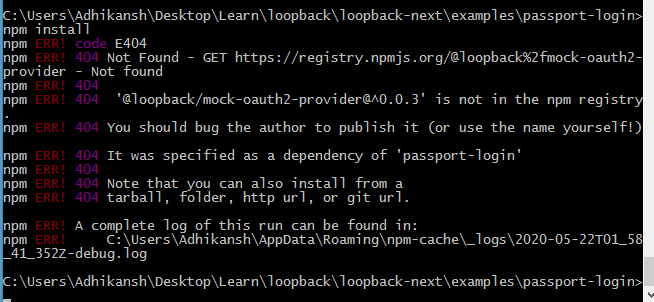
It's show error when installing the dependency '@loopback/mock-oauth2-provider@^0.0.3'
 HrithikMittal
All 18 comments
for time being please open package.json and remove "@loopback/mock-oauth2-provider": "^0.0.3", under dev dependencies.
 deepakrkris
on 22 May 2020
deepakrkris
on 22 May 2020
also delete ../loopback4-example-passport-login/src/__tests__/acceptance/passport-login.acceptance.ts and then do an npm I, you should be able to start the app then.
deepakrkris
on 22 May 2020
@deepakrkris We need to publish @loopback/mock-oauth2-provider. Let me see what I can do.
 raymondfeng
on 22 May 2020
raymondfeng
on 22 May 2020
See @loopback/[email protected]. It' on npm now.
raymondfeng
on 22 May 2020
Ya, it's available now. Thank you
HrithikMittal
on 22 May 2020
Hey @raymondfeng and @deepakrkris I am still facing a problem while running this
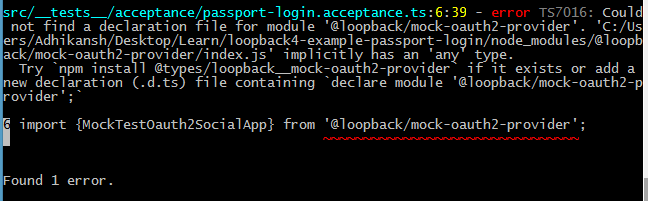
I also try to install the package 'npm install @types/loopback__mock-oauth2-provider' but it is not available.
and I also try by removing the package and
"
also delete ../loopback4-example-passport-login/src/__tests__/acceptance/passport-
login.acceptance.ts and then do an npm I, you should be able to start the app then.
"
but still, it showing the error
HrithikMittal
on 22 May 2020
No
@types/...is needed. Our packages are built in TypeScript and they come with TS d.ts files.
raymondfeng
on 22 May 2020
Hmm, the package.json is missing types and main.
raymondfeng
on 22 May 2020
then what to do now? Please can you make the changes?
HrithikMittal
on 22 May 2020
You can delete the acceptance tests.
raymondfeng
on 22 May 2020
We'll have to post a new version
raymondfeng
on 22 May 2020
@HrithikMittal To try the example, you can do the following:
git clone [email protected]:strongloop/loopback-next.git
cd loopback-next
npm ci
npm run build
cd examples/passport-login
npm start
@raymondfeng
[email protected]: Permission denied (publickey).
fatal: Could not read from remote repository.
Please make sure you have the correct access rights
and the repository exists.
 mathias22osterhagen22
on 26 May 2020
mathias22osterhagen22
on 26 May 2020
The issue is fixed by #5522. We'll publish a release.
raymondfeng
on 26 May 2020
@mathias22osterhagen22 You don't seem to have ssl key set up for your git account. But you should be able to run:
git clone https://github.com/strongloop/loopback-next.git
@raymondfeng
Yes sorry to reopen but still not working even following your steps :
> @loopback/[email protected] prestart C:\Users\LSC\Downloads\loopback-next-master (1)\loopback-next-master\examples\passport-login
> npm run build


> @loopback/[email protected] build C:\Users\LSC\Downloads\loopback-next-master (1)\loopback-next-master\examples\passport-login
> lb-tsc


> @loopback/[email protected] start C:\Users\LSC\Downloads\loopback-next-master (1)\loopback-next-master\examples\passport-login
> node .

Cannot start the application. Error: Cannot find module '../oauth2-providers'
Require stack:
- C:\Users\LSC\Downloads\loopback-next-master (1)\loopback-next-master\examples\passport-login\dist\index.js
    at Function.Module._resolveFilename (internal/modules/cjs/loader.js:982:15)
    at Function.Module._load (internal/modules/cjs/loader.js:864:27)
    at Module.require (internal/modules/cjs/loader.js:1044:19)
    at require (internal/modules/cjs/helpers.js:77:18)
    at main (C:\Users\LSC\Downloads\loopback-next-master (1)\loopback-next-master\examples\passport-login\dist\index.js:80:27)
    at Object.<anonymous> (C:\Users\LSC\Downloads\loopback-next-master (1)\loopback-next-master\examples\passport-login\dist\index.js:87:5)
    at Module._compile (internal/modules/cjs/loader.js:1158:30)
    at Object.Module._extensions..js (internal/modules/cjs/loader.js:1178:10)
    at Module.load (internal/modules/cjs/loader.js:1002:32)
    at Function.Module._load (internal/modules/cjs/loader.js:901:14)
    at Function.executeUserEntryPoint [as runMain] (internal/modules/run_main.js:74:12)
    at internal/main/run_main_module.js:18:47 {
  code: 'MODULE_NOT_FOUND',
  requireStack: [
    'C:\\Users\\LSC\\Downloads\\loopback-next-master (1)\\loopback-next-master\\examples\\passport-login\\dist\\index.js'
  ]
}
npm ERR! code ELIFECYCLE
npm ERR! errno 1
npm ERR! @loopback/[email protected] start: `node .`
npm ERR! Exit status 1
npm ERR!
npm ERR! Failed at the @loopback/[email protected] start script.
npm ERR! This is probably not a problem with npm. There is likely additional logging output above.

npm ERR! A complete log of this run can be found in:
npm ERR!     C:\Users\LSC\AppData\Roaming\npm-cache\_logs\2020-05-26T15_01_17_705Z-debug.log
I will wait for the release, all the documentation part about authentication + authorization is really difficult to understand.
mathias22osterhagen22
on 26 May 2020
@mathias22osterhagen22 You need to follow these steps:
git clone https://github.com/strongloop/loopback-next.git
cd loopback-next
npm ci
npm run build
cd examples/passport-login
npm start
@mathias22osterhagen22 you will have to create the oauth template spec as per https://github.com/strongloop/loopback-next/tree/master/examples/passport-login#create-oauth2-providersjson
deepakrkris
on 26 May 2020
Related issues
 teambitcodeGIT
·
3Comments
teambitcodeGIT
·
3Comments
 shahulhameedp
·
3Comments
shahulhameedp
·
3Comments
 frodoe7
·
3Comments
frodoe7
·
3Comments
 aceraizel
·
3Comments
aceraizel
·
3Comments
 marioestradarosa
·
3Comments
marioestradarosa
·
3Comments