Loopback-next: Extending existing model in controller
I'm attempting to extend a model in the same fashion as below:
However extending an existing model by adding properties does not seem to function as in the above example. Is there something that I am missing?
Example Repo:
https://github.com/dougal83/example-extend-model
 dougal83
All 28 comments
Taken from the reproduction sandbox:
  @post('/users', {
    responses: {
      '200': {
        description: 'User model instance',
        content: {'application/json': {schema: getModelSchemaRef(User)}},
      },
    },
  })
getModelSchemaRef is still referencing the base model, User. Changing it to NewUserRequest fixes the issue:
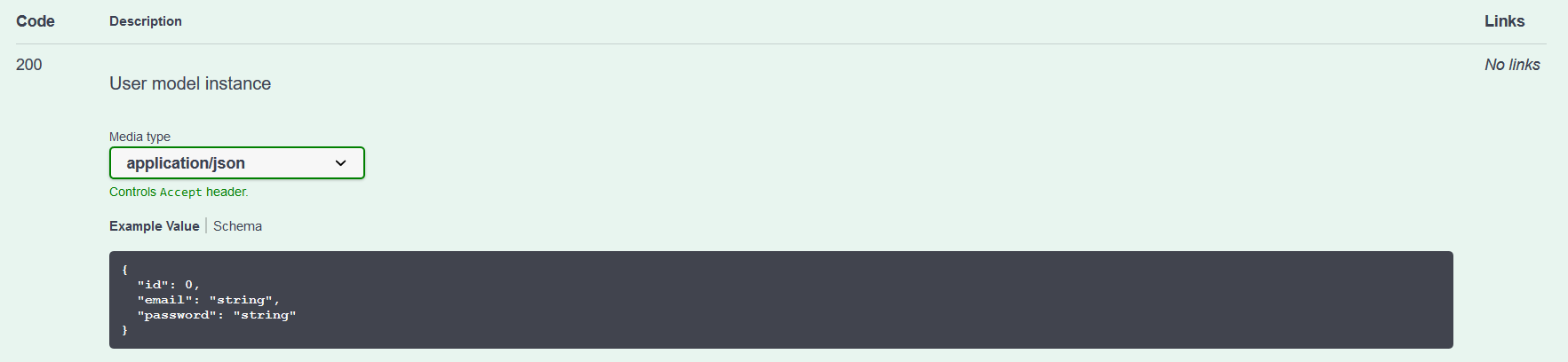
Edit Apologies, I believe I've misunderstood your question. I'll update if I've found a remedy.
 achrinza
on 25 Feb 2020
achrinza
on 25 Feb 2020
Edit Apologies, I believe I've misunderstood your question. I'll update if I've found a remedy.
lol, no worries. I've been looking over the Shopping example but couldn't figure it out. Either I'm a dummy or it's worth some documentation(if I've not missed that too).
dougal83
on 25 Feb 2020
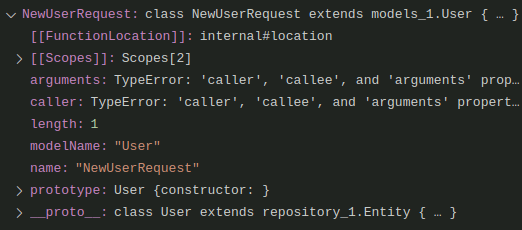
Debug shows the extended class refers to the User modelName instead of the expected NewUserRequest. Note that supplying `@model({modelName: 'NewUserRequest'}) will not remedy the issue, is this a metadata issue?
dougal83
on 25 Feb 2020
Hey @hacksparrow
Do you know if anything special had to be done the shopping example to extend the NewUser model?
dougal83
on 13 Mar 2020
@dougal83 , where is your breakpoint exactly?
 emonddr
on 23 Mar 2020
emonddr
on 23 Mar 2020
shopping has:
 @post('/users', {
    responses: {
      '200': {
        description: 'User',
        content: {
          'application/json': {
            schema: {
              'x-ts-type': User,
            },
          },
        },
      },
    },
  })
  async create(
    @requestBody({
      content: {
        'application/json': {
          schema: getModelSchemaRef(NewUserRequest, {
            title: 'NewUser',
          }),
        },
      },
    })
    newUserRequest: NewUserRequest,
  ): Promise<User> {
yours has:
@post('/users', {
    responses: {
      '200': {
        description: 'User model instance',
        content: {'application/json': {schema: getModelSchemaRef(User)}},
      },
    },
  })
  async create(
    @requestBody({
      content: {
        'application/json': {
          schema: getModelSchemaRef(NewUserRequest, {
            title: 'NewUser',
            exclude: ['id'],
          }),
        },
      },
    })
    user: Omit<NewUserRequest, 'id'>,
  ): Promise<User> {
Please elaborate step by step what you mean by does not seem to function. What you expected, and what you actually got. Thx.
emonddr
on 23 Mar 2020
@dougal83 , where is your breakpoint exactly?
I think it was L61 on the user controller.
Please elaborate step by step what you mean by does not seem to function. What you expected, and what you actually got. Thx.
@emonddr OK. So basically use explorer to create a new user.
- On shopping example, creating a new user has a password field in the request body (as per the extended model NewUserRequest), as expected.
- On the sandbox, creating a new user has no password field in the request body (despite the extended model NewUserRequest). I expect the model to be extended.
I don't see how the shopping example is actually managing to extend the User model and my sandbox is not. I'm missing something... hopefully not my marbles.
Thank you for spending the time to look at it for me!
dougal83
on 23 Mar 2020
Hmm. Yeah. My first instinct was to place a breakpoint on 61, but I didn't see the same debugger info you posted. That's why I asked for a specific line. I still don't see what you posted.
I see this:
 emonddr
on 23 Mar 2020
emonddr
on 23 Mar 2020
@emonddr Ah, I remember how I found it! I created the breakpoint on L48 and stepped into the getModelSchemaRef() process and found what I thought might be erroneous. I'm home now so I'll see if I can find the exact break.
dougal83
on 23 Mar 2020
I am going to debug shopping example to see how it succeeded at it.
emonddr
on 23 Mar 2020
Put a conditional breakpoint @ node_modules/@loopback/repository-json-schema/src/build-schema.ts L89 with the expression ctor.modelName == 'NewUserRequest'
Note ctor.definition.properties are as expected with password present.
On L91, schema has dropped password and reverted to pre extended model. Not sure if this is a bug or me looking for one! Perhaps you can shed some light on it. Thanks muchly.
dougal83
on 23 Mar 2020
In shopping, at line 89 of build-schema.ts, I see:

and if I expand definition and properties I see

On line 91, the key value seems to be obtained from title field in options and prefixed with model.
e.g. modelNewUser seems to be the key for NewUserRequest.
let schema = cached?.[key];
schema is null here, and a schema value is obtained on L96
schema = modelToJsonSchema(ctor, options);
at which point it is not a class , but a json object:
 emonddr
on 24 Mar 2020
emonddr
on 24 Mar 2020
@dougal83 , I have confirmed your bug.
In your app, at L96 of build-schema.ts, the schema object does not have the
password property.
I looked at the shopping cart POST /users you mentioned, and it differed in 2 ways:
1) It didn't omit the id
2) its open api schema was different.
I tried not omitting the id with yours and still had the same problem.
The problem seems to be
getModelSchemaRef(User) in
@post('/users', {
    responses: {
      '200': {
        description: 'User model instance',
        content: {'application/json': {schema: getModelSchemaRef(User)}},
      },
    },
  })
Not sure why.
If I change your POST /users open api schema to be the same as in the shopping app example:
@post('/users', {
    responses: {
      '200': {
        description: 'User',
        content: {
          'application/json': {
            schema: {
              'x-ts-type': User,
            },
          },
        },
      },
    },
  })
you don't lose the password property at line 96 in build-schema.ts .
emonddr
on 24 Mar 2020
The API explorer shows:
 emonddr
on 24 Mar 2020
emonddr
on 24 Mar 2020
Oh, but a POST /users fails with:
{
  "error": {
    "statusCode": 422,
    "name": "ValidationError",
    "message": "The `User` instance is not valid. Details: `password` is not defined in the model (value: undefined).",
    "details": {
      "context": "User",
      "codes": {
        "password": [
          "unknown-property"
        ]
      },
      "messages": {
        "password": [
          "is not defined in the model"
        ]
      }
    }
  }
}
shopping cart example is locked into specific dependencies:
e.g.
   "@loopback/openapi-v3": "3.1.0",
    "@loopback/repository": "2.0.1",
yours has
  "@loopback/openapi-v3": "^2.0.0",
    "@loopback/repository": "^1.19.1",
When I look in node_modules:
You seem to have @loopback/repository-json-schema of: "version": "1.12.2"
Shopping example has @loopback/repository-json-schema of : "version": "2.0.1"
So perhaps upgrade this module and possibly others?
emonddr
on 24 Mar 2020
The issue persists through, I have upgraded the package versions.
I think the issue is where the prototype of NewUserRequest may be remaining as 'User' and that is being picked up. Perhaps forcing the extended model to update its prototype would fix the issue. The shopping example has somehow managed this but I'm not sure how. :confused:
dougal83
on 24 Mar 2020
I updated the dependencies in your app.
If I change your POST /users to be similarly coded as in shopping example:
 @post('/users', {
    responses: {
      '200': {
        description: 'User',
        content: {
          'application/json': {
            schema: {
              'x-ts-type': User,
            },
          },
        },
      },
    },
  })
  async create(
    @requestBody({
      content: {
        'application/json': {
          schema: getModelSchemaRef(NewUserRequest, {
            title: 'NewUser',
            exclude: ['id'],
          }),
        },
      },
    })
    user: Omit<NewUserRequest, 'id'>,
  ): Promise<User> {
    const createdUserWithoutPassword = await this.userRepository.create(
      _.omit(user, 'password'),
    );
    return createdUserWithoutPassword;
  }
it works (yesterday I forgot to remove the password on the return, and that is why I got the validation error).
I will try your original open api spec for this method now.
emonddr
on 24 Mar 2020
Hmm, I still see your problem even if I change password to another name, and if I move NewUserRequest out of controller into its own file. Still investigating...
emonddr
on 24 Mar 2020
Added a failing unit test to reproduce the issue - https://github.com/strongloop/loopback-next/blob/fix-4721/packages/repository-json-schema/src/__tests__/unit/build-schema.unit.ts#L241.
 raymondfeng
on 24 Mar 2020
raymondfeng
on 24 Mar 2020
Thank you both for investigating. I've probably spent 12 hours cumulatively rebuilding the scenario to try and replicate based on the shopping example with no working result to show for it.
dougal83
on 24 Mar 2020
A big thanks for @raymondfeng for the PR. I knew the issue was in the metadata code, but couldn't put my finger on it. The PR fixes your problem. I npm packed loopback/packages/repository and installed the .tgz file into your project, and tested the fix. :)
emonddr
on 24 Mar 2020
❤️ It really is first-class support for a tricky problem. I still have no idea how the shopping example managed it but heyho. :)
dougal83
on 24 Mar 2020
@dougal83 , my observation while debugging was that the User type was placed in the cache first, and when NewUserRequest was being processed, the cache used the User value.
emonddr
on 25 Mar 2020
@loopback/repository 2.0.2 contains the fix. It was published yesterday early evening.
emonddr
on 25 Mar 2020
@dougal83 ^
emonddr
on 25 Mar 2020
@emonddr Thank you for your support and follow up. Much appreciated!
dougal83
on 25 Mar 2020
Related issues
 kesavkolla
·
3Comments
kesavkolla
·
3Comments
 mhdawson
·
3Comments
mhdawson
·
3Comments
 frodoe7
·
3Comments
frodoe7
·
3Comments
 acrodrig
·
3Comments
acrodrig
·
3Comments
 shadyanwar
·
3Comments
shadyanwar
·
3Comments