Loopback-next: Id property not auto generating in Loopback 4
Steps to reproduce
With settings: {idInjection: true, postgresql: {schema: 'public', table: 'user'}}
@property({
    type: 'number',
    generated:true,
    id: true,
    postgresql: {
      generated:true,
      columnName: 'id',
      dataType: 'integer',
      dataScale: 0,
      nullable: 'NO',
    },
  })
  id: number;
Current Behavior
Unhandled error in POST /users: 500 error: null value in column "id" violates no
t-null constraint
    at Connection.parseE (D:\FoxSense\pranesh-ba\birth-assist-server\node_module
s\pg\lib\connection.js:614:13)
    at Connection.parseMessage (D:\FoxSense\pranesh-ba\birth-assist-server\node_
modules\pg\lib\connection.js:413:19)
    at Socket.<anonymous> (D:\FoxSense\pranesh-ba\birth-assist-server\node_modul
es\pg\lib\connection.js:129:22)
    at Socket.emit (events.js:223:5)
    at addChunk (_stream_readable.js:309:12)
    at readableAddChunk (_stream_readable.js:290:11)
    at Socket.Readable.push (_stream_readable.js:224:10)
    at TCP.onStreamRead (internal/stream_base_commons.js:181:23)
Expected Behavior
User created sucessfully
Additional information
Id is generated when I manually turn on the Identity constraint in table properties via pgadmin . But I need the same to be done via running migrate.ts of the app.
 praneshvrp1396
All 11 comments
@praneshvrp1396 Hi, from the auto-migration section of the README file https://github.com/strongloop/loopback-connector-postgresql#auto-migrateauto-update-models-with-foreign-keys, I think the following setting should work:
  @property({
    id: true,
    type: 'Number',
    generated:true .  // edit: sorry I missed this one
    required: false, // needed
    postgresql: {
    // generated:true, no needed
    columnName: 'id',
    dataType: 'integer',
    dataScale: 0,
    nullable: 'NO',
    },
  })
  id: number;
Notice that the id should have required: false. This is because the id is generated in the database. We don't need to include it in the post request.
Could you try it out and let me know if it works?
And also feel free to let us know how we can make the documentation more clear/easy to find. Thanks!
 agnes512
on 21 Feb 2020
agnes512
on 21 Feb 2020
And as an addition, if the idproperty is generated, where can we specify the range of the idfield?
praneshvrp1396
on 24 Feb 2020
@praneshvrp1396 Hi, from the auto-migration section of the README file https://github.com/strongloop/loopback-connector-postgresql#auto-migrateauto-update-models-with-foreign-keys, I think the following setting should work:
  @property({
    id: true,
    type: 'Number',
    required: false, // needed
    postgresql: {
    // generated:true, no needed
    columnName: 'id',
    dataType: 'integer',
    dataScale: 0,
    nullable: 'NO',
    },
  })
  id: number;
Notice that the
idshould haverequired: false. This is because the id is generated in the database. We don't need to include it in the post request.Could you try it out and let me know if it works?
And also feel free to let us know how we can make the documentation more clear/easy to find. Thanks!
I tried and I am getting the same error.
And these are the properties of the primary key id
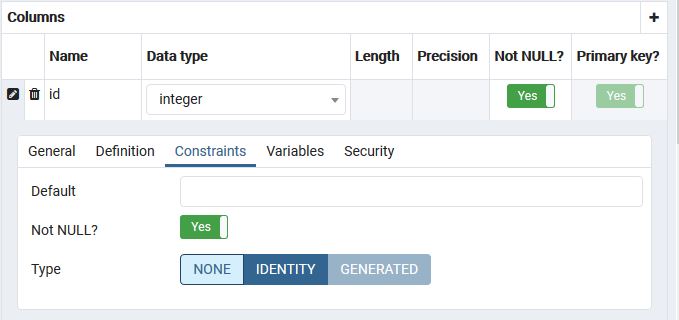
But when I manually change the properties directly in pgadmin like below, id generation is working fine. I need to eliminate the manual changes in pgadmin. Please provide me with a solution.

praneshvrp1396
on 24 Feb 2020
@praneshvrp1396 I edited my comment https://github.com/strongloop/loopback-next/issues/4708#issuecomment-589749770 a bit. Sorry that I missed generated: true.
Could you try npm run migrate and npm start again? You should be able to see something like:

agnes512
on 24 Feb 2020
@agnes512 Sorry, I should have queried that... I assumed that you knew something I did not! 😄
 dougal83
on 24 Feb 2020
dougal83
on 24 Feb 2020
@praneshvrp1396 I edited my comment #4708 (comment) a bit. Sorry that I missed
generated: true.Could you try
npm run migrateandnpm startagain? You should be able to see something like:
Getting the same error even after doing the required change as you said.
praneshvrp1396
on 25 Feb 2020
@praneshvrp1396 Would you like to post an example repo on your account that replicates the issue you are experiencing so that I can take a closer look?
agnes512
on 25 Feb 2020
@praneshvrp1396 Would you like to post an example repo on your account that replicates the issue you are experiencing so that I can take a closer look?
Really sorry. What does it mean to post an example repo? Since I am new to github..not familiar with terminalogies
praneshvrp1396
on 25 Feb 2020
@praneshvrp1396 Would you like to post an example repo on your account that replicates the issue you are experiencing so that I can take a closer look?
Really sorry. What does it mean to post an example repo? Since I am new to github..not familiar with terminalogies
Don't worry about it, we are new to Git at some point. Glad you are here! :) By example repo, it is meant to upload an example of your project/issue. The following guide should help:
Here is a guide: https://kbroman.org/github_tutorial/pages/init.html
dougal83
on 25 Feb 2020
Closing due to inactivity. Feel free to comment if the problem persists, so that we can re-open the issue.
 achrinza
on 24 Aug 2020
achrinza
on 24 Aug 2020
I was having the same issue because I had existing tables migrated with generated:false. Updated to generated:true and ran `npm run migrate' did not alter the tables with the config. I have to drop all the tables and migrate again.
 cytaylorw
on 26 Oct 2020
cytaylorw
on 26 Oct 2020
Related issues
 aceraizel
·
3Comments
aceraizel
·
3Comments
 ThePinger
·
3Comments
ThePinger
·
3Comments
 rexliu0715
·
3Comments
rexliu0715
·
3Comments
 shadyanwar
·
3Comments
shadyanwar
·
3Comments
 milindsingh
·
3Comments
milindsingh
·
3Comments
Most helpful comment
@praneshvrp1396 Hi, from the auto-migration section of the README file https://github.com/strongloop/loopback-connector-postgresql#auto-migrateauto-update-models-with-foreign-keys, I think the following setting should work:
Notice that the
idshould haverequired: false. This is because the id is generated in the database. We don't need to include it in the post request.Could you try it out and let me know if it works?
And also feel free to let us know how we can make the documentation more clear/easy to find. Thanks!