Loopback-next: vscode source code formatting vs. linting rules?
Questions
When saving a typescript file in vscode it's getting automatically formated by some linting rules:
When saving it automatically gets formated, e.g. some spaces after brackets are inserted:
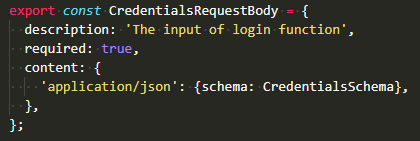

When running npm run lint:fix theese spaces are removed again to conform the .prettierrc or .eslintrc.js linting rules.
Is there any way to let vscode and prettier apply the same linting rules? Is this the expected behavior or is there something wrong with my local setup?
Windows 10 Version 1909 Enterprise
vscode 1.41.1
vscode ESLint Plugin 2.0.15
 derdeka
All 5 comments
Add to settings:
"typescript.format.insertSpaceAfterOpeningAndBeforeClosingNonemptyBraces": false,
EDIT: The above works as standard. However if you have an extension such as Prettier - Code formatter then the above rule will be ignored. However the prettier rules will be applied however but you may see a flicker on save. I've noticed that sometimes the extension can fail to format properly every time and rules will not be applied but you can simply resave.
 dougal83
on 7 Feb 2020
dougal83
on 7 Feb 2020
Add to settings:
"typescript.format.insertSpaceAfterOpeningAndBeforeClosingNonemptyBraces": false,
This setting works for me. Should we add this to .vscode/settings.json ?
The above works as standard.
Do you mean this would be the standard if i disable all plugins?
derdeka
on 10 Feb 2020
This setting works for me. Should we add this to .vscode/settings.json?
Wouldn't be a bad idea if you ask me. Would you like to do the honours with PR?
Do you mean this would be the standard if i disable all plugins?
I believe it would apply with vanilla VSCode install if you have a suitably recent version of Typescript in use. Can't remember of the top of my head.
dougal83
on 10 Feb 2020
FYI: here is our recommended VSCode setup: https://github.com/strongloop/loopback-next/blob/master/docs/site/VSCODE.md
 bajtos
on 17 Feb 2020
bajtos
on 17 Feb 2020
FYI: here is our recommended VSCode setup: https://github.com/strongloop/loopback-next/blob/master/docs/site/VSCODE.md
Thanks @bajtos @dougal83, i forgot to install prettier plugin on my new laptop. Anyway, i think the .vscode setting might be helpful.
derdeka
on 17 Feb 2020
Related issues
 mhdawson
·
3Comments
mhdawson
·
3Comments
 aceraizel
·
3Comments
aceraizel
·
3Comments
 cloudwheels
·
3Comments
cloudwheels
·
3Comments
 teambitcodeGIT
·
3Comments
teambitcodeGIT
·
3Comments
 shahulhameedp
·
3Comments
shahulhameedp
·
3Comments