Loopback-next: Loopback does not process MSSQL tables with 100 million records
Steps to reproduce
At work we have started using Loopback with Mssql and today we have to connect with a view with 100 million records but I have encountered a problem ... Tedious is not able to process the request with filters or limit
Current Behavior
I am currently returning an error like this:
?filter[limit]=100: 500 RequestError: Timeout: Request failed to complete in 15000ms
Expected Behavior
I expected him to give me 100 records back, I don't expect them to ever return me, it's impossible in less than 15 seconds!
Additional information
darwin x64 13.1.0
├── @loopback/[email protected]
├── @loopback/[email protected]
├── @loopback/[email protected]
├── @loopback/[email protected]
├── @loopback/[email protected]
├── @loopback/[email protected]
├── @loopback/[email protected]
├── @loopback/[email protected]
├── @loopback/[email protected]
├── @loopback/[email protected]
└── [email protected]
 frbuceta
All 38 comments
I am not sure if this is a Loopback or Tedious or loopback-connector-mssql problem
frbuceta
on 19 Nov 2019
Can you set DEBUG=loopback:connector:mssql to see what SQL statement is sent?
 raymondfeng
on 19 Nov 2019
raymondfeng
on 19 Nov 2019
Can you set
DEBUG=loopback:connector:mssqlto see what SQL statement is sent?
LOG
> DEBUG=loopback:connector:mssql node -r source-map-support/register .
loopback:connector:mssql Settings: {"name":"MsSQL","connector":"mssql","url":"","host":"XXX.XX.XXX.XXX","port":1433,"user":"XXXX","password":"XXXX","database":"XXXX","debug":false} +0ms
Server is running at http://127.0.0.1:3000
loopback:connector:mssql Connection established: XXX.XX.XXX.XXX +454ms
loopback:connector:mssql SQL: SELECT * FROM (SELECT [id],[codigo],[fecha],[latitud],[longitud],ROW_NUMBER() OVER ( ORDER BY [id]) AS RowNum FROM [dbo].[TABLE]
) AS S
WHERE S.RowNum > 0 AND S.RowNum <= 100
Parameters: [] +22s
loopback:connector:mssql Result: {"code":"ETIMEOUT","number":"ETIMEOUT","originalError":{"message":"Timeout: Request failed to complete in 15000ms","code":"ETIMEOUT"},"name":"RequestError","precedingErrors":[]} undefined +16s
Unhandled error in GET /vehicle-positions?filter[limit]=100: 500 RequestError: Timeout: Request failed to complete in 15000ms
at Request.userCallback (/Users/fran/Projects/.XXXX/XXXX-api/node_modules/mssql/lib/tedious.js:637:19)
at Request.callback (/Users/fran/Projects/.XXXX/XXXX-api/node_modules/tedious/lib/request.js:40:14)
at Connection.message (/Users/fran/Projects/.XXXX/XXXX-api/node_modules/tedious/lib/connection.js:2417:24)
at Connection.dispatchEvent (/Users/fran/Projects/.XXXX/XXXX-api/node_modules/tedious/lib/connection.js:1247:15)
at MessageIO.<anonymous> (/Users/fran/Projects/.XXXX/XXXX-api/node_modules/tedious/lib/connection.js:1107:14)
at MessageIO.emit (events.js:210:5)
at Message.<anonymous> (/Users/fran/Projects/.XXXX/XXXX-api/node_modules/tedious/lib/message-io.js:40:14)
at Message.emit (events.js:215:7)
at endReadableNT (/Users/fran/Projects/.XXXX/XXXX-api/node_modules/tedious/node_modules/readable-stream/lib/_stream_readable.js:1077:12)
at processTicksAndRejections (internal/process/task_queues.js:80:21)
@raymondfeng umm is making a select from another select
frbuceta
on 20 Nov 2019
This cannot be ... in the repository there is not the same code as in my node_modules
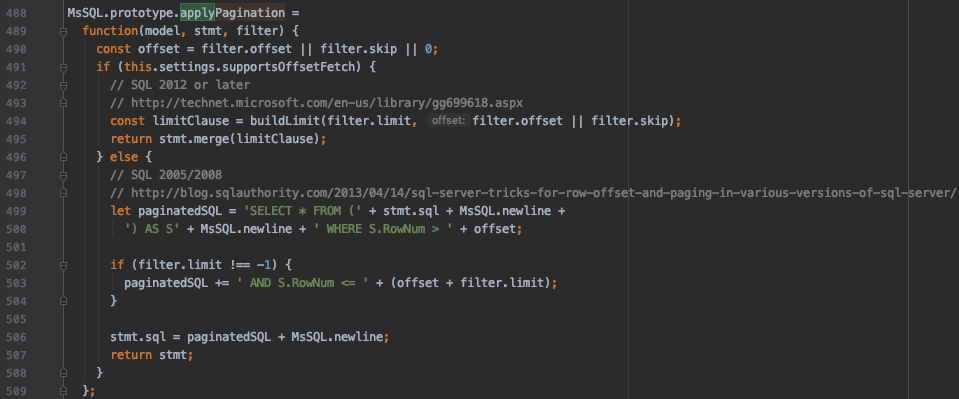
And I have the latest version installed. How can this be! v3.6.0
frbuceta
on 20 Nov 2019
@frbuceta, https://github.com/strongloop/loopback-connector-mysql/blob/ddb1c96a761443c9cc3b17a7630e87b22dd740ee/lib/mysql.js#L497-L501 is the same as the one in the master branch. The latest version is v5.4.2 https://github.com/strongloop/loopback-connector-mysql/releases. Perhaps you can try to update to 5.4.2?
 dhmlau
on 21 Nov 2019
dhmlau
on 21 Nov 2019
@frbuceta, https://github.com/strongloop/loopback-connector-mysql/blob/ddb1c96a761443c9cc3b17a7630e87b22dd740ee/lib/mysql.js#L497-L501 is the same as the one in the
masterbranch. The latest version isv5.4.2https://github.com/strongloop/loopback-connector-mysql/releases. Perhaps you can try to update to 5.4.2?
Ouch sorry, I got confused as a repository so it wasn't in code, it's not MySQL, it's MsSQL
Sorry
frbuceta
on 21 Nov 2019
@frbuceta, https://github.com/strongloop/loopback-connector-mysql/blob/ddb1c96a761443c9cc3b17a7630e87b22dd740ee/lib/mysql.js#L497-L501 is the same as the one in the
masterbranch. The latest version isv5.4.2https://github.com/strongloop/loopback-connector-mysql/releases. Perhaps you can try to update to 5.4.2?
This is where I think the code is failing, I am using MsSQL 2019
frbuceta
on 21 Nov 2019
@frbuceta have you tried to enable supportsOffsetFetch setting? I think it's set in datasource configuration.
{
"connector": "mssql",
"supportsOffsetFetch": true,
}
 bajtos
on 22 Nov 2019
bajtos
on 22 Nov 2019
@frbuceta have you tried to enable
supportsOffsetFetchsetting? I think it's set in datasource configuration.{ "connector": "mssql", "supportsOffsetFetch": true, }
Well, this is giving me errors on all endpoints
Unhandled error in POST /auth/sign-in: 500 RequestError: Invalid usage of the option NEXT in the FETCH statement.
Unhandled error in GET /vehicle-positions?filter[limit]=100: 500 RequestError: Invalid usage of the option NEXT in the FETCH statement.
frbuceta
on 22 Nov 2019
Your SQL Server seems to be an old version that does not allow FETCH/NEXT.
raymondfeng
on 22 Nov 2019
Your SQL Server seems to be an old version that does not allow
FETCH/NEXT.
I am using:
Microsoft SQL Server 2017 (RTM-GDR) (KB4505224) - 14.0.2027.2 (X64)
Jun 15 2019 00:26:19
Copyright (C) 2017 Microsoft Corporation
Standard Edition (64-bit) on Windows Server 2016 Standard 10.0 <X64> (Build 14393: ) (Hypervisor)
I don't know if this version supports it but it's recent ... 2017
frbuceta
on 22 Nov 2019
@frbuceta What is the SQL query produced with "supportsOffsetFetch": true,?
 dougal83
on 22 Nov 2019
dougal83
on 22 Nov 2019
@frbuceta What is the SQL query produced with
"supportsOffsetFetch": true,?
SQL: SELECT [id],[codigo],[fecha],[latitud],[longitud],ROW_NUMBER() OVER ( ORDER BY [id]) AS RowNum FROM [dbo].[xxxxxxxxxxxxxxxxxxx] OFFSET 0 ROWS FETCH NEXT 100 ROWS ONLY Parameters: [] +22s
frbuceta
on 23 Nov 2019
Is the SQL malformed? MSSQL Fiddle
dougal83
on 25 Nov 2019
@frbuceta @raymondfeng Looks like it is a malformed SQL query. FETCH NEXT must be preceded by ORDER BY as part of the SELECT - ORDER BY Clause.
So the query should be:
SELECT
    [id],
    [codigo],
    [fecha],
    [latitud],
    [longitud],
    ROW_NUMBER() OVER (ORDER BY [id]) AS RowNum
FROM [dbo].[xxxxxxxxxxxxxxxxxxx]
ORDER BY RowNum
OFFSET 0 ROWS
FETCH NEXT 100 ROWS ONLY
function buildLimit(limit, offset) {
  if (isNaN(offset)) {
    offset = 0;
  }
  let sql = 'OFFSET ' + offset + ' ROWS';
  if (limit >= 0) {
    sql += ' FETCH NEXT ' + limit + ' ROWS ONLY';
  }
  return sql;
}
Potential fix:
```typescript
function buildLimit(limit, offset) {
if (isNaN(offset)) {
offset = 0;
}
let sql = 'ORDER BY RowNum OFFSET ' + offset + ' ROWS';
if (limit >= 0) {
sql += ' FETCH NEXT ' + limit + ' ROWS ONLY';
}
return sql;
}
 achrinza
on 26 Nov 2019
achrinza
on 26 Nov 2019
SELECT * FROM (SELECT [id],[codigo],[fecha],[latitud],[longitud],ROW_NUMBER() OVER ( ORDER BY [id]) AS RowNum FROM [dbo].[TABLE]
@frbuceta When running this query on SSMS or Azure Data Studio, does it result in a similar error or response that's taking longer than 15 seconds?
achrinza
on 26 Nov 2019
SELECT * FROM (SELECT [id],[codigo],[fecha],[latitud],[longitud],ROW_NUMBER() OVER ( ORDER BY [id]) AS RowNum FROM [dbo].[TABLE]
@frbuceta When running this query on SSMS or Azure Data Studio, does it result in a similar error or response that's taking longer than 15 seconds?
[S0001][102] Incorrect syntax near 'TABLE'. in DataGrid
frbuceta
on 27 Nov 2019
Apologies, I didn't quote the full SQL query:
SELECT *
FROM (
    SELECT
        [id],
        [codigo],
        [fecha],
        [latitud],
        [longitud],
        ROW_NUMBER() OVER (ORDER BY [id]) AS RowNum FROM [dbo].[TABLE]
) AS S
WHERE S.RowNum > 0 AND S.RowNum <= 100;
(Modify the table and column names where needed)
The above query is the one generated by lb4 as per your comment: https://github.com/strongloop/loopback-next/issues/4160#issuecomment-556017460
Does the above result in a successful execution?
achrinza
on 28 Nov 2019
Apologies, I didn't quote the full SQL query:
SELECT *
FROM (
    SELECT
        [id],
        [codigo],
        [fecha],
        [latitud],
        [longitud],
        ROW_NUMBER() OVER (ORDER BY [id]) AS RowNum FROM [dbo].[TABLE]
) AS S
WHERE S.RowNum > 0 AND S.RowNum <= 100;
(Modify the table and column names where needed)
The above query is the one generated by lb4 as per your comment: #4160 (comment)
Does the above result in a successful execution?
Well this seems to still not work
It has been charging for 2 minutes and it's not over yet
It should not be sent to MySQL that only returned 100?
frbuceta
on 28 Nov 2019
@frbuceta Thanks for the reply; this seems more of an issue with the general efficiency of generated query, less of lb4 not being able to process it. Try using this filter REST query:
?filter[where][id][lt]=100
If you want to have an offset (e.g. id = 100 - 199):
?filter[where][id][gte]=100&filter[where][id][lt]=200
(Replace id with the ID column of the table if necessary)
This should prevent MSSQL from going through all 100 million records/tuples and use the PK indexes.
Another way might be:
?filter[where][id][between][0]=101&filter[where][id][between][1]=199
If that doesn't work, try creating a different filter.
achrinza
on 29 Nov 2019
@frbuceta Thanks for the reply; this seems more of an issue with the general efficiency of generated query, less of lb4 not being able to process it. Try using this
filterREST query:
?filter[where][id][lt]=100If you want to have an offset (e.g.
id= 100 - 199):
?filter[where][id][gte]=100&filter[where][id][lt]=200(Replace
idwith the ID column of the table if necessary)This should prevent MSSQL from going through all 100 million records/tuples and use the PK indexes.
Another way might be:
?filter[where][id][between][0]=101&filter[where][id][between][1]=199If that doesn't work, try creating a different filter.
I am waiting for your PR in the MSSQL repository to be approved, this will not work for me because my ids are very large, they do not go 1, 2, 3, 4 ...
frbuceta
on 2 Dec 2019
Just for reference, here is the pull request that should fix the issue: strongloop/loopback-connector-mssql#219
bajtos
on 5 Dec 2019
@frbuceta As per-https://github.com/strongloop/loopback-connector-mssql/pull/219#issuecomment-564408013, the PR may take a bit longer to be complete. Maybe you could test the PR first by setting the package.json dependency?
"loopback-connector-mssql": "git+https://github.com/achrinzafork/loopback-connector-mssql.git#daf6eb31e06772a91c3aa355e8fc313a6a1651d4"
If the issue still persists, then we know there's another issue that needs resolving.
achrinza
on 14 Dec 2019
@frbuceta As per-strongloop/loopback-connector-mssql#219 (comment), the PR may take a bit longer to be complete. Maybe you could test the PR first by setting the
package.jsondependency?"loopback-connector-mssql": "git+https://github.com/achrinzafork/loopback-connector-mssql.git#daf6eb31e06772a91c3aa355e8fc313a6a1651d4"If the issue still persists, then we know there's another issue that needs resolving.
No problem mate. Yes, I try it now and I tell you
frbuceta
on 16 Dec 2019
I can confirm that now it does crash loopback but the query still doesn't work, even doing a "where" still doesn't work. Any ideas?
On the other hand, if you tell me how many records are in the database
{
  "count": 2405635
}
@frbeutica Does it immediately crash upon startup or only when the query is executed? Using the same logging env. variable as stated in an earlier comment, what’s the error that occurs?
From: Francisco Buceta notifications@github.com
Sent: Monday, December 16, 2019 8:44:54 AM
To: strongloop/loopback-next loopback-next@noreply.github.com
Cc: Rifa Achrinza rifa@achrinza.com; Comment comment@noreply.github.com
Subject: Re: [strongloop/loopback-next] Loopback does not process tables with 100 million records (#4160)
This email was sent from outside the organization. Please be cautious, the sender may not be who they claim to be.
I can confirm that now it does crash loopback but the query still doesn't work, even doing a "where" still doesn't work. Any ideas?
—
You are receiving this because you commented.
Reply to this email directly, view it on GitHubhttps://github.com/strongloop/loopback-next/issues/4160?email_source=notifications&email_token=AF73T67B55DMJYNPEJF5BUTQY3FQNA5CNFSM4JPF6AW2YY3PNVWWK3TUL52HS4DFVREXG43VMVBW63LNMVXHJKTDN5WW2ZLOORPWSZGOEG5GZEQ#issuecomment-565865618, or unsubscribehttps://github.com/notifications/unsubscribe-auth/AF73T63NB735UUELU6W5HJTQY3FQNANCNFSM4JPF6AWQ.
achrinza
on 16 Dec 2019
@frbeutica Does it immediately crash upon startup or only when the query is executed? Using the same logging env. variable as stated in an earlier comment, what’s the error that occurs?
No error occurs, the request is processed indefinitely
frbuceta
on 16 Dec 2019
@frbeutica The issue really seems to be an inefficient generated query. I’ll see if I can replicate a similar environment in my lab.
In the mean time, just to rule out any variables, could you run this query on the MSSQL client of your choice:
SELECT id, codigo, fecha, latitud, longitud
FROM [TableName]
ORDER BY id
OFFSET 0 ROWS
FETCH NEXT 100 ROWS ONLY
I’m out and about right now, so the query may have some typos; modify that and [TableName] accordingly.
If the query above runs then we can rule out the MSSQL server as a variable.
From: Francisco Buceta notifications@github.com
Sent: Monday, December 16, 2019 8:50:05 AM
To: strongloop/loopback-next loopback-next@noreply.github.com
Cc: Rifa Achrinza rifa@achrinza.com; Comment comment@noreply.github.com
Subject: Re: [strongloop/loopback-next] Loopback does not process tables with 100 million records (#4160)
This email was sent from outside the organization. Please be cautious, the sender may not be who they claim to be.
@frbeutica Does it immediately crash upon startup or only when the query is executed? Using the same logging env. variable as stated in an earlier comment, what’s the error that occurs?
No error occurs, the request is processed indefinitely
—
You are receiving this because you commented.
Reply to this email directly, view it on GitHubhttps://github.com/strongloop/loopback-next/issues/4160?email_source=notifications&email_token=AF73T67SONU5KT4C75QKKSDQY3GD3A5CNFSM4JPF6AW2YY3PNVWWK3TUL52HS4DFVREXG43VMVBW63LNMVXHJKTDN5WW2ZLOORPWSZGOEG5G56Y#issuecomment-565866235, or unsubscribehttps://github.com/notifications/unsubscribe-auth/AF73T65KF4SK34KYAQOVBIDQY3GD3ANCNFSM4JPF6AWQ.
achrinza
on 16 Dec 2019
@frbeutica The issue really seems to be an inefficient generated query. I’ll see if I can replicate a similar environment in my lab. In the mean time, just to rule out any variables, could you run this query on the MSSQL client of your choice:
SQL SELECT id, codigo, fecha, latitud, longitud FROM [TableName] ORDER BY id OFFSET 0 ROWS FETCH NEXT 100 ROWS ONLYI’m out and about right now, so the query may have some typos; modify that and [TableName] accordingly. If the query above runs then we can rule out the MSSQL server as a variable.
MsSQL has nothing to do with what it seems ... the query took 6 seconds (98ms)
Thank you very much for the help
frbuceta
on 16 Dec 2019
WOW... When I do a "where" this is the call to MsSQL
SELECT [id],[codigo],[fecha],[latitud],[longitud]
FROM [TableName]
ORDER BY [id]
After waiting a couple of minutes it seems that the explorer tried to process what I asked of the database but in the end I don't just like that
frbuceta
on 16 Dec 2019
MsSQL has nothing to do with what it seems ... the query took 6 seconds (98ms)
Thank you very much for the help
@frbuceta Thanks for the report, I think it's almost safe to say that LoopBack 4's generated T-SQL query doesn't scale very well. I'll look more into it and drop any significant updates here.
Just to be sure, can you try to create a "GET endpoint" on an lb4 connector that executes (and potentially return) the below function?
RepoNameHere.execute('SELECT id, codigo, fecha, latitud, longitud FROM [TableName] ORDER BY id OFFSET 0 ROWS FETCH NEXT 100 ROWS ONLY')
(Modify accordingly)
The above function should allow raw SQL queries passed through lb4. If this also fails to execute, then the efficiency issue may be beyond the generated T-SQL query.
Also please try these queries against the MSSQL client of your choice (Update accordingly):
SELECT
    [id],
    [codigo],
    [fecha],
    [latitud],
    [longitud],
    ROW_NUMBER() OVER (ORDER BY [id]) AS RowNum
FROM [dbo].[TABLE]
WHERE RowNum > 0 AND RowNum <= 100;
SELECT
    [id],
    [codigo],
    [fecha],
    [latitud],
    [longitud],
    ROW_NUMBER() OVER (ORDER BY [id]) AS RowNum
FROM [dbo].[TABLE]
ORDER BY RowNum
OFFSET 0 ROWS
FETCH NEXT 100 ROWS ONLY;
If the above queries work fine then we can use these as guides for what the new generated queries should be.
WOW... When I do a "where" this is the call to MsSQL
SELECT [id],[codigo],[fecha],[latitud],[longitud]
FROM [TableName]
ORDER BY [id]
After waiting a couple of minutes it seems that the explorer tried to process what I asked of the database but in the end I don't just like that
That seems unusual. Was that query pulled from the lb4 logs or MSSQL itself? Also, does this happen with my fork of the MSSQL connector and/or the original MSSQL connector? I'll try to check on my end to confirm this issue.
I've removed the "fix" keyword from strongloop/loopback-connector-mssql#219 to prevent it from auto-closing this issue.
achrinza
on 16 Dec 2019
RepoNameHere.execute('SELECT id, codigo, fecha, latitud, longitud FROM [TableName] ORDER BY id OFFSET 0 ROWS FETCH NEXT 100 ROWS ONLY')This is working
SELECT
    [id],
    [codigo],
    [fecha],
    [latitud],
    [longitud],
    ROW_NUMBER() OVER (ORDER BY [id]) AS RowNum
FROM [dbo].[TABLE]
WHERE RowNum > 0 AND RowNum <= 100;
This query is not correct. It seems he doesn't like syntax
SELECT
    [id],
    [codigo],
    [fecha],
    [latitud],
    [longitud],
    ROW_NUMBER() OVER (ORDER BY [id]) AS RowNum
FROM [dbo].[TABLE]
ORDER BY RowNum
OFFSET 0 ROWS
FETCH NEXT 100 ROWS ONLY;
This works, it took 14 seconds
frbuceta
on 16 Dec 2019
@frbuceta Could you post the generated query when using the fork and "supportsOffsetFetch": true? AFAIK this should work fine if the above queries can be executed.
achrinza
on 17 Dec 2019
@frbuceta Could you post the generated query when using the fork and
"supportsOffsetFetch": true? AFAIK this should work fine if the above queries can be executed.
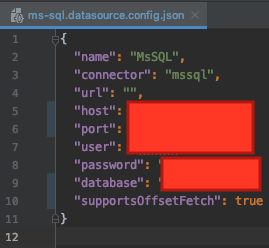
Unless you have it wrong, I have it defined as follows.
frbuceta
on 17 Dec 2019
@frbuceta Apologies, what I meant was using DEBUG=loopback:connector:mssql env. variable, using supportsOffSetFetch, making a request then posting the logged generated T-SQL query.
achrinza
on 17 Dec 2019
@frbuceta Apologies, what I meant was using
DEBUG=loopback:connector:mssqlenv. variable, usingsupportsOffSetFetch, making a request then posting the logged generated T-SQL query.
I've tried since postman and if it works, sorry for my mistake
SELECT [id],[codigo],[fecha],[latitud],[longitud],ROW_NUMBER() OVER ( ORDER BY [fecha]) AS RowNum FROM [dbo].[TABLENAME] WHERE [codigo]=@param1 ORDER BY RowNum OFFSET 0 ROWS FETCH NEXT 100 ROWS ONLY
I am also making an order by date but it seems not to work ... Can it be for the same?
Date FORMAT: 2019-09-17T07:14:10.457Z
Many thanks @achrinza
frbuceta
on 17 Dec 2019
Updates
Right after applying this patch to the mssql connector, it still does not return the results.
Will we have to apply a default limit? The request takes up to 2 minutes and even more
frbuceta
on 6 Feb 2020
@frbuceta From the top of my head -yes, you'll need to apply a default limit manually. This can be accomplished in 2 ways:
- Client-side
This can be done by adding it as part of the request filter query on the client-side - Server-side (recommended)
Modifying the filter object with a fixed limit before passing it into the repository functions will ensure a server-enforced default limit
achrinza
on 8 Feb 2020
Related issues
 mhdawson
·
3Comments
mhdawson
·
3Comments
 marioestradarosa
·
3Comments
marioestradarosa
·
3Comments
 rexliu0715
·
3Comments
rexliu0715
·
3Comments
 frodoe7
·
3Comments
frodoe7
·
3Comments
 acrodrig
·
3Comments
acrodrig
·
3Comments
Most helpful comment
@frbuceta @raymondfeng Looks like it is a malformed SQL query.
FETCH NEXTmust be preceded byORDER BYas part of the SELECT - ORDER BY Clause.So the query should be:
The offending line:
Potential fix:
```typescript
function buildLimit(limit, offset) {
if (isNaN(offset)) {
offset = 0;
}
let sql = 'ORDER BY RowNum OFFSET ' + offset + ' ROWS';
if (limit >= 0) {
sql += ' FETCH NEXT ' + limit + ' ROWS ONLY';
}
return sql;
}