Loopback-next: lb4 command not found
Description/Steps to reproduce
I installed loopback version 4 with the command npm i -g @loopback/cli (on Mac OS).When I try to create an app using the command lb4 app its throwing me an error lb4 command not found
Expected result
Should be able to create an app
 rajvarshu
All 21 comments
Open a new instance of the terminal program and try.
 hacksparrow
on 1 Jul 2019
hacksparrow
on 1 Jul 2019
@rajsmly143 What did you install? npm i -g loopback-cli or npm i -g @loopback/cli? The later is for lb4.
 raymondfeng
on 1 Jul 2019
raymondfeng
on 1 Jul 2019
Open a new instance of the terminal program and try.
I restarted my mac also, still facing the same issue.

rajvarshu
on 2 Jul 2019
What did you install?
npm i -g loopback-cliornpm i -g @loopback/cli? The later is forlb4.
I used npm i -g @loopback/cli
rajvarshu
on 2 Jul 2019
same issue here
 devpato
on 16 Jul 2019
devpato
on 16 Jul 2019
@rajvarshu and @devpato , are you using nvm to install node?
Could you please also try to run node -v? Thanks.
 dhmlau
on 16 Jul 2019
dhmlau
on 16 Jul 2019
Transferred to loopback-next repo, because this is the repo for LB4.
dhmlau
on 16 Jul 2019
i am still facing same issue
 gulnurumur
on 19 Jul 2019
gulnurumur
on 19 Jul 2019
It seems like we're having a hard time to reproduce the problem, so I'd like to get more information from those who ran into this issue. Here are a few questions I have in mind (feel free to provide as much information as you have!):
- are you running nvm for managing the node version you're running?
- what's the node version? (run
node -v) - which OS are you using?
- Do you get
command not founderror? or other error? - Did you install
@loopback/cliat the global level? i.e.npm i -g @loopback/cli.
Thanks a lot.
dhmlau
on 21 Jul 2019
I am getting the same problem. Please find below the answers to your questions:-
- are you running nvm for managing the node version you're running? No
- what's the node version? (run node -v) 10.16
- which OS are you using? Ubuntu 18.04
- Do you get command not found error? or other error? Command 'lb4' not found
- Did you install @loopback/cli at the global level? i.e. npm i -g @loopback/cli. Yes
 aneekbasu
on 9 Aug 2019
aneekbasu
on 9 Aug 2019
@aneekbasu, do you have /usr/local/bin on your $PATH?
I don't have an Ubuntu instance handy to try, here are a few issues that i found that might be useful. Could you please check them out?
https://github.com/strongloop/loopback/issues/281
https://github.com/strongloop/loopback/issues/2737
https://stackoverflow.com/questions/20934343/how-to-restore-reset-npm-configuration-to-default-values
Hope it helps.
dhmlau
on 9 Aug 2019
BTW, I strongly recommend that you use https://github.com/nvm-sh/nvm so that multiple node versions can be installed and isolated on your machine.
raymondfeng
on 9 Aug 2019
I am facing this issue too. npm install -g @loopback/cli
- I am using NVM
- Node: v10.15.3
- MacOS - Mojave
- NVM: 0.34.0
▶ lb4 app
zsh: command not found: lb4
 rashtay
on 14 Aug 2019
rashtay
on 14 Aug 2019
I fixed the issue. I am using NVM but on digging into the issue further, I realized that though my current version is v10.15.3, my packages were getting installed in v8.x.x. I don't even have v8.x.x version installed but .npmrc was pointing to that folder. I deleted that folder, created a new npm prefix pointing to the current version and voila, it worked.
rashtay
on 14 Aug 2019
@rashtay What was in your .npmrc? For nvm, it needs to be activated with a new terminal window after the installation. Run command -v nvm to make sure.
raymondfeng
on 14 Aug 2019
@raymondfeng nvm was working fine. Unfortunately, it was installing global packages in the folder of a different version of the node. I deleted that folder from .nvm and fixed the prefix.
Now, .npmrc points to the right node version
prefix=/Users/rahshett/.nvm/versions/node/v10.15.3
rashtay
on 16 Aug 2019
This is almost certainly a PATH issue for everyone. I had /usr/local/opt/node@8/bin on my path for some reason. Changing it to /usr/local/opt/node/bin solved the issue for me. In fact, node@8 no longer even existed.
For others, you may need to google what your path should look like for node stuff.
- are you running nvm for managing the node version you're running? No
- what's the node version? (run node -v) v12.10.0
- which OS are you using? macOS 10.14.6
- Do you get command not found error? or other error?
zsh: command not found: lb4 - Did you install @loopback/cli at the global level? i.e. npm i -g @loopback/cli. Yes
 JasonMFry
on 11 Sep 2019
JasonMFry
on 11 Sep 2019
- macOs 10.13.6 (17G8030)
- Yes
- Yes
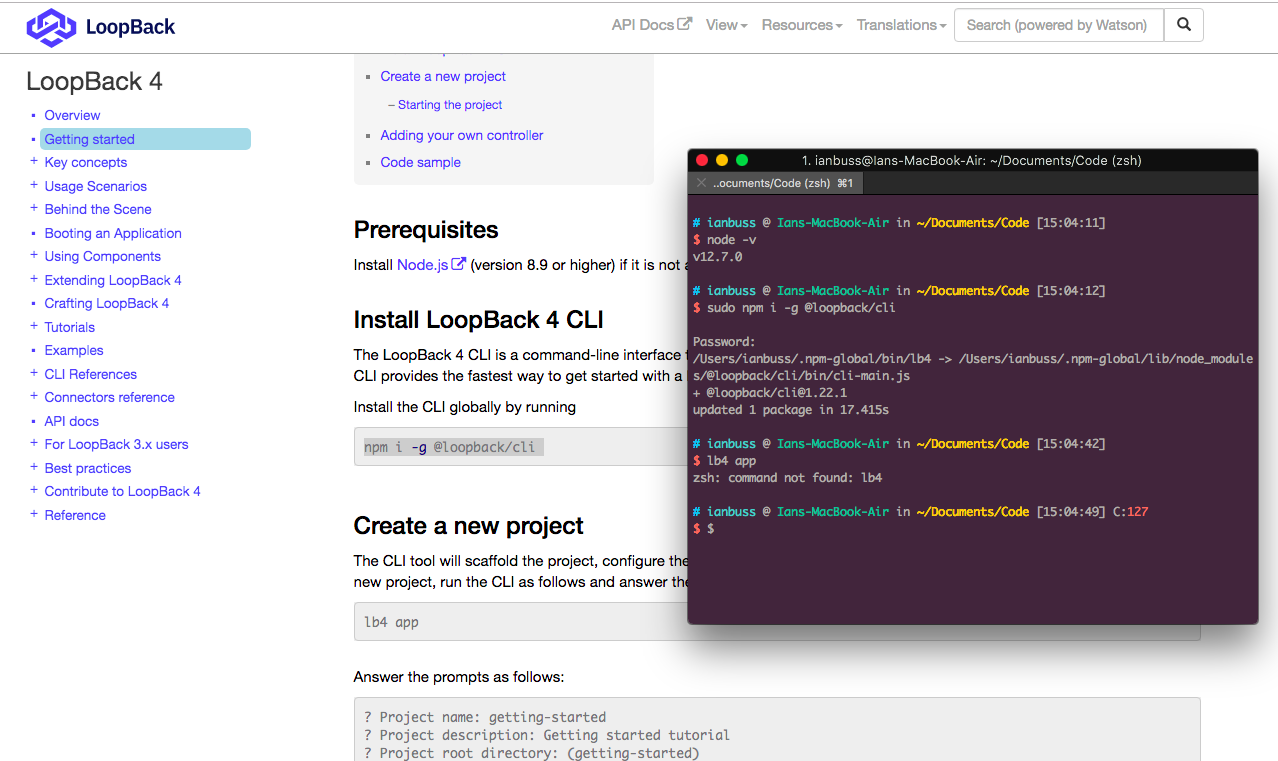
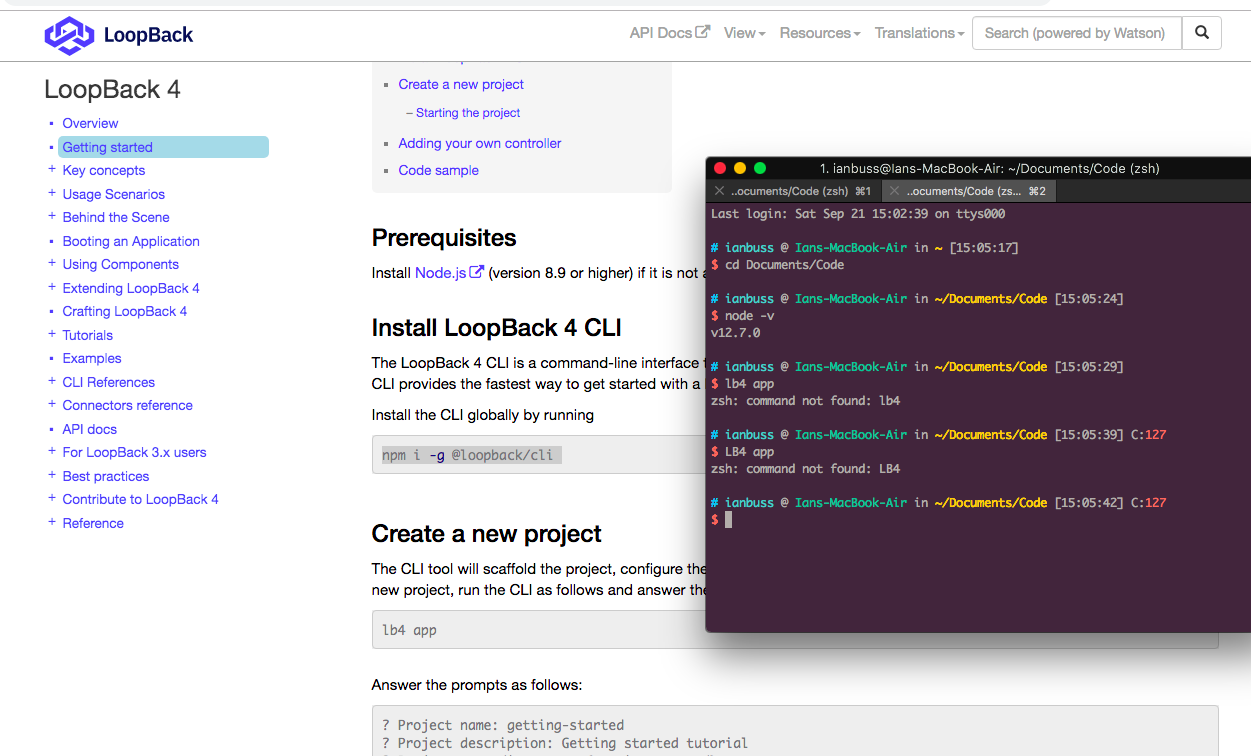
It has been a while since I've touched NodeJs. So I may have something in my terminal incorrectly listed.
 ianpatrickbuss
on 21 Sep 2019
ianpatrickbuss
on 21 Sep 2019
Solved
In my case, installed using the command:
$ sudo npm install -g @loopback/cli
It not worked:
$ lb4
-bash: lb4: command not found
But it worked by path:
$ /usr/local/opt/node/bin/lb4 app
? Project name: (projects)
I created an alias in .bash_profile:
alias lb4="/usr/local/opt/node/bin/lb4"
And now working fine:
$ lb4 app
? Project name: (bayma)
nvm: No
node version: v12.14.1
macOS: 10.14.6
error -bash: lb4: command not found
 baymabruno
on 9 Jan 2020
baymabruno
on 9 Jan 2020
@baymabruno Thanks a lot, great hint!
That happend to me because i installed nodejs on Mac with Brew command on user A now everithing i do about npm or whatever has to be done on that User and other users don't recognize the installation... well... looks like i finally have an scuse to format the MAC :)
 nfriacowboy
on 21 Jan 2020
nfriacowboy
on 21 Jan 2020
@baymabruno, thanks for your info!
I'm now closing this issue. Thanks.
dhmlau
on 19 Mar 2020
Related issues
 zero-bugs
·
3Comments
zero-bugs
·
3Comments
 teambitcodeGIT
·
3Comments
teambitcodeGIT
·
3Comments
 shadyanwar
·
3Comments
shadyanwar
·
3Comments
 acrodrig
·
3Comments
acrodrig
·
3Comments
 aceraizel
·
3Comments
aceraizel
·
3Comments