Loopback-next: Registering the Custom JWT Authentication Strategy
I have followed and created JWTAuthenticationStrategy like strongloop/loopback4-example-shopping. But I can not register my custom Strategy.
My code:
import {BootMixin} from '@loopback/boot';
import {ApplicationConfig, BindingKey} from '@loopback/core';
import {
RestExplorerBindings,
RestExplorerComponent,
} from '@loopback/rest-explorer';
import {RepositoryMixin} from '@loopback/repository';
import {RestApplication} from '@loopback/rest';
import {ServiceMixin} from '@loopback/service-proxy';
import * as path from 'path';
import {
AuthenticationComponent,
registerAuthenticationStrategy,
} from '@loopback/authentication';
import {JWTAuthenticationStrategy} from './authentication-strategies/jwt-strategy';
import {MySequence} from './sequence';
/**
- Information from package.json
*/
export interface PackageInfo {
name: string;
version: string;
description: string;
}
export const PackageKey = BindingKey.create('application.package');
const pkg: PackageInfo = require('../package.json');
export class BirdNestServerApplication extends BootMixin(
ServiceMixin(RepositoryMixin(RestApplication)),
) {
constructor(options: ApplicationConfig = {}) {
super(options);
//....
registerAuthenticationStrategy(this, JWTAuthenticationStrategy);
//....
}
}
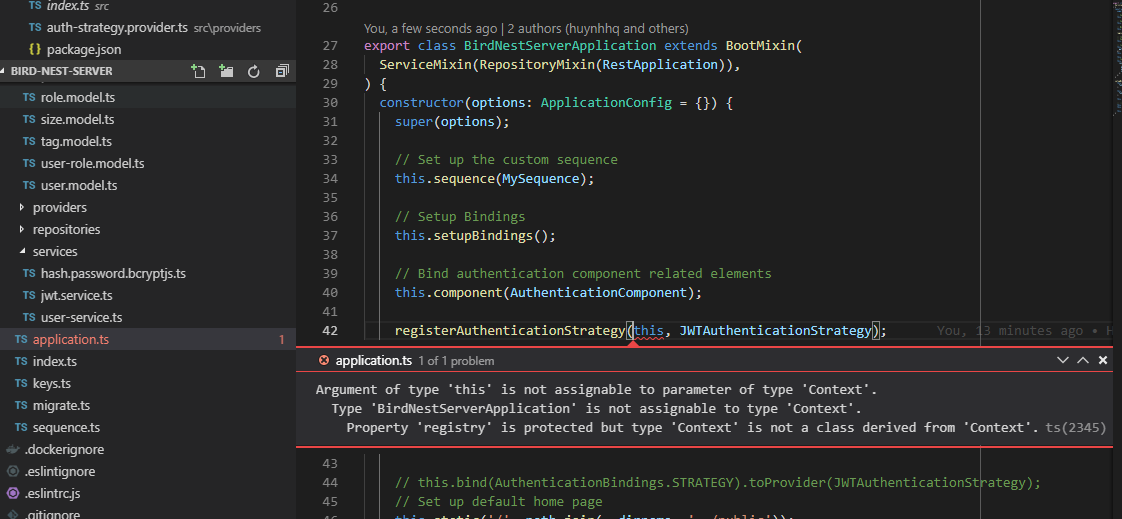
Error: Argument of type 'this' is not assignable to parameter of type 'Context'.
Type 'BirdNestServerApplication' is not assignable to type 'Context'.
Property 'registry' is protected but type 'Context' is not a class derived from 'Context'.
Please help me!!!
 huynhhq
All 13 comments
Hard to say anything without seeing the project code. As a guess are you missing?:
````ts
import {
AuthenticationComponent,
} from '@loopback/authentication';
// Bind authentication component related elements
this.component(AuthenticationComponent);
````
Might be helpful if you could make an example repository and post it here? Otherwise reexamine the shopping example for what you've done differently.
 dougal83
on 1 Jul 2019
dougal83
on 1 Jul 2019
Thanks for reply. This is file application.ts of my project: https://github.com/huynhhq/bird-nest-server/blob/master/src/application.ts
I don't think it's has any different from shopping example. (Sorry my english is bad)
I am a newbie, i really don't know how to fix it. Please help me!
huynhhq
on 1 Jul 2019
cc @emonddr
 dhmlau
on 2 Jul 2019
dhmlau
on 2 Jul 2019
I had the same issue with this topic too.
However, when I clone shopping-cart-example project, it has not suffered from this issue
And the following tutorial not suffered from this issue too
https://strongloop.com/strongblog/building-an-online-game-with-loopback-4-pt4/
Hope @huynhhq can figure out and fix that
 hackagon
on 2 Jul 2019
hackagon
on 2 Jul 2019
I solved this problem by using any type:
this.component(AuthenticationComponent);
registerAuthenticationStrategy(this as any, JWTStrategy);
Now it worked as I expected
hackagon
on 2 Jul 2019
@huynhhq
Uninstall global @loopback/cli
Be sure to grab the latest @loopback/cli and install globally
Be sure to grab the latest @loopback/authentication
(This has dependencies on @loopback/core, @loopback/context as well)
I found that running npm update --save updated to the latest versions of these packages,
and running npm run build was able to compile cleanly, and vscode no longer showed the problem with registerAuthenticationStrategy(this, strategy) complaining about 'this' is not assignable to parameter of type 'Context'.
 emonddr
on 3 Jul 2019
emonddr
on 3 Jul 2019
@emonddr Since @loopback/authentication relies on a certain version of @loopback/core and @loopback/context (and more?) to work properly, it might be a considerations to add them as peerDependencies in package.json. This will cause npm to warn the user after the installation of the package finishes if those dependencies are not installed or have a different/lower version than required.
 nflaig
on 11 Aug 2019
nflaig
on 11 Aug 2019
Had the same issue, @emonddr solution to do a full update & rebuild worked for me.
 QuentinLB
on 25 Sep 2019
QuentinLB
on 25 Sep 2019
Yep. Worked for me, too. Thx!
 belltanellc
on 30 Sep 2019
belltanellc
on 30 Sep 2019
Same here, spent some time in frustration but glad to have found this thread, the update solution by @emonddr worked. Thanks!
 sformisano
on 2 Dec 2019
sformisano
on 2 Dec 2019
npm update did the job for me :)
 hshakilst
on 9 Dec 2019
hshakilst
on 9 Dec 2019
npm update just worked wonderfully. Thanks!
 rodrigouz
on 13 Dec 2019
rodrigouz
on 13 Dec 2019
Moving forward, please try lb4 update. See https://loopback.io/doc/en/lb4/Update-generator.html for more details.
 raymondfeng
on 13 Dec 2019
raymondfeng
on 13 Dec 2019
Related issues
 marioestradarosa
·
3Comments
marioestradarosa
·
3Comments
 shadyanwar
·
3Comments
shadyanwar
·
3Comments
 dericgw
·
3Comments
dericgw
·
3Comments
 cloudwheels
·
3Comments
cloudwheels
·
3Comments
 HamzaMansouri7
·
3Comments
HamzaMansouri7
·
3Comments
Most helpful comment
@huynhhq
Uninstall global @loopback/cli
Be sure to grab the latest @loopback/cli and install globally
Be sure to grab the latest @loopback/authentication
(This has dependencies on @loopback/core, @loopback/context as well)
I found that running
npm update --saveupdated to the latest versions of these packages,and running
npm run buildwas able to compile cleanly, and vscode no longer showed the problem withregisterAuthenticationStrategy(this, strategy)complaining about 'this' is not assignable to parameter of type 'Context'.