Lombok: Fail to install lombok-1.18.14.jar in Eclipse Version: 2020-09 (4.17.0)
The regular process to install lombok in Eclipse (https://projectlombok.org/setup/eclipse) fail .
Works OK with lombok-1.18.12.jar and previous versions.
My environment:
- Eclipse installation is done using eclipse-java-2020-09-R-win32-x86_64.zip .
- Java installation is done using openjdk-15_windows-x64_bin.zip
- The workspace is fresh.
- Windows 10
 eitan-rosenberg
All 30 comments
@rspilker @rzwitserloot
The current release version breaks eclipse. The error log shows NoClassDefFoundError: lombok/launch/PatchFixesHider$Transform.
Root cause: https://github.com/rzwitserloot/lombok/commit/1b534d17d39f687d42ebab733327a59c3466a949#r43072163
 Rawi01
on 9 Oct 2020
Rawi01
on 9 Oct 2020
@rspilker @rzwitserloot
The current release version breaks eclipse. The error log showsNoClassDefFoundError: lombok/launch/PatchFixesHider$Transform.Root cause: 1b534d1#r43072163
Indeed.....
!ENTRY org.eclipse.core.resources 4 2 2020-10-09 10:23:57.705
!MESSAGE Problems occurred when invoking code from plug-in: "org.eclipse.core.resources".
!STACK 0
java.lang.NoClassDefFoundError: lombok/launch/PatchFixesHider$Transform
at org.eclipse.jdt.internal.compiler.parser.Parser.endParse(Parser.java:11685)
at org.eclipse.jdt.internal.compiler.parser.Parser.parse(Parser.java:12878)
at org.eclipse.jdt.internal.compiler.parser.Parser.parse(Parser.java:13102)
at org.eclipse.jdt.internal.compiler.parser.Parser.parse(Parser.java:13059)
at org.eclipse.jdt.internal.compiler.parser.Parser.dietParse(Parser.java:11446)
at org.eclipse.jdt.internal.compiler.Compiler.internalBeginToCompile(Compiler.java:850)
at org.eclipse.jdt.internal.compiler.Compiler.beginToCompile(Compiler.java:394)
at org.eclipse.jdt.internal.compiler.Compiler.compile(Compiler.java:444)
at org.eclipse.jdt.internal.compiler.Compiler.compile(Compiler.java:426)
at org.eclipse.jdt.internal.core.builder.AbstractImageBuilder.compile(AbstractImageBuilder.java:386)
at org.eclipse.jdt.internal.core.builder.BatchImageBuilder.compile(BatchImageBuilder.java:214)
at org.eclipse.jdt.internal.core.builder.AbstractImageBuilder.compile(AbstractImageBuilder.java:318)
at org.eclipse.jdt.internal.core.builder.BatchImageBuilder.build(BatchImageBuilder.java:79)
at org.eclipse.jdt.internal.core.builder.JavaBuilder.buildAll(JavaBuilder.java:275)
at org.eclipse.jdt.internal.core.builder.JavaBuilder.build(JavaBuilder.java:192)
at org.eclipse.core.internal.events.BuildManager$2.run(BuildManager.java:832)
at org.eclipse.core.runtime.SafeRunner.run(SafeRunner.java:45)
at org.eclipse.core.internal.events.BuildManager.basicBuild(BuildManager.java:220)
at org.eclipse.core.internal.events.BuildManager.basicBuild(BuildManager.java:263)
at org.eclipse.core.internal.events.BuildManager$1.run(BuildManager.java:316)
at org.eclipse.core.runtime.SafeRunner.run(SafeRunner.java:45)
at org.eclipse.core.internal.events.BuildManager.basicBuild(BuildManager.java:319)
at org.eclipse.core.internal.events.BuildManager.basicBuildLoop(BuildManager.java:371)
at org.eclipse.core.internal.events.BuildManager.build(BuildManager.java:392)
at org.eclipse.core.internal.events.AutoBuildJob.doBuild(AutoBuildJob.java:154)
at org.eclipse.core.internal.events.AutoBuildJob.run(AutoBuildJob.java:244)
at org.eclipse.core.internal.jobs.Worker.run(Worker.java:63)
Caused by: java.lang.ClassNotFoundException: lombok.launch.PatchFixesHider$Transform cannot be found by org.eclipse.jdt.core_3.23.100.v20200916-1304_JAVA15_PATCH
at org.eclipse.osgi.internal.loader.BundleLoader.findClass(BundleLoader.java:516)
at org.eclipse.osgi.internal.loader.ModuleClassLoader.loadClass(ModuleClassLoader.java:171)
at java.base/java.lang.ClassLoader.loadClass(ClassLoader.java:522)
... 27 more
eitan-rosenberg
on 9 Oct 2020
Hi, confirming this bug. I would just add that this is most probably not specific to a concrete Eclipse or Java version, as I have just tested it with Eclipse 2020-06 and Java 11 with the same results.
Plus a suggestion - as this issue is a show-stopper for Eclipse users, couldn't be the Lombok download page changed, so that it somehow takes this into account? It still offers downloading this broken version without a warning.
 pbodnar
on 10 Oct 2020
pbodnar
on 10 Oct 2020
Confirmed as well, using Eclipse 2020-09 and Java 11 (also using SonarLint if that even matter).
 Yberion
on 12 Oct 2020
Yberion
on 12 Oct 2020
Confirming, too. Same issue with Eclipse 2019-09. Installed the SonarLint plugin and - boom! My Eclipse setup was screwed. :-(
Uninstalled SonarLint, but the bug remained. Can't open a single Editor-window. :-((
Started googling and read that newer Lombok-versions (I had originally v1.18.8 installed) should fix the issue. Installed the newest (v1.18.14) but still had the issue. Then I read that v1.18.12 did not show the problem and - indeed - with v1.18.12 I am up and running again. Even reinstalled SonarLint again and still all running well. Hope that stays so...
YMMV
 mmoser18
on 12 Oct 2020
mmoser18
on 12 Oct 2020
@mmoser18, yes, your experience is de-facto confirmed by what is already told in the issue description. :)
pbodnar
on 12 Oct 2020
Hello Lombok team,
Is there any new development with this pesky bug ?
Regard.
eitan-rosenberg
on 12 Oct 2020
I haven't seen any activity yet from maintainers or our resident bug fixer since the release.
@rspilker @rzwitserloot @Rawi01
 randakar
on 12 Oct 2020
randakar
on 12 Oct 2020
Also confirmed this bug for MacOS.
 aaiezza
on 12 Oct 2020
aaiezza
on 12 Oct 2020
Confirmed as well, using Eclipse 2020-09 and Java 8 in MacOS.
 biswarup81
on 13 Oct 2020
biswarup81
on 13 Oct 2020
I have the same bug with Eclipse 2020-09 and Java 11
 mldIFK
on 13 Oct 2020
mldIFK
on 13 Oct 2020
Confirmed as well, using Eclipse 2020-09 and Java 11 on windows 10.
 twonky4
on 13 Oct 2020
twonky4
on 13 Oct 2020
Same issue over here:
- OpenJDK 11 (Linux)
- Eclipse 2020-06
- Spring Tool Suite 4.8.0
 Musikolo
on 14 Oct 2020
Musikolo
on 14 Oct 2020
Same error reported.
Environment used to generate the issue :
- macOS Catalina (10.15.5)
- Eclipse 2020-06
$ java -version
openjdk version "1.8.0_265"
OpenJDK Runtime Environment (AdoptOpenJDK)(build 1.8.0_265-b01)
OpenJDK 64-Bit Server VM (AdoptOpenJDK)(build 25.265-b01, mixed mode)
- The workspace is empty without any previous load of binaries.
 antferdom
on 15 Oct 2020
antferdom
on 15 Oct 2020
Confirming this issue on
OS: Windows 10
Eclipse:
Version 2020-09 (4.17.0)
Build id: 20200910-1200
Plugins:
SonarLint 5.4.0
Lombok 1.18.14
Java:
openjdk version "11.0.8" 2020-07-14
OpenJDK Runtime Environment AdoptOpenJDK (build 11.0.8+10)
OpenJDK 64-Bit Server VM AdoptOpenJDK (build 11.0.8+10, mixed mode)
 ingjuliob
on 15 Oct 2020
ingjuliob
on 15 Oct 2020
@biswarup81 and others, I think it's nice that you confirm the bug.
Yet, I think just clicking the "thumbs up" at the issue description and optionally clicking "Subscribe" should by enough if you've got nothing _really new_ to add to help to resolve the issue. I hope you see my point, thanks! :)
pbodnar
on 15 Oct 2020
Same error reported.
Environment used to generate the issue :
- macOS Catalina (_10.15.5_)
- Eclipse 2020-06
$ java -version
openjdk version "1.8.0_265"
OpenJDK Runtime Environment (AdoptOpenJDK)(build 1.8.0_265-b01)
OpenJDK 64-Bit Server VM (AdoptOpenJDK)(build 25.265-b01, mixed mode)
- The workspace is empty without any previous load of binaries.
Caused by: java.lang.ClassNotFoundException: lombok.launch.PatchFixesHider$Transform cannot be found by org.eclipse.jdt.core_3.22.0.v20200530-2032
antferdom
on 15 Oct 2020
Same error reported.
Environment used to generate the issue :
- macOS Catalina (_10.15.5_)
- Eclipse 2020-06
$ java -version
openjdk version "1.8.0_265"
OpenJDK Runtime Environment (AdoptOpenJDK)(build 1.8.0_265-b01)
OpenJDK 64-Bit Server VM (AdoptOpenJDK)(build 25.265-b01, mixed mode)
- The workspace is empty without any previous load of binaries.
Caused by: java.lang.ClassNotFoundException: lombok.launch.PatchFixesHider$Transform cannot be found by org.eclipse.jdt.core_3.22.0.v20200530-2032
After have been seeking for the lombok jars binaries on my Eclipse IDE launcher path : _/Applications/Eclipse.app/Contents/Eclipse/_ , I finally concluded on delete them to figure out the side effects of an abrupt uninstallation of the malicious plugin, lombok in our case.
Once I did it, I tried to relaunch my eclipse but it went instantly closed without any error message begin reported.
antferdom
on 15 Oct 2020
Same error reported.
Environment used to generate the issue :
- macOS Catalina (_10.15.5_)
- Eclipse 2020-06
$ java -version
openjdk version "1.8.0_265"
OpenJDK Runtime Environment (AdoptOpenJDK)(build 1.8.0_265-b01)
OpenJDK 64-Bit Server VM (AdoptOpenJDK)(build 25.265-b01, mixed mode)
- The workspace is empty without any previous load of binaries.
Caused by: java.lang.ClassNotFoundException: lombok.launch.PatchFixesHider$Transform cannot be found by org.eclipse.jdt.core_3.22.0.v20200530-2032
After have been seeking for the lombok jars binaries on my Eclipse IDE launcher path : _/Applications/Eclipse.app/Contents/Eclipse/_ , I finally concluded on delete them to figure out the side effects of an abrupt uninstallation of the malicious plugin, lombok in our case.
Once I did it, I tried to relaunch my eclipse but it went instantly closed without any error message begin reported.
You can try to uninstall lombok from eclipse using its own installer, it has a Uninstall from my IDE option.
 japarejo
on 15 Oct 2020
japarejo
on 15 Oct 2020
We'll release a new version in a few hours.
 rspilker
on 15 Oct 2020
rspilker
on 15 Oct 2020
The cause of the problem has been identified. We have a boolean to distinguish between Eclipse and ecj, the standalone java compiler. They share most of the code, but Eclipse has some extra features (a user interface for instance).
There was no code to automatically detect what environment was being used. We did have explicit parameters, but they would default to Eclipse.
When we were working on our test infrastructure, we changed that. We thought we had a proper detection mechanism. Turned out we didn't. We now always use the ecj code, instead of the Eclipse code.
We're working on a solution and new release right now.
rspilker
on 15 Oct 2020
We've just released 1.18.16, that contains a fix for this problem. We've also updated the old versions page, and no longer link to the broken release. The changelog has been modified to indicate that 1.18.14 should not be used.
rspilker
on 16 Oct 2020
@rspilker , could you also please enable the link https://projectlombok.org/downloads/lombok-1.18.16.jar ?
I also found that when I download https://projectlombok.org/downloads/lombok.jar from the download page, I get previous version 1.18.14:

Thank you!
Musikolo
on 16 Oct 2020
@Musikolo I've also faced the same problem. So I made wrong issue... 😢
 nazy
on 16 Oct 2020
nazy
on 16 Oct 2020
It is working !!!!
Thank you and keep safe.
eitan-rosenberg
on 16 Oct 2020
Yeh, the download link on Lombok page still points to 1.18.14.
I was able to get the latest version from maven central and it seems to be working.
https://search.maven.org/search?q=lombok
 rougou
on 16 Oct 2020
rspilker
on 16 Oct 2020
rougou
on 16 Oct 2020
rspilker
on 16 Oct 2020
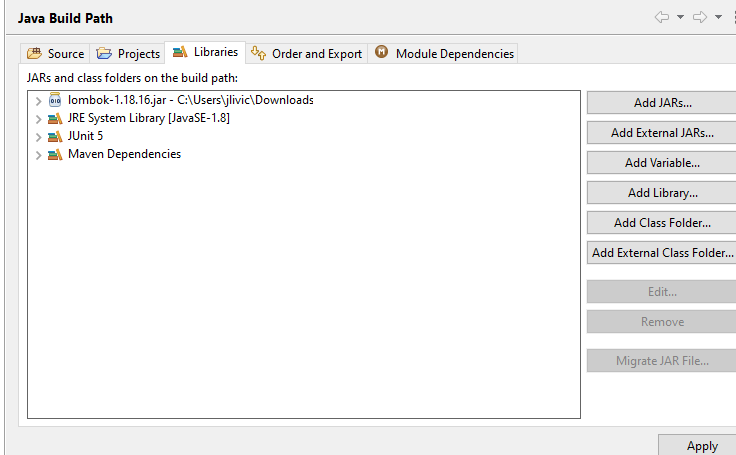
If anybody find this helpful. I removed even this last version from pom.xml. Installed lombok on my sts, put it in build path, exit, turn on and that removed every possible problem. I used version 1.18.16 from @rspilker from comment above.
 jlivic
on 16 Oct 2020
jlivic
on 16 Oct 2020
well, here it works, after installing version 1.18.16, available just above! thanks
 Leo-Marinho
on 16 Oct 2020
Leo-Marinho
on 16 Oct 2020
Now our website serves the right jar file.
rspilker
on 16 Oct 2020
Related issues
 Bryksin
·
3Comments
Bryksin
·
3Comments
 zenglian
·
3Comments
zenglian
·
3Comments
 YinAqu
·
3Comments
YinAqu
·
3Comments
 wheredevel
·
3Comments
wheredevel
·
3Comments
 Maaartinus
·
3Comments
Maaartinus
·
3Comments
Most helpful comment
The cause of the problem has been identified. We have a boolean to distinguish between Eclipse and ecj, the standalone java compiler. They share most of the code, but Eclipse has some extra features (a user interface for instance).
There was no code to automatically detect what environment was being used. We did have explicit parameters, but they would default to Eclipse.
When we were working on our test infrastructure, we changed that. We thought we had a proper detection mechanism. Turned out we didn't. We now always use the ecj code, instead of the Eclipse code.
We're working on a solution and new release right now.