Lombok: [BUG] Installer not working with Redhat CodeReady Studio
Describe the bug
I'm unable to install Lombok using the UI (see https://github.com/rzwitserloot/lombok/issues/2175) so I'm trying using the command line java -jar lombok.jar install /home/anton/devstudio/studio/devstudio
Actual behavior
WARNING: Can't find any IDE at: /home/anton/devstudio/studio/devstudio
WARNING: Zero valid locations found; so nothing was done!
Expected behavior
Expect it to recognize the ide installation directory and do its magic.
Version info (please complete the following information):
- Lombok version 1.18.8
- Platform - Red Hat CodeReady Studio
Red Hat CodeReady Studio

Version: 12.12.0.GA
Build id: GA-v20190628-0434-B4598
Build date: 20190628-0434
 magick93
All 13 comments
I'm confirming this, Lombok can't be installed to the new CodeReady studio through UI installer. However, it seems to be supported and it is possible to install using command java -jar lombok-1.18.8.jar install /Applications/codeready/studio/devstudio.app. Pay attention to the ".app" extension, because it won't work without it.
And when a command finishes successfully, output should be:
Lombok installed to: /Applications/codeready/studio/devstudio.app
Then just restart the IDE. My version of CodeReady is 12.11.0.GA.
 pavlee
on 15 Jul 2019
pavlee
on 15 Jul 2019
What @pavlee wrote seems to indicate that the command line is working just peachy, and what's wrong here is that you passed the wrong thing, @magick93.
If you feel that lombok should have been able to figure it out given the argument /home/anton/devstudio/studio/devstudio please provide the precise, fully qualified absolute path to the relevant eclipse.ini file and we can assess whether the eclipse-like finder can be upgraded to find it.
@pavlee I am unclear about what you meant with 'the GUI does not find it'. Are you:
- Referring to the fact that on HQ screens on crappy swing implementations (which are unfortunately widespread), the UI of the installer is unusable, or
- That lombok's installer UI does not find it, but if you explicitly click the browse button within the GUI it does, and also, the path you installed it is chosen by you and not a default choice (look, we aren't going to do a complete soup to nuts scan of your entire drive, that seems ridiculous).
- That lombok's installer does not find it, which is unexpected because you picked the default location;
/Applications/codeready/studio/devstudio.appis the obvious location. (Don't you just install it by dragging it there? What's 'codeready' signalling here? Please understand we have zero experience with whatever 'devstudio' is, unfortunately. - Even with the 'browse' button you can't get there somehow.
parked: Without feedback, will be closed if after 2019-07-25
 rzwitserloot
on 16 Jul 2019
rzwitserloot
on 16 Jul 2019
@pavlee
However, it seems to be supported and it is possible to install using command java -jar lombok-1.18.8.jar install /Applications/codeready/studio/devstudio.app. Pay attention to the ".app" extension, because it won't work without it.
I tried java -jar lombok.jar install /Applications/codeready/studio/devstudio.app but unfortunately got the same result as previously:
WARNING: Can't find any IDE at: /Applications/codeready/studio/devstudio.app
WARNING: Zero valid locations found; so nothing was done!
magick93
on 17 Jul 2019
I was able to get it to install using java -jar lombok.jar install /home/anton/devstudio/studio.
magick93
on 17 Jul 2019
I guess I had identified the problem:
if you look at what the lombook installer does (see below snapshot)
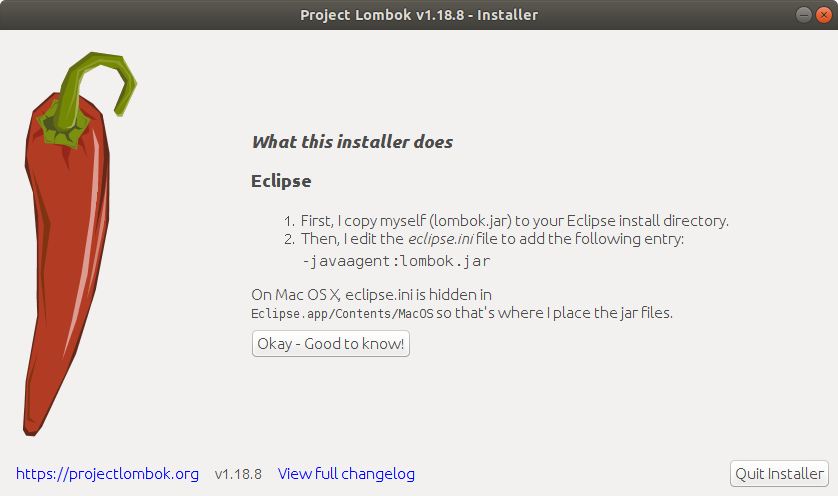
it add '-javaagen: lombok.jar' under 'openFile' sector in the file 'eclipse.ini';
unfortunately, there is no such a file named 'eclipse.ini' in the CodeReady Studio; rather, there is a file named 'codereadystudio.ini' in the place.
I checked the contents of the files and assumed that they serve for the same purpose.
so my solution:
1, manually copy 'lombok.jar' to 'codereadystudio/studio/'
2, manually add '-javaagen: lombok.jar' under 'openFile' sector in the 'codereadystudio/studio/codereadystudio.ini'(see below);
/usr/lib/jvm/java-8-oracle/bin/java
-startup
plugins/org.eclipse.equinox.launcher_1.5.400.v20190515-0925.jar
--launcher.library
plugins/org.eclipse.equinox.launcher.gtk.linux.x86_64_1.1.1000.v20190125-2016
-product
com.jboss.devstudio.core.product
-showsplash
platform\:/base/plugins/com.jboss.devstudio.core
--launcher.defaultAction
openFile
-vmargs
-Xms512m
-Xmx1024m
--add-modules=ALL-SYSTEM
[email protected]/workspace
-javaagent:/home/wjz/codereadystudio/studio/lombok.jar
and it works
 jing-zhou
on 17 Jul 2019
jing-zhou
on 17 Jul 2019
I'm confirming this, Lombok can't be installed to the new CodeReady studio through UI installer. However, it seems to be supported and it is possible to install using command
java -jar lombok-1.18.8.jar install /Applications/codeready/studio/devstudio.app. Pay attention to the ".app" extension, because it won't work without it.And when a command finishes successfully, output should be:
Lombok installed to: /Applications/codeready/studio/devstudio.app
Then just restart the IDE. My version of CodeReady is 12.11.0.GA.
Thank you for the instructions :-)
The lombok.jar (1.18.8) window is squished on my computer and can't be resized. So I can't push the button to select my Eclipse installation path, like I could on 1.16.6.
 rugbroed
on 22 Jul 2019
rugbroed
on 22 Jul 2019
➜ Downloads java -jar lombok-1.18.10.jar install /Applications/codereadystudio/studio/codereadystudio.app
WARNING: Can't find any IDE at: /Applications/codereadystudio/studio/codereadystudio.app
WARNING: Zero valid locations found; so nothing was done!
My code ready version is below, deployed on mac. Please advice if this is a mac issue
Version: 12.13.0.GA
Build id: GA-v20191024-0752-B5215
Build date: 20191024-0752
 ananth777
on 13 Nov 2019
ananth777
on 13 Nov 2019
jing-zhou's fix worked for Windows 10 also.
 bedwar2
on 6 Mar 2020
bedwar2
on 6 Mar 2020
@rzwitserloot Do you know if the p2 installer also works for other eclipse-like products?
 rspilker
on 12 Mar 2020
rspilker
on 12 Mar 2020
@rspilker It should.
For all with this project: Can you uninstall lombok if you installed via @jing-zhou's workaround, and then install a new eclipse plugin (via _Help>Install New Software_), pointing at update site:
and try that?
That's probably going to be how to install lombok from now on :)
Let me know if that works in codeready.
rzwitserloot
on 13 Mar 2020
I added jing-zhou's fix to the installer as well. Can anyone test if this one picks it up (the GUI should find it if you put this thing in a common place, and if not, if you use the 'add...' button).
Current edge release has the feature: https://projectlombok.org/download-edge
(Not listed in the changelog; not important enough for an entry I think).
rzwitserloot
on 15 Mar 2020
I never could get the installer to work as suggested above. However, I did install via _Help>Install New Software_ and all is working perfectly. Thank you.
 jessegduke
on 24 Mar 2020
jessegduke
on 24 Mar 2020
Red Hat CodeReady Studio Version: 12.15.0.GA. Manual configuration of lombok does not work, following above works fine.
_Help->Install New Software->https://projectlombok.org/p2_
check the installer and finish. Restart the IDE and it will work.
 pankaj-kumar2905
on 20 May 2020
pankaj-kumar2905
on 20 May 2020
Related issues
 jaschenk
·
3Comments
jaschenk
·
3Comments
 rdsubhas
·
3Comments
rdsubhas
·
3Comments
 gardenias
·
3Comments
gardenias
·
3Comments
 lludwa
·
3Comments
lludwa
·
3Comments
 mmoayyed
·
3Comments
mmoayyed
·
3Comments
Most helpful comment
I guess I had identified the problem:

if you look at what the lombook installer does (see below snapshot)
it add '-javaagen: lombok.jar' under 'openFile' sector in the file 'eclipse.ini';
unfortunately, there is no such a file named 'eclipse.ini' in the CodeReady Studio; rather, there is a file named 'codereadystudio.ini' in the place.
I checked the contents of the files and assumed that they serve for the same purpose.
so my solution:
1, manually copy 'lombok.jar' to 'codereadystudio/studio/'
2, manually add '-javaagen: lombok.jar' under 'openFile' sector in the 'codereadystudio/studio/codereadystudio.ini'(see below);
and it works