Lombok: Not Working In Eclipse Oxygen
I know it was just released, but just so people are aware, this does not work for eclipse oxygen. It has validation errors for everything that you were doing with lombok annotations.
 jakking
All 19 comments
@jakking
Since try eclipse oxygen, project do not unwell. And work with:
OS: Win7 X64 ,
Eclipse: eclipse-jee-oxygen-R-win32-x86_64,
Lombok: lombok-1.16.10.
 jinyahuan
on 29 Jun 2017
jinyahuan
on 29 Jun 2017
For me, after installing Lombok on Eclipse Oxygen, it doesn't open anymore.
I've tried several versions of Lombok.
 mauricio-ms
on 29 Jun 2017
mauricio-ms
on 29 Jun 2017
My Eclipse install seems to be working just fine. Setup:
Eclipse Java EE IDE for Web Developers.
...
Version: Oxygen Release (4.7.0)
Build id: 20170620-1800
...
Lombok v1.16.16 "Dancing Elephant" is installed. https://projectlombok.org/
$ lsb_release -a
No LSB modules are available.
Distributor ID: Ubuntu
Description:    Ubuntu 16.04.2 LTS
Release:    16.04
Codename:   xenial
 cardamon
on 29 Jun 2017
cardamon
on 29 Jun 2017
Mine is not working, and my setup is:
Eclipse Java EE IDE for Web Developers.
Version: Oxygen Release (4.7.0)
Build id: 20170620-1800
Using Windows 7 Pro 64 bit
My eclipse is opening, it just has validation errors saying that getters and setters do not exist
jakking
on 29 Jun 2017
Hmm. It just works on my machine:
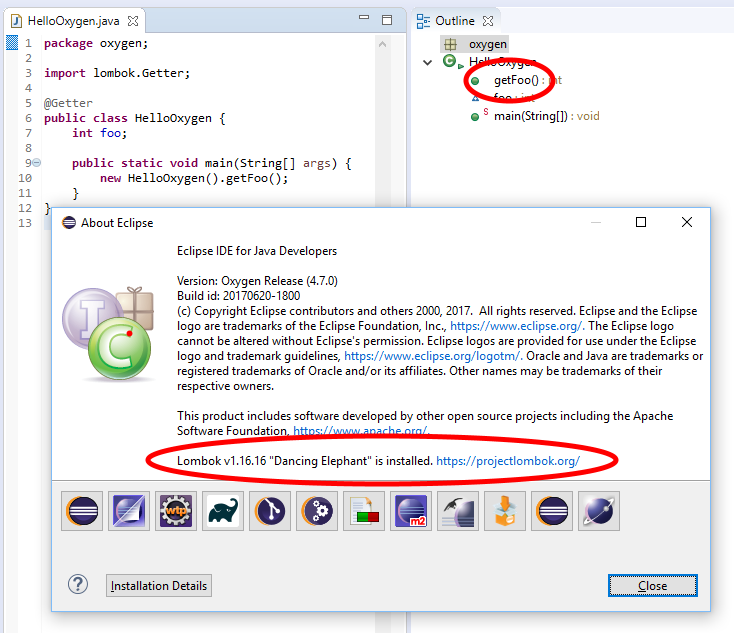
 rspilker
on 29 Jun 2017
rspilker
on 29 Jun 2017
Can you try lombok version 1.16.16?
rspilker
on 29 Jun 2017
I uninstalled and re installed and now it is showing Lombok is installed.
jakking
on 30 Jun 2017
Do a Project -> Clean and it picks it up
 Glamdring
on 5 Jul 2017
Glamdring
on 5 Jul 2017
I cannot get it to work, Oxygen and Lombok 1.16. returns exit = 1 on eclipse launch. Tried re-installing everything.
 jfzr
on 11 Jul 2017
jfzr
on 11 Jul 2017
Had the same problem.
My solution: returned from java version 8u144 to 8u141.
 remondeklerk
on 6 Aug 2017
remondeklerk
on 6 Aug 2017
I just reinstalled my Ubuntu machine, and couldn't get it to work.
It was caused by creating and using a launcher (a .desktop file) _before_ Lombok was installed by using 'lock to launcher'. The Exec property in the file will end up missing the -javaagent argument.
In this case the solution was simple: unlock from laucher, restart Eclipse, and then lock to launcher again...
edit: actually, it might be a good idea to change the laucher's Exec to just run the Eclipse binary...
cardamon
on 15 Aug 2017
I have Eclipse:
Version: Oxygen Release (4.7.0)
Build id: 20170620-1800
and when I install Lombok 1.16.18 it won't open at all.
On Windows 10.
(edit)
Solution: I was trying to start Eclipse from an icon pinned to the taskbar, or from a desktop icon. I deleted both of those, re-installed Lombok, started Eclipse directly from the .exe, and it opened fine. Then I re-added the desktop and taskbar icons and they work too now.
@mauricio-ms were you trying to start from an icon?
 anthonyz-davis
on 24 Aug 2017
anthonyz-davis
on 24 Aug 2017
I installed lombok on Eclipse Oxygen and it had issues.
In my case Lombok was installed and the eclipse.ini file had this entry
-javaagent:lombok.jar
I had to edit it to give the correct path and it worked.
 SudheendraSingh
on 6 Sep 2017
SudheendraSingh
on 6 Sep 2017
Eclipse version: Oxygen
OS: Ubuntu 14.04
Java version: 1.8.0_144
If eclipse.desktop exist, remove it.
- java -jar /path/to/lombok.jar
- cd /path/to/eclipse & ./eclipse
- lock Eclipse to the Launcher
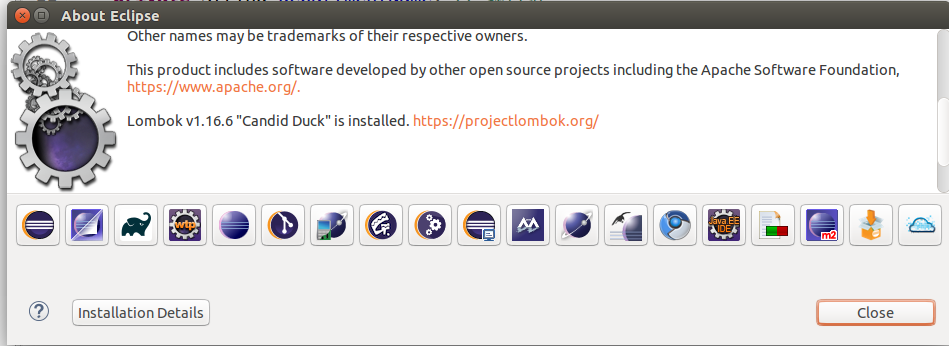
 c6i
on 9 Oct 2017
c6i
on 9 Oct 2017
My installation in Eclipse Oxygen2 quit working properly after installing SpringToolSuite. Eclipse now flags any instance of log in a class annotated with @Slf4j, and also flags any class using getter/setters of @Data objects.
Re-installing, upgrading from 1.16.18 to 1.16.20, cleaning projects .... nothing sticks.
Sometimes (!) doing a project clean "fixes" the issue, until I do a "Run as ... SpringBoot application" Then all the red flags show up again, and Eclipse says it can't run the project due to compilation problems. Running from gradle command line or just java -jar works fine.
 nrohluap
on 13 Feb 2018
nrohluap
on 13 Feb 2018
I am use Eclipse Oxygen v3, and tried to install Lombock, but is not show description in About Eclipse, also down grade the version of java to 1.8.0_152, but no recongnize Lombock and send errors in project, tell me please what need to do.

 fco271292
on 1 Apr 2018
fco271292
on 1 Apr 2018
operatingSystem: win7 64bit
java version: 1.8.0_144 64bit
Version: Oxygen.3a Release (4.7.3a)
Build id: 20180405-1200
Lombok v1.16.20 "Dancing Elephant" is installed.
lombok installed success, but lombok still cannot be resolved
 xingchch
on 14 May 2018
xingchch
on 14 May 2018
Do a Project -> Clean and it picks it up
well done!
 golangscott
on 30 May 2019
golangscott
on 30 May 2019
For me, after installing Lombok on Eclipse Oxygen, it doesn't open anymore.
I've tried several versions of Lombok.
Hi, Could you solve this problem?
 joiscadz
on 28 Apr 2020
joiscadz
on 28 Apr 2020
Related issues
 lludwa
·
3Comments
lludwa
·
3Comments
 rdsubhas
·
3Comments
rdsubhas
·
3Comments
 mmoayyed
·
3Comments
mmoayyed
·
3Comments
 michaelkuechler
·
3Comments
michaelkuechler
·
3Comments
 lombokissues
·
3Comments
lombokissues
·
3Comments
Most helpful comment
Do a Project -> Clean and it picks it up