Lombok-intellij-plugin: You aren't using a compiler supported by lombok, so lombok will not work and has been disabled.
Short description
I didn make any changes, Previously it was working fine but when I take a pull of master branch then my all projet stop working and above error start showing at the time of compilation.
This error shown in buildOutput.
In terminal it shows: Failed to execute goal org.apache.maven.plugins:maven-compiler-plugin:3.6.1:compile
Expected behavior
It should start working as expected
Version information
IDEA Version: IntelliJ IDEA 2020.3 EAP (Community Edition)
Runtime version: 11.0.8+10-b1098.1 amd64JDK Version: 1.8.0
- OS Type & Version:ubuntu1.18.0
- Lombok Plugin Version: 1.18.0
- Lombok Dependency Version: _What version of lombok.jar are you using?_
Stacktrace
I am not able to find any solution any where on the net please help me out
```
 akanshapasricha1
All 11 comments
duplicate #950
This is issue of lombok project. Please look here: rzwitserloot/lombok#2592 and here https://youtrack.jetbrains.com/issue/IDEA-252069
Unfortunately this can be fixed only in lombok self. So we need to wait for new lombok release.
 mplushnikov
on 5 Oct 2020
mplushnikov
on 5 Oct 2020
I have the same issue, I have updated my Lombok dependency in pom.xml and it worked for me.
 rhts01
on 2 Dec 2020
rhts01
on 2 Dec 2020
I had the same nasty problem when I updated today to 2020.3. It would be better for Jetbrains to try to coordinate with Lombok when releasing a new version of IDEA. Even worse is that if you go on idea's download section and click on "Other versions" in order to download the previous version, you get an empty page! Also when the IDE updates a version it would better make a backup of the previous version and offer in the UI an option to rollback to that backup. For who is interested in downloading the previous version (2020.2.4), I downloaded it from here: https://confluence.jetbrains.com/display/IDEADEV/IDEA+2020.2+latest+builds
 valentinbrasov
on 2 Dec 2020
valentinbrasov
on 2 Dec 2020
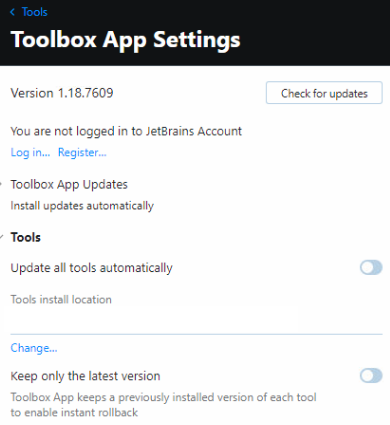
@valentinbrasov Jetbrains Toolbox provides instant rollback feature for all Jetbrains products if "Keep only latest version" setting is unchecked (It's unchecked by default as far as I remember).
 armujahid
on 3 Dec 2020
armujahid
on 3 Dec 2020
This has a workaround in this thread rzwitserloot/lombok#2592 mentioned by @mplushnikov.
The suggestion here fixed it for me: https://github.com/rzwitserloot/lombok/issues/2592#issuecomment-705449860
Yes, add -Djps.track.ap.dependencies=false to the build process options.

 bryce-pilcher
on 9 Dec 2020
bryce-pilcher
on 9 Dec 2020
This has a workaround in this thread rzwitserloot/lombok#2592 mentioned by @mplushnikov.
The suggestion here fixed it for me: rzwitserloot/lombok#2592 (comment)
Yes, add -Djps.track.ap.dependencies=false to the build process options.
You, Sir, Saved my day. Thank you so very much :)
 Debugger-15
on 11 Dec 2020
Debugger-15
on 11 Dec 2020
This has a workaround in this thread rzwitserloot/lombok#2592 mentioned by @mplushnikov.
The suggestion here fixed it for me: rzwitserloot/lombok#2592 (comment)Yes, add -Djps.track.ap.dependencies=false to the build process options.
You, Sir, Saved my day. Thank you so very much :)
Saved my day. Thank you! 👍
 sirajmunir10p
on 14 Dec 2020
sirajmunir10p
on 14 Dec 2020
This has a workaround in this thread rzwitserloot/lombok#2592 mentioned by @mplushnikov.
The suggestion here fixed it for me: rzwitserloot/lombok#2592 (comment)
Yes, add -Djps.track.ap.dependencies=false to the build process options.
Thanks Buddy!... you are life saver.
 ANKIToyo
on 15 Dec 2020
ANKIToyo
on 15 Dec 2020
worked from me 👍
 jain1dit
on 16 Dec 2020
jain1dit
on 16 Dec 2020
Thanks for the solution !
 dpkahuja-jg
on 16 Dec 2020
dpkahuja-jg
on 16 Dec 2020
Does not work for me. Only downgrade to 2020.2 allows me to run application.
 toudidel
on 17 Dec 2020
toudidel
on 17 Dec 2020
Related issues
 michalrogozinski
·
4Comments
michalrogozinski
·
4Comments
 pavelgordon
·
4Comments
pavelgordon
·
4Comments
 timothymdavis
·
4Comments
timothymdavis
·
4Comments
 chrvip
·
5Comments
chrvip
·
5Comments
 Skeletak
·
6Comments
Skeletak
·
6Comments
Most helpful comment
This has a workaround in this thread rzwitserloot/lombok#2592 mentioned by @mplushnikov.
The suggestion here fixed it for me: https://github.com/rzwitserloot/lombok/issues/2592#issuecomment-705449860