Lombok-intellij-plugin: Add a support for Intellij IDEA 2020.1
Short description
Current Lombok version is incompatible with Intellij IDEA 2020.1
Expected behavior
Lombok Plugin is fully operating on Intellij IDEA 2020.1
Version information
- IDEA Version: Intellij IDEA 2020.1
- JDK Version: JDK 11 & JDK 1.8
- OS Type & Version: Windows 10 Pro
- Lombok Plugin Version: 0.29-2019.3
- Lombok Dependency Version: 1.18.10
Steps to reproduce
_What steps do we need to take to reproduce this issue?_
- Install Intellij IDEA 2020.1
- Open Settings / Plugins
- See
Sample project
N/A
Additional information
N/A
Stacktrace
N/A
 sergeivisotsky
All 18 comments
@sergeivisotsky
You can add a new version manually.
lombok-plugin-0.30-EAP.zip
1) Go to the Preferences... > Plugins
2) Go to the "Installed" tab
3) Find lombok and hit "Update"
4) Restart IntelliJ
 DenisKozachok
on 13 Apr 2020
DenisKozachok
on 13 Apr 2020
@DenisKozachok Thanks!
sergeivisotsky
on 13 Apr 2020
Not able to update even after copying the extracted zip to C:/Program Files/JetBrains/IntelliJ IDEA Community Edition 2018.2.5\plugins.
Still see only Disable and Uninstall options in the Plugins UI.
 arjunsuccena
on 13 Apr 2020
arjunsuccena
on 13 Apr 2020
@arjunsuccena For me it works. Maybe it is specific for Intellij IDEA Community in your case.
sergeivisotsky
on 13 Apr 2020
yes I can confirm the issue will occur with latest IDEA Community Version. For me also only disable and uninstall appear.
13:11 Plugin Error: Plugin "Lombok" is incompatible (until build 193.SNAPSHOT < IC-201.6668.121).
 serious6
on 13 Apr 2020
serious6
on 13 Apr 2020
@DenisKozachok the solution works in IDEA Ultimate 2020.1. Thank you!
 intellitour
on 13 Apr 2020
intellitour
on 13 Apr 2020
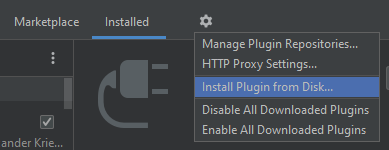
@DenisKozachok it works, but on my GNU/Linux box the steps are slightly different, maybe help others:
- File settings (Ctrl+Alt+s) -> Plugins
- Go to the _Installed_ tab (same above)
- Find and highlight Lombok
- Along with Installed tab click on :gear: icon and choose _Install Plugin from Disk_
 habutre
on 13 Apr 2020
habutre
on 13 Apr 2020
Looks like this issue duplicates #775
 bitnot
on 13 Apr 2020
bitnot
on 13 Apr 2020
If you don't wan't to install anything manually this solved for me
https://github.com/mplushnikov/lombok-intellij-plugin/issues/775#issuecomment-611823534
 mpbalmeida
on 13 Apr 2020
mpbalmeida
on 13 Apr 2020
@sergeivisotsky
You can add a new version manually.
lombok-plugin-0.30-EAP.zip
- Go to the Preferences... > Plugins
- Go to the "Installed" tab
- Find lombok and hit "Update"
- Restart IntelliJ
Thanks! It worked
 gustavodiasdev
on 14 Apr 2020
gustavodiasdev
on 14 Apr 2020
Thanks @DenisKozachok . I was able to get past the error by manually updating the plugin.
 crpdev
on 14 Apr 2020
crpdev
on 14 Apr 2020
Please release this plugin asap....
 svenhaag
on 14 Apr 2020
svenhaag
on 14 Apr 2020
@svenhaag @crpdev @gustavodiasdev you don't need to do anything manually, the plugin 029 is compiled for 2020.1 already, just do this
https://github.com/mplushnikov/lombok-intellij-plugin/issues/775#issuecomment-611823534
In my company, manual plugins are blocked for security reason
mpbalmeida
on 14 Apr 2020
Just manually reinstall the plugin if it fails to update. For some reason, some users are experiencing this problem... I just reinstalled it and it works.
 vberezan
on 14 Apr 2020
vberezan
on 14 Apr 2020
Not able to update even after copying the extracted zip to C:/Program Files/JetBrains/IntelliJ IDEA Community Edition 2018.2.5\plugins.
Still see only Disable and Uninstall options in the Plugins UI.
for me the option is under the gear icon "install plugin from disk", no need to store the zip inside intellij and it worked
 Miamoto-Musashi
on 14 Apr 2020
Miamoto-Musashi
on 14 Apr 2020
@sergeivisotsky
You can add a new version manually.
lombok-plugin-0.30-EAP.zip
- Go to the Preferences... > Plugins
- Go to the "Installed" tab
- Find lombok and hit "Update"
- Restart IntelliJ
I have used the version you have linked, and installed it. It works correctly, thanks!
 Katakurinna
on 14 Apr 2020
Katakurinna
on 14 Apr 2020
@Katakurinna @Miamoto-Musashi @vberezan
https://github.com/mplushnikov/lombok-intellij-plugin/issues/775#issuecomment-611823534
Since https://github.com/mplushnikov/lombok-intellij-plugin/releases already has a build for 2020.1, the solution is uninstall plugin, restart and reinstall plugin - Intellij will pick the right version then.
mpbalmeida
on 14 Apr 2020
duplicate #775
 mplushnikov
on 14 Apr 2020
mplushnikov
on 14 Apr 2020
Related issues
 mr
·
5Comments
mr
·
5Comments
 Skeletak
·
6Comments
Skeletak
·
6Comments
 pavelgordon
·
4Comments
pavelgordon
·
4Comments
 timothymdavis
·
4Comments
timothymdavis
·
4Comments
 clayreimann
·
3Comments
clayreimann
·
3Comments
Most helpful comment
@sergeivisotsky
You can add a new version manually.
lombok-plugin-0.30-EAP.zip
1) Go to the Preferences... > Plugins
2) Go to the "Installed" tab
3) Find lombok and hit "Update"
4) Restart IntelliJ