Lombok-intellij-plugin: Latest Lombok 0.29-2019.3 is not compatible with IDEA 2020.1
Short description
getters and setters do not work correctly - IDEA can't find its behaviour after IDE has been updated to 2020.1 version
Expected behavior
IDEA marks red getters and setters
Version information
- IDEA Version: 2020.1
- JDK Version: OpenJDK 64-Bit Server VM (build 25.252-b07, mixed mode)
- OS Type & Version: Ubuntu 20.04
- Lombok Plugin Version: 0.29-2019.3
- Lombok Dependency Version: 1.18.10
Steps to reproduce
- Update IDEA to 2020.1
 cybergeene
All 44 comments
I just updated the intellij dependency and build it locally. For me this lombok-plugin-0.30-EAP.zip
works until the official update ist out :-) (Settings➙Plugins➙:gear:➙Install Plugin from Disk...)
 burka
on 7 Apr 2020
burka
on 7 Apr 2020
It's works for me.
Thanks a lot!
cybergeene
on 7 Apr 2020
Thanks, this helped me as well.
 hgmtrebing
on 7 Apr 2020
hgmtrebing
on 7 Apr 2020
Thanks for the quick workaround on this!
 twoversionsofme
on 8 Apr 2020
twoversionsofme
on 8 Apr 2020
@burka this didn't work on ubuntu, do you have another build?
 skpriyatham58
on 8 Apr 2020
skpriyatham58
on 8 Apr 2020
@skpriyatham58 https://github.com/mplushnikov/lombok-intellij-plugin/issues/775#issuecomment-610553000 works on Ubuntu bionic 18.04 in the following environment:
_IntelliJ IDEA 2020.1 (Ultimate Edition)
Build #IU-201.6668.113, built on April 7, 2020
Runtime version: 11.0.6+8-b765.25 amd64
VM: OpenJDK 64-Bit Server VM by JetBrains s.r.o
Linux 5.3.0-45-generic_
 gaetan-auffret
on 8 Apr 2020
gaetan-auffret
on 8 Apr 2020
It's works here, with Ubuntu 18 (but there is another problem with Jdk11 installed by intellij through Snap)
IntelliJ IDEA 2020.1 (Ultimate Edition)
Build #IU-201.6668.113, built on April 7, 2020
Runtime version: 11.0.6+8-b765.25 amd64
VM: OpenJDK 64-Bit Server VM by JetBrains s.r.o
Linux 4.15.0-96-generic
 davidgfolch
on 8 Apr 2020
davidgfolch
on 8 Apr 2020
@davidgfolch I have the same problem with JDK. It seems like a project doesn't see many things e.g. String, Throwable, @Override etc, but is is building successfully. Have already found a solution to that?
 mykpatryk
on 8 Apr 2020
mykpatryk
on 8 Apr 2020
Yes, just moved to jdk8 in that project
On Wed, 8 Apr 2020 10:26 mykpatryk, notifications@github.com wrote:
@davidgfolch https://github.com/davidgfolch I have the same problem
with JDK. It seems like a project doesn't see many things e.g. String,
Throwable, @override https://github.com/override etc, but is is
building successfully. Have already found a solution to that?—
You are receiving this because you were mentioned.
Reply to this email directly, view it on GitHub
https://github.com/mplushnikov/lombok-intellij-plugin/issues/775#issuecomment-610824059,
or unsubscribe
https://github.com/notifications/unsubscribe-auth/AEHHTYMBOUHHRKG5C7ZJIWLRLQYJTANCNFSM4MDJY55A
.
davidgfolch
on 8 Apr 2020
Works like a charm, thanks
 CrystallDEV
on 8 Apr 2020
CrystallDEV
on 8 Apr 2020
@skpriyatham58 I used Ubuntu 19.10 with JDK8 and it worked. Maybe you could build it yourself and have a look where the problem is? You can use the branch of my merge request, then only a ./gradlew build would be neccessary. The result will be in build/distributions/.
burka
on 9 Apr 2020
Solution in my case: After InteliJ update to 2020, my JDK was completely crushed / unnoticeable by InteliJ. Once you reinstall JDK everything will be back to normal
Obviously you have to update project structure settings to the new one :)
mykpatryk
on 9 Apr 2020
Thanks!
 aygiz
on 9 Apr 2020
aygiz
on 9 Apr 2020
Thanks
 pomliu
on 9 Apr 2020
pomliu
on 9 Apr 2020
thanks
 zlren
on 9 Apr 2020
zlren
on 9 Apr 2020
Thank you!
 Aberdeener
on 9 Apr 2020
Aberdeener
on 9 Apr 2020
I just updated to IntelliJ 2020.1 on macOS 10.15 and Lombok plugin broke. Using this alternative
 pavankjadda
on 9 Apr 2020
pavankjadda
on 9 Apr 2020
I just updated to IntelliJ 2020.1 on macOS 10.15 and Lombok plugin broke. Using this alternative
Same here...
 ruurd
on 9 Apr 2020
ruurd
on 9 Apr 2020
The EAP release works fine for me: https://github.com/mplushnikov/lombok-intellij-plugin/releases/tag/releasebuild_0.29-2020.1-3
 zman0900
on 9 Apr 2020
zman0900
on 9 Apr 2020
@burka Just wondering: where did you get this link from? I don't see it referenced anywhere nor does googling reveal any such url pattern (.../user/repo/files/...) to me. Is this some unreleased release? Did you upload that file and manage to publish it under the url of this repo? :confused:
 jed-meyer
on 9 Apr 2020
jed-meyer
on 9 Apr 2020
Did you upload that file and manage to publish it under the url of this repo?
@jed-meyer Seems it's an attachment to the issue comment. This is "code from the internet", that people are downloading & running on their machines :P Security risk?
 tr00per
on 9 Apr 2020
tr00per
on 9 Apr 2020
Since https://github.com/mplushnikov/lombok-intellij-plugin/releases already has a build for 2020.1, the solution is uninstall plugin, restart and reinstall plugin - Intellij will pick the right version then.
 dquintela
on 10 Apr 2020
dquintela
on 10 Apr 2020
I just reinstalled the Lombok and it‘s work for me.
 pptom
on 10 Apr 2020
pptom
on 10 Apr 2020
Thanks!!!!!
 quayegallas
on 10 Apr 2020
quayegallas
on 10 Apr 2020
I just reinstalled the Lombok and it‘s work for me.
@pptom Thanks!!!!It's works
 feng2r200
on 10 Apr 2020
feng2r200
on 10 Apr 2020
@pptom you are right!!
 amu5
on 10 Apr 2020
amu5
on 10 Apr 2020
It works for me! thank you!!
 chaosmin
on 10 Apr 2020
chaosmin
on 10 Apr 2020
Thanks for this tip. I was a lost soul.
 astroviking3000
on 10 Apr 2020
astroviking3000
on 10 Apr 2020
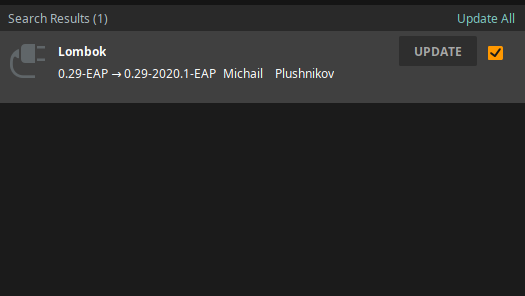
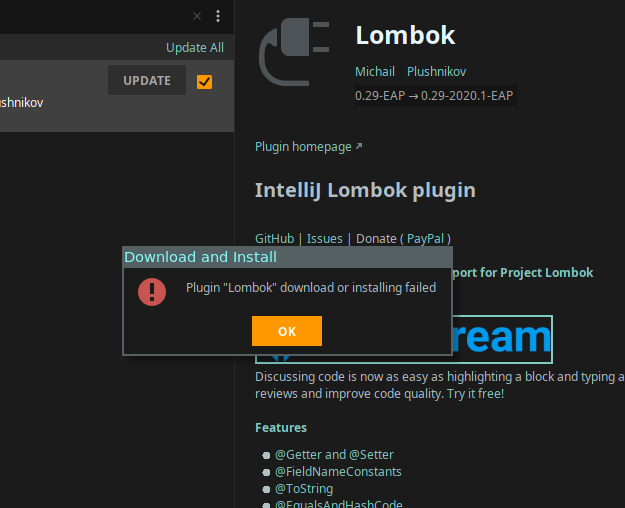
I just uninstalled lombok plugin -> restarted idea -> re-installed lombok plugin -> restarted again
Then there is notification that there is lombok plugin update,
but upon updating it, there is an error.
 panjiesw
on 10 Apr 2020
panjiesw
on 10 Apr 2020
I have the same problem as @panjiesw.
I found this in my log file:
2020-04-10 08:17:44,758 [ 395326]   INFO - ateSettings.impl.UpdateChecker - failed to load plugin descriptions from : Malformed URL:
2020-04-10 08:18:01,273 [ 411841]   INFO - lij.ide.plugins.DynamicPlugins - Plugin Lombook Plugin is not unload-safe because of extension to non-dynamic EP com.intellij.implicit.resource.closer
2020-04-10 08:18:01,732 [ 412300]   INFO - Settings.impl.PluginDownloader - Plugin Lombook Plugin: current version (max) 0.29-EAP
 jdevreese
on 10 Apr 2020
jdevreese
on 10 Apr 2020
@jed-meyer Seems it's an attachment to the issue comment. This is "code from the internet", that people are downloading & running on their machines :P Security risk?
@tr00per Seems you're spot on, thanks! Personally, I won't download and run anything like this, but that's just my everyday paranoia. The generated url is more than misleading though as it implies referencing an official repo file. @github should at least add something to the path to make it clear this is 3rd party content. Better yet, publish it under the url of the user uploading it and rendering the link in a way clearly indicating its external source, e.g. with an icon.
jed-meyer
on 10 Apr 2020
Experiencing the same problem as @panjiesw
Since I had the same error message when trying to update, I uninstalled the plugin, restarted the Intellij, installed the plugin, restarted again and still had the update notification. If i click on the update button, I receive again the same error.
 akyrey
on 10 Apr 2020
akyrey
on 10 Apr 2020
Lombok Plugin Version: 0.29-2019.3 is for Intellij 2019.3 as you can see.
Why do you not update/use version 0.29-EAP, available already from 01.03.2020?
 mplushnikov
on 10 Apr 2020
mplushnikov
on 10 Apr 2020
@mplushnikov Our IntelliJ installations didn't offer 0.29-EAP as a plugin update until today.
So after upgrading IntelliJ itself to 2020.1 it just complained about the Lombok Plugin (0.29-2019.3) being incompatible, but didn't offer an update for the plugin.
But now my local IntelliJ just updated the Lombok plugin by itself. (Without the need to re-install it, as mentioned above)
 larsgrefer
on 10 Apr 2020
larsgrefer
on 10 Apr 2020
@larsgrefer In my case I could not upgrade lombok until today, but IntelliJ didn't do it by itself, it required me to update manually. By this I mean:
- Go to the
Preferences... > Plugins - Go to the "Installed" tab
- Find lombok and hit "Update"
- Restart IntelliJ
 joffrey-bion
on 10 Apr 2020
joffrey-bion
on 10 Apr 2020
@burka Just wondering: where did you get this link from?
@jed-meyer I build it and uploaded it as an attachment to my post :-) Exactly as @tr00per said :-)
burka
on 10 Apr 2020
IntelliJ IDEA 2020.1 (Ultimate Edition)
Build #IU-201.6668.121, built on April 8, 2020
Runtime version: 11.0.6+8-b765.25 x86_64
VM: OpenJDK 64-Bit Server VM by JetBrains s.r.o
macOS 10.15.4
GC: ParNew, ConcurrentMarkSweep
same here
 wuzhefang
on 10 Apr 2020
wuzhefang
on 10 Apr 2020
I just updated the intellij dependency and build it locally. For me this lombok-plugin-0.30-EAP.zip
works until the official update ist out :-) (Settings➙Plugins➙⚙️➙Install Plugin from Disk...)
Thank you, worked on macOS 10.15.4
 romantorkit
on 11 Apr 2020
romantorkit
on 11 Apr 2020
The last version lombok-plugin-0.30-EAP.zip leads to the following info for _@UtilityClass_ annotated classes with static methods inside IntelliJ
@UtilityClass already marks methods static.
If you discard the static on the method, the whole project cannot be built anymore.
 skromberg
on 11 Apr 2020
skromberg
on 11 Apr 2020
Verison lombok-plugin-0.30-EAP.zip does make Intellij recognize Lombok annotations. However, it you put contradictory Lombok annotations on the same class, there is no compile error at all. Example: add @RequiredArgsConstructor with @NoArgsConstructor compiles correctly.
Because as a matter of fact those two annotation do not generate conflicting code at all. Please use the refactoring menu choices to see what Lombok actually generates before making a conclusion.
ruurd
on 12 Apr 2020
Since https://github.com/mplushnikov/lombok-intellij-plugin/releases already has a build for 2020.1, the solution is uninstall plugin, restart and reinstall plugin - Intellij will pick the right version then.
Thanks for the solution method. It worked well for me!
 CasaSky
on 14 Apr 2020
CasaSky
on 14 Apr 2020
The latest IntelliJ IDE version (2020.1) contains a BUG for several plugins (including plugin for Lombok) were shown as incompatible with the updated version of the IDE.
You can find the issue with a detailed explanation here: https://youtrack.jetbrains.com/issue/IDEA-237113.
It has already been resolved and the fix will be in the nearest IDE patch (presumably 2020.1.1).
As of now, the workaround is to re-install the plugin in the IDE settings.
mplushnikov
on 14 Apr 2020
The last version lombok-plugin-0.30-EAP.zip leads to the following info for _@UtilityClass_ annotated classes with static methods inside IntelliJ
@UtilityClass already marks methods static.If you discard the static on the method, the whole project cannot be built anymore.
Due to a peculiar way javac processes static imports, trying to do a non-star static import of any of the members of a @UtilityClass won't work. Either use a star static import: import static TypeMarkedWithUtilityClass.*; or don't statically import any of the members.
mplushnikov
on 14 Apr 2020
Regarding the star imports, if you actually put static on methods in classes that use @UtililtyClass then it works just fine. We have always done this, and use @UtilityClass to generate the private constructor and to indicate the _intent_ of the class. Adding static to each method isn't much extra work and once you're down past the top of the class, it helps having the static on there. (In my opinion of course.)
 sleberknight
on 15 Apr 2020
sleberknight
on 15 Apr 2020
Related issues
 mr
·
5Comments
mr
·
5Comments
 michalrogozinski
·
4Comments
michalrogozinski
·
4Comments
 chrvip
·
5Comments
chrvip
·
5Comments
 Viking1726
·
4Comments
Viking1726
·
4Comments
 dodalovic
·
3Comments
dodalovic
·
3Comments
Most helpful comment
I just updated the intellij dependency and build it locally. For me this lombok-plugin-0.30-EAP.zip
works until the official update ist out :-) (Settings➙Plugins➙:gear:➙Install Plugin from Disk...)