Lombok-intellij-plugin: IntelliJ 2019.1 EAP: Plugin not supported
Short description
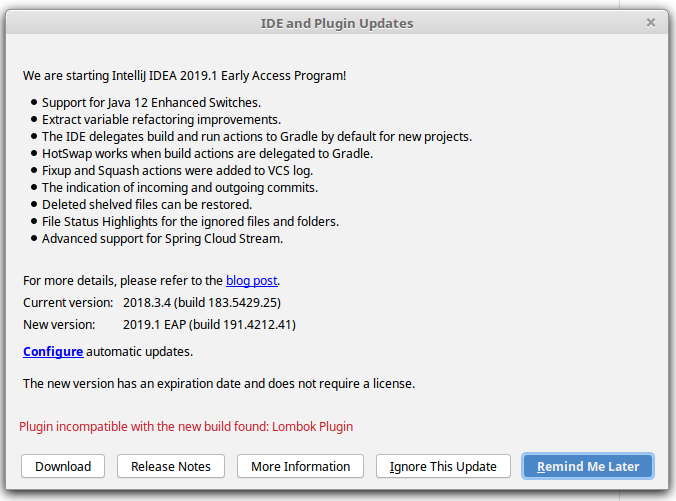
IntelliJ 2019.1 EAP considers the Lombok Plugin not compatible and warns before updating.
Expected behavior
Lombok Plugin should not show up as incompatible when updating to 2019.1 EAP
Version information
- IDEA Version: 2019.1 EAP 191.4214.41
- Lombok Plugin Version: v0.23-2018.3
Steps to reproduce
- Have IntelliJ 2018.x installed, have Lombok plugin installed
- Start IntelliJ Update dialog
Additional Info
Screenshot of update dialog:
 kosi2801
All 9 comments
In 2018.3.4 also
fixed by reinstalling the plugin
 AlexByte
on 25 Feb 2019
AlexByte
on 25 Feb 2019
I am not sure I understand the fix here: if the plugin version is declared as not compatible with IDEA, how could reinstalling it fix the issue and remove the warning? Or is there a fix available in 0.24 version of the plugin?
 mmoayyed
on 27 Feb 2019
mmoayyed
on 27 Feb 2019
This error was displayed after importing settings.
AlexByte
on 27 Feb 2019
@mmoayyed 0.24 version will prevent Intellij to show this warning during update from 2018.3 to 2019.1
But you can also use existing plugin version -> ignore this warning-> update Intellij-> update plugins. This will install plugin marked as supported for 2019.1
 mplushnikov
on 27 Feb 2019
mplushnikov
on 27 Feb 2019
Thank you very much for clarifying this.
mmoayyed
on 27 Feb 2019
I have a new laptop, downloaded this IntelliJ 2019.1, installed the lombok plugin 0.24, from scratch, and still it's getting disabled by Intellij. I will have to use the previous Intellij version in order to work.
 DianaAlcantara
on 3 Apr 2019
DianaAlcantara
on 3 Apr 2019
@DianaAlcantara try to reinstall the plugin.
AlexByte
on 3 Apr 2019
Thanks Alex, but I already removed and installed it again twice. I know the resinstalling the For now, I'll try working with 2018.3.6. I plugin thing worked for one of my team mates who had the previous intellij and installed the new one: he had to remove and reinstall the plugin. In this case I'm starting with the 2019.1, no other intellij version was on this machine, and reinstalling it is not working. For now I'm gonna use the old one, until this is solved. Thanks!
DianaAlcantara
on 3 Apr 2019
@DianaAlcantara This is already closed. Create other issue.
AlexByte
on 3 Apr 2019
Related issues
 pedegie
·
4Comments
pedegie
·
4Comments
 leialexisjiang
·
5Comments
leialexisjiang
·
5Comments
 Nikolas-Charalambidis
·
3Comments
Nikolas-Charalambidis
·
3Comments
 michalrogozinski
·
4Comments
michalrogozinski
·
4Comments
 Skeletak
·
6Comments
Skeletak
·
6Comments
Most helpful comment
@mmoayyed 0.24 version will prevent Intellij to show this warning during update from 2018.3 to 2019.1
But you can also use existing plugin version -> ignore this warning-> update Intellij-> update plugins. This will install plugin marked as supported for 2019.1