I installed loki using helm and configured ingress to to port 3100 and path /loki. Now when I access https://myURL/loki is giving 404. It seems loki is trying to basepath as / instead of /loki.
is there a way where I can install loki with defining path (key for path)?
 cloudam
All 10 comments
http_path_prefix proeprty is missing in values.yaml
cloudam
on 10 Feb 2020
Tried with solution in https://github.com/grafana/loki/issues/144. But its not working too. getting below error
helm upgrade --install loki loki/loki-stack --namespace=monitoring -server.path-prefix=/loki/
Error: unknown shorthand flag: 's' in -server.path-prefix=/sonar/loki/
cloudam
on 10 Feb 2020
Helm doesn't understand loki flags. You have to use extraArgs and because it's a dictionary I don't think you can't use command line with helm (e.g. --set) .
You need to have your own custom helm value override:
loki:
  extraArgs:
    server.path-prefix: /sonar/loki/
then you can do
helm upgrade --install loki loki/loki-stack --namespace=monitoring -f values.yaml
 cyriltovena
on 11 Feb 2020
cyriltovena
on 11 Feb 2020
This issue has been automatically marked as stale because it has not had any activity in the past 30 days. It will be closed in 7 days if no further activity occurs. Thank you for your contributions.
![stale[bot] picture](https://avatars3.githubusercontent.com/in/1724?v=4&s=40) stale[bot]
on 12 Mar 2020
stale[bot]
on 12 Mar 2020
Helm doesn't understand loki flags. You have to use
extraArgsand because it's a dictionary I don't think you can't use command line with helm (e.g. --set) .You need to have your own custom helm value override:
loki:
  extraArgs:
    server.path-prefix: /sonar/loki/
then you can do
helm upgrade --install loki loki/loki-stack --namespace=monitoring -f values.yaml
I tired this. But loki pod is not coming up.
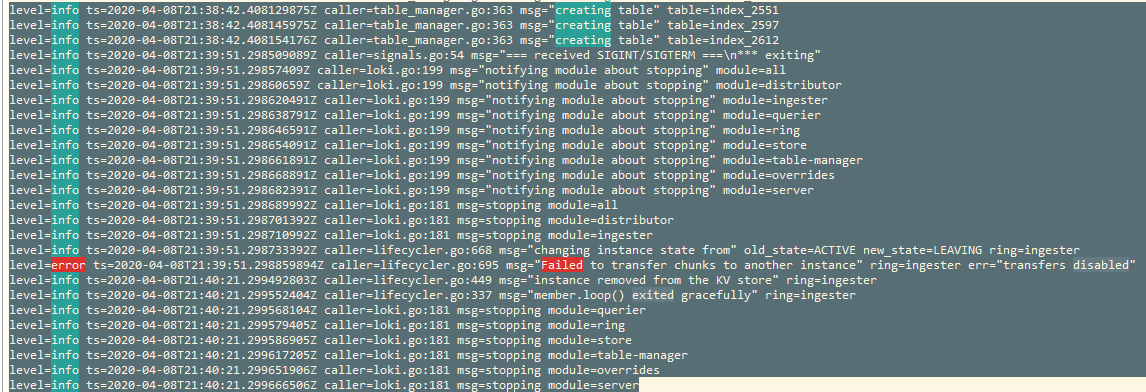
Below are values.yaml entries
Additional Loki container arguments, e.g. log level (debug, info, warn, error)
extraArgs:
server.path-prefix: /sonar/loki/
# log.level: debug
livenessProbe:
httpGet:
path: /ready
port: http-metrics
initialDelaySeconds: 45
cloudam
on 9 Apr 2020
Those are just shutdown logs, the error is fine, can you share more logs ?
cyriltovena
on 9 Apr 2020
Thanks Cyril. I am attaching my values.yaml file and complete pod logs.
loki_logs.txt
values.yaml.txt
I am using loki-stack to install the components. downloaded the repo. make changes to repo directly and then execute it from local.
Status after installation.
Pod is in running status. but not active/healthy
root@US1239175W1:/opt/devops/repos# pods -n dev | grep loki
loki-0 0/1 Running 1 2m28s
loki-promtail-6b86h 1/1 Running 0 2m28s
loki-promtail-dm2b9 1/1 Running 0 2m28s
loki-promtail-gx5fr 1/1 Running 0 2m28s
loki-promtail-nsm25 1/1 Running 0 2m28s
loki-promtail-pfrzr 1/1 Running 0 2m28s
loki-promtail-xm9kq 1/1 Running 0 2m28s
loki-promtail-z82h6 1/1 Running 0 2m28s
cloudam
on 9 Apr 2020
Issue is fixed. its because of the liveness and readiness probe. I set the same urls for readiness check.
Thanks a lot Cyril. Really appreciate your help.
cloudam
on 9 Apr 2020
@cyriltovena
Now after installing loki under custom path, its not picking the labels.
http://localhost:3100/status/loki/api/prom/label
{"values":["__name__"]}
do we need to change something in promtail values.yaml?
promtail logs showing below error
level=error ts=2020-04-13T02:26:56.597795526Z caller=client.go:246 component=client host=loki:3100 msg="final error sending batch" status=404 error="server returned HTTP status 404 Not Found (404): 404 page not found"
level=error ts=2020-04-13T02:26:57.798429372Z caller=client.go:246 component=client host=loki:3100 msg="final error sending batch" status=404 error="server returned HTTP status 404 Not Found (404): 404 page not found"
cloudam
on 13 Apr 2020
Looks like the config for promtail url is wrong may be you should use that prefix now ? see the url here suggester https://github.com/grafana/loki/blob/6d5408c100e464e807cc3b1ad48be512c96167e3/docs/clients/promtail/configuration.md#client_config
may be it should be http://example.com:3100/sonar/loki/api/v1/push ?
cyriltovena
on 15 Apr 2020
Related issues
 Mario-Hofstaetter
·
4Comments
Mario-Hofstaetter
·
4Comments
 gouthamve
·
4Comments
cyriltovena
·
4Comments
gouthamve
·
4Comments
cyriltovena
·
4Comments
 arnitolog
·
6Comments
arnitolog
·
6Comments
 bzon
·
5Comments
bzon
·
5Comments