Hello!
I am having a hard time truncating exception messages when using logger.exception('Some message', e). With SQL exceptions notably, it logs the whole parameterized query (with 10.000 parameters). This even prevents me from receiving some error mails.
I tried:
- truncating the exception message if its length is above
Ncharacters. But loguru uses better exceptions andlen(str(some_exception))does not account for that so it gives me a much shorter length that what is going to be logged. - removing better exceptions by using
os.environ['BETTER_EXCEPTIONS'] = '0'in my code before importing the loguru.logger.
Perhaps the problems I described better_exceptions and truncating could be part of an enhancement? Unless there are options that I did not see or a good workaround.
Thanks in advance!
 ThibTrip
All 9 comments
Hey @ThibTrip! :)
Did you try setting backtrace=False and diagnose=False while adding your handler?
The first parameter reduces the size of the stackrace, while the second controls the display of variable values.
 Delgan
on 17 Aug 2020
Delgan
on 17 Aug 2020
Hello @Delgan ! Thanks a lot for the idea! With backtrace=False and diagnose=False the parameterized query was still there however I tried to filter it out again and must have been doing it wrong before because now it works! It is not as elegant as I would hope though 🙈.
I have included an example code here to show how you can filter the traceback:
from sqlalchemy import create_engine
from loguru import logger
from notifiers.logging import NotificationHandler
import pandas as pd
import random
import os
import re
Add logging to file
logger.add('my_logger.log', encoding='utf-8')
1
Function to silence the SQL error
def silence_sql_error(logger:logger, exception:Exception):
    """
    Removes SQL parameterized queries from traceback messages to avoid
    huge logs (which is problematic if for instance you want to send error mails).
    """
    # you may want to put this in the outer scope so that it does not compile each time the
    # function is ran
    RE_SQL_ERROR = re.compile('\[SQL\:.*\]\n\[parameters\:.*\n\(Background on this error.*\)')

    # log a "normal" exception if not in presence of an SQL error otherwise log an error
    # we use error and not exception otherwise loguru still picks up the exception despite
    # our filtering
    message = str(e)
    match = RE_SQL_ERROR.search(message)
    if match:
        logger.info('SQL exception detected. Removing the parameterized query to avoid huge traceback messages.')
        logger.error(RE_SQL_ERROR.sub('', message))
    else:
        logger.exception('Oups', e)
Push data to postgres
Simulate an error by terminating the connection in the database.
engine = create_engine('CONN_STRING')
schema = 'tests'
engine.execute(f'CREATE SCHEMA IF NOT EXISTS {schema};')

# create and push a big df so we have time to terminate the connection
df = pd.DataFrame({i:[random.choice(range(10)) for i in range(1000000)] for i in range(10)})

try:
    logger.info('Pushing data to postgres')
    df.to_sql(name='test_loguru', con=engine, schema=schema, if_exists='replace',
              index=False, chunksize=100, method='multi')
except Exception as e:
    silence_sql_error(logger=logger, exception=e)
2020-08-18 10:16:11.181 | INFO     | __main__:<module>:10 - Pushing data to postgres
2020-08-18 10:16:20.864 | INFO     | __main__:silence_sql_error:16 - SQL exception detected. Removing the parameterized query to avoid huge traceback messages.
2020-08-18 10:16:20.866 | ERROR    | __main__:silence_sql_error:17 - (psycopg2.errors.AdminShutdown) terminating connection due to administrator command
SSL connection has been closed unexpectedly
Open the log to check there are no huge traceback message due to a SQL query
with open(log_path, encoding='utf-8', mode='r') as f:
    print(f.read())
2020-08-18 10:16:11.181 | INFO     | __main__:<module>:10 - Pushing data to postgres
2020-08-18 10:16:20.864 | INFO     | __main__:silence_sql_error:16 - SQL exception detected. Removing the parameterized query to avoid huge traceback messages.
2020-08-18 10:16:20.866 | ERROR    | __main__:silence_sql_error:17 - (psycopg2.errors.AdminShutdown) terminating connection due to administrator command
SSL connection has been closed unexpectedly
If backtrace=False and backtrace=False wasn't enough, maybe you need to use a format function to customize exception handling! There is an example in the documentation that I tried to adapt to your use case:
import stackprinter

def format(record):
    format_ = "{time} {message}\n"
    exception = record["exception"]

    if exception is not None:
        formatted_exception = stackprinter.format(exception)
        if len(formatted_exception) > 1000:
             type, value, _ = exception
             formatted_exception = "{}: {}\n<Traceback too big to be displayed>".format(type, value)
        record["extra"]["formatted_exception"] = formatted_exception
        format_ += "{extra[formatted_exception]}\n"

    return format_

logger.add(sys.stderr, format=format)
Thanks again for your new ideas @Delgan ! Is your code working for you? For me it logs twice and does not shorten the message. I think this is due to the default sys handler still beeing there and I don't see any code to shorten the message.
Anyhow I understand how it works and came up with this which I thinks is also a good solution :)! Since I work 99.99% of the time in Jupyter and was affraid there might be differences I tested both your code and mine with Jupyter (IPython) and "normal" Python.
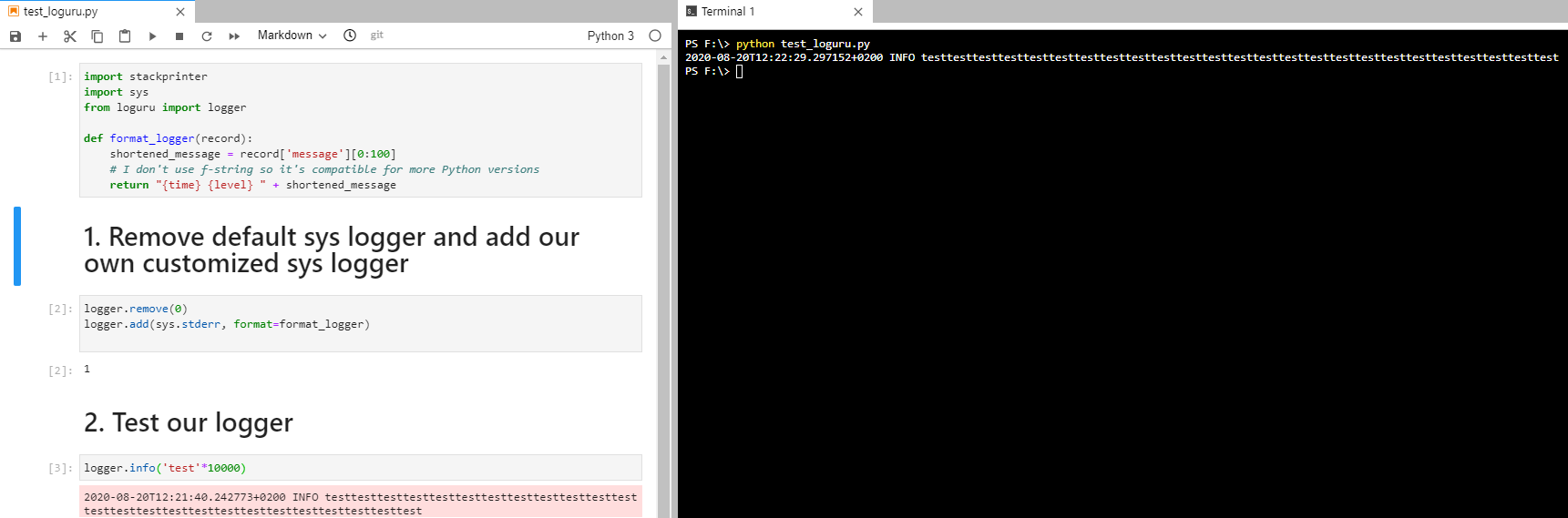
_Note: if you are wondering I use the extension "jupytext" to work with Python files as if they were Notebooks_
EDIT: you may close this issue unless you want to point something out or such 👍
copy pastable code
import stackprinter
import sys
from loguru import logger

def format_logger(record):
    shortened_message = record['message'][0:100]
    # I don't use f-string so it's compatible for more Python versions
    return "{time} {level} " + shortened_message

# Remove default sys logger and add our own customized sys logger
logger.remove(0)
logger.add(sys.stderr, format=format_logger)


# Test our logger
logger.info('test'*10000)
Is your code working for you? For me it logs twice and does not shorten the message. I think this is due to the default sys handler still beeing there and I don't see any code to shorten the message.
Yes, sorry, you need to .remove() the default handler just as you did later.
Anyhow I understand how it works and came up with this which I thinks is also a good solution :)!
Yes, it should work fine! The only downside is that you will not get any information about the exception which occurred (because "{exception}" is not part of your custom format).
Also, you have to be careful. It is not recommended to add the message directly to the format. The function str.format() will be called on the returned string, and it can cause errors if there are curly braces in your message. Instead, you should add the message to the extra dict and use it in the format:
def format_logger(record):
    shortened_message = record['message'][0:100]
    record["extra"]["shortened_message"] = shortened_message
    return "{time} {level} {extra[shortened_message]}\n"
Understood :+1: ! Thanks again, love this library :smile: !
ThibTrip
on 21 Aug 2020
Great, thanks too! :smile:
I'm closing this ticket then, but if you have any more questions, of course I stay available.
Delgan
on 21 Aug 2020
In case anyone stumbles upon this issue, do not forget to add {exception} in the function to format the logger if you want to see any traceback :see_no_evil: ...
For instance:
def format_logger(record):
    record["extra"]["shortened_message"] = record.get('message', '')[0:5000]
    record['iso_time'] = record['time'].replace(microsecond=0).isoformat()
    msg = "{iso_time} | {level} | {name}:{function}:{line} - {extra[shortened_message]}\n"
    return msg + '{exception}\n' if record['exception'] else msg # exception is None unless there is an exception
@ThibTrip By the way you can add the {exception} unconditionally, it will be formatted as an empty string if there is no exception in the log record.
def format_logger(record):
    record["extra"]["shortened_message"] = record.get('message', '')[0:5000]
    record['iso_time'] = record['time'].replace(microsecond=0).isoformat()
    return "{iso_time} | {level} | {name}:{function}:{line} - {extra[shortened_message]}\n{exception}"
Related issues
 lvar
·
6Comments
lvar
·
6Comments
 ghost
·
4Comments
ghost
·
4Comments
 volfco
·
5Comments
volfco
·
5Comments
 lgvaz
·
6Comments
lgvaz
·
6Comments
 talz
·
6Comments
talz
·
6Comments