Locust: Download Report in multi-worker setup
Is your feature request related to a problem? Please describe.
I am frustrated that there's no "Download Report" in the multi-worker test, so I could see the summary of the test in the mult-worker environment.
Describe the solution you'd like
I'd like to have the "Download Report" link available in the multi-worker test. The report should aggregate the data from the workers.
 mezhaka
All 9 comments
That it weird. Sounds like a bug. Just looking at the code I see no reason for it not to work in distributed mode.
I guess you are running locust ”normally”, not as a library?
This feature was implemented in https://github.com/locustio/locust/pull/1516
@taojy123 , I guess you tested it running distributed, right?
 cyberw
on 28 Oct 2020
cyberw
on 28 Oct 2020
@mezhaka Sorry, that should be my problem.
I turned off the statistics in worker mode because of a previous issue (https://github.com/locustio/locust/issues/1531#issuecomment-677572200), which may have caused this.
I'll try to optimize it by including the worker's statistics when exporting the report.
It may take some time.Then I'll make a new PR.
 taojy123
on 29 Oct 2020
taojy123
on 29 Oct 2020
I'm getting ready to release 1.3.2. Any chance you'll have time to fix it this soon? :)
cyberw
on 2 Nov 2020
@cyberw
Sorry, I was very busy yesterday and the day before.
I tried to reproduce the problem on my computer today, but I found that the "Download Report" is available in multi-work mode. It works! 😂
The steps I followed are as follows.
locustfile.py:
from locust import HttpUser, between, task


class WebsiteUser(HttpUser):
    wait_time = between(1, 2)

    @task
    def index(self):
        self.client.get("/")

    @task
    def xls(self):
        self.client.get("/xls/")
Start a master and two workers:
locust -f locustfile.py --master
locust -f locustfile.py --worker
locust -f locustfile.py --worker
Then I go to http://localhost:8089 and see the web ui is fine.
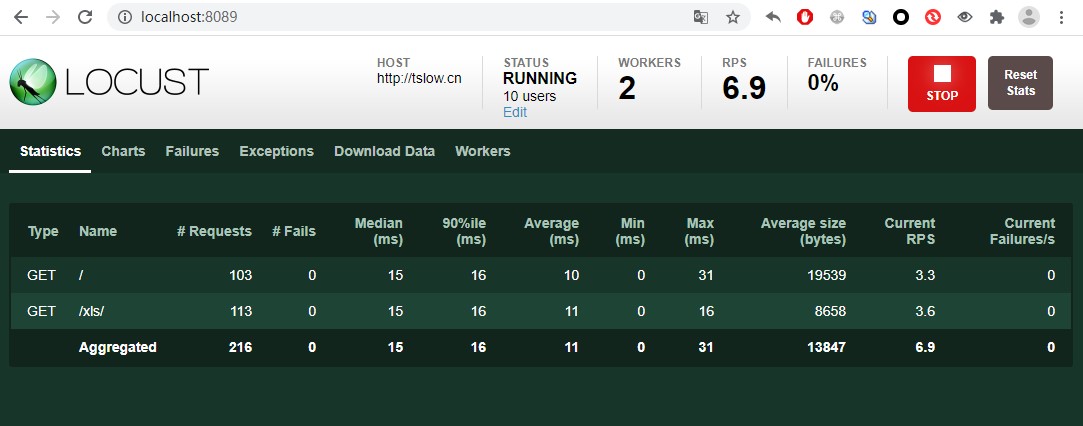
Click to see statistics fine
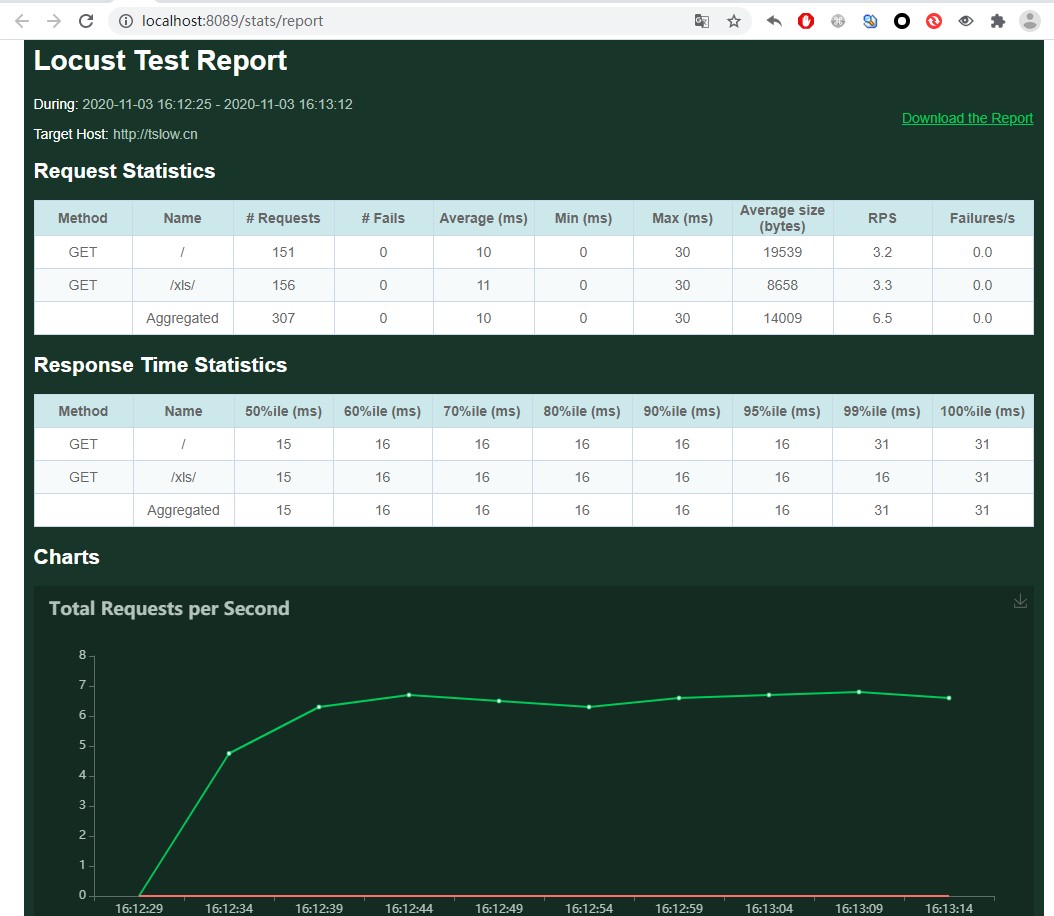
@mezhaka
May I ask what your procedure is?
taojy123
on 3 Nov 2020
I am using docker-compose to run tests. I can reproduce it. I can send
you my setup later today when I get to the keyboard.
On Tue, Nov 3, 2020, 09:06 taojy123 notifications@github.com wrote:
@cyberw https://github.com/cyberw
Sorry, I was quite busy the other day.
I tried to reproduce the problem on my computer today, but I found that
the export report function is available in multi-work mode.
The steps I followed are as follows.code
Start a master and two workers
locust -f locustfile.py --master
locust -f locustfile.py --worker
locust -f locustfile.py --workerThen I go to http://localhost:8089 and see a button to download the
report.
Click to see statistics@mezhaka https://github.com/mezhaka
May I ask what your procedure is?Translated with www.DeepL.com/Translator (free version)
—
You are receiving this because you were mentioned.
Reply to this email directly, view it on GitHub
https://github.com/locustio/locust/issues/1610#issuecomment-720964946,
or unsubscribe
https://github.com/notifications/unsubscribe-auth/AAI7HYOODAVVI5X6KZECQVLSN62X5ANCNFSM4TCM4X4A
.
mezhaka
on 3 Nov 2020
I see! The docker image with latest tag is too old (v1.1), and the master is the newest.
See this page on DockerHub: https://hub.docker.com/r/locustio/locust/tags
You should modify your docker-compose.yml like this:
version: '3'

services:
  master:
    image: locustio/locust:master
    ports:
     - "8089:8089"
    volumes:
      - ./:/mnt/locust
    command: -f /mnt/locust/locustfile.py --master -H http://master:8089

  worker:
    image: locustio/locust:master
    volumes:
      - ./:/mnt/locust
    command: -f /mnt/locust/locustfile.py --worker --master-host master
(add a tag name on image)
taojy123
on 3 Nov 2020
I've reached out to @heyman to see if he can give me the correct permissions to fix the latest image.
cyberw
on 3 Nov 2020
I have fixed the build process so that any tagged commit will build locustio/locust:latest (and tagged 1.3.2).
Is this fixed now or is there still a problem?
cyberw
on 4 Nov 2020
@mezhaka Please try again
There is not any problem if it works
taojy123
on 5 Nov 2020
Related issues
 pawlaguna
·
4Comments
pawlaguna
·
4Comments
 meeech
·
4Comments
meeech
·
4Comments
 foxracle
·
3Comments
foxracle
·
3Comments
 YannickXiong
·
3Comments
YannickXiong
·
3Comments
 kowalcj0
·
3Comments
kowalcj0
·
3Comments
Most helpful comment
@mezhaka Sorry, that should be my problem.
I turned off the statistics in worker mode because of a previous issue (https://github.com/locustio/locust/issues/1531#issuecomment-677572200), which may have caused this.
I'll try to optimize it by including the worker's statistics when exporting the report.
It may take some time.Then I'll make a new PR.