Loadable-components: Consider using the defer attribute instead of async for script tags [performance]
🚀 Feature Proposal
It seems like the most performant way of loading scripts is to include them with defer instead of async. At least according to this article
We'd be getting the following:

Instead of:

And when it comes to SSR, it would mean the js would only execute _in order_ once the HTML is fully loaded.
 charlespwd
All 28 comments
However, that would delay the DCL event. Thoughts?
charlespwd
on 7 Mar 2019
Defer also maintain the right execution order for scripts, and scripts has to be executed __after_ DCL - so it's always a right way to go.
 theKashey
on 7 Mar 2019
theKashey
on 7 Mar 2019
Scripts are not in the head, they are in the body. So I think async is better. In fact I inspired from next.js for that one. I don't think defer is better if we put it at the end of body.
 gregberge
on 10 Mar 2019
gregberge
on 10 Mar 2019
@neoziro - it's not about script position, only about marking them as defer, _defering_ execution to the "body end".
theKashey
on 10 Mar 2019
@theKashey I understand, but I don't know if the defer attribute is useful when the script is placed at the end of the body. In the article, they talk about a script in the head of the page.
gregberge
on 11 Mar 2019
It would help to maintain the script execution order, which may matter (load the main/run chunk first)
theKashey
on 11 Mar 2019
I don’t want to maintain the script execution order, this is the point!
gregberge
on 11 Mar 2019
With async - script execution order is random
Without async - waterfall, without any "prefetching"
With defer - waterfall __with__ prefetching.
All scripts would be loaded simultaneously, and executed only when script before got executed. It's sounds a bit safer.
theKashey
on 11 Mar 2019
The webpack plugin handles it with a jsonp function. So it is totally safe today, it is more performant because the code is evaluated when loaded. With defer it is not the case. So async is the expected behaviour.
gregberge
on 11 Mar 2019
I tend to disagree. Just today we went to a little trouble, where order-dependent CSS got broken due to reverted order of chunk execution.
I am not 100% how it might be possible, while according to the module system module2 should be executed module1 (module1 depends on module2), but by fact, module2 got executed after.
They were in different chunks, assembled in a third chunk and so on. Execution order might be important.
theKashey
on 12 Mar 2019
There is already methods to specify additional props, I propose to make a change, if async={false} is passed, then we remove the async tag. And we can also add defer. So we let the user customize that part. I prefer to stay with async by default.
gregberge
on 12 Mar 2019
For what it's worth, moving the scripts to the body with async instead of defer increased our (local) lighthouse score by 1.
charlespwd
on 13 Mar 2019
@charlespwd +1 is good or not good?
gregberge
on 13 Mar 2019
@neoziro, it's good in favor of async loading.
charlespwd
on 13 Mar 2019
OK so I prefer to keep it like that for now. CSS is an edge case that could be addressed in other ways. Also assets loading order has been fixed in #266. It should work better now. Wait and see.
gregberge
on 13 Mar 2019
So - I am pretty sure async is a __wrong__ decision.
Defer- run scripts, in the right order, __after__ page is fully loadedAsync- run a script once it is ready. __before__ or __after__ page is fully loadedReact.hydrate- merge with a __existing__ HTML
The __only__ variant, when react can hydrate __is defer__. In async mode DOM three could be not complete, by any reason, and the result would be just __broken__.
You might wait for DOM-ready, but it would be equal to defer, but less semantic and safe.
theKashey
on 24 Mar 2019
Let see what's going on on next : https://github.com/zeit/next.js/issues/6602
gregberge
on 24 Mar 2019
Can confirm async attribute messes up css styles on first page load. Using defer with webpack's ext-html-plugin resolves it, but i rather dynamically fetch script tags on server instead of injecting them at build time.
 gerardmrk
on 25 Apr 2019
gerardmrk
on 25 Apr 2019
Defer isn't really more performant, as @charlespwd said. But it's necessary to guarantee order of script execution.
In some of my tests, using async worked on Chrome because it was trying to be 'smart' and guessing dependencies between scripts, but this was failing in other browsers.
If you have 2 scripts and one depends (or should be executed after) the other script you should use defer, as @theKashey said.
I see here that async is hardcoded. I would suggest letting the developer choose (through options) which script attributes they want to use.
 yairkukielka
on 14 May 2019
yairkukielka
on 14 May 2019
I'm doing this for now as a temp workaround till they fix it (doesn't cover any edge cases):
private _replaceScriptAsyncToDefer = async (scriptTags: string) => {
  if (!scriptTags) {
    return Promise.resolve("");
  }

  return Promise.resolve(scriptTags.replace(/\sasync\s/g, " defer "));
};
https://github.com/gerardmrk/erogen/blob/master/app/client.web/src/renderer/index.tsx#L220
gerardmrk
on 14 May 2019
Yeah we should give the possibility to the user to choose between the two, I created an issue #337.
gregberge
on 15 May 2019
Thanks for opening that issue, @neoziro !
I was thinking of overriding the default behavior passing a function to chunkExtractor.getScriptElements(). According to the documentation you can pass a function to it, but reading the source code it looks like this wouldn't work (because it only expects an object). Should the docs be updated or should this behavior be implemented?
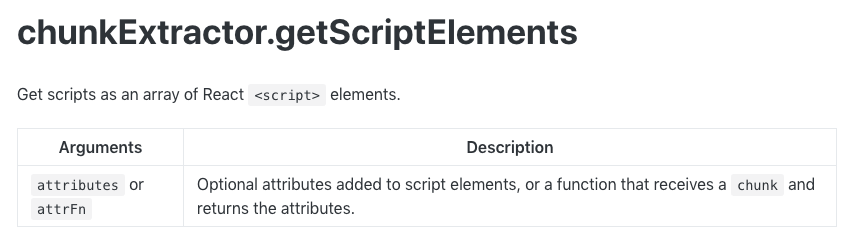
yairkukielka
on 15 May 2019
@yairkukielka the documentation and the code are up to date, see https://github.com/smooth-code/loadable-components/blob/master/packages/server/src/ChunkExtractor.js#L26
gregberge
on 17 May 2019
I missed this! Thanks for pointing it out! :)
yairkukielka
on 17 May 2019
to find out the details, I did this
https://github.com/seeliang/client-side-performance/blob/master/load-fallback/index.html
hope it could help others
 seeliang
on 31 Jan 2020
seeliang
on 31 Jan 2020
So it turns out finally it has an optional argument support there.
exractor.getScriptTags({ defer: "", anyAttrToScript: "youGotIt" });
This is reference to everyone who browses this issue should get the answer at last (this) comment. 😃 Please add this use case scenario in docs as well. @gregberge in Docs, it is not clear that exactly how the arguments should be passed and so eventually one has to check in the code how is it receiving the args. So, it will be easy and time saving for everyone if an example is provided there 🙏🏻 !
 shivang2joshi
on 16 Jun 2020
shivang2joshi
on 16 Jun 2020
@shivang2joshi - I tried that but it purely adds to the scripts, rather than removing the async word. That's definitely hardcoded in: https://github.com/gregberge/loadable-components/blob/master/packages/server/src/ChunkExtractor.js#L46
In our case - we're loading script tags into the head, rather than the body, and want them to be defer. Our solution to this is to use the getScriptElements function on the extractor, then run them through a custom function to build the script tags with defer instead of async.
  const buildScriptTags = arr =>
    arr
      .map(({ props }) => {
        if (props.id === '__LOADABLE_REQUIRED_CHUNKS__') {
          return `<script id="__LOADABLE_REQUIRED_CHUNKS__" type="application/json">${
            props.dangerouslySetInnerHTML.__html
          }</script>`;
        } else {
          return `<script ${Object.entries(props)
            .map(([key, val]) => {
              return key === 'async' ? 'defer' : `${key}="${val}"`;
            })
            .join(' ')}></script>`;
        }
      })
      .join('\n');

  const scripts = buildScriptTags(extractor.getScriptElements());
Not the best, but it works 🤷♂️
 markwoodward23
on 3 Jul 2020
markwoodward23
on 3 Jul 2020
@shivang2joshi - I tried that but it purely adds to the scripts, rather than removing the async word. That's definitely hardcoded in: https://github.com/gregberge/loadable-components/blob/master/packages/server/src/ChunkExtractor.js#L46
In our case - we're loading script tags into the head, rather than the body, and want them to be defer. Our solution to this is to use the
getScriptElementsfunction on the extractor, then run them through a custom function to build the script tags with defer instead of async.const buildScriptTags = arr => arr .map(({ props }) => { if (props.id === '__LOADABLE_REQUIRED_CHUNKS__') { return `<script id="__LOADABLE_REQUIRED_CHUNKS__" type="application/json">${ props.dangerouslySetInnerHTML.__html }</script>`; } else { return `<script ${Object.entries(props) .map(([key, val]) => { return key === 'async' ? 'defer' : `${key}="${val}"`; }) .join(' ')}></script>`; } }) .join('\n'); const scripts = buildScriptTags(extractor.getScriptElements());Not the best, but it works 🤷♂️
For your use case, this might work just fine. So simple, just replace async with defer in final output.
shivang2joshi
on 4 Jul 2020
Related issues
 zetekla
·
5Comments
gregberge
·
7Comments
zetekla
·
5Comments
gregberge
·
7Comments
 gcardella
·
7Comments
gcardella
·
7Comments
 quentind
·
7Comments
quentind
·
7Comments
 hemmxwxsoo
·
4Comments
hemmxwxsoo
·
4Comments
Most helpful comment
I'm doing this for now as a temp workaround till they fix it (doesn't cover any edge cases):
https://github.com/gerardmrk/erogen/blob/master/app/client.web/src/renderer/index.tsx#L220