Lnpopupcontroller: The layout of the bar is broken if use custom view for *BarButtonItems
Description
Description in the title.
The bug appeared in the build for iOS 11 with Xcode 9. In previous builds all worked fine - all views are placed in proper positions.
LNPopupController version - 2.5.0 (integrated through Carthage)
Steps to Reproduce
In the example project, in the method _setPopupItemButtonsWithTraitCollection, need to set a custom view for button item:
self.popupItem.rightBarButtonItems = @[[[UIBarButtonItem alloc] initWithCustomView:[[UIView alloc] initWithFrame:CGRectMake(0, 0, 20, 20)]]];
Result:

Source of error and partial solution
Tthe problem description and the partial solution can be found here:
https://stackoverflow.com/questions/46247451/ios-11-uibarbuttonitem-images-not-sizing
But it is not enough. If to set constraints like this:
UIView* view = [[UIView alloc] initWithFrame:CGRectMake(0, 0, 20, 20)];
if (@available(iOS 9, *)) {
    [view.widthAnchor constraintEqualToConstant: 20].active = YES;
    [view.heightAnchor constraintEqualToConstant: 20].active = YES;
}
self.popupItem.rightBarButtonItems = @[[[UIBarButtonItem alloc] initWithCustomView:view]];
then, the result will look better:
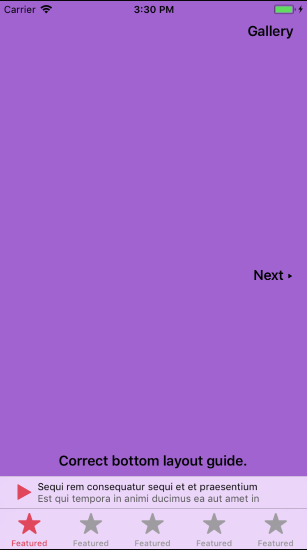
But still incorect:
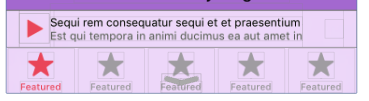
The width of the text labels is too small. So that, the text is not aligned to the center of the bar.
Looks like the error lies in method _layoutTitles on calculating the value of _titlesView.frame for iOS 11.
 YuriyVelichkoPI
All 11 comments
Since frame should be correct even with auto layout, I don’t see a reason for a bug. I will look at this soon.
 LeoNatan
on 26 Sep 2017
LeoNatan
on 26 Sep 2017
I faced the same issue after update to iOS 11 iPhone 6s/7. For iPhone 5s works well.
Screenshot for iPhone 6s/iOS 11:

View debugger for iPhone 6s/iOS 11:

While debugging:
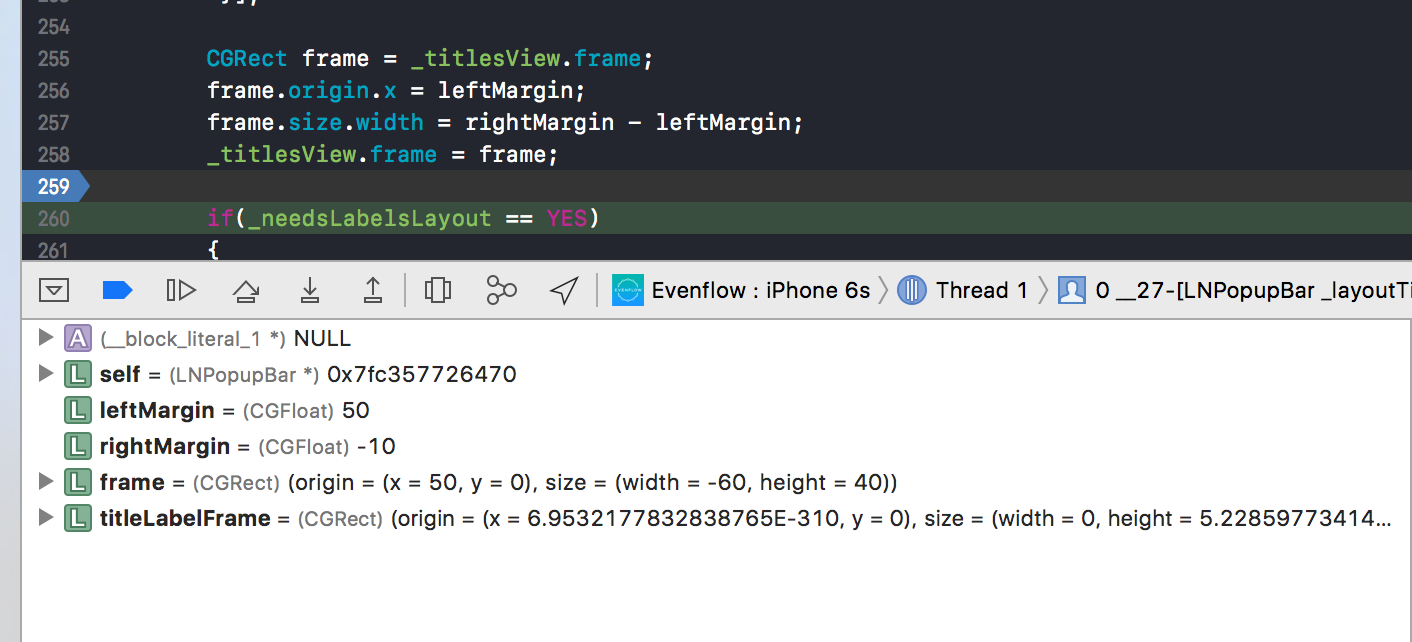
Then frame width is counted as rightMarigin - leftMarigin what is -60 in this case.
Hope it helps.
 wfratczak
on 28 Sep 2017
wfratczak
on 28 Sep 2017
Can you please attach a demo project?
LeoNatan
on 28 Sep 2017
I can't attach my project, the issue appears when I attach custom rightBarButtonItem.
When I add widthConstraint for this rightItem, everything works well.
wfratczak
on 28 Sep 2017
This is an iOS 11 requirement as I understand it. So not sure it’s a bug.
LeoNatan
on 28 Sep 2017
@LeoNatan from my opinion, the bug is that the text label(s) is not centered in the bar if to add a custom view. Even with applying iOS11 requirements (with using constraints instead of the frame).
The position and width of labels are calculated in the code of framework. So looks like calculation can be incorrect in case of new iOS approach of managing bar button items.
Or, can you suggest another path to support iOS11 and custom views? It will be great!
As I mentioned you can reproduce the issue easily with example project from the current repository.
YuriyVelichkoPI
on 28 Sep 2017
Hey guys, I´m still not sure what causes this weird behavior, but it is true it has to do with title/subtitle frame. I want to share with you guys how i manages to fix it, while waiting for an oficial solution from @LeoNatan. Hope its useful for someone else.
In the class LNPopupBar.m I edited like in the screenshot.
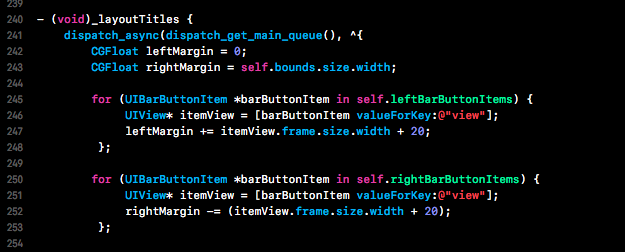
This is how original code looked like:

This is how it looks now on iPhone 8 plus & iPhone 5s:


 SaulMS-Moss
on 9 Nov 2017
SaulMS-Moss
on 9 Nov 2017
Thanks for the continued discussion, guys.
Could you guys please provide a demo project where these issues reproduce? Just want to see how you create your bar button items.
LeoNatan
on 9 Nov 2017
Unfortunately I don´t have a demo at hand, but I will gladly show you the way I create the UIBarButtonItem:
Inside my RootViewController I use these commando to open the PopupBar.

Inside my _playerVC_ I then create the views I´ll insert the UIBarButtonItem.

And for last I make a call to my _initToolbarVariables_, where I insert and set my popupItem.

Hope this helps you.
SaulMS-Moss
on 9 Nov 2017
I got the same issue since I updated Xcode to version 9.x and iOS to version 11.x. I'm using LNPopupController v1.4.6 (integrated through Carthage) but to me the problem appears only when i need to update an UIBarButtonItem, for example when I want to change playButton with pauseButton like this:
(from)
popupItem.leftBarButtonItems = [playButton, nextButton]
(to)
popupItem.leftBarButtonItems.removeAll()
popupItem.leftBarButtonItems = [pauseButton, nextButton]
I discovered that the issue disappears if instead of use removeAll() I simply update the specific item that I want to change, for example:
(from)
popupItem.leftBarButtonItems = [playButton, nextButton]
(to)
popupItem.leftBarButtonItems![0] = pauseButton
That way everything works good like before.
Hope this helps you.
 RiccardoManoni
on 5 Jan 2018
RiccardoManoni
on 5 Jan 2018
Fixed.
LeoNatan
on 15 Jan 2018
Related issues
 user3587412
·
4Comments
user3587412
·
4Comments
 itjunkii83
·
3Comments
itjunkii83
·
3Comments
 johnswifttt
·
5Comments
johnswifttt
·
5Comments
 RajChanchal
·
3Comments
johnswifttt
·
6Comments
RajChanchal
·
3Comments
johnswifttt
·
6Comments