Lmms: No Thorough Guide to Theming LMMS is Available
I would like to volunteer for writing a more thorough guide to creating themes in LMMS. Right now, the standard CSS file has a relatively useful number of comments but still leaves some aspects left up to interpretation, which I would like to improve. The mediawiki instance (not this github wiki) has a rather barebones guide and I'd like to improve the information that serves, as well.
Would the community here prefer for me to write the guide here on github, or on the mediawiki instance? Anonymous visitors cannot register for accounts on the latter, and it appears it has not been updated in over a year. Either way, I'd like to make a documentation contribution.
 nitronova
All 5 comments
CC: @tresf should this go on gitbook as well?
 Spekular
on 9 Jun 2019
Spekular
on 9 Jun 2019
I'd recommend keeping it with developer documentation on our GitHub wiki for now. As for non-obvious code (CSS) commenting, let's keep that inside the code as it's subject to change and developers won't know to look in a wiki when stuff gets refactored or added.
 tresf
on 10 Jun 2019
tresf
on 10 Jun 2019
So, one thing that I'd like assistance with is with understanding the hierarchy of the QWidgets and custom widgets that were designed for this software. I have been trying my best with experimentation and trying to read the source, but I do not know C++ or Qt well enough to really have a good idea. But from reading Qt's documentation, it appears that the CSS applied to Qt Applications is similar to HTML, which follows a tree-like hierarchy.
I'll paste in here a list of terms that are used in the CSS file as well as the custom tags used in this project. How would I begin to arrange these in a sort of hierarchy so that it is easier to understand what the CSS is being applied to? Or better yet, where can I find this information, myself?
Also, what is the "root" object of this software? That's part of my struggle with finding a hierarchy, is that I can't find a "root" object that I can access by itself. I can't access it with just QMainWindow, because apparently, lots of stuff uses QMainWindow.
"Hierarchy" of QWidget objects.
 QAbstractButton      = All buttons.
  QPushButton
  QRadioButton
  QToolButton
 QAbstractSlider      = Scrollbars/Master&Pitch/FPS in Settings, etc
  QScrollBar
  QSlider
 QAbstractSpinBox     = Value changing in SpinBoxes
  QDoubleSpinBox      = Volume adjustments
  QSpinBox            = Tempo, for example.
 QComboBox            = Drop Down Menus
  QFontComboBox
 QDialog              = Dialogs that have to be Windows windows.
  QColorDialog
  QErrorMessage
  QFileDialog
  QFontDialog
  QInputDialog
  QMessageBox
  QProgressDialog
  QWizard
 QFrame               = Wrappers for other widgets
  QAbstractScrollArea
   QAbstractItemView
    QListView         = inside ladspa plugin browser)
     QListWidget
    QTreeView         // ::item, ::branch :has-children
     QTreeWidget
   QMdiArea
   QScrollArea
   QTextEdit          = Notes
  QLabel
  QSplitter
  QStackedWidget      = Contents of tabs in About
 QGroupBox            = Wrappers for groups of widgets
 QLineEdit            = Single line text editing // :read-only, :focus
 QMainWindow          = Seems like this goes behind *everything*
 QMdiSubWindow        = Floating dialog windows (includes Windows windows)
 QMenu                = Yep // ::item, ::seperator :selected :disabled
 QMenuBar             = Yep
 QProgressBar         = Yep, there are progress bars, here.
 QTabBar              = Tabs in about
 QTabWidget           = Contents in tab
 QToolBar             = Hover text
Original LMMS names and some of their qproperties
 AutomatableSlider (master volume, master pitch) // :handle:vertical
 AutomationEditor
  color
  background-color (on top of a QMainWindow)
  qproperty-backgroundShade
  qproperty-vertexColor
  qproperty-crossColor
  qproperty-lineColor
  qproperty-beatLineColor
  qproperty-barLineColor
  qproperty-graphColor
  qproperty-scaleColor
 AutomationPatternView
 BBTCOView
 ControllerRackView
 CPULoadWidget
  background
  border
 EffectRackView
 EffectSelectDialog (add effect dialog)
 Fader
 FxLine
 FxMixerView
 LmmsPalette
 PatternView
 PianoRoll
  background-color
  qproperty-backgroundShade
  qproperty-noteModeColor
  qproperty-noteColor
  qproperty-noteOpacity
  qproperty-noteBorders
  qproperty-selectedNoteColor
  qproperty-barColor
  qproperty-markedSemitoneColor
  qproperty-lineColor
  qproperty-beatLineColor
  qproperty-barLineColor
  qproperty-textColor
  qproperty-textColorLight
  qproperty-textShadow
 PianoView
 PluginDescList
 PluginDescWidget
 SampleTCOView
 SubWindow (windows in the QMdiArea)
  color (non-selected color)
  qproperty-activeColor
  qproperty-textShadowColor
  qproperty-borderColor
 TextFloat (appears when adjusting dials)
 TrackContainerView
  QFrame
  QLabel
 TrackContentObjectView
 TrackLabelButton
 TrackView
  QWidget
 TimeLineWidget
 VisualizationWidget
  background
  border
  qproperty-normalColor
  qproperty-warningColor
  qproperty-clippingColor
Just to add, here's an example of what I've figured out so far from experimentation (since I'm not sure how else to figure it out, at the moment)
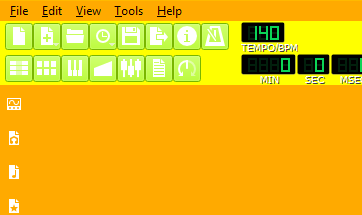
From the following CSS:
*,QWidget,QToolButton,AutomatableSlider,AutomationEditor,AutomationPatternView,BBTCOView,
ControllerRackView,CPULoadWidget,EffectRackView,EffectSelectDialog,Fader,FxLine,FxMixerView,
LmmsPalette,PatternView,PianoRoll,PianoView,PluginDescList,PluginDescWidget,SampleTCOView,
SubWindow,TextFloat,TrackContainerView,TrackContentObjectView,TrackLabelButton,TrackView,
TimeLineWidget,VisualizationWidget
{
  background: transparent;
}

QMainWindow
{
  background: #f00;
}
QMainWindow > QWidget
{
  background: #fa0;
}
QMainWindow > QWidget > QWidget#mainToolbar
{
  background: #ff0;
}
QMainWindow > QWidget > QWidget#mainToolbar > QToolButton
{
  background: #af0;
}
What I've deduced so far is that, I think the root object is (a) QMainWindow, but it has an inner wrapper that does not appear to be a child of QWidget, based on many attempts to use the child tags of the class hierarchy list (and others in the Qt docs) to repeat the color. So the hierarchy appears to be
- QMainWindow
- QWidget. Just a QWidget, nothing more.
- QWidget, but this one has the #mainToolbar name, so QWidget#mainToolbar
- QToolButton for the buttons in the main toolbar.
This is a demonstration of what I'm trying to figure out. If I know how the hierarchy of objects here are laid out, then I can make documentation of this in the wiki, since I know the CSS of this pretty well so far, and even how it sort of connects in the C++ files, a bit.
Another thing I should write down is that certain elements have a black background behind their backgrounds, and thus setting their background to transparent does not actually make them transparent. Perhaps this should be made into an issue ticket once I have compiled which ones are, but I know for sure that QToolButton elements keep getting a black background-background.
nitronova
on 13 Jun 2019
So, I've encountered some very strange behavior with styling, again, mainly with the program possibly not properly repainting itself.
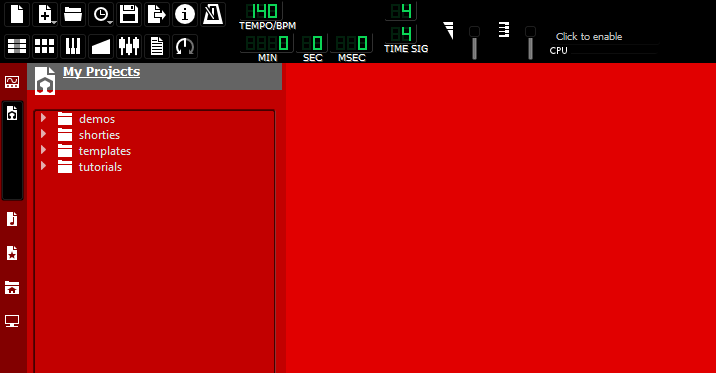
*,QWidget,QToolButton,AutomatableSlider,AutomationEditor,AutomationPatternView,BBTCOView,
ControllerRackView,CPULoadWidget,EffectRackView,EffectSelectDialog,Fader,FxLine,FxMixerView,
LmmsPalette,PatternView,PianoRoll,PianoView,PluginDescList,PluginDescWidget,SampleTCOView,
SubWindow,TextFloat,TrackContainerView,TrackContentObjectView,TrackLabelButton,TrackView,
TimeLineWidget,VisualizationWidget
{
  background: transparent;
}
QMainWindow > QWidget
{
  background: #000;
}
QMainWindow > QWidget > QWidget > QWidget > QWidget:hover,
QMainWindow > QWidget > QWidget > QWidget:hover,
QMainWindow > QWidget > QWidget:hover,
{
  background: rgba( 255, 0, 0, 130 );
}
So, the intent here was to keep probing for wrappers and it is going rather unexpectedly, but more importantly is a strange painting issue. I'm going to list the steps to achieve each screenshot. Assuming you're using the CSS in this post, I expect the behavior to replicate. For the first screenshot:
- Start your mouse in the upper
#mainToolbararea. - Move your mouse into the My Projects frame. Do not move it into the sidebar's button bar.
- Move the mouse to the right, into the QMdiArea.
Each wrapper (the furthest back uses the full space, the middle (my projects, etc) covers that remaining sidebar space and extends to the right edge of the application, and the third (brightest) is a QMdiArea.
Now for the second set of steps that produces an unexpected result.
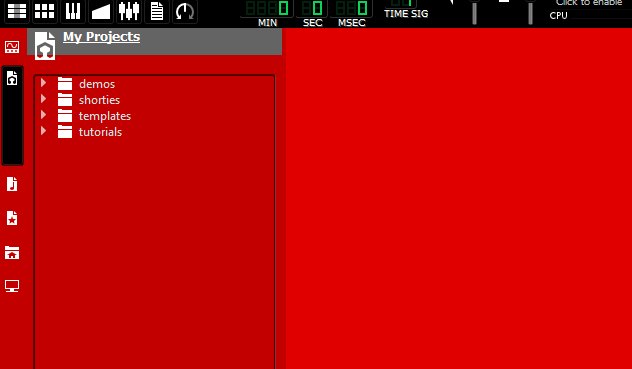
Note here that there are now only two distinct colors.
- Start your mouse in the upper
#mainToolbararea. - Move your mouse, first, into the sidebar's button bar part. This furthest-back wrapper extends across the entire program. But for some reason it is strangely brighter here.
- Move your mouse to the right, into the My Projects section. The color it takes on is not brighter, because for some reason, moving your mouse over the first section colors the whole screen as if you hovered over two wrapper layers?
- Move mouse into QMdiArea, its color will change as expected.
Possibly worth its own bug report, however, because I don't yet understand how everything is arranged, I can't say for certain that this is a bug or something strange with my CSS.
Edit: For anyone wondering, my current hierarchy is...
- QMainWindow
- QDialog (loading dialog, for example)
- QMenu (you can color it with this apparently)
- QMenuBar
- QWidget (unknown/unnamed) main toolbar and workspace wrapper
- QWidget#mainToolbar
- AutomatableSlider (child of QWidget)
- ::groove
- ::handle
- QLabel (for the master volume and pitch)
- QToolButton
- QWidget (unknown/unnamed)
- CPULoadWidget (wrapper for cpu load)
- VisualizationWidget (visualizes waveform and clipping)
- \qproperty-normalColor
- \qproperty-warningColor
- \qproperty-clippingColor
- QWidget (unknown/unnamed) wrapper for sidebar and workspace
- QSplitter (this area includes both the QMdiArea and the sidebar contents but not the button bar.)
- QMdiArea
- QWidget
- QWidget
- QTreeView
- SideBar
- QToolButton
The LmmsPalette selector has qproperties that will take care of some of the things that I couldn't access, such as the grey bar at the top of the expanded sidebar sections.
nitronova
on 14 Jun 2019
Related issues
 FigyTuna
·
3Comments
FigyTuna
·
3Comments
 Gabrielxd195
·
3Comments
Gabrielxd195
·
3Comments
 TrumpislikeCyrus
·
4Comments
TrumpislikeCyrus
·
4Comments
 Andrewer11
·
3Comments
Andrewer11
·
3Comments
 softrabbit
·
3Comments
softrabbit
·
3Comments
Most helpful comment
I'd recommend keeping it with developer documentation on our GitHub wiki for now. As for non-obvious code (CSS) commenting, let's keep that inside the code as it's subject to change and developers won't know to look in a wiki when stuff gets refactored or added.