I have been working on a LMMS project for a couple of weeks now but I keep experiencing a problem. Whenever I play it, it crashes consecutively at the same spot in the project. I am using windows 10 and i am wondering if someone could help me out here. Thanks.
 kairuip00p
All 27 comments
What version of LMMS are you using? If you're using 1.2.0 RC6, do you have any VSTs in the project, and if so, what are they? If you're not using 1.2.0 RC6, please download it here and let us know if you still have the issue.
 SecondFlight
on 28 Jun 2018
SecondFlight
on 28 Jun 2018
Alright I'll try it out, Thanks!
kairuip00p
on 28 Jun 2018
Installing the newest version doesn't seem to work. I have 11 VSTs. Perhaps that's stretching the limit? I have 7 synths, 1 piano plugin, 1 sub-bass plugin, and 2 guitar plugins. @SecondFlight
kairuip00p
on 28 Jun 2018
Do you mean that the newest version won't work at all, or that it still crashes in the same place? Could you tell us which VSTs you're using?
 DomClark
on 28 Jun 2018
DomClark
on 28 Jun 2018
@DomClark I am able to install the newest version, it's just that it doesn't solve my problem. I'm using the VSTs listed above
kairuip00p
on 28 Jun 2018
Could you list the names of the VSTs you are using? If you wouldn't mind, could you also provide your project file? You can just drag and drop it into the comment box.
DomClark
on 28 Jun 2018
@kairuip00p We're asking about the specific VSTs you're using. VSTs can break LMMS in a whole host of different ways, and so we can't test the issue you're having without being able to reproduce the same environment.
SecondFlight
on 28 Jun 2018
@SecondFlight @DomClark Okay, I understand. I can't provide the project file so I'll describe the VSTs. For the piano plugin, I'm using DSK Akoustik Keyz, the synth is Sinnah by NUsofting, the guitar plugin is DSK Akoustik Guitarz, and the sub-bass is just called Sub. Thank you all for taking your time to help me.
kairuip00p
on 28 Jun 2018
Can you figure out which track is making it crash? You can check if a particular track is responsible by making a copy of the project and removing all of the other tracks, then playing the troublesome spot. Do this for each track and you should find out which one is causing the problem.
Also, if you're not happy about putting your project somewhere public like the bug tracker, but wouldn't mind providing it to a developer individually, you can do so on our Discord server at https://lmms.io/chat, or you can find my email address on my GitHub profile.
DomClark
on 28 Jun 2018
@DomClark Alright thanks I'll try it out. And also, about putting the track in the discussion, it's not that I don't want to, it's that I actually can't. It says that it doesn't support that type of file.
kairuip00p
on 28 Jun 2018
@DomClark Thanks, I deleted one of the tracks and it stopped crashing. Thank you everyone who took their time. I really appreciate it.
kairuip00p
on 28 Jun 2018
Which VST did you remove to stop the crashing?
On Thu, Jun 28, 2018, 03:51 kairuip00p notifications@github.com wrote:
@DomClark https://github.com/DomClark Thanks, I deleted one of the
tracks and it stopped crashing. Thank you everyone who took their time. I
really appreciate it.—
You are receiving this because you are subscribed to this thread.
Reply to this email directly, view it on GitHub
https://github.com/LMMS/lmms/issues/4454#issuecomment-400885289, or mute
the thread
https://github.com/notifications/unsubscribe-auth/AIgVmtSA4OgC3f0ZcyiMTjcyaUxvNfNyks5uBDaXgaJpZM4U6f4Y
.
 Spekular
on 28 Jun 2018
Spekular
on 28 Jun 2018
To be clear, LMMS shouldn't break when you have 11 VSTs. This isn't just a support forum, we actually want to fix the issue you were having, but we can't fix a bug that we can't reproduce. As of right now you have not given us enough information to reproduce it.
SecondFlight
on 29 Jun 2018
@SecondFlight @DomClark @Spekular What other information should I provide?
The VST I removed was one of the Sinnah synths.
kairuip00p
on 29 Jun 2018
The VST I removed was one of the Sinnah synths.
Which one?
The best information we could get would be a minimal project that crashes just including that VST.
 zonkmachine
on 29 Jun 2018
zonkmachine
on 29 Jun 2018
@zonkmachine How do I provide the file? It doesn't let me drag and drop.
kairuip00p
on 29 Jun 2018
@kairuip00p Save it as .mmp (uncompressed lmms format) and then zip it. That's what I usually do.
zonkmachine
on 29 Jun 2018
Copy..zip
Okay here it is.
kairuip00p
on 29 Jun 2018
@kairuip00p Thank you for the file; I've managed to reproduce the crash and will investigate. Hopefully we can fix this for a future version.
DomClark
on 29 Jun 2018
@kairuip00p Thanks for your help investigating this issue!
SecondFlight
on 29 Jun 2018
Thanks for helping me out!
kairuip00p
on 29 Jun 2018
I've found the cause of the bug: the list of MIDI messages LMMS sends to VSTs occasionally isn't sorted chronologically. Such a list causes Sinnah's message processing code to enter an infinite loop. I'll fix this in my next VST PR.
DomClark
on 1 Jul 2018
The natural solution here is to sort the MIDI messages into chronological order in RemoteVstPlugin::process before passing them to the plugin. However there is a complication:
LMMS generates note-on events during NotePlayHandle construction, which happens in Song::processNextBuffer. Note-off events are generated by the NotePlayHandle during play handle processing, which starts later on in Mixer::renderNextBuffer. VeSTige uses an InstrumentPlayHandle, so the audio for a buffer can be generated after note-on events but before note-off events.
There is now an issue with notes adjacent to each other at the same pitch. Usually one note ends and the second begins within the same buffer, so the note-on generates a note-off-note-on sequence for the plugin, and the later note-off event is ignored. However, note lengths are rounded down to an integer number of samples, so there can be a one-sample gap between adjacent notes, allowing the first note to finish in one buffer, then the second note to start in the next. In this case, the note off event is sent with a time equal to the end of a buffer, but because the note-off can be sent after audio has already been processed, it can end up arriving at the plugin for the next buffer. Now the note-on event has a time at the start of this buffer, and the note-off event a time at the end, so sorting the events puts the second note's note-on before the first note's note-off and the second note doesn't play.
This seems to stem from a mistake/bug in InstrumentPlayHandle::play:
https://github.com/LMMS/lmms/blob/2ecc8bb4fafd112cbe9205b5c78ba969646400c9/include/InstrumentPlayHandle.h#L45-L52
Usually NotePlayHandles for an instrument are processed before its InstrumentPlayHandle, but this is skipped for midi-based instruments; this seems to be incorrect. Removing this special case fixes the note order bug, but now #2565 and #2606 affect all instruments using InstrumentPlayHandles.
I think incompatibility with a single VST is better than breaking the arpeggiator for all VSTs and possibly some other internal instruments, so I don't think this should be fixed until #2606 is.
DomClark
on 15 Aug 2018
I've found the cause of the bug: the list of MIDI messages LMMS sends to VSTs occasionally isn't sorted chronologically. Such a list causes Sinnah's message processing code to enter an infinite loop.
There is now an issue with notes adjacent to each other at the same pitch.
@DomClark However, I can reproduce the hang without adjacent notes...
4454.zip
 PhysSong
on 23 Aug 2018
PhysSong
on 23 Aug 2018
@PhysSong Sorry, I was probably unclear with my explanation. The hang wasn't caused by adjacent notes; I originally narrowed it down to a setup like the one you provided. I can't get your project file to crash, but it depends on the sample rate, so perhaps yours is 48000Hz or something. Here's something similar that crashes for me:
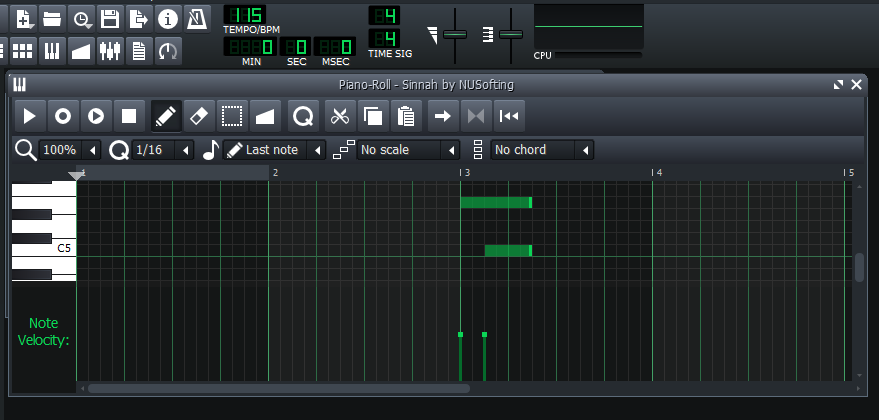
It crashes upon reaching the end of the two notes; the issue seems to be as follows:
- Each note has its start point and duration calculated in frames; this is done in floating point then cast to an integer type. The note ends at the sum of these. To convert beats to samples, we can multiply by
sample_rate/(bpm/60), so we have the following:
Top note:
on     (f_cnt_t) 8.0*44100/(115/60) = 184069
length (f_cnt_t) 1.5*44100/(115/60) =  34513
off                                 = 218582

Bottom note:
on     (f_cnt_t) 8.5*44100/(115/60) = 195573
length (f_cnt_t) 1.0*44100/(115/60) =  23008
off                                 = 218581
- The top note starts first, so it comes first in the mixer's list of play handles.
- When the notes turn off, the note off events are sent roughly in order of position in the play handle list (I realise play handle processing is threaded so it's probably a little more complicated than this). The first note sends a note off event for frame 218582, then the second a note off event for frame 218581. These are out of order and Sinnah hangs.
The issue I was talking about with the consecutive notes arises after applying the most obvious fix for this: sorting the events chronologically. The details are in my previous comment, but to summarise:
- A seemingly incorrect optimisation can lead to certain MIDI events being sent for the wrong buffer.
- Sorting events chronologically within a buffer (the fix for the Sinnah bug) can then sort an event for an earlier buffer after an event for a later buffer.
- In the case of adjacent notes, this can sort a note off event after a note on event for the same note.
- The result is that sometimes the second note of a pair of adjacent notes effectively gets skipped, because it is turned off along with the first note of the pair.
This new issue can be fixed by removing the incorrect optimisation, but that allows another bug (#2606) to affect a lot more instruments than it used to. I think the Sinnah bug is more minor than this other bug because it affects a single VST, rather than a large number of instruments, and so the majority of users will never encounter it. The other bug can potentially break the arpeggio feature for many instruments.
DomClark
on 23 Aug 2018
Thank you for the detailed explanation!
PhysSong
on 24 Aug 2018
Following on from my comment on #2606, it looks like the fix for this won't actually worsen the arpeggiator problems, so I will make a PR soon.
DomClark
on 13 Nov 2018
Related issues
 softrabbit
·
3Comments
softrabbit
·
3Comments
 Sawuare
·
3Comments
Sawuare
·
3Comments
 demmm
·
3Comments
Spekular
·
4Comments
demmm
·
3Comments
Spekular
·
4Comments
 fentras
·
3Comments
fentras
·
3Comments
Most helpful comment
Copy..zip
Okay here it is.