
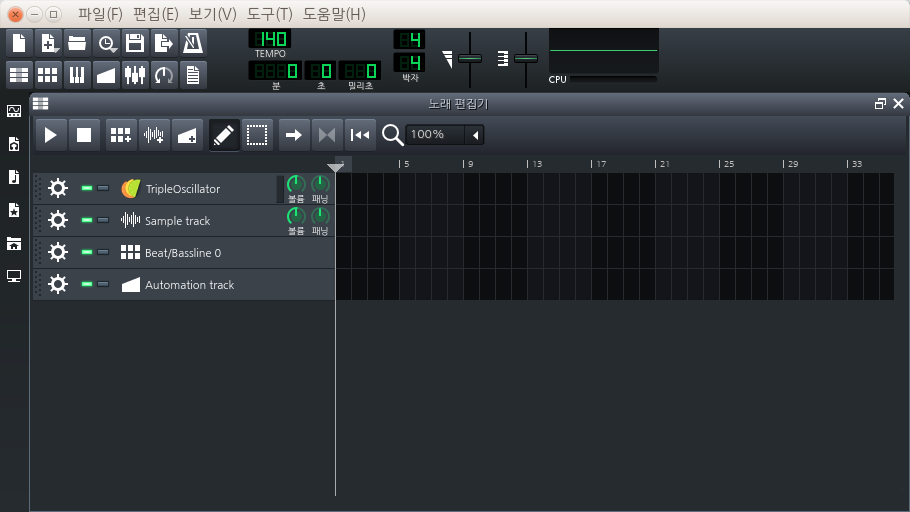
As seen in the above picture, there is a bug with QMdiArea and Ubuntu's Unity interface which puts the Minimize/Restore/Maximize buttons in the upper left corner of LMMS (instead of the upper right) and erroneously attaches it to a movable toolbar.
I couldn't find anywhere on the internet explaining this QT/Unity combination behavior, but @tobydox suggested it was due to the Unity menu relocation, and eventually stumbled upon this article https://wiki.ubuntu.com/DesktopExperienceTeam/ApplicationMenu#Troubleshooting in the "Kubuntu Desktop Installation" provides the hint, which allows QT applications to disable the Desktop Environment from rendering it's own native menubar:
QT_X11_NO_NATIVE_MENUBAR=1 lmms
or for the .desktop file:
[Desktop Entry]
Exec=env QT_X11_NO_NATIVE_MENUBAR=1 lmms
_Ubuntu 14.04 beta x86_

NOTE! The env parameter is REQUIRED in the desktop shortcut, but not in terminal.
Before applying this patch, we should hear from other X11 based Desktop Environment users after testing this feature.
Is anyone running another X11 Desktop Environment that is able to try this? Please chime in if you can help test this!
 tresf
tresf
All 13 comments
This is a go for Cinnamon 2.0, KDE and LXDE (and obviously Unity) which should cover most use-cases.
@diizy, if you agree, can you commit Exec=env QT_X11_NO_NATIVE_MENUBAR=1 lmms to the .desktop file in your branch?
https://github.com/diizy/lmms/blob/stable-0.4/data/lmms.desktop
I think this is well needed patch for 1.0.0 as it's a small fix and it has a very positive impact on the Ubuntu desktop experience without breaking other Ubuntu derivative desktops.
Tested QT_X11_NO_NATIVE_MENUBAR=1 lmms setting with:
KDE/Kubuntu 14.04 x86 nightly
LXDE/Lubuntu 14.04 x86 nightly
In both cases, this menubar setting had no impact on the actual menubar within LMMS. Both desktops behaved _normally_ both WITH and WITHOUT this setting applied. Screenshots provided for evidence:
LXDE with
QT_X11_NO_NATIVE_MENUBAR=1 lmmssetting
KDE with
QT_X11_NO_NATIVE_MENUBAR=1 lmmssetting


KDE, LXDE and Unity tests were performed using deb http://ppa.launchpad.net/israeldahl/lmms-testing/ubuntu trusty main
-Tres
tresf
on 20 Mar 2014
On 03/20/2014 03:46 PM, Tres Finocchiaro wrote:
This is a go for Cinnamon 2.0, KDE and LXDE (and obviously Unity)
which should cover most use-cases.@diizy https://github.com/diizy, if you agree, can you commit
|Exec=env QT_X11_NO_NATIVE_MENUBAR=1 lmms| to the .desktop file in
your branch?
done
 diizy
on 20 Mar 2014
diizy
on 20 Mar 2014
Closing this since the fix has been merged
diizy
on 23 Mar 2014
Recently I investigated this issue again. QT_X11_NO_NATIVE_MENUBAR is related to the appmenu-qt package which unsets Qt::AA_DontUseNativeMenuBar attribute. However, the package only affects Qt4 apps.
 PhysSong
on 9 Feb 2019
PhysSong
on 9 Feb 2019
This bug report suggests Qt5 honors Qt::AA_DontUseNativeMenuBar since 5.6.1. https://bugreports.qt.io/browse/QTBUG-28960
@PhysSong are you suggesting we switch to this method? If so, this bug report should be reopened.
tresf
on 9 Feb 2019
Also, this should be a Linux-only (or Unity-only) setting. MacOS doesn't suffer the same MDI window problems when the menu is removed..
tresf
on 9 Feb 2019
FYI, Qt5 + Unity gives this result:
PhysSong
on 10 Feb 2019
Same. So I guess this isn't really an issue any longer because the original bug has been suppressed.

tresf
on 10 Feb 2019
I should note there's another bug with Qt5 + Unity. If the MDI area is scrollable because of the subwindow arrangement, the maximize button will erroneously show up instead of the restore button. I guess that it's related to QMdiArea::resizeEvent, but still finding the reason.
Edit: it also happens when resizing the main window after maximizing a subwindow...
PhysSong
on 10 Feb 2019
When the MDI area is resized, QMdiArea::resizeEvent resizes maximized subwindow to match the size of the MDI area. It unsets Qt::WindowMaximized and creates a QResizeEvent. SubWindow::resizeEvent calls SubWindow::adjustTitleBar before Qt::WindowMaximized is set again by QMdiSubWindow::resizeEvent. Changing the order to call those functions seems to fix the issue.
PhysSong
on 10 Feb 2019
@tresf Just a suspicion, but is there any chance that https://github.com/LMMS/lmms/issues/488#issuecomment-462098257 and https://github.com/LMMS/lmms/issues/2450#issuecomment-217666180 are related? Could you test out this patch on macOS?
diff --git a/src/gui/SubWindow.cpp b/src/gui/SubWindow.cpp
index 0a0effc45..2b9b50148 100644
--- a/src/gui/SubWindow.cpp
+++ b/src/gui/SubWindow.cpp
@@ -150,16 +150,7 @@ void SubWindow::elideText( QLabel *label, QString text )

 bool SubWindow::isMaximized()
 {
-#ifdef LMMS_BUILD_APPLE
-       // check if subwindow size is identical to the MdiArea size, accounting for scrollbars
-       int hScrollBarHeight = mdiArea()->horizontalScrollBar()->isVisible() ? mdiArea()->horizontalScrollBar()->size().height() : 0;
-       int vScrollBarWidth = mdiArea()->verticalScrollBar()->isVisible() ? mdiArea()->verticalScrollBar()->size().width() : 0;
-       QSize areaSize( this->mdiArea()->size().width() - vScrollBarWidth, this->mdiArea()->size().height() - hScrollBarHeight );
-
-       return areaSize == this->size();
-#else
        return QMdiSubWindow::isMaximized();
-#endif
 }


@@ -302,8 +293,8 @@ void SubWindow::adjustTitleBar()

 void SubWindow::resizeEvent( QResizeEvent * event )
 {
-       adjustTitleBar();
        QMdiSubWindow::resizeEvent( event );
+       adjustTitleBar();

        // if the window was resized and ISN'T minimized/maximized/fullscreen,
        // then save the current size
the maximize button will erroneously show up instead of the restore button [...] Changing the order to call those functions seems to fix the issue.
Just a suspicion, but is there any chance that #488 (comment) and #2450 (comment) are related? Could you test out this patch on macOS?
@PhysSong it fixes it.
- Without the special workaround in
ifdef LMMS_BUILD_APPLE, the maximize behavior is incorrect when double-clicking the title bar. With the flipping of
adjustTitleBarandresizeEvent, the workaround is no longer needed.
tresf
on 10 Feb 2019
Note, this bug was readdressed in https://github.com/LMMS/lmms/pull/4818 to clean up our desktop launcher.
tresf
on 11 Feb 2019
Related issues
 mikobuntu
·
4Comments
mikobuntu
·
4Comments
 binyominzeev
·
3Comments
binyominzeev
·
3Comments
 fentras
·
3Comments
fentras
·
3Comments
 Gabrielxd195
·
3Comments
Gabrielxd195
·
3Comments
 DeRobyJ
·
3Comments
DeRobyJ
·
3Comments