Lmms: Automation Editor - Draw line not aligned
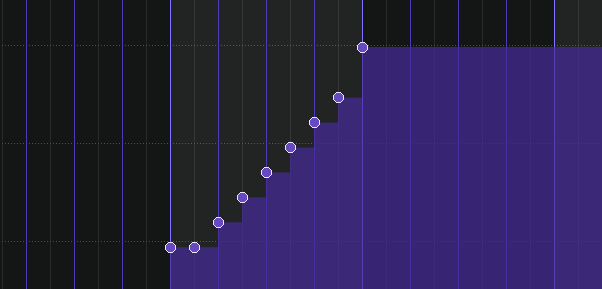
Using the <Shift> modifier draws one point at the same level at the beginning and/or the end of the line.
 zonkmachine
All 20 comments
I think the Shift behaviour can be dropped tbh, we can do proper lines now in the automation, and it's from a time where you couldn't do that, so you had to reside to the shortcut.
 Umcaruje
on 20 Nov 2017
Umcaruje
on 20 Nov 2017
Right. I'm perfectly fine with removing this.
zonkmachine
on 20 Nov 2017
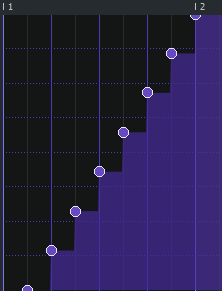
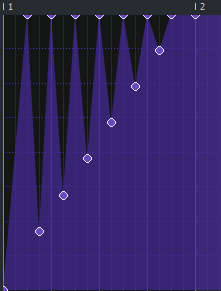
It's still useful. For example if you set quantization to 2Xths and draw a
line, then Xths and draw another you can get a triangle wave type shape
very quickly.
On Nov 20, 2017 19:01, "Oskar Wallgren" notifications@github.com wrote:
Right. I'm perfectly fine with removing this.
—
You are receiving this because you are subscribed to this thread.
Reply to this email directly, view it on GitHub
https://github.com/LMMS/lmms/issues/3995#issuecomment-345777684, or mute
the thread
https://github.com/notifications/unsubscribe-auth/AIgVmq9j9eGumoy7lAXb0cVg-cwJPOZjks5s4b5egaJpZM4QkkrG
.
 Spekular
on 20 Nov 2017
Spekular
on 20 Nov 2017
This Shift mode is handy.
 Sawuare
on 20 Nov 2017
Sawuare
on 20 Nov 2017
Confirmed. I just found another bug:
- Add a point at the very beginning of the pattern.
- Set quantization level to 1/4
- Hold shift key and click 1/16 bar before the second bar starts.
 PhysSong
on 21 Nov 2017
PhysSong
on 21 Nov 2017
OK. It looks like a majority is for keeping it. Hacking...
zonkmachine
on 21 Nov 2017
@PhysSong I'm pretty much done straightening out the line. I have seen disappearing points but I'm currently failing to reproduce it from your recipe above.
zonkmachine
on 21 Nov 2017
@zonkmachine Could you try edited steps and test what happens?
PhysSong
on 21 Nov 2017

zonkmachine
on 21 Nov 2017
@zonkmachine Could you retry with significant difference in Y position difference?
PhysSong
on 21 Nov 2017
Yes. I'm testing now with all settings I can think of but don't see anything. Is this supposed to be reproducible every time?
$ ../target-stable-1.2/bin/lmms --version
LMMS 1.2.0-rc49.11
(Linux x86_64, Qt 4.8.6, GCC 4.8.5)
@PhysSong Can you test #3997 and see if this fixes the issue you saw?
zonkmachine
on 22 Nov 2017
Okay, I will.
PhysSong
on 22 Nov 2017
I mean https://github.com/LMMS/lmms/pull/3997#issuecomment-346416449 here.
PhysSong
on 26 Nov 2017
I mean #3997 (comment) here.
Sorry, I didn't get that. Do you mean that you see the issues I describe in that comment on stable-1.2 ?
zonkmachine
on 27 Nov 2017
Not really the same, but something very similar. The issue with the start/end point and quantization. I can make a demo if you want.
PhysSong
on 27 Nov 2017
Demo, yes please!
zonkmachine
on 27 Nov 2017
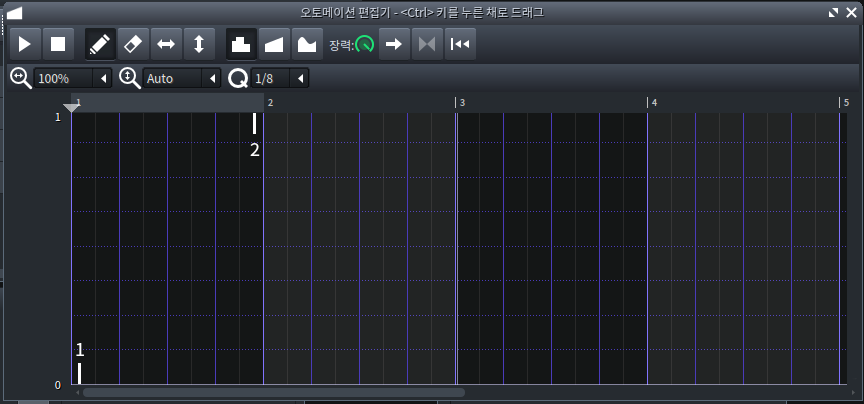
- Click a point 1/24 bar right from the very beginning.
- Click another point 1/24 bar left from the beginning of second bar while pressing
Shift.
The points will look weird, both with and without #3995.
PhysSong
on 27 Nov 2017
The points will look weird
Pic please! As before I don't see anything odd here.
zonkmachine
on 27 Nov 2017
Ah, the line itself isn't weird, but the position of end-points are.
PhysSong
on 28 Nov 2017
Related issues
 mikobuntu
·
4Comments
mikobuntu
·
4Comments
 Firepal
·
3Comments
Firepal
·
3Comments
 fentras
·
3Comments
fentras
·
3Comments
 FigyTuna
·
3Comments
FigyTuna
·
3Comments
 Andrewer11
·
3Comments
Andrewer11
·
3Comments
Most helpful comment
It's still useful. For example if you set quantization to 2Xths and draw a
line, then Xths and draw another you can get a triangle wave type shape
very quickly.
On Nov 20, 2017 19:01, "Oskar Wallgren" notifications@github.com wrote: