Lizmap-web-client: Value map not used in Table view
In a qgs I have several fields factorized (0,1,2, etc.) with labels configured in Layer properties>Fields>Value map. The labels are shown correctly in the LM popups, but in table view the original numeric values are displayed instead.
 pcav
pcav
All 11 comments
Attribute table are based on WFS getFeature request. Not sure how Lizmap should handle this. In some part of Lizmap, the real value is needed, not the corresponding label
improve QGIS Server getFeature with an option to get the labels instead of the values, such as WMS GetFeatureInfo request. Could be a additionnal parameter computevalues=true. I am not sure this would be considered as a bugfix and can land in 2.18 LTR
let Lizmap do the job, which can be a bit heavy, since all the values should be get from each source ( value list, value relation = full table) and then used as corresponding key/value tables.
 mdouchin
on 24 Jan 2018
mdouchin
on 24 Jan 2018
Same issue with 'Value Relation' widget.
@mdouchin when you say it would be heavy, you think about the case where we query each layers client side isn't it?
With SQL layers we could also join one layer with other layers containing key/values server side. Layers would have to be be on the same database though.
 nboisteault
on 17 Jul 2018
nboisteault
on 17 Jul 2018
Here is what I've made to solve this issue (but it might cause bugs...) :
First I add an event at begin of 'buildLayerAttributeDatatable' function in attributeTable.js which return layer name and features :
function buildLayerAttributeDatatable(aName, aTable, cFeatures, cAliases, aCallback ) {

    lizMap.events.triggerEvent("attributeLayerBeforeContentReady",
        {
            'name' : aName,
            'features': cFeatures
        }
    );
...
then I add my own javascript to replace keys by values. Note that this function will be called every time attribute table is refreshed so you might want to cache the result of every ajax call.
lizMap.events.on({
    attributeLayerBeforeContentReady: function(e) {
        if(e.name == "YOUR-LAYER"){
            var typeNameAndProperty = [];
            typeNameAndProperty['LAYER-WITH-KEY-VALUES'] = 'FIELD-YOU-WANT-KEYS-TO-BE-REPLACED-BY-VALUES';

            for (var typeName in typeNameAndProperty){
                var property = typeNameAndProperty[typeName];

                jQuery.ajax({
                    dataType: "json",
                    url: '/lm/index.php/lizmap/service/?repository=REPOSITORY&project=PROJECT&SERVICE=WFS&VERSION=1.0.0&REQUEST=GetFeature&TYPENAME='+typeName+'&OUTPUTFORMAT=GeoJSON',
                    async: false, // we need to wait data before we show table
                    success : function( WFS_data ) {
                        var keyValueMap = [];
                        for(var i = 0; i < WFS_data.features.length; i++){
                            keyValueMap[WFS_data.features[i].properties.id] = WFS_data.features[i].properties.nom;
                        }

                        for(var i = 0; i < e.features.length; i++){
                            if(e.features[i].properties[property] !== null){
                                // Get the keys
                                var keys = [];
                                // Only one value
                                if(typeof e.features[i].properties[property] == "number"){
                                    keys.push(e.features[i].properties[property]);
                                    // Change type from integer to string in config
                                    lizMap.config.layers[e.name]['types'][property] = "string";
                                }else{ // Array of values
                                    keys = e.features[i].properties[property].replace(/[{}]/g,'').split(',');
                                }

                                // Replacement by corresponding values
                                var values = [];

                                for(var j = 0; j < keys.length; j++){
                                    var key = parseInt(keys[j], 10);
                                    values.push(keyValueMap[key]);
                                }
                                // Each value separated by a comma.
                                e.features[i].properties[property] = values.join(', ');
                            }
                        }
                    }
                });
            }
        }
    }
});
@mdouchin can you tell us how translateWfsFieldValues() works ?
nboisteault
on 7 Jun 2019
Hi all! Any news about this issue? we noticed that the nice-to-have label has been recently removed...
Anyway, we have tried to better understand how the translateWfsFieldValues() function works but it's not so clear to us. We understood it returns the field value by passing the layer name, the field name, the field value and a translation_dict which is set equal to null in https://github.com/3liz/lizmap-web-client/blob/release_3_3/lizmap/www/js/attributeTable.js#L1343-L1346
What should be the proper use of translation_dict? @mdouchin @nboisteault
 RobiFag
on 8 May 2020
RobiFag
on 8 May 2020
I agree that this is a serious limitation.
pcav
on 8 May 2020
translateWfsFieldValues() can be overridden to create your own user-specific function.
Example used to get translated text depending on active language:
// Layers that must be translated, ie values must be replaced by label
var layers_to_translate = [
   'a QGIS layer to translate',
    'another layer'
];

// Future translation data will be stored in the following object
var translation_data = {};

var translation_layer = 'translation_fields';
// In this layer
// A field "fieldname" with the corresponding field name to translate in layers
// A field "code" contains the code i.e the value which can be found in the field to translate
// Field "label_fr" contains the label corresponding to this code. You could have multiple labels depending on the language "label_it", "label_es", etc.
// Example
// fieldname        code        label_fr        label_it
// country           paris         Paris           Parigi
// country           rome        Rome          Roma
// material          metal        Métal          metallo
// ....

// Get the active language
var translation_language = document.documentElement.lang.split('-')[0];

lizMap.events.on({

   // Define layer field aliases in attribute layers
   'attributeLayersReady': function(e){

      // Initialize alias object
      for(var i in layers_to_translate){
         var layer = layers_to_translate[i];
         lizMap.config.layers[layer]['alias'] = {};
         translation_data[layer] = {}
      }

      // Get fields and form item translation data
      var layer = translation_layer;
      lizMap.getFeatureData(layer, null, null, 'none', false, null, null, function(aName, aFilter, aFeatures, aAliases){
         if( aFeatures.length != 0 ) {
            for(var i in aFeatures){
               var data = aFeatures[i]['properties'];
               // Get field containing the translated label for the active language
               var translated_label = 'label_' + translation_language;
               if('fieldname' in data && translated_label in data ){
                  var fieldname = data['fieldname'];
                  for(var i in layers_to_translate){
                     var alayer = layers_to_translate[i];
                     if(data['layer'] != alayer)
                        continue;
                    // Fill in the dictionnary
                    if(data[translated_label]){
                        if( !(fieldname in translation_data[alayer]) ) {
                           translation_data[alayer][fieldname] = {};
                        }
                        translation_data[alayer][fieldname][data['code']] = data[translated_label];
                    }
                  }
               }
            }
            // Override lizMap.translateWfsFieldValues(aName, colName, data, translation_dict)
            lizMap.translateWfsFieldValues = function (aName, fieldName, fieldValue, translation_dict){
               var retVal = fieldValue;
               if( translation_data
                 && aName in translation_data
                 && 'value' in translation_data[aName]
                 && fieldValue in translation_data[aName][fieldName]
                 && translation_data[aName][fieldName][fieldValue]
               ){
                  retVal = translation_data[aName][fieldName][fieldValue];
               }
               return retVal;
            }

         }
         return false;
      });
   }

});
NB: I have changed the code in this issue, based on a more complex example, with to test. Please test and try ;-)
mdouchin
on 8 May 2020
Hi @mdouchin, I tested the js script. I made a few small changes and it works perfectly! Now the attribute table displays the labels instead of values with valuemap widget.
I was wondering if it's possible to do something similar for the tool 'filter data with form'. I'm trying to better understand the filter.js file but I'm not able to find a function like translateWfsFieldValues(). Any suggestion?
RobiFag
on 12 May 2020
Hi all,
starting from the js script of @mdouchin I'm trying to display the labels instead of values with valuemap widget in the 'filter data with form' tool.
At the moment I have only tested the script with filter type = uniquevalues (maybe some changes are required using other filter types).
Following the Javascript code:
var filtered_layer = [
    'filtered_layer_1',
    'filtered_layer_2'
];

// Future translation data will be stored in the following object
var translation_data = {};

var translation_layer = 'description_table';

lizMap.events.on({

   // Define layer field aliases in attribute layers
    'dockopened': function(e){
      // Initialize alias object
      for(var i in filtered_layer){
         var layer = filtered_layer[i];
         translation_data[layer] = {}
      }
      // Get fields and form item translation data
      var layer = translation_layer;
      lizMap.getFeatureData(layer, null, null, 'none', false, null, null, function(aName, aFilter, aFeatures, aAliases){
         if( aFeatures.length != 0 ) {
            for(var f in aFeatures){
               var data = aFeatures[f]['properties'];
               // Get field containing the translated label for the active language
               var translated_label = 'descrizione';
               if('fieldname' in data && translated_label in data ){
                  var fieldname = data['fieldname'];
                  for(var fl in filtered_layer){
                     var alayer = filtered_layer[fl];
                    if(data[translated_label]){
                        if( !(fieldname in translation_data[alayer]) ) {
                           translation_data[alayer][fieldname] = {};
                        }
                        translation_data[alayer][fieldname][data['cod']] = data[translated_label];
                    }
                  }
                  for (conf in filterConfig){
                      if (filterConfig[conf]['field'] in translation_data[alayer]){
                      $("div#liz-filter-box-"+filterConfig[conf].title).each(function(){
                            $(this).find("p span span.new").filter(function(){
                                return $(this).text() == "\xa0" + [data['cod']]
                            }).html(' ' + translation_data[alayer][filterConfig[conf].field][data['cod']]);
                        });
                      }
                  }
               }
            }
         }
         return false;
      });
   }
});
I used the dockopened javascript event. Everything works fine if I set filters for a single layer. If I set filters for more than one layer when I changed the layer from the related drop-down menù, my js script doesn't work because the dockopened event is not triggered. The behaviour is shown in the .gif below.
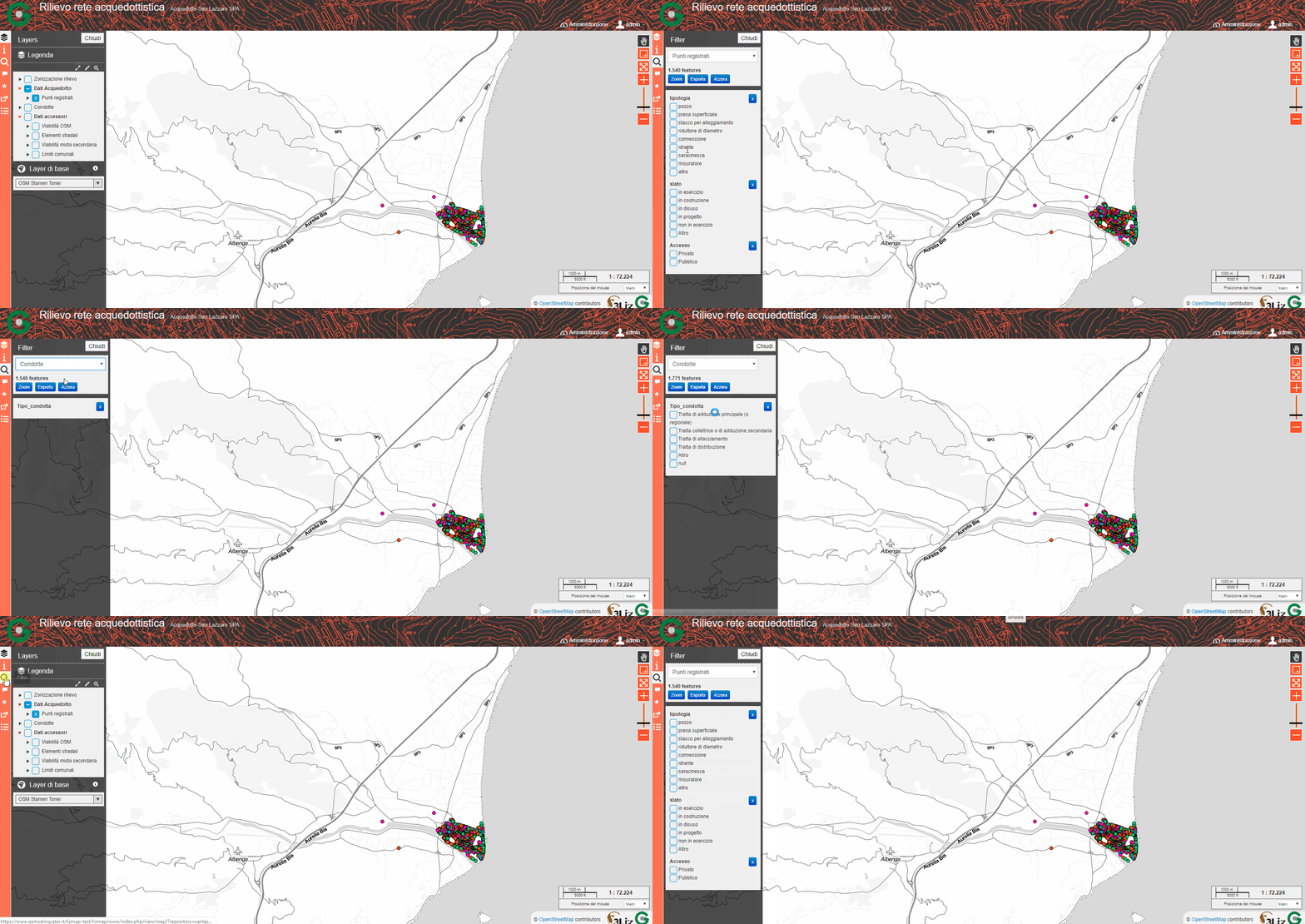
I also tried to use the event layerFilterParamChanged but it is triggered only when I check a checkbox for instance. Moreover, it's not clear to me the behaviour of this event since it usually seems to not be triggered by changing the layer but sometimes yes.
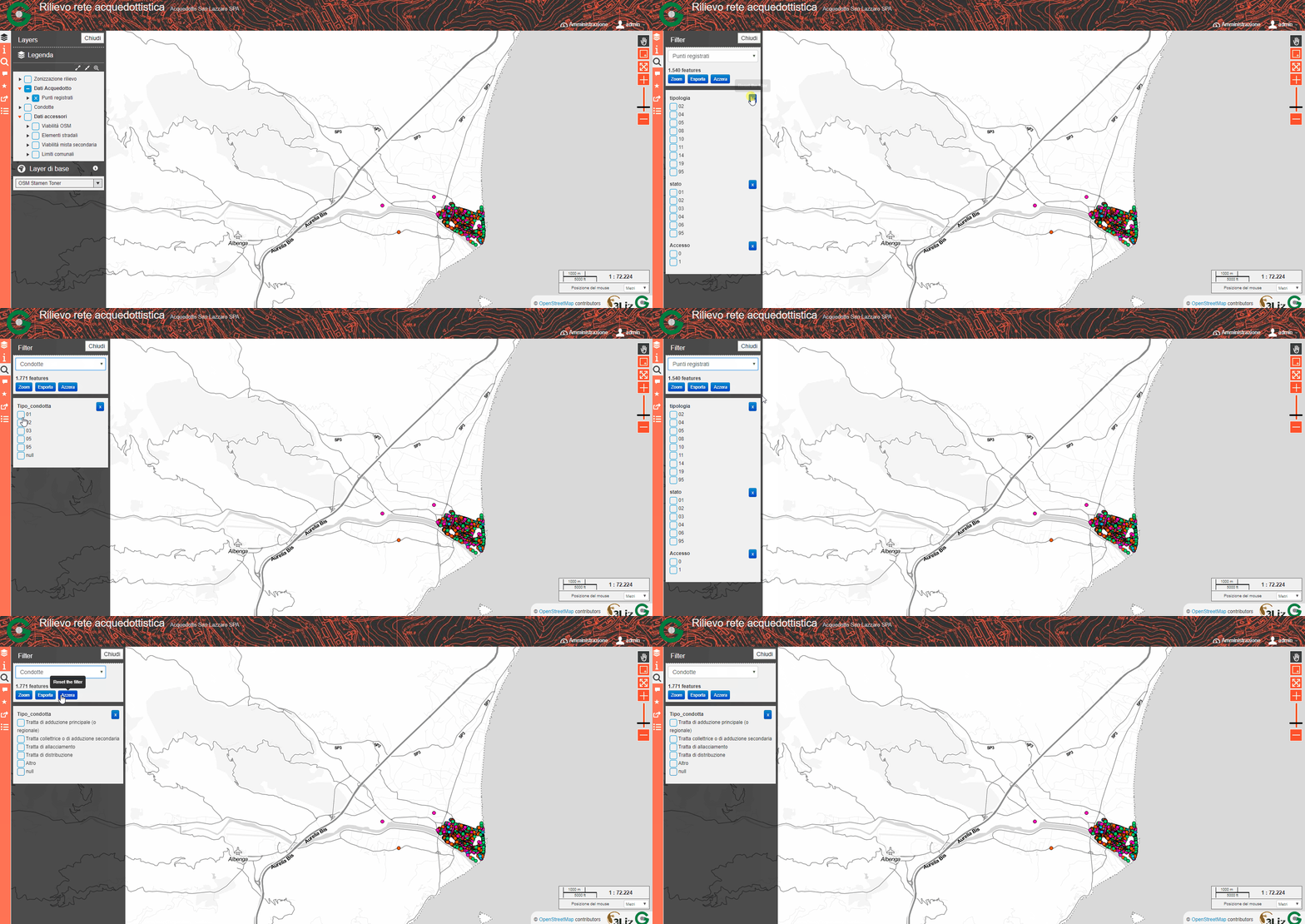
I'm trying to find the proper event that is triggered when I changed the layer from the filter tool drop-down menù.
The js script above requires a small change in the Filter.js file. At
https://github.com/3liz/lizmap-web-client/blob/release_3_3/lizmap/www/js/filter.js#L409 I put the variable label in a span tag with class=new as in the following code block:
dhtml+= '<span class="new"> ' + label +'</span>';
The js script above uses the filter title in the jQuery selector hence it only works with titles which do not include spaces (e.g. 'My_filter' instead of 'My filter').
Some questions:
- what is the triggered event when the layer change?
- where are the available javascript event (e.g. uicreated, mapcreated, dockopened, etc.) defined?
I know the script is a bit rough at the moment but maybe it could be a good starting point!
RobiFag
on 19 May 2020
Hi, at the moment I found a workaround which works quite good but maybe it requires some refinements. I triggered the event "dockopened" in the handler of the layer selector. More precisely I added the line lizMap.events.triggerEvent("dockopened"); after https://github.com/3liz/lizmap-web-client/blob/release_3_3/lizmap/www/js/filter.js#L1183
Hope this helps!
RobiFag
on 22 May 2020
Hi @mdouchin, I tested the js script. I made a few small changes and it works perfectly! Now the attribute table displays the labels instead of values with valuemap widget.
I was wondering if it's possible to do something similar for the tool 'filter data with form'. I'm trying to better understand the filter.js file but I'm not able to find a function like translateWfsFieldValues(). Any suggestion?
Hi, I'm still testing the js script to show labels instead of values in tables with Value map widget. As already said, I made some changes to the js script suggested by @mdouchin and it works perfectly but only if the columns with Value Map widget are type text. If the column is integer the js script doesn't work.
I took a look at attributeTable.js and I found an 'if condition' based on column types at line https://github.com/3liz/lizmap-web-client/blob/release_3_3/lizmap/www/js/attributeTable.js#L1316 . If the cType is numeric the translateWfsFieldValues() is not triggered. Hence I added the same function used for cType default to the numeric condition. With these changes to the attributeTable.js file, the js script seems to work perfectly both with text and numeric columns.
Do you think these changes can be included in the next release? Is it better if I open a Pull Request?
RobiFag
on 8 Jun 2020
Related issues
 danzig666
·
10Comments
pcav
·
5Comments
danzig666
·
10Comments
pcav
·
5Comments
 josemvm
·
13Comments
josemvm
·
13Comments
 t0xycus
·
7Comments
t0xycus
·
7Comments
 robibrazze
·
5Comments
robibrazze
·
5Comments