Lizmap-web-client: LizMap LDAP integration
Hello,
Several LizMap versions ago I knew there were plans to allow user validation to rely on external LDAP server instead of the internal LizMap user database.
What about this topic? Is it possible with the new version?
TIA.
 vherreros
All 86 comments
hi @vherreros
you can see the documentation here:
https://github.com/3liz/lizmap-documentation/blob/6326d359b6038007bb04ff25b9fe57a5040bf77e/source/install/linux.rst#ldap-authentication
 josemvm
on 15 Jul 2017
josemvm
on 15 Jul 2017
Hello,
I've finally read the documentation and there are still two questions regarding LDAP validation.
Question 1:
In my current setup, I use local LizMap validation. I've created several users belonging to several groups and then assigned those groups the ability to see / edit some of my QGIS projects, but not all. When changing to LDAP validation, how can I manage these kind of permissions? I mean, how can LizMap know which group belongs a certain user to, provided LDAP server has just answered that the user has entered the right password?
Queston 2:
Is it possible to maintain local user validation as well as LDAP validation? This would be interesting during the phase of transition from local to LDAP validation.
Thanks.
vherreros
on 8 Aug 2017
hi @vherreros
Question 1:
when you use ldap authentication, after the first login of a user the user's data (including the group if so defined in authldap.coord.ini.php) will be imported to your local database. then you should define policies for these (new) groups.
Question 2:
you can have local users and ldap users but with different names because the ldap users override the local users.
am i wrong or can you be more explicit @mdouchin @laurentj ?
josemvm
on 9 Aug 2017
We really should improve documentation on this. If I understand correctly, there is 2 way to use the LDAP brige in Lizmap:
- Get the users (and update them if needed) based on LDAP, but do not retrieve any groups from LDAP server. You use LDAP only for authentication, and you manually create or modify groups inside Lizmap and put the users into your groups to give them rights.
- Same as above, but also "ask" the LDAP provider to update the groups inside Lizmap db to synchronize them with the LDAP groups for each user. Be aware this will take the lead, and remove or add your users for the Lizmap groups you could have created before using LDAP. The provider asks the groups of the user from the LDAP server, create this groups if missing, and update the relations between the users and the groups in your Lizmap database)
One of the options inside the configuration file can let you decide which behaviour is used
@laurentj you confirm ?
 mdouchin
on 9 Aug 2017
mdouchin
on 9 Aug 2017
Well, no success.
I've followed this steps (according to the documentation). Every action is performed with root permissions (sudo command), and my LizMap install directory is /var/www/lizmap/):
- Installation of LDAPDAO module (just unzipping the module from https://github.com/jelix/ldapdao-module and copying the unzipped directory ldapdao to /var/www/lizmap/lizmap/modules/).
- Installation of php-ldap by 'sudo apt install php-ldap' (it gets release 7.0.22 under Ubuntu 16.04).
- Several config files changes, as stated below:
3.1. /var/www/lizmap/lizmap/var/config/localconfig.ini.php: Added the following section:
[modules]
ldapdao.access=1
jacl2.access=1
jauth.access=2
jauthdb.access=1
3.2. /var/www/lizmap/lizmap/var/config/admin/config.ini.php and /var/www/lizmap/lizmap/var/config/index/config.ini.php: In the section [coordplugins], changing the default value 'auth="index/auth.coord.ini.php"' to 'auth="authldap.coord.ini.php"'.
3.3. /var/www/lizmap/lizmap/var/config/profiles.ini.php: Added the following section (my LDAP server only allows me secure connections, so I use port 636 instead of 389):
[ldap:myldapdao]
hostname=my.ldap.server.hostname
port=636
adminUserDn="uid=,o=,dc=,dc="
adminPassword="**"
3.4. /var/www/lizmap/lizmap/var/config/mainconfig.ini.php: In the section [coordplugins], added the line 'auth="authldap.coord.ini.php"'.
- Very important and lacking in the documentation: Copy the LDAPDAO config file to the LizMap config directory and changing permissions:
sudo cp /var/www/lizmap/lizmap/modules/ldapdao/install/authldap.coord.ini.php /var/www/lizmap/lizmap/var/config/
sudo chown root:www-data /var/www/lizmap/lizmap/var/config/authldap.coord.ini.php
sudo chmod 775 /var/www/lizmap/lizmap/var/config/authldap.coord.ini.php
- Run the installer via 'sudo php /var/www/lizmap/lizmap/install/installer.php'.
Installation finishes sucessfully, but now I can't validate in LizMap via web plugin (even after restarting Apache2 service). When trying to log in (either with LizMap local or LDAP users), the web browser just shows 'Error 500. A technical error has occured. Sorry for this trouble.'.
Apache doesn't show any error in its log.
LizMap error log (/var/www/lizmap/lizmap/var/log/error.log) shows:
2017-08-11 13:45:51 147.96.4.61 error 2017-08-11 13:45:51 [615] ldap profile name is missing /var/www/lizmap/lizmap/modules/ldapdao/plugins/auth/ldapdao/ldapdao.auth.php 29
Where do I have to specify the LDAP profile name missing?
Thanks...
vherreros
on 11 Aug 2017
hi @vherreros
you must configure your authldap.coord.ini.php file according to the parameters of your ldap server
...
; profile to use for jDb
profile = "jauth"
ldapprofile = "myldapdao"
...
https://github.com/jelix/ldapdao-module/blob/master/ldapdao/install/authldap.coord.ini.php
josemvm
on 11 Aug 2017
Great, we keep on progressing. Now the local user validation is up and running. Let's focus on LDAP user login. Next failure point:
When using ldapsearch for testing my connection, I've seen that
ldapsearch -H ldap://my.ldap.server.hostname:636/ ...
doesn't work, but
ldapsearch -H ldaps://my.ldap.server.hostname:636/
alows me to query the LDAP server.
In /var/www/lizmap/lizmap/var/config/profiles.ini.php, section [ldap:myldapdao], I have:
hostname=my.ldap.server.hostname
port=636
adminUserDn="uid=,o=,dc=,dc="
adminPassword="**"
I'm using the secure port (I'm not allowed to use the non secure port 389), but the validation through LizMap web client hangs after 1 minute more or less. The web browser displays something like 'Login failure' or 'Validation failure' (sorry but I'm using the Spanish locales), and LizMap error log shows:
2017-08-12 12:04:18 my.PC.IP.address warning 2017-08-12 12:04:18 [2] ldap_search(): Search: Can't contact LDAP server /var/www/lizmap-web-client-3.1.1/lizmap/modules/ldapdao/plugins/auth/ldapdao/ldapdao.auth.php 253
It seems LizMap LDAPDAO profile is not using ldaps but ldap protocol, so the connection doesn't succeed.
Is there a way to force LizMap LDAP module to use ldaps secure protocol?
Thanks again...
P.S.: I've opend an issue on LDAPDAO thread asking for a way to force LDAPDAO to use ldaps connections. If I get a response, I'll publish it here too.
vherreros
on 12 Aug 2017
Hi @vherreros ,
To connect to ldap with ssl, try hostname=ldaps://my.ldap.server.hostname/.
See http://php.net/manual/en/function.ldap-connect.php .
 laurentj
on 28 Aug 2017
laurentj
on 28 Aug 2017
Hi @josemvm and @vherreros,
I'm interested to use LDAP with Active Directory (windows) configuration in order to connect my lizmap installed on a linux system.
If I correctly understand, I have configured the authldap.coord.ini.php adding ldapprofile = "myldapdao", which I read in the profiles.ini.php file
where I defined
hostname=pippo.local
port=389
adminUserDn="cn=Admin Server,ou=Users,dc=pippo,dc=local"
adminPassword="******"
but it do not work.
Perhaps it is not correct the syntax of adminUserDn?
Perhaps it is need to modify uid /sAMAccountName in the authldap.coord.ini.php file?
Many thanks for your help
 rmarzocchi84
on 15 Jan 2018
rmarzocchi84
on 15 Jan 2018
Sorry, Roberto, but I've still not deployed LDAP validation in my LizMap system, so I can't help you... Anyway, any comment on this issue will be welcome under this thread.
vherreros
on 15 Jan 2018
Hi @rmarzocchi84
You must set correctly all configuration parameters into authldap.coord.ini.php, according to you ldap architecture. Since it is specific to each organization, we cannot really help you. In comments in this file, there are some examples for Active Directory, but it may not exactly what you should indicate. Ask to your LDAP administrator.
laurentj
on 17 Jan 2018
I have exactly the same problem I think I set the correct parameters into authldap.coord.ini.php accordingly to my architecture but surely there is something wrong. In the error log of lizmap i have the following error:
2018-01-17 19:26:01 192.168.23.171 warning 2018-01-17 19:26:01 [2] ldap_search(): Search: Operations error /opt/www/ldapdao-module-master/ldapdao/plugins/auth/ldapdao/ldapdao.auth.php 253
Is there anyone that have successfully configured lizmap with Active Directory Authentication and can help me to retrieve the necessary correct parameters from my Active Directory infrastructure and can help me to know where and how to put them into configuration files?
Thanks in advance.
 quelo1972
on 18 Jan 2018
quelo1972
on 18 Jan 2018
hi
@quelo1972 i'm using OpenLDAP, not Active Directory, but i think your ldap module it's not at the right place...
see here: https://github.com/jelix/ldapdao-module/blob/master/README.md#install-files-with-jelix-16
the structure should look something like this:
your_lizmap/lizmap/lizmap-modules/ldapdao
and inside you should have:
install
locales
plugins
module.xml
josemvm
on 18 Jan 2018
Ok I've just followed the instructions in that link, in fact there is a following instruction
"Install files with Jelix 1.6. Copy the ldapdao directory into the modules/ directory of your application"
so I've putted the ldapdao directory in my_app_lizmap/lizmap/modules/ldapdao in which I have
drwxr-xr-x 5 root root 4096 dic 10 21:10 .
drwxr-xr-x 4 root root 4096 gen 15 11:01 ..
drwxr-xr-x 2 root root 4096 dic 10 21:10 install
drwxr-xr-x 5 root root 4096 dic 10 21:10 locales
-rw-r--r-- 1 root root 640 dic 10 21:10 module.xml
drwxr-xr-x 3 root root 4096 dic 10 21:10 plugins
root@SRVLNXWINTRA01:/opt/www/lizmap/lizmap/modules/ldapdao#
when I execute the installer the module ldapdao is correctly installed
root@SRVLNXWINTRA01:/opt/www/lizmap/lizmap/modules# php ../../lizmap/install/installer.php && ../../lizmap/install/set_rights.sh
Installation start..
[notice] Installation starts for the entry point index
All modules dependencies are ok
All modules are installed or upgraded for the entry point index
[notice] Installation starts for the entry point admin
All modules dependencies are ok
All modules are installed or upgraded for the entry point admin
[notice] Installation starts for the entry point script
All modules dependencies are ok
All modules are installed or upgraded for the entry point script
Installation ended.
quelo1972
on 18 Jan 2018
Ok I'moved it in the right place re-executed the installer.php but when I try to login with an active directory user I have the same error:
2018-01-18 12:36:31 192.168.23.171 warning 2018-01-18 12:36:31 [2] ldap_search(): Search: Operations error /opt/www/ldapdao-module-master/ldapdao/plugins/auth/ldapdao/ldapdao.auth.php 253
quelo1972
on 18 Jan 2018
It seems searchUserFilter and/or searchUserBaseDN are not set correctly. Be sure you have the tag %%LOGIN%% in searchUserFilter, which is replaced by the user login.
Edit: verify also searchAttributes, which indicate the mapping between LDAP attributes and user properties of Lizmap
laurentj
on 18 Jan 2018
This is my authldap.coord.ini.php
driver = "ldapdao"
session_name = "JELIX_USER"
secure_with_ip = 0
timeout = 0
auth_required = off
on_error = 2
error_message = "jauth~autherror.notlogged"
on_error_action = "jauth~login:form"
bad_ip_action = "jauth~login:out"
on_error_sleep = 0
after_login = "jauth~login:form"
after_logout = "jauth~login:form"
enable_after_login_override = on
enable_after_logout_override = on
persistant_enable=on
persistant_cookie_name=jelixAuthentificationCookie
persistant_duration = 1
password_hash_method = 1
password_hash_options =

[ldapdao]
compatiblewithdb = on
dao = "jauthdb~jelixuser"
profile = "jauth"
ldapprofile = "myldapdao"
password_crypt_function = sha1
form = "jauthdb_admin~jelixuser"
uploadsDirectory= ""
jelixAdminLogin="admin"
searchUserBaseDN="OU=Comune di Spoleto,DC=comune,DC=spoleto,DC=local"
searchUserFilter="(&(objectClass=user)(sAMAccountName=%%LOGIN%%))"
bindUserDN="CN=%?%,OU=Comune di Spoleto,DC=comune,DC=spoleto,DC=local"
searchAttributes="sAMAccountName:login,givenName:firstname,sn:lastname,mail:email,distinguishedName,name,dn"
searchGroupFilter=
searchGroupProperty="cn"
searchGroupBaseDN=""
@rmarzocchi84
can you check your lizmap error.log ?
josemvm
on 18 Jan 2018
when I login with an active directory user I have this error in the lizmap error.log:
2018-01-18 12:36:31 192.168.23.171 warning 2018-01-18 12:36:31 [2] ldap_search(): Search: Operations error /opt/www/ldapdao-module-master/ldapdao/plugins/auth/ldapdao/ldapdao.auth.php 253
quelo1972
on 18 Jan 2018
I have the same error but I am not the administrator of LDAP server and I think I do some mistakes in the authldap.coord.ini.php file
rmarzocchi84
on 19 Jan 2018
yes, i think so...
josemvm
on 19 Jan 2018
Is there anyone that have successfully configured lizmap with Active Directory Authentication and can help me to retrieve the necessary correct parameters from my Active Directory infrastructure and can help me to know where and how to put them into configuration files?
I'm the administrator of my Active Directory Domain.
quelo1972
on 19 Jan 2018
Have you @quelo1972 if you are on linux, you should try the command line tool ldapsearch to test your ldap credentials before configuring Lizmap. It will help you try some requests and see the results
# Install ldap tools
sudo apt install ldap-utils
Some websites with how-to on ldapsearch command line:
mdouchin
on 24 Jan 2018
I really did more! in addition to successfully execute the command line below
root@SRVLNXWINTRA01:/opt/www/lizmap/lizmap/var/config# ldapsearch -x -b "dc=comune,dc=spoleto,dc=local" -D "[email protected]" -h comune.spoleto.local -W '(sAMAccountName=andrea.rossetti)'
Enter LDAP Password:
# extended LDIF
#
# LDAPv3
# base <dc=comune,dc=spoleto,dc=local> with scope subtree
# filter: (sAMAccountName=andrea.rossetti)
# requesting: ALL
#

# Andrea Rossetti, Servizio Informatico e Telefonico, Direzione DOC, Comune di
 Spoleto, comune.spoleto.local
dn: CN=Andrea Rossetti,OU=Servizio Informatico e Telefonico,OU=Direzione DOC,O
 U=Comune di Spoleto,DC=comune,DC=spoleto,DC=local
objectClass: top
objectClass: person
objectClass: organizationalPerson
objectClass: user
cn: Andrea Rossetti
sn: Rossetti
physicalDeliveryOfficeName: SITEL - Sistemi Informatici e Telefonici
facsimileTelephoneNumber: +39 ***************************
givenName: Andrea
distinguishedName: CN=Andrea Rossetti,OU=Servizio Informatico e Telefonico,OU=
 Direzione DOC,OU=Comune di Spoleto,DC=comune,DC=spoleto,DC=local
instanceType: 4
whenCreated: 20071004105835.0Z
whenChanged: 20180124085530.0Z
displayName: Andrea Rossetti
................
.................
search: 2
result: 0 Success

# numResponses: 5
# numEntries: 1
# numReferences: 3
I also wrote a small PHP script al follow:
<?php
session_start();

//Server LDAP: comune.spoleto.local
//Dominio: comune.spoleto.local
//Utente: lizmap
//Password: ************

// Credentials for the bind user
$_POST = array("myusername" => "lizmap", "mypassword" => "************");
$ldapserver="comune.spoleto.local";
$ldapport = 389;
$dominio="comune.spoleto.local";

$ldaprdn=$_POST['myusername']."@".$dominio;
$ldappass=$_POST['mypassword'];
$searchUserBaseDN="OU=Comune di Spoleto,DC=comune,DC=spoleto,DC=local";
$login="andrea.rossetti";
$searchUserFilter="(sAMAccountName=$login)";
$searchAttributes=array("dn","mail","givenName","sn");

echo "Connesione ...<br>";
//connessione al server
$ds=ldap_connect($ldapserver,$ldapport ) or die ("Could not connect to LDAP");  //  deve essere un nome server LDAP valido!

//ldap_set_option($ds, LDAP_OPT_PROTOCOL_VERSION, 3);
echo "Risultato di connessione : " . $ds . "<br>";
if ($ds) {
        $ldapbind = ldap_bind($ds, $ldaprdn, $ldappass) or die ("Could not bind to LDAP");
        echo $ldaprdn."<br>";
        echo $ldappass."<br>";

        if ($ldapbind) {
                echo "LDAP bind successful...";
        } else {
                echo "LDAP bind unsuccessful...";
        }
        $results = ldap_search ($ds, $searchUserBaseDN,$searchUserFilter,$searchAttributes);
        $entries = ldap_get_entries($ds,$results);
        if ($entries['count'] == 0) return false;
        print_r($entries);
        ldap_close($ds);
}
?>
Running this script from the command line it WORKS!
root@SRVLNXWINTRA01:/opt/www/lizmap/lizmap/var/config# php /root/prova.php
Connesione ...<br>Risultato di connessione : Resource id #4<br>[email protected]<br>************<br>LDAP bind successful...Array
(
    [count] => 1
    [0] => Array
        (
            [sn] => Array
                (
                    [count] => 1
                    [0] => Rossetti
                )

            [0] => sn
            [givenname] => Array
                (
                    [count] => 1
                    [0] => Andrea
                )

            [1] => givenname
            [mail] => Array
                (
                    [count] => 1
                    [0] => [email protected]
                )

            [2] => mail
            [count] => 3
            [dn] => CN=Andrea Rossetti,OU=Servizio Informatico e Telefonico,OU=Direzione DOC,OU=Comune di Spoleto,DC=comune,DC=spoleto,DC=local
        )

)
based on these 2 positive test results I have compiled the authldap.coord.ini.php file and profile.ini.php as below, but in the lizmap error log I obtain the same error.
I would not want there to be some hidden bugs in the ldapdao-module module for which it does not work with active directory?!?
Otherwise I do not know what else to do!
2018-01-24 15:56:40 192.168.23.171 warning 2018-01-24 15:56:40 [2] ldap_search(): Search: Operations error /opt/www/lizmap/lizmap/lizmap-modules/ldapdao/plugins/auth/ldapdao/ldapdao.auth.php 253
root@SRVLNXWINTRA01:/opt/www/lizmap/lizmap/var/config# cat authldap.coord.ini.php
;<?php die(''); ?>
;for security reasons , don't remove or modify the first line

;============= Main parameters
driver = "ldapdao"
;============ Parameters for the plugin
session_name = "JELIX_USER"
secure_with_ip = 0
;Timeout. After the given time (in minutes) without activity, the user is disconnected.
timeout = 0
auth_required = off
on_error = 2
error_message = "jauth~autherror.notlogged"
on_error_action = "jauth~login:form"
bad_ip_action = "jauth~login:out"

;=========== Parameters for jauth module
on_error_sleep = 0
after_login = "jauth~login:form"
after_logout = "jauth~login:form"
enable_after_login_override = on
enable_after_logout_override = on

;============ Parameters for the persistance of the authentification
persistant_enable=on
persistant_cookie_name=jelixAuthentificationCookie
persistant_duration = 1

;=========== parameters for password hashing
password_hash_method = 1
password_hash_options =

;=========== Parameters for drivers
[ldapdao]
compatiblewithdb = on
dao = "jauthdb~jelixuser"
;profile = "jauth"
profile = "pgldapdao"
ldapprofile = "pgldap"
password_crypt_function = sha1
form = "jauthdb_admin~jelixuser"
uploadsDirectory= ""

;--- ldap parameters
jelixAdminLogin="admin"
searchUserBaseDN="OU=Comune di Spoleto,DC=comune,DC=spoleto,DC=local"
searchUserFilter="(sAMAccountName=%%LOGIN%%)"
bindUserDN="$dn"
searchAttributes="sAMAccountName:login,givenName:firstname,sn:lastname,mail:email,distinguishedName,name,dn:"

;searchGroupFilter="(&(objectClass=posixGroup)(cn=XYZ*)(memberUid=%%LOGIN%%))"
searchGroupFilter=
searchGroupProperty="cn"
searchGroupBaseDN=""


root@SRVLNXWINTRA01:/opt/www/lizmap/lizmap/var/config# cat profiles.ini.php
;<?php die(''); ?>
;for security reasons, don't remove or modify the first line
[jdb]
default=jauth
jacl2_profile=jauth

[jdb:jauth]
driver=sqlite3
database="var:db/jauth.db"

[jdb:lizlog]
driver=sqlite3
database="var:db/logs.db"
;force_encoding = on
;table_prefix =
;driver=pdo
;dsn=mysql:host=localhost;dbname=test
;user=
;password=

[jcache]
default=myapp

[jcache:myapp]
enabled=1
driver=file
ttl=0
;automatic_cleaning_factor = 0
cache_dir=
file_locking=1
directory_level=0
directory_umask=
file_name_prefix=
cache_file_umask=
;dao = ""
;dbprofile = ""
;servers = memcache_host1:11211,memcache_host2:11211,memcache_host3:11211 i.e HOST_NAME:PORT
;servers =

[jcache:qgisprojects]
enabled=1
driver=file
ttl=0

[jdb:pgldapdao]
driver = "pgsql"
database = "lizmap"
host = "localhost"
port = "5678"
user = "lizmap"
password = "*********"
;service =
persistent = "on"
force_encoding = on
timeout = "10"
single_transaction = "on"
;search_path = ""

[ldap:pgldap]
hostname=comune.spoleto.local
port=389
adminUserDn="CN=lizmap binduser,CN=Users,DC=comune,DC=spoleto,DC=local"
;adminUserDn="[email protected]"
adminPassword="*************"
Hi, I did an attempt to fix this issue. Please, everybody, either you use Active Directory or not, retrieve the new ldapdao.auth.php file and replace the old one in the module you installed, and tell me if the issue is fixed (for Active Directory users) or if it still works for other ldap directory.
laurentj
on 25 Jan 2018
hi @laurentj
it still works for OpenLDAP Directory Services
josemvm
on 25 Jan 2018
@quelo1972 you should copy paste this content into ldap-module/plugins/auth/ldapdao.auth.php ! (replace all previous content of course)
laurentj
on 25 Jan 2018
When I try to authenticate myself as an active directory user (andrea.rossetti) I have the error below:
Error 500. A technical error has occured. Sorry for this trouble.
and in the lizmap error log file there is:
2018-01-25 11:12:21 192.168.23.171 error 2018-01-25 11:12:21 [0] Cannot access empty property /opt/www/lizmap/lizmap/lizmap-modules/ldapdao/plugins/auth/ldapdao/ldapdao.auth.php 344
quelo1972
on 25 Jan 2018
@quelo1972 tell us what you have in var/log/errors.log
laurentj
on 25 Jan 2018
2018-01-25 11:23:25 192.168.23.171 error 2018-01-25 11:23:25 [0] Cannot access empty property /opt/www/lizmap/lizmap/lizmap-modules/ldapdao/plugins/auth/ldapdao/ldapdao.auth.php 344
quelo1972
on 25 Jan 2018
This is because you map "dn" to nothing into searchAttributes="sAMAccountName:login,givenName:firstname,sn:lastname,mail:email,distinguishedName,name,dn:"
Indicates "dn:dn" or "dn".
searchAttributes="sAMAccountName:login,givenName:firstname,sn:lastname,mail:email,distinguishedName,name,dn"
laurentj
on 25 Jan 2018
Now I've modified dn: to dn:dn or dn (only without ":" ) but now I have "login error" and nothing in the error.log.
I'm sure to use the correct credential login andrea.rossetti and password * the correct password.
quelo1972
on 25 Jan 2018
@quelo1972 do you have something into var/log/messages.log ?
laurentj
on 25 Jan 2018
In /opt/www/lizmap/lizmap/var/log I have only error.log and a .empty file.
quelo1972
on 25 Jan 2018
root@SRVLNXWINTRA01:/opt/www/lizmap# find . -name messages.log
root@SRVLNXWINTRA01:/opt/www/lizmap#
quelo1972
on 25 Jan 2018
please have a look to your apache2 or nginx logs too. They should be visible in /var/log/apache2/ or /var/log/nginx/ This completely depends on your linux distribution and how you configured and installed the server, so we cannot guess where the log files have been placed
Have you run lizmap/install/set_rights in your lizmap root repository ? Take into account that you should use the server user name. By default, it is www-data.
mdouchin
on 25 Jan 2018
@quelo1972
into var/config/localconfig.ini.php, set these parameters:
[logger]
auth=file

[fileLogger]
auth=auth.log
Then, you should have some messages into var/log/auth.log
laurentj
on 25 Jan 2018
now I have in auth.log
2018-01-25 15:06:26 192.168.23.171 auth ldapdao: cannot bind to any configured path with the login andrea.rossetti
what does it means?
quelo1972
on 25 Jan 2018
what do I have to do. Do I have to give up? :)
quelo1972
on 26 Jan 2018
@quelo1972 two possibilities : the password or the login are wrong, or bindUserDn is bad.
In your bindUserDN, you indicate $dn, so it will use the value of the dn attribute retrieved using searchAttributes, to authenticate against the ldap (here it tries with CN=Andrea Rossetti,OU=Servizio Informatico e Telefonico,OU=Direzione DOC,OU=Comune di Spoleto,DC=comune,DC=spoleto,DC=local).
I improved error messages. Update the ldapdao.auth.php file with this content. You should see with which DN it tries to authenticate.
However, I think your bindUserDn is wrong, as, in your simple PHP script, you bind with "[email protected]".
So, if all users have the same "@comune.spoleto.local" suffix, you should set:
bindUserDn="%%LOGIN%%@comune.spoleto.local"
If bindUserDn="$dn" is also a possibility for some other users, you can set both too:
bindUserDn[]="%%LOGIN%%@comune.spoleto.local"
bindUserDn[]="$dn"
OK! Now it's work!
I updated my ldapdao.auth.php and the used
bindUserDn="%%LOGIN%%@comune.spoleto.local"
in authldap.coord.ini.php and finally the authentication mechanism work well.
Now all that remains to do
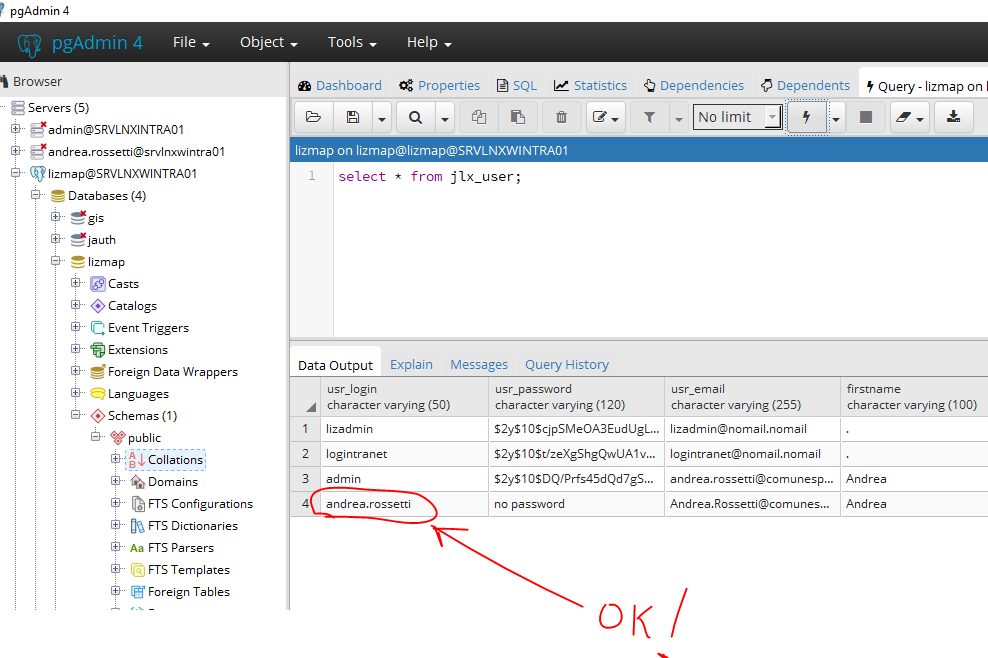
is to map the active directory groups with lizmap group.
Thank you very much!
quelo1972
on 26 Jan 2018
Now it is not very clear to me how to synchronize active directory groups with lizmap groups. For example I created a Group in AD named GeoPortaleSITEL with member andrea.rossetti, and I created a Group with the same name in lizmap, but
- I haven't any new entry in the database named GeoPortaleSITEL, in no table... where is this information stored?
- how do I filter a group of Active Directory that contains a certain sAMAccountName %% LOGIN %%?
quelo1972
on 26 Jan 2018
@quelo1972
- in jacl2_* tables
- I don't know how AD work. See https://github.com/jelix/ldapdao-module/blob/master/README.md#configuration-properties-for-user-rights
laurentj
on 27 Jan 2018
There isn't any record in any jacl2_* table it contains "GeoPortaleSITEL".
quelo1972
on 27 Jan 2018
hi @quelo1972
you need to create in your AD a group named
adminsand populate it with user admins (andrea.rossetti, etc.) for LWCon LWC login as
andrea.rossetticlick over
user/andrea.rossetti,My account,Rights of user, then you can see the users and the assigned groups for themto synchronize AD groups with LWC groups, you need to create similar AD groups inside LWC
i hope it helps
josemvm
on 27 Jan 2018
I think there is a way with a configuration parameter to "tell" Lizmap to synchronize automatically the AD groups with Lizmap groups, which means that when a user is logged in, Lizmap will get the groups from the AD server, and create groups which are not in Lizmap database, and delete groups that are not.
@laurentj can you confirm this is what the parameter searchGroupFilter is made for ?
mdouchin
on 27 Jan 2018
I understood where the groups stored ... they are stored in the sqlite3 auth.db database and not in postgresql !!! instead the user andrea.rossetti are stored in postgresql ... but this is not good! I want everything to be stored in postgresql. In addition, the logs are also stored in the other sqlite3 called logs.db and also those that would be stored in postgresql. How does this happen?
quelo1972
on 27 Jan 2018
ok... In profiles.ini.php under [jdb] I've modified jacl2_profile=jauth into jacl2_profile=pgldapdao and now all jacl2_* tables in postgresql were populated instead of sqlite3
quelo1972
on 28 Jan 2018
Sorry for the many questions! I've modified my little ldap_search() script to test the filter below:
(&(objectClass=group)(CN=GeoPortale*)(member:1.2.840.113556.1.4.1941:=%%dn%%))
where %%dn%% is the dn of the user returned from the searchAttributes and it works (for the explanation see this link).
My script return an array as below:
(
    [count] => 1
    [0] => Array
        (
            [cn] => Array
                (
                    [count] => 1
                    [0] => GeoPortaleSITEL
                )
            [0] => cn
            [count] => 1
            [dn] => CN=GeoPortaleSITEL,CN=Users,DC=comune,DC=spoleto,DC=local
        )
)
Both in lizmap (postgresql) and in active directory I've created some groups like GeoPortaleSITEL, GeoPortalePRG, etc, that's why in the query I used ... (GeoPortale*) . I've then created a qgis project and I assigned it to GeoPortaleSITEL Group (repositories.view, tools.displayGetCapabilityLink, tools.edition.use, tools.layer.export, tools.LoginFilteredLayers.override). So I went to configure the authldap.coord.ini.php file as below
...
searchGroupFilter="(&(objectClass=group)(CN=GeoPortale*)(member:1.2.840.113556.1.4.1941:=%%dn%%))"
searchGroupProperty="cn"
searchGroupBaseDN="CN=Users,DC=comune,DC=spoleto,DC=local"
...
Now as the user andrea.rossetti is a member of the GeoPortaleSITEL group in Active Directory, I expect that on its first login, lizmap will associate it with the homonymous group, and that I can view and work with the project associated to this group. Instead, the user is created in lizmap (postgresql table jlx_user) but no group is associated with it and after login I can view an empty page without any projects in the browser.
I attach my script:
<?php
session_start();

//include 'connect.php';
//Server LDAP: comune.spoleto.local
//Dominio: comune.spoleto.local


//Utente: lizmap
//Password: P1s0l1n01

$conn = @pg_connect('host=localhost port=5678 dbname=lizmap user=lizmap password=********');
$_POST = array("myusername" => "lizmap", "mypassword" => "********");

$ldapserver="comune.spoleto.local";
$ldapport = 389;
$dominio="comune.spoleto.local";
$ldaprdn=$_POST['myusername']."@".$dominio;
$ldappass=$_POST['mypassword'];
$searchUserBaseDN="DC=comune,DC=spoleto,DC=local";
$searchGroupBaseDN="CN=Users,DC=comune,DC=spoleto,DC=local";
$login="andrea.rossetti";
$dn="CN=Andrea Rossetti,OU=Servizio Informatico e Telefonico,OU=Direzione DOC,OU=Comune di Spoleto,DC=comune,DC=spoleto,DC=local";
$searchGroupFilter="(&(objectClass=group)(CN=GeoPortale*)(member:1.2.840.113556.1.4.1941:=$dn))";
$searchGroupProperty=array("cn");

echo "Connesione ...<br>";
//connessione al server
$ds=ldap_connect($ldapserver,$ldapport ) or die ("Could not connect to LDAP");  //  deve essere un nome server LDAP valido!
ldap_set_option ($ds, LDAP_OPT_REFERRALS, 0) or die('Unable to set LDAP opt referrals');
ldap_set_option($ds, LDAP_OPT_PROTOCOL_VERSION, 3) or die('Unable to set LDAP protocol version');

echo "Risultato di connessione : " . $ds . "<br>";
if ($ds) {
        $ldapbind = ldap_bind($ds, $ldaprdn, $ldappass) or die ("Could not bind to LDAP");
        echo $ldaprdn."<br>";
        echo $ldappass."<br>";

        if ($ldapbind) {
                echo "LDAP bind successful...";
        } else {
                echo "LDAP bind unsuccessful...";
                }
        $results = ldap_search ($ds, $searchGroupBaseDN,$searchGroupFilter,$searchGroupProperty);
        $entries = ldap_get_entries($ds,$results);
        if ($entries['count'] == 0) return false;
        print_r($entries);
        ldap_close($ds);
}
?>
the user is created in lizmap (postgresql table jlx_user) but no group is associated with it
i have no idea about AD but in openldap the users table have no information about groups, the table groups have information about users
about profiles and configuration take a look at the Jelix 1.6 documentation https://docs.jelix.org/en/manual-1.6/db/configuration#postgresql-profile
josemvm
on 28 Jan 2018
In fact my search filter is
(&(objectClass=group)(CN=GeoPortale*)(member:1.2.840.113556.1.4.1941:=%%dn%%))
such as "search for the group whose cn starts with GeoPortale and whose member is the dn of the user who logged in (%%dn%%)
quelo1972
on 28 Jan 2018
I've modified the section below of the profile.ini.php
[jdb:jauth]
driver=sqlite3
database="var:db/jauth.db"
to
[jdb:jauth]
driver = "pgsql"
database = "lizmap"
host = "localhost"
port = "5678"
user = "lizmap"
password = "*********"
;service =
persistent = "on"
force_encoding = on
timeout = "10"
single_transaction = "on"
;search_path = ""
But in the browser i have the error below:
Error 500. A technical error has occured. Sorry for this trouble.
and in the error log I have the error below:
2018-01-28 14:55:21 192.168.23.171 error 2018-01-28 14:55:21 [403] query non valida (ERROR: current transaction is aborted, commands ignored until end of transaction block(SELECT "log_counter"."id", "log_counter"."key", "log_counter"."counter", "log_counter"."repository", "log_counter"."project" FROM "log_counter" AS "log_counter" WHERE "log_counter"."key" = 'login' AND "log_counter"."repository" IS NULL AND "log_counter"."project" IS NULL LIMIT 1 OFFSET 0)) /opt/www/lizmap/lib/jelix/plugins/db/pgsql/pgsql.dbconnection.php 165
quelo1972
on 28 Jan 2018
Does it seem that there is an extra closing parenthesis at the end of the query? Or am I wrong.
quelo1972
on 28 Jan 2018
In short, 2 problems remain to be solved for me:
- the Group filter problem (view my post starting by "Sorry for the many questions!")
- store the lizmap log in postgresql instead of sqlite3 (view 2 posts ago)
Thanks.
quelo1972
on 29 Jan 2018
- store the lizmap log in postgresql instead of sqlite3 (view 2 posts ago)
have you tried the same for the [jdb:lizlog] as for the [jdb:jauth] ?
josemvm
on 29 Jan 2018
@quelo1972
in ldapdao.auth.php, line 384, adds some logs, and tell us what logs say
        $groups = array();

jLog::log("searchGroupBaseDN:". $this->_params['searchGroupBaseDN'], 'auth');
jLog::log("filter:".$filter, 'auth');
jLog::log("grpProp: $grpProp", 'auth');

        if (($search = ldap_search($connect,
            $this->_params['searchGroupBaseDN'],
            $filter,
            array($grpProp)))) {
jLog::log("search ok", 'auth');
            $entry = ldap_first_entry($connect, $search);
            if ($entry) {
                do {
                    $attributes = ldap_get_attributes($connect, $entry);
jLog::dump($attributes, 'attributes', 'auth');
                    if (isset($attributes[$grpProp]) && $attributes[$grpProp]['count'] > 0 ) {
                        $groups[] = $attributes[$grpProp][0];
                    }
                } while ($entry = ldap_next_entry($connect, $entry));
            }
        }
jLog::dump($groups, 'found groups', 'auth');
        return $groups;
to avoid making mistakes, can you send me the complete file?
quelo1972
on 29 Jan 2018
have you tried the same for the [jdb:lizlog] as for the [jdb:jauth]
I have the same error in browser
Error 500. A technical error has occured. Sorry for this trouble.
I have the same error in error.log
2018-01-29 11:59:45 192.168.23.171 error 2018-01-29 11:59:45 [403] query non valida (ERROR: current transaction is aborted, commands ignored until end of transaction block(SELECT "log_counter"."id", "log_counter"."key", "log_counter"."counter", "log_counter"."repository", "log_counter"."project" FROM "log_counter" AS "log_counter" WHERE "log_counter"."key" = 'login' AND "log_counter"."repository" IS NULL AND "log_counter"."project" IS NULL LIMIT 1 OFFSET 0)) /opt/www/lizmap/lib/jelix/plugins/db/pgsql/pgsql.dbconnection.php 165
quelo1972
on 29 Jan 2018
@laurentj
in ldapdao.auth.php, line 384, adds some logs, and tell us what logs say
I added the requested log lines:
now in the ./lizmap/var/config/log/auth.log I have:
2018-01-29 13:23:38     192.168.23.171  auth    searchGroupBaseDN:CN=Users,DC=comune,DC=spoleto,DC=local
2018-01-29 13:23:38     192.168.23.171  auth    filter:(&(objectClass=group)(CN=GeoPortale*)(member:1.2.840.113556.1.4.1941:=%%dn%%))
2018-01-29 13:23:38     192.168.23.171  auth    grpProp: cn
2018-01-29 13:23:38     192.168.23.171  auth    search ok
2018-01-29 13:23:38     192.168.23.171  auth    found groups: array (
)
@laurentj
I've modified the query
(&(objectClass=group)(CN=GeoPortale*)(member:1.2.840.113556.1.4.1941:=%%dn%%))
into
(&(objectClass=group)(CN=GeoPortale*)(member:1.2.840.113556.1.4.1941:=%%distinguishedName%%))
and now in the ./lizmap/var/config/log/auth.log I have:
2018-01-29 13:29:50     192.168.23.171  auth    searchGroupBaseDN:CN=Users,DC=comune,DC=spoleto,DC=local
2018-01-29 13:29:50     192.168.23.171  auth    filter:(&(objectClass=group)(CN=GeoPortale*)(member:1.2.840.113556.1.4.1941:=CN=Andrea Rossetti,OU=Servizio Informatico e Telefonico,OU=Direzione DOC,OU=Comune di Spoleto,DC=comune,DC=spoleto,DC=local))
2018-01-29 13:29:50     192.168.23.171  auth    grpProp: cn
2018-01-29 13:29:50     192.168.23.171  auth    search ok
2018-01-29 13:29:50     192.168.23.171  auth    attributes: array (
  'cn' =>
  array (
    'count' => 1,
    0 => 'GeoPortaleSITEL',
  ),
  0 => 'cn',
  'count' => 1,
)
2018-01-29 13:29:50     192.168.23.171  auth    found groups: array (
  0 => 'GeoPortaleSITEL',
)
but the user andrea.rossetti has not yet been associated with the GeoPortaleSITEL group
quelo1972
on 29 Jan 2018
@laurentj
I'm getting a doubt! Which field should match, id_aclgrp or name?

quelo1972
on 29 Jan 2018
Which field should match, id_aclgrp or name?
id_aclgrp of course.
laurentj
on 29 Jan 2018
ok now everything is a bit 'clearer ... summarizing:
the right Active Directory group filter is
(&(objectClass=group)(CN=GeoPortale*)(member:1.2.840.113556.1.4.1941:=%%distinguishedName%%))
and the field with which the distinguishedName must match is id_aclgrp and not name
in fact it now works and when andrea.rossetti logs in finally can view the qgis project

thanks!
quelo1972
on 29 Jan 2018
@laurentj
@quelo1972 you should copy paste this content into ldap-module/plugins/auth/ldapdao.auth.php ! (replace all previous content of course)
Now I have a question... I'll have to keep the modified file ldapdao.auth.php or it will be inserted into the distribution .tar.gz package?
quelo1972
on 29 Jan 2018
@quelo1972 I just released a new version 2.0.1. Thank you for your feedback and for your help to fix some issues.
laurentj
on 29 Jan 2018
@quelo1972 this could be very useful in lizmap documentation, if you want to contribute for this purpose https://github.com/3liz/lizmap-documentation/issues/48
How to use Postgres as user database
& log database
https://github.com/3liz/lizmap-documentation
thanks
josemvm
on 29 Jan 2018
@laurentj
From the series "you can never be quiet"! Now this happens to me ...
at the first login the user is created andrea.rossetti and is associated to the right lizmap group, but at each subsequent login it happens that the following error appears in the browser
Error (HTTP 500 - internal server error).....
and the following error is reported in the error.log
2018-01-29 17:10:27     192.168.23.171  error   2018-01-29 17:10:27     [403]   query non valida (ERROR:  duplicate key value violates unique constraint "jacl2_user_group_pkey"
DETAIL:  Key (login, id_aclgrp)=(andrea.rossetti, GeoPortaleSITEL) already exists.(INSERT INTO "jacl2_user_group" (
"login","id_aclgrp"
) VALUES (
'andrea.rossetti', 'GeoPortaleSITEL'
)))     /opt/www/lizmap/lib/jelix/plugins/db/pgsql/pgsql.dbconnection.php       165
@laurentj @josemvm
@quelo1972 this could be very useful in lizmap documentation, if you want to contribute for this purpose 3liz/lizmap-documentation#48
How to use Postgres as user database
& log database
https://github.com/3liz/lizmap-documentation
thanks
How should I do to collaborate with the lizmap documentation?
First you have to help me solve all the remaining problems, see my previous post and the problem of the lizlog, After which I will collaborate with great pleasure in the documentation. :)
quelo1972
on 29 Jan 2018
@laurentj I do not know if you read my previous posts but unfortunately you have to reopen the issue because it only works for the first login of a user, the next login there is an error on a query and returns error 500 in the browser, it seems that the script tries to write a duplicate record in the log_detail table. Let's take a little last effort! Thank you.
quelo1972
on 30 Jan 2018
Excuse me, unfortunately not being an expert programmer in php, I am not able to contribute by modifying the code, I am confident that your silence is due to the fact that you are still finding a solution for my two problems, the most urgent of which is that linked to the module ldapdao-module, until I haven't a solution I can not put into production the geo-portal lizmap for my organization. Thank you very much for the work done up to now.
quelo1972
on 31 Jan 2018
I see that the error is in the script
/opt/www/lizmap/lib/jelix/plugins/db/pgsql/pgsql.dbconnection.php 165
and not in the module ldapdao-module, but then it should give the same error if instead of using postgres I would continue to use sqlite3?
I look forward to an answer, thank you again.
quelo1972
on 1 Feb 2018
@laurentj @josemvm
@quelo1972 this could be very useful in lizmap documentation, if you want to contribute for this purpose 3liz/lizmap-documentation#48
How to use Postgres as user database
& log database
https://github.com/3liz/lizmap-documentation
thanks
Concerning "How to use Postgres as user database" I can also give my contribute to the documentation.. how? using Transifex or github?
Concerning LDAP integration I will follow the discussion hope @quelo1972 will solve also the latest errors.. Unfortunately I am not expert of LDAP
rmarzocchi84
on 1 Feb 2018
About the use of PostgreSQL as the database to store the auth and acl tables (users, groups and rights), there is already some information here
https://docs.3liz.com/en/install/windows.html#using-postgresql-as-administrator-database-optional
I think we should move this part outside the "Windows" install manual, as it concerns both Linux and Windows.
About the error of @quelo1972 , please be patient, as this project is open-source, and developers may not be available to answer as quickly as expected depending on their workload and the period of time.
mdouchin
on 1 Feb 2018
In the meantime, if it can serve, I have done other tests. I tried to go over to sqlite3 for jdb and trying to login as andrea.rossetti the user is created in jlx_user and the association is created in jacl2_user_group. All work very well, also for subsequent logins!
quelo1972
on 1 Feb 2018
@quelo1972 you mean that you have reinstalled completely Lizmap from scratch, keeping the sqlite2 for jdb instead of PostgreSQL, and everything works well this way ?
If so, please add your full Lizmap acl configuration here as an example for other users.
For PostgreSQL, please try to reinstall completely Lizmap by using a new empty DB created before the new Lizmap install (just to be sure nothing has been corrupted with your many tries).
Cheers
mdouchin
on 2 Feb 2018
Nothing is corrupted, I simply reconfigured profiles.ini.php to work with sqlite3, and it works, but if I reconfigure profiles.ini.php to work with postgresql only the fist login of every user work, and for the subsequent login I have the errors described before.
quelo1972
on 2 Feb 2018
The problem seems to be the following: when I configure lizmap to use the db postgres, at the first login of every user everything works fine, in fact the user is authenticated with Active Directory, the user is correctly created in the jlx_user table and is associated with the correct group inside the jacl2_user_group table. At subsequent login attempts the user is properly authenticated by Active Directory but at this point the program tries to rewrite the same record in jacl2_user_group violating the primary key constraint. This does not seem to happen if you set sqlite3 as jdb.
quelo1972
on 3 Feb 2018
hi @quelo1972
your error in error.log
2018-01-29 11:59:45 192.168.23.171 error 2018-01-29 11:59:45 [403] query non valida (ERROR: current transaction is aborted, commands ignored until end of transaction block(SELECT "log_counter"."id", "log_counter"."key", "log_counter"."counter", "log_counter"."repository", "log_counter"."project" FROM "log_counter" AS "log_counter" WHERE "log_counter"."key" = 'login' AND "log_counter"."repository" IS NULL AND "log_counter"."project" IS NULL LIMIT 1 OFFSET 0)) /opt/www/lizmap/lib/jelix/plugins/db/pgsql/pgsql.dbconnection.php 165
it seems to me that you have same structure or content problem in your log_counter postgresql table... so, please check it


i migrated all my tables (users, groups, rights and logs) from sqlite to postgresql and everything works as expected!
josemvm
on 4 Feb 2018
This is my schema log_counter table

quelo1972
on 4 Feb 2018
@josemvm can you export your db schema in sql create text format ? Thanks. Maybe I've done some mistakes replicating the sqlite3 structure to postgresql.
quelo1972
on 4 Feb 2018
@josemvm I tried to execute the query in the error.log from pgsql and it works:

quelo1972
on 4 Feb 2018
@quelo1972 a stupid answer:
the user which you use in your pgadmin connection is the same user which you use in lizmap (profile.ini.php)?
rmarzocchi84
on 5 Feb 2018
In summary:
I deleted all the tables and sequences in PG;
I recreated the structure as a .sql file of which I paste the commands below
but when I try to login as admin the error in the error.log is the same
2018-02-05 10:17:27 192.168.23.171 error 2018-02-05 10:17:27 [403] query non valida (ERROR: current transaction is aborted, commands ignored until end of transaction block(SELECT "log_counter"."id", "log_counter"."key", "log_counter"."counter", "log_counter"."repository", "log_counter"."project" FROM "log_counter" AS "log_counter" WHERE "log_counter"."key" = 'login' AND "log_counter"."repository" IS NULL AND "log_counter"."project" IS NULL LIMIT 1 OFFSET 0)) /opt/www/lizmap/lib/jelix/plugins/db/pgsql/pgsql.dbconnection.php 165
CRETE SCRIPT
BEGIN TRANSACTION;
CREATE TABLE IF NOT EXISTS jlx_user (
    usr_login   varchar ( 50 ) NOT NULL DEFAULT '',
    usr_password    varchar ( 120 ) NOT NULL DEFAULT '',
    usr_email   varchar ( 255 ) NOT NULL DEFAULT '',
    firstname   VARCHAR ( 100 ) NOT NULL DEFAULT '',
    lastname    VARCHAR ( 100 ) NOT NULL DEFAULT '',
    organization    VARCHAR ( 100 ) DEFAULT '',
    phonenumber VARCHAR ( 20 ) DEFAULT '',
    street  VARCHAR ( 150 ) DEFAULT '',
    postcode    VARCHAR ( 10 ) DEFAULT '',
    city    VARCHAR ( 150 ) DEFAULT '',
    country VARCHAR ( 100 ) DEFAULT '',
    comment TEXT DEFAULT '',
    PRIMARY KEY(usr_login)
);
INSERT INTO jlx_user (usr_login,usr_password,usr_email,firstname,lastname,organization,phonenumber,street,postcode,city,country,comment) VALUES ('admin','$2y$10$idm2uvxkdKwm3BKEUY/Uie1fZgZgwqhiNiky7AMX5V6VzUzyjidL2','[email protected]','','','','','','','','','');

CREATE TABLE IF NOT EXISTS jacl2_user_group (
    login   varchar ( 50 ) NOT NULL,
    id_aclgrp   varchar ( 50 ) NOT NULL,
    PRIMARY KEY(login,id_aclgrp)
);
INSERT INTO jacl2_user_group (login,id_aclgrp) VALUES ('admin','__priv_admin'),
 ('admin','admins');

 CREATE TABLE IF NOT EXISTS jacl2_subject_group (
    id_aclsbjgrp    VARCHAR ( 50 ) NOT NULL,
    label_key   VARCHAR ( 60 ) NOT NULL,
    PRIMARY KEY(id_aclsbjgrp)
);
INSERT INTO jacl2_subject_group (id_aclsbjgrp,label_key) VALUES ('acl.grp.user.management','jacl2db~acl2db.acl.grp.user.management'),
 ('acl.grp.group.management','jacl2db~acl2db.acl.grp.group.management'),
 ('auth.grp.user.management','jelix~auth.acl.grp.user.management'),
 ('lizmap.admin.grp','admin~jacl2.lizmap.admin.grp'),
 ('lizmap.grp','admin~jacl2.lizmap.grp');

 CREATE TABLE IF NOT EXISTS jacl2_subject (
    id_aclsbj   varchar ( 100 ) NOT NULL,
    label_key   varchar ( 100 ) DEFAULT NULL,
    id_aclsbjgrp    VARCHAR ( 50 ) DEFAULT NULL,
    PRIMARY KEY(id_aclsbj)
);
INSERT INTO jacl2_subject (id_aclsbj,label_key,id_aclsbjgrp) VALUES ('acl.user.view','jacl2db~acl2db.acl.user.view','acl.grp.user.management'),
 ('acl.user.modify','jacl2db~acl2db.acl.user.modify','acl.grp.user.management'),
 ('acl.group.modify','jacl2db~acl2db.acl.group.modify','acl.grp.group.management'),
 ('acl.group.create','jacl2db~acl2db.acl.group.create','acl.grp.group.management'),
 ('acl.group.delete','jacl2db~acl2db.acl.group.delete','acl.grp.group.management'),
 ('acl.group.view','jacl2db~acl2db.acl.group.view','acl.grp.group.management'),
 ('auth.users.list','jelix~auth.acl.users.list','auth.grp.user.management'),
 ('auth.users.view','jelix~auth.acl.users.view','auth.grp.user.management'),
 ('auth.users.modify','jelix~auth.acl.users.modify','auth.grp.user.management'),
 ('auth.users.create','jelix~auth.acl.users.create','auth.grp.user.management'),
 ('auth.users.delete','jelix~auth.acl.users.delete','auth.grp.user.management'),
 ('auth.users.change.password','jelix~auth.acl.users.change.password','auth.grp.user.management'),
 ('auth.user.view','jelix~auth.acl.user.view','auth.grp.user.management'),
 ('auth.user.modify','jelix~auth.acl.user.modify','auth.grp.user.management'),
 ('auth.user.change.password','jelix~auth.acl.user.change.password','auth.grp.user.management'),
 ('lizmap.admin.access','admin~jacl2.lizmap.admin.access','lizmap.admin.grp'),
 ('lizmap.admin.services.update','admin~jacl2.lizmap.admin.services.update','lizmap.admin.grp'),
 ('lizmap.admin.repositories.create','admin~jacl2.lizmap.admin.repositories.create','lizmap.admin.grp'),
 ('lizmap.admin.repositories.update','admin~jacl2.lizmap.admin.repositories.update','lizmap.admin.grp'),
 ('lizmap.admin.repositories.delete','admin~jacl2.lizmap.admin.repositories.delete','lizmap.admin.grp'),
 ('lizmap.repositories.view','admin~jacl2.lizmap.repositories.view','lizmap.grp'),
 ('lizmap.admin.repositories.view','admin~jacl2.lizmap.admin.repositories.view','lizmap.admin.grp'),
 ('lizmap.admin.services.view','admin~jacl2.lizmap.admin.services.view','lizmap.admin.grp'),
 ('lizmap.tools.edition.use','admin~jacl2.lizmap.tools.edition.use','lizmap.grp'),
 ('lizmap.tools.loginFilteredLayers.override','admin~jacl2.lizmap.tools.loginFilteredLayers.override','lizmap.grp'),
 ('lizmap.tools.displayGetCapabilitiesLinks','admin~jacl2.lizmap.tools.displayGetCapabilitiesLinks','lizmap.grp'),
 ('lizmap.tools.layer.export','admin~jacl2.lizmap.tools.layer.export','lizmap.grp');
CREATE TABLE IF NOT EXISTS jacl2_rights (
    id_aclsbj   varchar ( 100 ) NOT NULL,
    id_aclgrp   varchar ( 50 ) NOT NULL,
    id_aclres   varchar ( 100 ) NOT NULL DEFAULT '-',
    canceled    integer NOT NULL DEFAULT 0,
    PRIMARY KEY(id_aclsbj,id_aclgrp,id_aclres)
);
INSERT INTO jacl2_rights (id_aclsbj,id_aclgrp,id_aclres,canceled) VALUES ('acl.group.modify','admins','-',0),
 ('acl.group.create','admins','-',0),
 ('acl.group.delete','admins','-',0),
 ('acl.group.view','admins','-',0),
 ('acl.user.modify','admins','-',0),
 ('acl.user.view','admins','-',0),
 ('auth.users.list','admins','-',0),
 ('auth.users.view','admins','-',0),
 ('auth.users.modify','admins','-',0),
 ('auth.users.create','admins','-',0),
 ('auth.users.delete','admins','-',0),
 ('auth.users.change.password','admins','-',0),
 ('auth.user.view','admins','-',0),
 ('auth.user.modify','admins','-',0),
 ('auth.user.change.password','admins','-',0),
 ('auth.user.view','users','-',0),
 ('auth.user.modify','users','-',0),
 ('auth.user.change.password','users','-',0),
 ('lizmap.admin.repositories.view','admins','-',0),
 ('lizmap.admin.services.view','admins','-',0),
 ('lizmap.admin.access','admins','-',0),
 ('lizmap.admin.repositories.create','admins','-',0),
 ('lizmap.admin.repositories.delete','admins','-',0),
 ('lizmap.admin.repositories.update','admins','-',0),
 ('lizmap.admin.services.update','admins','-',0);
CREATE TABLE IF NOT EXISTS jacl2_group (
    id_aclgrp   varchar ( 50 ),
    name    varchar ( 150 ) NOT NULL,
    grouptype   integer NOT NULL DEFAULT '0',
    ownerlogin  varchar ( 50 ),
    PRIMARY KEY(id_aclgrp)
);
INSERT INTO jacl2_group (id_aclgrp,name,grouptype,ownerlogin) VALUES ('__anonymous','anonymous',0,NULL),
 ('admins','admins',0,NULL),
 ('users','users',1,NULL),
 ('__priv_admin','admin',2,'admin');
CREATE TABLE IF NOT EXISTS geobookmark (
    id  SERIAL PRIMARY KEY,
    usr_login   text NOT NULL,
    bname   text NOT NULL,
    bmap    text NOT NULL,
    bparams text NOT NULL,
    FOREIGN KEY(usr_login) REFERENCES jlx_user(usr_login)
);

CREATE TABLE IF NOT EXISTS log_detail (
    id  SERIAL PRIMARY KEY,
    log_key VARCHAR NOT NULL,
    log_timestamp   TIMESTAMP WITH TIME ZONE,
    log_user    VARCHAR,
    log_content TEXT,
    log_repository  VARCHAR,
    log_project VARCHAR,
    log_ip  VARCHAR
);

CREATE TABLE IF NOT EXISTS log_counter (
    id  SERIAL PRIMARY KEY,
    key VARCHAR NOT NULL,
    counter INTEGER,
    repository  VARCHAR,
    project VARCHAR
);

COMMIT;
profiles.ini.php
;<?php die(''); ?>
;for security reasons, don't remove or modify the first line

[jdb]

; name of the default profile to use for any connection
default=jauth
;jacl2_profile=jauth
jacl2_profile=pgldapdao

[jdb:jauth]
driver=sqlite3
database="var:db/jauth.db"

[jdb:lizlog]
;driver=sqlite3
;database="var:db/logs.db"
driver = "pgsql"
database = "lizmap"
host = "localhost"
port = "5678"
user = "lizmap"
password = "*************"
;service =
persistent = "on"
force_encoding = on
timeout = "10"
single_transaction = "on"
;search_path = ""

; when you have charset issues, enable force_encoding so the connection will be
; made with the charset indicated in jelix config
;force_encoding = on

; with the following parameter, you can specify a table prefix which will be
; applied to DAOs automatically. For manual jDb requests, please use method
; jDbConnection::prefixTable().
;table_prefix =

; Example for pdo :
;driver=pdo
;dsn=mysql:host=localhost;dbname=test
;user=
;password=


[jcache]

; name of the default profil to use for cache
default=myapp


[jcache:myapp]
; disable or enable cache for this profile
enabled=1
; driver type (file, db, memcached)
driver=file
; TTL used (0 means no expire)
ttl=0


; Automatic cleaning configuration (not necessary with memcached)
;   0 means disabled
;   1 means systematic cache cleaning of expired data (at each set or add call)
;   greater values mean less frequent cleaning
;automatic_cleaning_factor = 0

; Parameters for file driver :

; directory where to put the cache files (optional default 'JELIX_APP_TEMP_PATH/cache/')
cache_dir=
; enable / disable locking file
file_locking=1
; directory level. Set the directory structure level. 0 means "no directory structure", 1 means "one level of directory", 2 means "two levels"...
directory_level=0
; umask for directory structure (default jelix one : 0775)
directory_umask=
; prefix for cache files (default 'jelix_cache')
file_name_prefix=
; umask for cache files (default jelix one: 0664)
cache_file_umask=

; Parameters for db driver :

; dao used (default 'jelix~jcache')
;dao = ""
; dbprofil (optional)
;dbprofile = ""


; Parameters for memcached driver :

; Memcached servers.
; Can be a list e.g
;servers = memcache_host1:11211,memcache_host2:11211,memcache_host3:11211 i.e HOST_NAME:PORT
;servers =

[jcache:qgisprojects]
enabled=1
driver=file
ttl=0

; Postgresql to store users authenticated by  Active Directory (LDAP)
;[jdb:__common__]
[jdb:pgldapdao]
driver = "pgsql"
database = "lizmap"
host = "localhost"
port = "5678"
user = "lizmap"
password = "***********"
;service =
persistent = "on"
force_encoding = on
timeout = "10"
single_transaction = "on"
;search_path = ""

;[jdb:pgldapdao]

;[jdb:lizlog]

; Active Directory authentication
[ldap:pgldap]
hostname=comune.spoleto.local
port=389
adminUserDn="CN=lizmap binduser,CN=Users,DC=comune,DC=spoleto,DC=local"
;adminUserDn="[email protected]"
adminPassword="******************"
authldap.coord.ini.php
;<?php die(''); ?>
;for security reasons , don't remove or modify the first line

;============= Main parameters

; driver name : "ldap", "Db", "Class" or "LDS" (respect the case of characters)
driver = "ldapdao"

;============ Parameters for the plugin
; session variable name
session_name = "JELIX_USER"

; Says if there is a check on the ip address : verify if the ip
; is the same when the user has been connected
secure_with_ip = 0

;Timeout. After the given time (in minutes) without activity, the user is disconnected.
; If the value is 0 : no timeout
timeout = 0

; If the value is "on", the user must be authentificated for all actions, except those
; for which a plugin parameter  auth.required is false
; If the value is "off", the authentification is not required for all actions, except those
; for which a plugin parameter  auth.required is true
auth_required = off

; What to do if an authentification is required but the user is not authentificated
; 1 = generate an error. This value should be set for web services (xmlrpc, jsonrpc...)
; 2 = redirect to an action
on_error = 2

; locale key for the error message when on_error=1
error_message = "jauth~autherror.notlogged"

; action to execute on a missing authentification when on_error=2
on_error_action = "jauth~login:form"

; action to execute when a bad ip is checked with secure_with_ip=1 and on_error=2
bad_ip_action = "jauth~login:out"


;=========== Parameters for jauth module

; number of second to wait after a bad authentification
on_error_sleep = 0

; action to redirect after the login
after_login = "jauth~login:form"

; action to redirect after a logout
after_logout = "jauth~login:form"

; says if after_login can be overloaded by a "auth_url_return" parameter in the url/form for the login
enable_after_login_override = on

; says if after_logout can be overloaded by a "auth_url_return" parameter in the url/form for the login
enable_after_logout_override = on

;============ Parameters for the persistance of the authentification

; enable the persistance of the authentification between two sessions
persistant_enable=on

; the name of the cookie which is used to store data for the authentification
persistant_cookie_name=jelixAuthentificationCookie

; duration of the validity of the cookie (in days). default is 1 day.
persistant_duration = 1

;=========== parameters for password hashing

; method of the hash. 0 or "" means old hashing behavior of jAuth
; (using password_* parameters in drivers ).
; Prefer to choose 1, which is the default hash method (bcrypt).
password_hash_method = 1

; options for the hash method. list of "name:value" separated by a ";"
password_hash_options =

;=========== Parameters for drivers

[ldapdao]

compatiblewithdb = on

; name of the dao to get user data
dao = "jauthdb~jelixuser"

; profile to use for jDb
;profile = "jauth"
profile = "pgldapdao"

; profile to use for ldap
;ldapprofile = ""
ldapprofile = "pgldap"

; ldap needs clear password to connect, this is useless for our plugin
; except for the admin user.
; even if password_hash_method is activated, we set it to allow
; password storage migration
; @deprecated
password_crypt_function = sha1

; name of the form for the jauthdb_admin module
form = "jauthdb_admin~jelixuser"

; path of the directory where to store files uploaded by the form (jauthdb_admin module)
; should be related to the var directory of the application
uploadsDirectory= ""

;--- ldap parameters

; this is the jelix user that have admin rights. It will not be verified in the
; ldap
jelixAdminLogin="admin"

; base dn to search users. Used to search a user using the filter from searchUserFilter
; example for Active Directory: "ou=ADAM users,o=Microsoft,c=US", or "OU=Town,DC=my-town,DC=com"
;searchUserBaseDN="dc=XY,dc=fr"
searchUserBaseDN="OU=Comune di Spoleto,DC=comune,DC=spoleto,DC=local"

; filter to get user information, with the given login name
; example for Active Directory: "(sAMAccountName=%%LOGIN%%)"
;searchUserFilter="(&(objectClass=posixAccount)(uid=%%LOGIN%%))"
searchUserFilter="(sAMAccountName=%%LOGIN%%)"
; it can be a list:
;searchUserFilter[]=...
;searchUserFilter[]=...

; the dn to bind the user to login.
; The value can contain a `?` that will be replaced by the corresponding
; attribute value readed from the result of searchUserFilter.
; Or it can contain  `%%LOGIN%%`, replaced by the given login
; Or it can contain only an attribute name, starting with a `$`: the
; attribute should then contain a full DN.
;bindUserDN="uid=%?%,ou=users,dc=XY,dc=fr"
;bindUserDN="$dn"
bindUserDN="%%LOGIN%%@comune.spoleto.local"
;It can be a list of DN template:
;bindUserDN[]= ...
;bindUserDN[]= ...

; attributes to retrieve for a user
; for dao mapping: "ldap attribute:dao attribute"
; ex: "uid:login,givenName:firstname,mail:email" : uid goes into the login property,
; ldap attribute givenName goes to the property firstname etc..
; example for Active Directory: "cn,distinguishedName,name"
; or "sAMAccountName:login,givenName:firstname,sn:lastname,mail:email,distinguishedName,name,dn"
;searchAttributes="uid:login,givenName:firstname,sn:lastname,mail:email"
searchAttributes="sAMAccountName:login,givenName:firstname,sn:lastname,mail:email,distinguishedName,name,dn:dn"

; search ldap filter to retrieve groups of a user.
; The user will be assign to jAcl2 groups having the same name of ldap groups.
; Leave empty if you don't want this synchronisation between jAcl2 groups and
; ldap groups.
; !!! IMPORTANT !!! : if searchGroupFilter is not empty,
; the plugin will remove the user from all existing jelix groups
; and only keep the relation between the user and the group retrieved from LDAP
;searchGroupFilter="(&(objectClass=posixGroup)(cn=XYZ*)(memberUid=%%LOGIN%%))"
;searchGroupFilter=
searchGroupFilter="(&(objectClass=group)(CN=GeoPortale*)(member:1.2.840.113556.1.4.1941:=%%distinguishedName%%))"

; the property in the ldap entry corresponding to a group, that indicate the
; the group name
searchGroupProperty="cn"

; base dn to search groups. Used to search a group using the filter from searchGroupFilter
;searchGroupBaseDN=
searchGroupBaseDN="CN=Users,DC=comune,DC=spoleto,DC=local"
------------------------
@rmarzocchi84
@quelo1972 a stupid answer:
the user which you use in your pgadmin connection is the same user which you use in lizmap (profile.ini.php)?
Yes.
quelo1972
on 5 Feb 2018
Hi
sorry @quelo1972 to not respond quickly :
First, i'm not working at full time on Jelix or Lizmap. I'm just a contributor. Unfortunately, I have projects for customers (not related to Jelix or Lizmap) that have priorities over your bugs.
Second, you post several bugs in a single Github issue. It is then very difficult to follow your problems.
Please, post only one problem per Github issues.
For me, your latest problems are not related to LDAP. So I close this issue. Open a new issue for each of your problem. And if you have other problems with LDAP, please open a new github issue.
One problem, one github issue. Thank you ;-)
laurentj
on 5 Feb 2018
Ok excuse me... I will open two new issue.
quelo1972
on 5 Feb 2018
Related issues
 pcav
·
12Comments
josemvm
·
3Comments
pcav
·
12Comments
josemvm
·
3Comments
 saeri-ims
·
12Comments
saeri-ims
·
12Comments
 news24lor
·
7Comments
news24lor
·
7Comments
 danzig666
·
10Comments
danzig666
·
10Comments