Livewire: initial-data attribute not found in component after updating to 1.0.1
I updated livewire from 0.7.4 to 1.0.1 and after updating I get this error in the console.
index.js:19 Uncaught TypeError: Cannot read property 'data' of null
    at new Component (index.js:19)
    at index.js:69
    at Array.forEach (<anonymous>)
    at Livewire.start (index.js:67)
    at HTMLDocument.<anonymous> (dashboard:38)
The attribute is in the rendered HTML but when the component is parsed by livewire, it is not found.
I dug into the issue a little bit morning. Here are the steps to reproduce the issue. I assume that you have a fresh installation of Laravel with livewire and Turbolinks installed and configured.
1) Create two separate livewire components.
2) Include those two livewire components in two separate pages.
3) Now add links into your layout to navigate between the two pages.
4) Now navigate to any one of the pages and then quickly navigate to another page while the previous page request is still pending.
 besrabasant
All 54 comments
Sorry, will need more info on the problem.
 calebporzio
on 2 Mar 2020
calebporzio
on 2 Mar 2020
Sorry for the discreetness @calebporzio. I have a simple counter livewire component on a page. But when I load the page, I get this error in the console. When I debug the component, I find that the initial-data prop on the component returns null.
besrabasant
on 2 Mar 2020
Having the same issue ... not sure how to provide more detail. Here is what I'm seeing:

 mikebronner
on 3 Mar 2020
mikebronner
on 3 Mar 2020
Not sure how much this helps, but I did some poking around since I'm experiencing the same thing. I added some console.log calls to js/component/index.js:
extractLivewireAttribute(name) {
console.log(name)
console.log(this.el.el)
const value = this.el.getAttribute(name)
this.el.removeAttribute(name)
return value
}
This is what I see in the console:
<div wire:initial-data="{\"id\":\"Qp1aG1nXNOYnzd…153ee29cebddcbfa2b1b\"}" wire:id="Qp1aG1nXNOYnzd1LuKFT">
initial-data
<div wire:id="Qp1aG1nXNOYnzd1LuKFT">
It looks like it is indeed trying to get initial-data from a node that doesn't have it. The wire:id in both of those ^ is the same, so it looks like it gets removed at some point? I can keep digging, but I'm looking at this code for the first time, so I can't promise I'll get too far, hah.
Edit: Oh, the attribute is getting removed on the _next line_ 😅 If I remove that line, the error goes away and my component works. It looks like that line has been there for a while, though, so perhaps the bug is that it's getting called twice? Will keep digging.
 GRardB
on 5 Mar 2020
GRardB
on 5 Mar 2020
Okay, I've figured it out!
_So_, there are two noteworthy things here:
- Given: "I updated livewire from 0.7.4 to 1.0.1" - Same here!
- I am willing to bet that all of us have Turbolinks installed.
Previously, we needed to add this code to get Turbolinks and Livewire to work nicely together:
document.addEventListener('turbolinks:load', () => {
if (!window.livewire) {
window.livewire = new Livewire()
window.livewire.start()
} else {
window.livewire.restart()
}
})
Now, we don't have to do that:
If you have Turbolinks installed on the page (installation instructions here), Livewire will handle the rest.
What was happening:
window.livewire.start() was being called in my code _and_ in Livewire's code. Calling this twice led to a bunch of code getting re-run twice, including this.extractLivewireAttribute('initial-data'). The attribute gets removed the first time start() is called, and fails the second time.
Boom!
GRardB
on 5 Mar 2020
@GRardB Yes, I have Turbolinks installed.
Ok... I dug into the issue a bit... This issue arises only when you move to another route while the previous route request is not completed.
I have updated the issue with steps to reproduce. @calebporzio
besrabasant
on 6 Mar 2020
Getting this too on a simple component using Turbolinks...
[Error] Unhandled Promise Rejection: TypeError: null is not an object (evaluating 'initialData.data')
Component (livewire.js:1:40192)
onNodeAdded (livewire.js:1:46283)
handleNodeAdded (livewire.js:1:28092)
handleNodeAdded (livewire.js:1:28465)
(anonymous function) (livewire.js:1:31493)
morphEl (livewire.js:1:32026)
(anonymous function) (livewire.js:1:30204)
morphEl (livewire.js:1:32026)
(anonymous function) (livewire.js:1:30204)
morphEl (livewire.js:1:32026)
(anonymous function) (livewire.js:1:33060)
value (livewire.js:1:44995)
value (livewire.js:1:44409)
value (livewire.js:1:42892)
value (livewire.js:1:42530)
value (livewire.js:1:48071)
(anonymous function) (livewire.js:1:47774)
(anonymous function) (livewire.js:1:48982)
promiseReactionJob
 stevebauman
on 6 Mar 2020
stevebauman
on 6 Mar 2020
Ok I've also done some digging, this is with nested components inside of a @foreach:
<!-- resources/views/livewire/add-risk-areas.blade.php -->
@foreach($risk->areas as $area)
@livewire('add-risk-area-button', ['risk' => $risk, 'area' => $area], key($area->id))
@endforeach
Once I removed the sub-component, I didn't get this issue anymore...
stevebauman
on 7 Mar 2020
As this seems like a very common scenario, sub-component inside a foreach, this probably needs to be looked at.
I just ran into the same issue with a simple list of posts, using a 'post' sub-component. Pagination will only work for the first click.
Using the bulit-in Laravel pagination without the 'WithPagination' trait, it works fine as well.
Any ideas @calebporzio?
 devcircus
on 29 Mar 2020
devcircus
on 29 Mar 2020
I just ran into the same issue with a simple list of posts, using a 'post' sub-component. Pagination will only work for the first click.
Seeing this too in my app.
 freekmurze
on 8 Apr 2020
freekmurze
on 8 Apr 2020
Also getting this - in my case, the below error (which corresponds to initialData.data) is raised when my search results contain entries the previous search also contained. I've tried adding totally unique keys to each search result and the issue remains.
Can confirm I am using nested components inside a foreach

 devoided
on 15 Apr 2020
devoided
on 15 Apr 2020
Got the same error when using nested components and not using Turbolinks.
Fixed the issue by changing the nested component's key to a random one.
Before
@foreach($contacts as $key => $contact)
    @livewire('child-component', [], key($contact->id))
@endforeach
After
@foreach($contacts as $key => $contact)
    @livewire('child-component', [], key(rand() * $contact->id))
@endforeach
And still don't know why this tweak works 🤔
 heruputra
on 17 Apr 2020
heruputra
on 17 Apr 2020
Can confirm I am using nested components inside a foreach
Weighing-in to this too. Reactive reload simply does not work for me when using nested components (i.e. sub-components) in foreach loop. Same console log error as OP
Now for me, it does not matter if reload is due to reacting to event from child component (to kind of re-run the loop) or even through normal wire:poll). It just spits that error instead of repainting
 damms005
on 20 Apr 2020
damms005
on 20 Apr 2020
Update: Found the problem. Disabling the options.views.data DataCollector in debugbar's config resolves the issue for me. It appends multiple instances of the components' rendered views to the DOM thus causing livewire to re-evaluate those, too. Eventually the Component constructor is run more than once.
Derived from that i guess that the problem boils down to a component with the same wire:id being in the DOM multiple times - regardless how it got there.
I get this error as soon as i add _any_ component to a view, an "empty" one, too (v1.0.12).
Logging console.log('initialize', this.id, initialData); in the Component constructor:
export default class Component {
constructor(el, connection) {
el.rawNode().__livewire = this
this.id = el.getAttribute('id')
const initialData = JSON.parse(this.extractLivewireAttribute('initial-data'))
console.log('initialize', this.id, initialData);
/*
this.data = initialData.data || {}
this.events = initialData.events || []
this.children = initialData.children || {}
this.checksum = initialData.checksum || ''
this.name = initialData.name || ''
this.errorBag = initialData.errorBag || {}
this.redirectTo = initialData.redirectTo || false
*/
// ...
}
// ...
extractLivewireAttribute(name) {
const value = this.el.getAttribute(name)
this.el.removeAttribute(name)
return value
}
// ...
With just one component on the page, it is constructed multiple times, deleting the initial-data attribute after the first time (present on initial load)
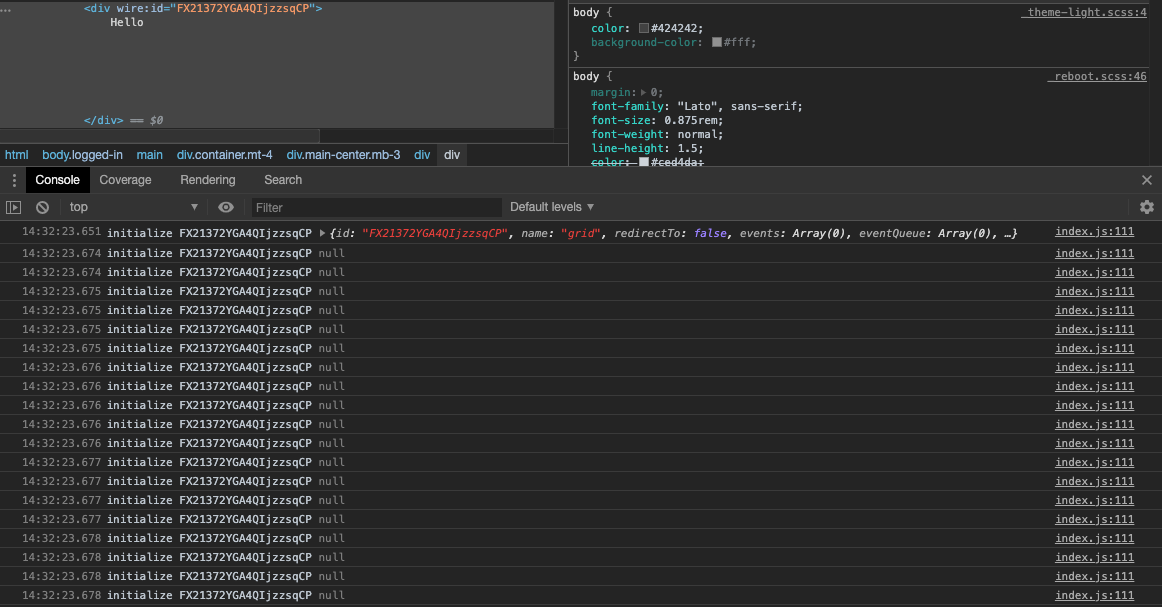
Subsequent instantiations will cause said error as the attribute is not there anymore, obviously.
Question is why the constructor is called that often ~, what removing the attribute was added for. Going by the commit date that error should've come up much earlier; something in the lifecycle of components changed recently?~
Not too deep into the code yet, just started using it yesterday. (Love livewire btw - such a treat to work with)
 luchaos
on 22 Apr 2020
luchaos
on 22 Apr 2020
Just had this issue come up after adding a Livewire component within another.
I'm using the Livewire routing and then a sub component in that view, adding a random key (as suggested) prevents the error but would like to not have to.
I'm not using debugbar so the comment above doesn't fix all issues.
 wearetoggle
on 28 Apr 2020
wearetoggle
on 28 Apr 2020
@togglebroadband @heruputra are you sure that the key is unique ?
also if possible @togglebroadband can you put your code
 amaelftah
on 28 Apr 2020
amaelftah
on 28 Apr 2020
Is there a temporary solution to this issue until it gets resolved?
 JunaidQadirB
on 6 May 2020
JunaidQadirB
on 6 May 2020
Just stumbled into this problem. Got it solved putting :keys to every nested component in a loop. Hopefully it helps!
 asantibanez
on 8 May 2020
asantibanez
on 8 May 2020
Adding the key solves the problem for me:
@livewire("path.to.component.{$model->id}", [], key($model->id))
 indigoram89
on 14 May 2020
indigoram89
on 14 May 2020
Agreed @indigoram89
It gets solved also by adding a key to every component. Not only to components rendered in loops. 👍
asantibanez
on 17 May 2020
I have encountered this this error when having a laravel component inside livewire component template that had a livewire component as a slot. Adding key didn't solve it for me.
 bomshteyn
on 28 May 2020
bomshteyn
on 28 May 2020
Got the same error when using nested components and not using Turbolinks.
Fixed the issue by changing the nested component's key to a random one.
Before
@foreach($contacts as $key => $contact)
    @livewire('child-component', [], key($contact->id))
@endforeach
After
@foreach($contacts as $key => $contact)
    @livewire('child-component', [], key(rand() * $contact->id))
@endforeach
And still don't know why this tweak works 🤔
After a long search, This one works for me.
 jdtanjuaquio
on 31 May 2020
jdtanjuaquio
on 31 May 2020
Got the same error when using nested components and not using Turbolinks.
Fixed the issue by changing the nested component's key to a random one.
Before
@foreach($contacts as $key => $contact)
    @livewire('child-component', [], key($contact->id))
@endforeach
After
@foreach($contacts as $key => $contact)
    @livewire('child-component', [], key(rand() * $contact->id))
@endforeach
And still don't know why this tweak works thinking
This works perfectly.
 trollfalgar
on 1 Jun 2020
trollfalgar
on 1 Jun 2020
Thank @heruputra
According to this document
Similar to VueJs, if you render a component inside a loop, Livewire has no way of keeping track of which one is which. To remedy this, livewire offers a special "key" syntax:
<div>
@foreach ($users as $user)
@livewire('user-profile', ['user' => $user], key($user->id))
@endforeach
</div>
 cosmospham
on 1 Jun 2020
cosmospham
on 1 Jun 2020
Any new about this problem. I don't have a loop components, only nestes components, putting a fixed key is not solved problem.
 dgironella
on 4 Jun 2020
dgironella
on 4 Jun 2020
Any new about this problem. I don't have a loop components, only nestes components, putting a fixed key is not solved problem.
Have you ever tried key(rand().'name...')?
cosmospham
on 4 Jun 2020
Any new about this problem. I don't have a loop components, only nestes components, putting a fixed key is not solved problem.
Have you ever tried
key(rand().'name...')?
Now work, with key(rand()) only not, very stranger....
dgironella
on 4 Jun 2020
Got the same error when using nested components and not using Turbolinks.
Fixed the issue by changing the nested component's key to a random one.
Before
@foreach($contacts as $key => $contact)
    @livewire('child-component', [], key($contact->id))
@endforeach
After
@foreach($contacts as $key => $contact)
    @livewire('child-component', [], key(rand() * $contact->id))
@endforeach
And still don't know why this tweak works
That's not a good solution at all.
Key should help Livewire to find elements in the DOM.
A better solution would be to combine the component name and the primary key.
@foreach($contacts as $key => $contact)
@livewire('child-component', [], key('child-component' . $contact->id))
@endforeach
I will open a PR to automagic prefix the key with the component name if the key is numeric.
 nuernbergerA
on 4 Jun 2020
nuernbergerA
on 4 Jun 2020
Got the same error when using nested components and not using Turbolinks.
Fixed the issue by changing the nested component's key to a random one.
Before@foreach($contacts as $key => $contact) @livewire('child-component', [], key($contact->id)) @endforeachAfter
@foreach($contacts as $key => $contact) @livewire('child-component', [], key(rand() * $contact->id)) @endforeachAnd still don't know why this tweak works
That's not a good solution at all.
Key should help Livewire to find elements in the DOM.
A better solution would be to combine the component name and the primary key.
@foreach($contacts as $key => $contact) @livewire('child-component', [], key('child-component' . $contact->id)) @endforeachI will open a PR to automagic prefix the key with the component name if the key is numeric.
I don't think so. I have tried with fixed keys and it didn't work, but rand() worked.
cosmospham
on 5 Jun 2020
Well if you use
@foreach($contacts as $key => $contact)
@livewire('child-component', [], key(rand()))
@endforeach
It will behave the same as:
@foreach($contacts as $key => $contact)
@livewire('child-component')
@endforeach
Because livewire will add a random string as key if there is no key defined.
nuernbergerA
on 5 Jun 2020
But I wonder why it does not work from the begining, when I didn't use key() function. That caused this:
index.js:19 Uncaught TypeError: Cannot read property 'data' of null
That's a good question.
Since the issue has many comments it's hard to me to catch up.
Would you mind posting detailed steps for me to reproduce?
nuernbergerA
on 5 Jun 2020
I've run into the same issue as most people here, issue persists with Turbolinks and without. I've tried to randomize the key and i've tried adding a key to call nested components. same issue across the board.
Update:
adding :key="(rand() * $model->id)" to the parent and child components solved the issue.
 taylormaguire
on 19 Jun 2020
taylormaguire
on 19 Jun 2020
In case it might help, I got the same error when including @livewireScripts twice by mistake.
(I'm not using Turbolinks nor loops)
 mercuryseries
on 20 Jun 2020
mercuryseries
on 20 Jun 2020
Just ran into this issue as well (also for nested components)
 oliverbj
on 22 Jun 2020
oliverbj
on 22 Jun 2020
Can confirm I had this issue for a while - turns out it was triggered when content with a duplicate key appeared on the page twice (eg when searching, then subsequently searching again yielding some of the same results as search 1)
Fixed by using the rand() * $result->id method mentioned above
devoided
on 22 Jun 2020
First, I'll say that sometimes when you see this error, it's because you are loading @livewireScripts twice.
I added a console.warn to Livewire to help people with this case.
It appears there's something deeper here with nested components.
I would love for someone to post an explicit replication of this error that I can copy and past requiring no domain code. Otherwise, it'll be very hard for me to debug.
Thanks!
calebporzio
on 24 Jun 2020
i can give you access to my repo and willing to do a quick video or tuple call if you want too
08:26:49.529 Uncaught (in promise) TypeError: can't access property "data", initialData is null
Component index.js:20
onNodeAdded index.js:342
callHook morphdom.js:35
handleNodeAdded morphdom.js:140
morphEl morphdom.js:407
morphEl morphdom.js:219
morphEl morphdom.js:332
morphEl morphdom.js:219
morphdomFactory morphdom.js:463
handleMorph index.js:252
value index.js:225
value index.js:170
value index.js:146
value index.js:30
onMessage index.js:9
sendMessage http.js:32
promise callbacksendMessage/< http.js:27
promise callbacksendMessage http.js:25
value index.js:41
value index.js:130
later debounce.js:50
setTimeout handlerdebounce/< debounce.js:54
value index.js:116
emit Store.js:53
emit Store.js:52
value index.js:187
value index.js:177
value index.js:146
value index.js:30
onMessage index.js:9
sendMessage http.js:32
promise callbacksendMessage/< http.js:27
promise callbacksendMessage http.js:25
value index.js:41
value index.js:130
later debounce.js:50
setTimeout handlerdebounce/< debounce.js:54
value index.js:116
debouncedHandler node_initializer.js:179
value index.js:421
debouncedHandler node_initializer.js:141
value dom_element.js:183
attachListener node_initializer.js:193
attachDomListener node_initializer.js:123
initialize node_initializer.js:25
initialize node_initializer.js:9
value index.js:71
value index.js:369
walk walk.js:5
walk walk.js:10
walk walk.js:10
value index.js:356
value index.js:69
Component index.js:40
value index.js:75
value index.js:364
walk walk.js:5
walk walk.js:10
walk walk.js:10
value index.js:356
value index.js:69
Component index.js:40
value index.js:73
value index.js:71
value index.js:63
dispatch turbolinks.js:5
notifyApplicationAfterPageLoad turbolinks.js:6
visitCompleted turbolinks.js:6
index.js:20:69
taylormaguire
on 24 Jun 2020
Also getting the same issue - it's definitely something with nested components, with key and without, I will work on reproducing it.
 notomato
on 25 Jun 2020
notomato
on 25 Jun 2020
To reproduce clone https://github.com/notomato/livewire-issue-659, visit /test and click the button to add children.
notomato
on 25 Jun 2020
Thanks @notomato for putting an example together. I am able to reproduce the bug.
However, I was able to fix it with the key attribute.
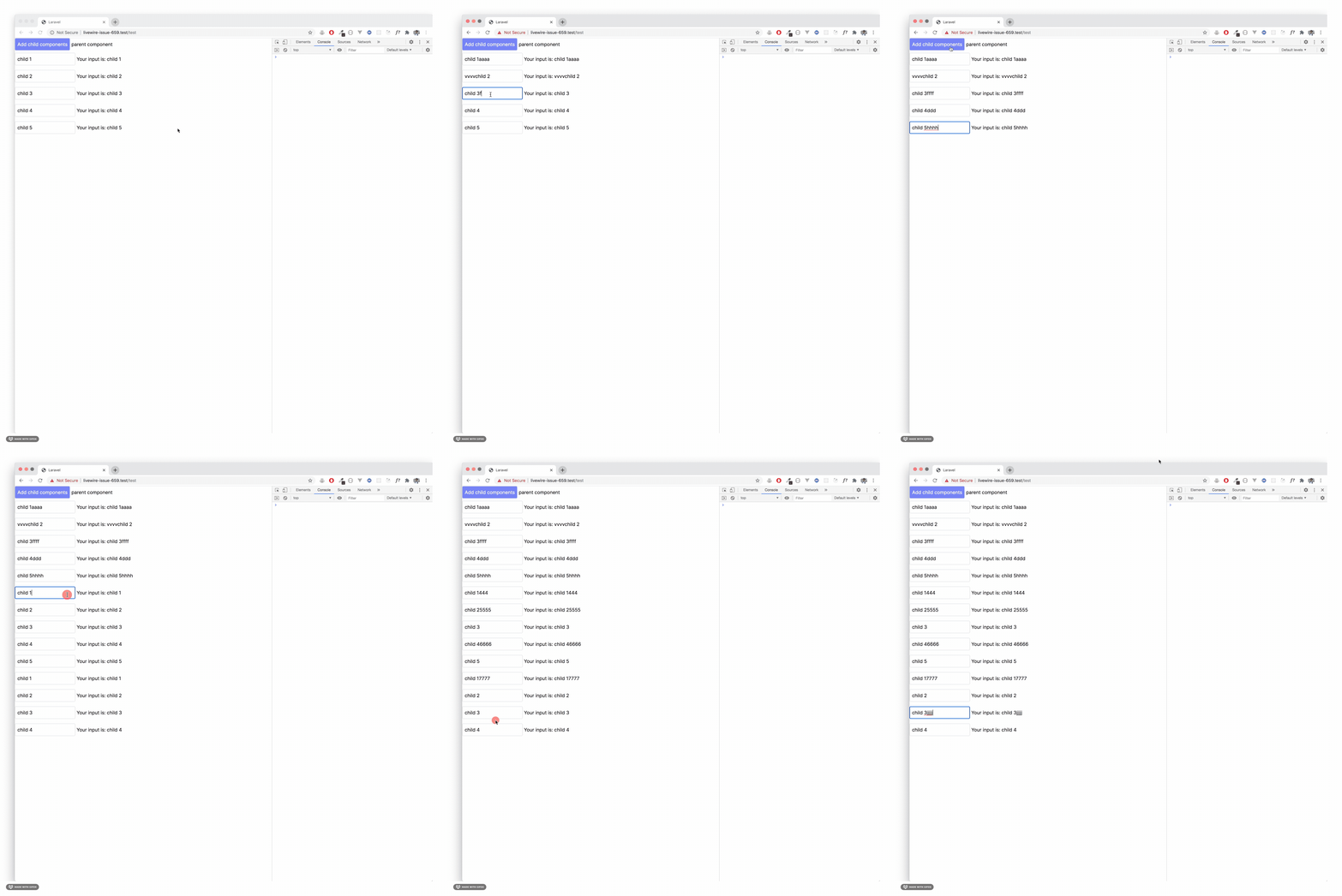
(added some styling also 😎)
I added an unique id to each rendered child component

In the parent component the id is set using and uuid4 on the loop

I updated the child layout to be show wire:model is also working

Hope this helps.
asantibanez
on 25 Jun 2020
Hello everyone! Want to share my two cents on how to fix these kind of bugs. I've had some eureka moments when working with Livewire. It's not a vast list and it's narrowed down to my experience with the framework.
- Always put a
keyattribute when rendering components in a loop. Not:keyorwire:key. Justkey. This key must be unique among the rendered components.
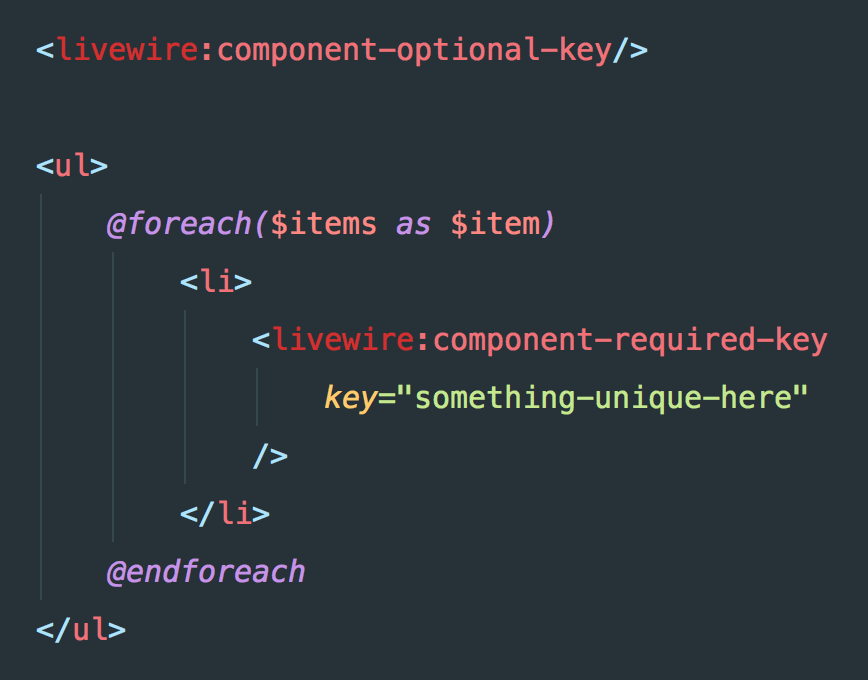
- Nested components by themselves do not need a
key. However, they can break when rendering next to other dynamics parts of the view. For example
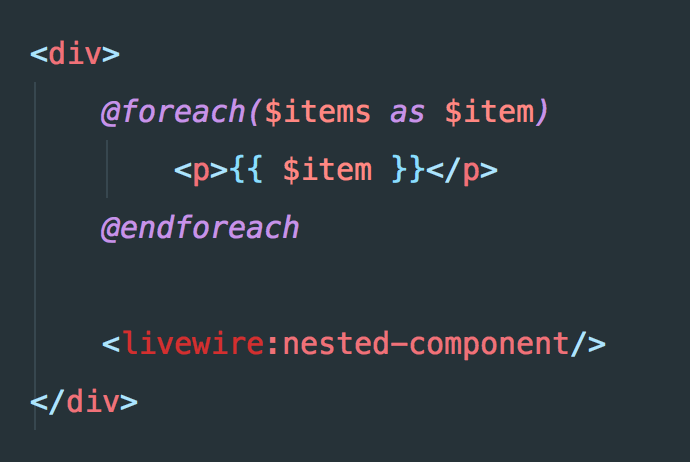
This will break the nested component when the foreach renders a new element. My wild guess is that Livewire tracks the position in the DOM where the component is located. Let's say we have 10 items rendered, then our NestedComponent will be on the 11th position. When rendering 11 items, our component goes to the 12th position and it breaks. To avoid this, add a wrapper element to every dynamic sections of your view: foreach, if, etc.
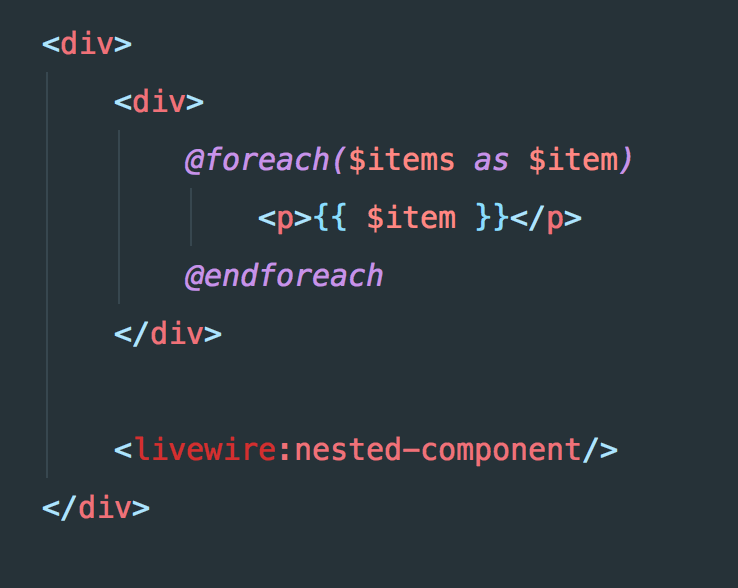
This time, the Nested component will be always in the 2nd position, no matter how many the items the loop renders.
Hope this helps!
asantibanez
on 25 Jun 2020
Andres, thanks for sharing, this has been my experience as well, however in my case I’ve also had to add a key to both the parent and child components, in and this case both keys had to be randomized.
From: Andrés Santibáñez notifications@github.com
Reply-To: livewire/livewire reply@reply.github.com
Date: Thursday, June 25, 2020 at 10:49 AM
To: livewire/livewire livewire@noreply.github.com
Cc: Taylor Maguire taylor@sequelevents.com, Comment comment@noreply.github.com
Subject: Re: [livewire/livewire] initial-data attribute not found in component after updating to 1.0.1 (#659)
Hello everyone! Want to share my two cents on how to fix these kind of bugs. I've had some eureka moments when working with Livewire. It's not a vast list and it's narrowed down to my experience with the framework.
- Always put a key attribute when rendering components in a loop. Not :key or wire:key. Just key. This key must be unique among the rendered components.
[image]https://user-images.githubusercontent.com/5126648/85772175-34079e00-b6e2-11ea-9ef5-b6afaa73b61a.png
- Nested components by themselves do not need a key. However, they can break when rendering next to other dynamics parts of the view. For example
[image]https://user-images.githubusercontent.com/5126648/85771574-a926a380-b6e1-11ea-9424-5d78c60d2017.png
This will break the nested component when the foreach renders a new element. My wild guess is that Livewire tracks the position in the DOM where the component is located. Let's say we have 10 items rendered, then our NestedComponent will be on the 11th position. When rendering 11 items, our component goes to the 12th position and it breaks. To avoid this, add a wrapper element to every dynamic sections of your view: foreach, if, etc.
[image]https://user-images.githubusercontent.com/5126648/85771872-f0ad2f80-b6e1-11ea-912d-42fd972bae66.png
This time, the Nested component will be always in the 2nd position, no matter how many the items the loop renders.
Hope this helps!
—
You are receiving this because you commented.
Reply to this email directly, view it on GitHubhttps://github.com/livewire/livewire/issues/659#issuecomment-649728108, or unsubscribehttps://github.com/notifications/unsubscribe-auth/AELEMKKUCDCHTPC35RGASPLRYOE3DANCNFSM4K64RHOQ.
taylormaguire
on 25 Jun 2020
Thank you! @asantibanez
 jantinnerezo
on 25 Jun 2020
jantinnerezo
on 25 Jun 2020
Thanks @asantibanez - can confirm adding "key" attribute to child component resolves this (and not wire:key). Not sure why though, didn't see mention of a key attribute anywhere in docs.
notomato
on 26 Jun 2020
@notomato you can find it here in the docs. bottom of the page
taylormaguire
on 26 Jun 2020
D’oh. Thanks.
GitHub notifications@github.com wrote:
“@notomato you can find it here in the docs. bottom of the page
https://laravel-livewire.com/docs/nesting-components”
—
You are receiving this because you were mentioned.
Reply to this email directly, view it on GitHub, or unsubscribe.
notomato
on 27 Jun 2020
I have the same issue and I've created a repository to reproduce it here https://github.com/thijsvdanker/livewire-initial-data-bug
Some essential ingredients to that example are:
- Vuejs is loaded
- there are some nested components (blade view -> livewire component -> blade component -> livewire component)
- !! there is no text above the blade component :/
Number 3 is what surprised me the most.
This works (no error)
<div>
Some text above regular component
<x-regular-component />
<button wire:click="next" type="button">Next</button>
</div>
And this doesn't (initial data error)
<div>
<x-regular-component />
<button wire:click="next" type="button">Next</button>
</div>
I hope this helps a little.
 thijsvdanker
on 8 Jul 2020
thijsvdanker
on 8 Jul 2020
My issue (above) was resolved by adding https://github.com/livewire/vue.
(I've updated my repository with the fixed version in this branch)
For my personal project I also needed to add window.vue = Vue in app.js as described here
thijsvdanker
on 10 Jul 2020
I just ran into this, using nested components inside a foreach:
<livewire:list wire.poll>
@foreach($items as $item)
<livewire:item></livewire:item>
@endforeach
</livewire:list>
The error appears when the list is updated from the wire.poll
Adding a unique key to the nested component did the trick for me:
<livewire:list wire.poll>
@foreach($items as $item)
<livewire:item :key="$item->id"></livewire:item>
@endforeach
</livewire:list>
Adding the key attribute is not a big deal, although it is not a very obvious solution; maybe just adding a more verbose error message could help.
 jeffochoa
on 17 Jul 2020
jeffochoa
on 17 Jul 2020
Had an issue "initialData is null". Similar setup:
foreach(...) {
<livewire:parent>
foreach(...) {
<livewire:child />
}
</livewire:parent>
}
At first I added :keys="$model->id" to parent and child. Same issue.
Then I prefixed the model name to keys :keys="model-name.$model->id"
Then I realized I really don't know how this syntax works.
Finally this actual code snippet worked <livewire:component-name :mount-parameter-name="$model" key="model-name.{{ $model->id }}" />
I added these keys to each component, nested or not. So far everything seems to work. Notice curly braces and lack of colon : before keys.
 ardyn
on 31 Jul 2020
ardyn
on 31 Jul 2020
I have this bug caused by lib laravel debugbar.
Fixed changing options.views.data = false at /config/debugbar.php
options' => [
...
'views' => [
'data' => false, // change to false with livewire
],'
 fontenele
on 14 Aug 2020
fontenele
on 14 Aug 2020
Closing due to inactivity
calebporzio
on 17 Sep 2020
Got the same error when using nested components and not using Turbolinks.
Fixed the issue by changing the nested component's key to a random one.
Before
@foreach($contacts as $key => $contact)
    @livewire('child-component', [], key($contact->id))
@endforeach
After
@foreach($contacts as $key => $contact)
    @livewire('child-component', [], key(rand() * $contact->id))
@endforeach
And still don't know why this tweak works 🤔
Yeah this works.
 jearsonbgomez
on 18 Sep 2020
jearsonbgomez
on 18 Sep 2020
Related issues
 mokhosh
·
3Comments
mokhosh
·
3Comments
 cloudstudio
·
3Comments
cloudstudio
·
3Comments
 austenc
·
3Comments
austenc
·
3Comments
 pmartelletti
·
3Comments
pmartelletti
·
3Comments
 connecteev
·
4Comments
connecteev
·
4Comments
Most helpful comment
Got the same error when using nested components and not using Turbolinks.
Fixed the issue by changing the nested component's key to a random one.
Before
After
And still don't know why this tweak works 🤔