Lit-element: Input not updating on page while having its value set, can be seen in source.
Hi,
lit-element: 0.5.2
webcomponentsjs: 2.0.0
I have a 'product-page.js' element, showing a picture and an input field for leaving a note. My issue is, after typing into the input, say on the first page when navigating to the second (basically just feeding the element with the next product's data coming form the store) the value I set via binding doesn't show up inside the input, it keeps showing the note entered on the previous page. But when I check the source, its value attribute is set and it has the string I have set, but it doesn't get reflected on the UI.
I have tried to set the value both as attribute and property, no matter, the value doesn't show up on the UI. In turn, the image is ok, its rendered as expected.
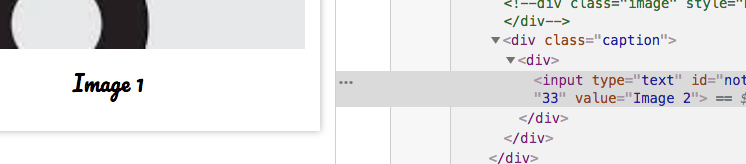
the element's source:
....
_render({print}) {
  return html`
  <div class="container">
    <div class="frame">
      <div class="image" style$="${print ? 'background-image: url(' + window.URL.createObjectURL(print.src) + ');' : ''}" alt=""/></div>
      <div class="caption">
        <div>
          <input type="text" value$="${print && print.settings ? print.settings.note : ''}" on-keyup="${(e) => this.saveNote(e)}" placeholder="Note here..." maxlength="33">
        </div>
      </div>
    </div>
    `;}
...

static get properties() { return {
  print: Object
}}

_stateChanged(state) {
  this.print = currentItemSelector(state);
}

saveNote(e){ // method for testing
  let settings = {note: e.target.value};
  this.print.settings = settings;

  store.dispatch(updatePrint(this.print));
}
 vedtam
All 12 comments
@vedtam
Your problem is the immutability of properties, I think. It should be:
this.print = {...this.print, settings};
Or something like that. You have to make sure to override the object and not just changing attributes, to propagate your changes.
Possibly duplicate #69
 evayde
on 13 Aug 2018
evayde
on 13 Aug 2018
Lit-Element does a strict comparison by default, so if the print object doesn't change, then there will be no re-render. With the new 0.6 version (dev release) you can supply your own shouldInvalidate method that will check whether there should be a repaint. But as the object is still the same, you need to call invalidate() right after this.paint.settings.
It might be easier with a separate this.printSettings property.
 kenchris
on 28 Aug 2018
kenchris
on 28 Aug 2018
Please see https://github.com/Polymer/lit-element/issues/107#issuecomment-416376381 for more information about dealing with mutable data.
 sorvell
on 28 Aug 2018
sorvell
on 28 Aug 2018
I think there's another problem with input.value update - if I manually change the value within the input, it will NO LONGER get its value changed to the bound value="${val}" even thought the valproperty does change properly and does get updated in other places such as <b>${val}</b> which is showing updated value correctly.
I'm guessing that the input.value binding is somehow being blocked after manually changing its value.
If I don't touch the input (don't edit it) then it does reflect all value changes properly.
 pitus
on 4 Nov 2018
pitus
on 4 Nov 2018
@pitus This is because HTML doesn't map the value attribute in an <input/> to the value property. If you want to force the visible value of the input from state (which might not always be the correct thing to do), you can use <input .value="${val}" /> to set the property directly from your template.
 Westbrook
on 5 Nov 2018
Westbrook
on 5 Nov 2018
@Westbrook thanks a lot for that hint/info ... I haven't thought of that and it does work as expected when setting the value property vs attribute. Too bad the default lit-element spec changed to set attributes rather than properties as most times we probably prefer setting properties than attributes.
pitus
on 18 Jan 2019
@pitus , @Westbrook I noticed a problem with this approach. Let's say the input's value is bound to property val. If val is changed and set with a new value, the input element gets updated as expected. If val is set to the same value as before, the update does not flow through to the input element. So let's say val='xxx' and I set val='yyy', the input will get updated. Now if I change the text on the input to yyyzzz, and again set val='yyy', the element is not updated - the change is ignored. Now if I set val='xxx', the input will get updated. So somewhere, it is checking if the value has changed, and it is not using the change detection function of the property, even if I provide one.
 manjukas
on 28 Feb 2019
manjukas
on 28 Feb 2019
@manjukas the functionality you have outlined is as expected. The renderer effects change on the render DOM when the properties of your element change, if the property that you are binding into the input does't change that value won't be applied to the input on that render pass, this helps to maintain the expected UX of the user. Where new data to be pushed into an element with property bound input elements while the user was typing, then their input value would get flushed every time as well.
If you have a specific use case that you are trying to support with this, I'd be happy to see if I can share code to support, but in the context that you want the elements property to override the property input by the user, you'd need to take advantage of the events published by the input. Something like the following would give you a solid location in your code to confirm the value of the input.
  handleChange(e) {
    // do sanitization work to maybe change the input value
    // and re-apply it via this.initialValue = 'something else';

    // maybe there's a little validation you'd like to do early

    // or enforce the initial value.
    e.target.value = this.initialValue;
  }
  render() {
    return html`
      <input .value="${this.initialValue}" @change="${this.handleChange}"></input>
    `;
  }
Thanks @Westbrook the scenario is a form. So we initially load the object to the form, and the input elements in the form gets update to display the correct values. Now the user is allowed to modify the values. If the user decides that they want to reset the form to the original values, they can click a Reset button. Now what will happen is that the values the user has modified are not reset to the original, because although we set the bound property, the input element is not updated. To me it seems a bit inconsistent, because if the bound property is set to a new value, the input element does get updated. Why wouldn't it used the change checking function provided with the property declaration?
manjukas
on 28 Feb 2019
Why wouldn't it used the change checking function provided with the property declaration?
It's important to realize that lit-html (the renderer for LitElement) has no context as to the element that it is binding data to, only the part that is being bound. So it can't compare this.inputValue to this.shadowRoot.querySelector('input').value because it knows nothing about the second value. It can say, when this part was given this.inputValue before it was value x and whenever it receives value x again, it can skip doing any further work on that part.
In order to get the experience you're talking about, you'd need to save the initial values of your form, bind the values in the input (as dispatched by the change event) back into the element, and then apply the initial values a second time when the "Refresh" button is used. There are a number of different ways that this might happen, a simpler one might look like:
  resetValue() {
    this.inputValue = this.initialInputValue;
  }
  handleChange(e) {
    this.inputValue = e.target.value;
  }
  render() {
    return html`
      <input .value="${this.inputValue}" @change="${this.handleChange}"></input>
      <button @click="${this.resetValue}">Reset</button>
    `;
  }
  updated(changedProperties) {
    if (changedProperties.has('inputValue') && changedProperties.get('inputValue') === undefined) {
      this.initialInputValue = this.inputValue;
    }
  }
https://stackblitz.com/edit/y5feoh?file=my-element.js
However, there are much better/more thorough ones that would depend on the broader approach that you take to data management across you application.
Good luck, have fun!
Westbrook
on 28 Feb 2019
Thanks @Westbrook , appreciate your suggestion.
manjukas
on 28 Feb 2019
I'm not sure if I'm too late. I had the same problem and I solved with this:
myValueChanged (event) {
  const element = event.target;
  let myNewVal = element.value;
  // do your custom processing or validation...

  if (this.myVal === myNewVal  && this.myVal !== element.value){
    element.value = this.myVal;
  } else {
    this.myVal = myNewVal;
  }
}

render () {
  return html`<input .value="${this.myVal}" @change="${this.myValueChanged}"`;
}
Hope it helps.
 alvardsoler
on 14 Mar 2019
alvardsoler
on 14 Mar 2019
Related issues
 kurukururuu
·
3Comments
kurukururuu
·
3Comments
 PotterDai
·
4Comments
PotterDai
·
4Comments
 YegorUdovchenko
·
3Comments
YegorUdovchenko
·
3Comments
 zzzgit
·
4Comments
zzzgit
·
4Comments
 Leon-Alexey
·
5Comments
Leon-Alexey
·
5Comments
Most helpful comment
@pitus This is because HTML doesn't map the
valueattribute in an<input/>to thevalueproperty. If you want to force the visible value of the input from state (which might not always be the correct thing to do), you can use<input .value="${val}" />to set the property directly from your template.