Lit-element: Arrays causing child element's render to trigger twice
Description
A child element's render function triggers twice. First with an undefined value then again with the correct value. The value passed to the child from the parent is sourced from an array being modified.
Live Demo
https://stackblitz.com/edit/lit-element-undefined-render-fmsei3~~
https://stackblitz.com/edit/lit-element-undefined-render-v2
Steps to Reproduce
As in the live demo.
Expected Results
Render once with the correct value.
Actual Results
Browser console :
Render child undefined
Render child Cookie#0
Browsers Affected
- [x] Chrome
- [x] Firefox
- [ ] Edge
- [ ] Safari 11
- [ ] Safari 10
- [ ] IE 11
Versions
- lit-element: v0.5.2
- webcomponents: v2.0.2
 Tanbouz
All 5 comments
I don't understand what the problem is

${html`<child-element name="${cookieJar[0]}"></child-element>`} renders Secret Cookie
Then you render Secret Cookie again as part of the map as well as the Cookie#...
Change the code to only use the map and you only see Secret Cookie once:

 kenchris
on 28 Aug 2018
kenchris
on 28 Aug 2018
Sorry, now that I have looked at it again. I think the issue title and description are both confusing and incorrect.
I removed "Secret Cookie" and ${html`<child-element name="${cookieJar[0]}"></child-element>`}
To rephrase my question/issue, why does it print Render child undefined then Render child Cookie #0 in the browser console when you click the button?
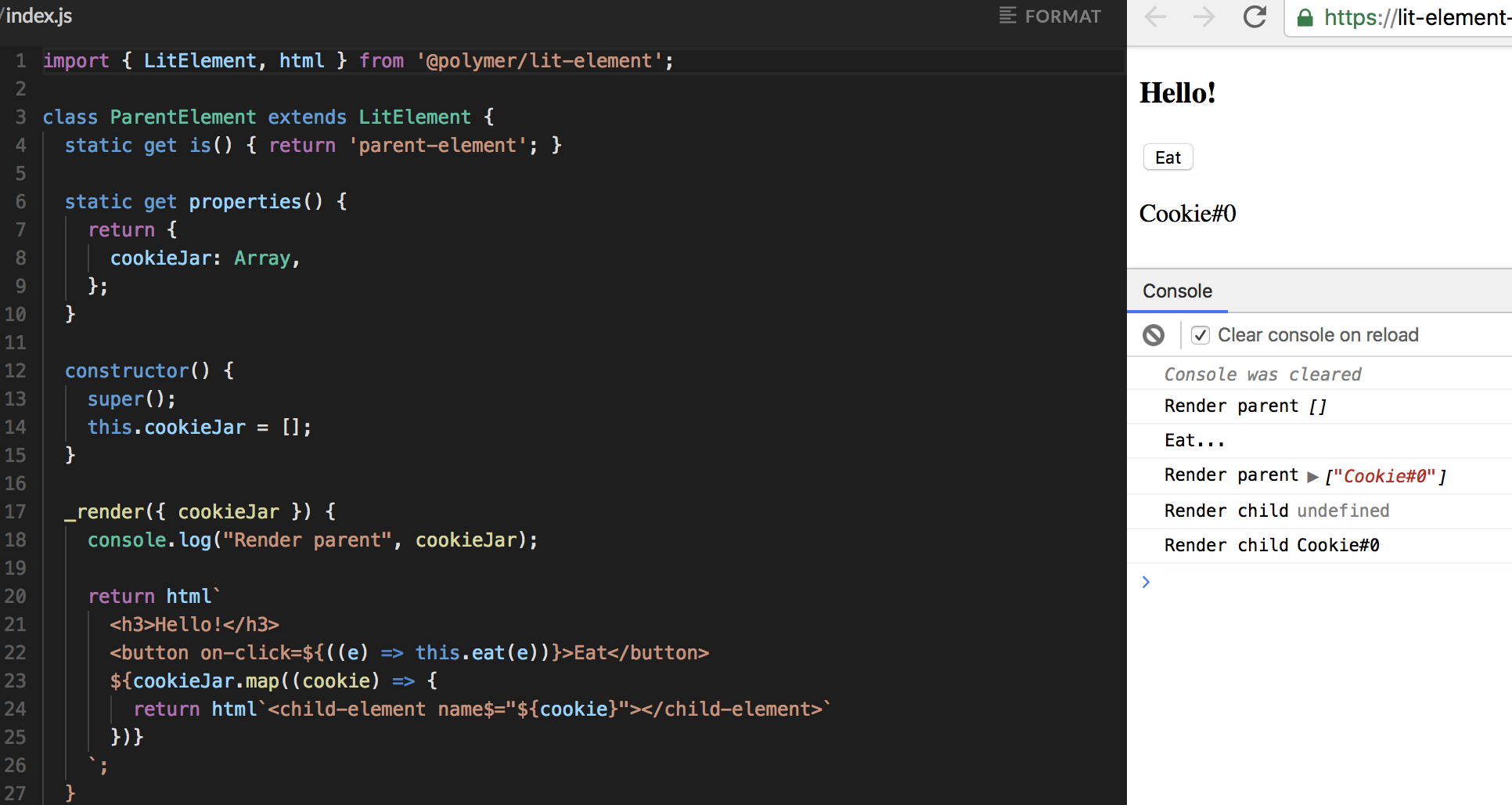
I will edit the original issue description to clarify. thank you.
Tanbouz
on 28 Aug 2018
Maybe related: https://github.com/Polymer/lit-element/issues/143 ?
It would be an issue if you end up having to add guards for undefined values when you _know_ you are only ever passing complete data to them - templates would become bloated with unnecessary checks
 CaptainCodeman
on 28 Aug 2018
CaptainCodeman
on 28 Aug 2018
This will be fixed in the forthcoming 0.6 release that's currently available as dev. The issue has to do with the way lit-html works. It creates the elements and then sets properties on them. If a custom-element processes changes synchronously upon creation (as version 0.5 did), it'll see the state before lit-html sets properties.
Note, this is exactly the same thing that would happen if a user called document.createElement and generally a good element should work in this case.
In version 0.5 LitElement processed all changes except the initial state asynchronously. For consistency, version 0.6 handles all changes asynchronously, and as a result, this issue does not occur.
Here's the updated example, now working with the dev release preview of the 0.6 release.
 sorvell
on 28 Aug 2018
sorvell
on 28 Aug 2018
This should also be addressed in lit-html. For reference, here's the issue.
sorvell
on 28 Aug 2018
Related issues
 chwzr
·
3Comments
sorvell
·
3Comments
chwzr
·
3Comments
sorvell
·
3Comments
 ghost
·
3Comments
ghost
·
3Comments
 erikkroes
·
3Comments
erikkroes
·
3Comments
 LRagji
·
5Comments
LRagji
·
5Comments
Most helpful comment
This will be fixed in the forthcoming
0.6release that's currently available asdev. The issue has to do with the waylit-htmlworks. It creates the elements and then sets properties on them. If a custom-element processes changes synchronously upon creation (as version0.5did), it'll see the state beforelit-htmlsets properties.Note, this is exactly the same thing that would happen if a user called
document.createElementand generally a good element should work in this case.In version
0.5LitElement processed all changes except the initial state asynchronously. For consistency, version0.6handles all changes asynchronously, and as a result, this issue does not occur.Here's the updated example, now working with the
devrelease preview of the0.6release.