Linuxgsm: steamcmd not in repo for Ubuntu 14.04
Issues raised here are ONLY for:
- LinuxGSM bugs.
- Feature suggestions.
User Story
I tried installing a linux server for classic CS1.6 and it says SteamCMD is still missing
During the installation i was missing jq, netcat, and steamcmd shown in red under
Checking Dependencies
=================================
I cancelled the server installation and installed these manually, however steamcmd was not located
even I put it in LinuxGSM/steamcmd. It just shows that there is no such dependency present:
Server:/var/Volume00/LinuxGSM$ sudo apt-get install steamcmd
[sudo] password for XXXX:
Reading package lists... Done
Building dependency tree
Reading state information... Done
E: Unable to locate package steamcmd
Basic info
- Distro: [Ubuntu 14.04]
- Game: [Counter strike 1.6]
- LinuxGSM version:
Server:/var/Volume00/LinuxGSM$ git  log -1 --pretty
commit 9e5377086bbbb0bc065c5a8990b25c3d472c1d20
Merge: 3ae32af 0257457
Author: Daniel Gibbs <[email protected]>
Date:   Tue Mar 24 22:49:08 2020 +0000

    Merge branch 'hotfix/v20.1.5'
Further Information
The server manager better use curl -sqL "https://steamcdn-a.akamaihd.net/client/installer/steamcmd_linux.tar.gz" | tar zxvf -
To Reproduce
Steps to reproduce the behaviour:
- Clone
LinuxGSMin a folder - Execute
Server:/var/Volume00/LinuxGSM$ ./linuxgsm.sh install csserver - Select CS1.6
- Executable created
./csserver - Execute
Server:/var/Volume00/LinuxGSM$ ./csserver install - Installed
SteamCMDis not present - Start the server...
Server:/var/Volume00/LinuxGSM$ ./csserver start
Warning! Missing dependencies: steamcmd
Information! Automatically installing missing dependencies.
Expected behaviour
When SteamCMD is curl-ed and extracted in the steamcmd folder to pass its dependency as green.
 dvdvideo1234
All 10 comments
Use a newer Ubuntu like 18.04 ;)
 gOOvER
on 12 Apr 2020
gOOvER
on 12 Apr 2020
UBUNTU 14.04 is since 1 year EOL ;) Use a newer Version and try again
No, because ;)
- No need to change the distro version with an update when it is already working on
prod( the server also runs other remote service applications ) - The board is designed to work with Ubuntu 12.
- This is remote machine and maintenance requires me going out during coronavirus epidemic
- Any major update has potentially catastrophic outcome which will require me going out.
- Valve have already defined the way of installing
steamcmdusing curl and tar commands. - There is really no point of invoking
sudo apt-get install steamcmdas they do not support only this way of installation. - To me
LinuxGSMmust check thesteamcmdfolder if there is available installation whensudo apt-get install steamcmdis not available and being used automatically - There must always be a manual interaction available for installing dependencies
dvdvideo1234
on 12 Apr 2020
I can do the manual steps of sudo apt-get install steamcmd, will evaluate to copying this into /etc, but I do not think this is the point here as it beter use the local installation /steamcmd folder.
dvdvideo1234
on 12 Apr 2020
- You shouldn't be using unsupported distros because of security risks. Plus if Canonical isn't supporting it then I'm not sure why I should.
- It is unlikely that you will have an issue upgrading because of a motherboard.
- Do you not have some sort of KVM access? Its pretty standard for remote servers.
- same as above
- I wrote most of the instructions on the SteamCMD wiki page.
- I have decided to start using the packages if they are available.
- If the server is not Ubuntu or Debian then it will use curl.
I had waited several years before using the steamcmd packages to ensure that the package we're available on all supported Ubuntu versions before deciding to use them. I did not anticipate people still using unsupported distros (14.04 has been out of support for a year at this point) especially since game servers regularly use the latest software.
What I will do is add a bypass for 14.04 so it will not look for the steamcmd package and instead, it will use the curl version. It will be ready for release 20.2.0. I do however highly recommend you upgrade at the next available opportunity.
 dgibbs64
on 12 Apr 2020
dgibbs64
on 12 Apr 2020
Thank you!
It passes now !
dvdvideo1234
on 15 Apr 2020
It shouldn't as I haven't released the update to the master branch yet 😬
dgibbs64
on 15 Apr 2020
It shouldn't as I haven't released the update to the master branch yet
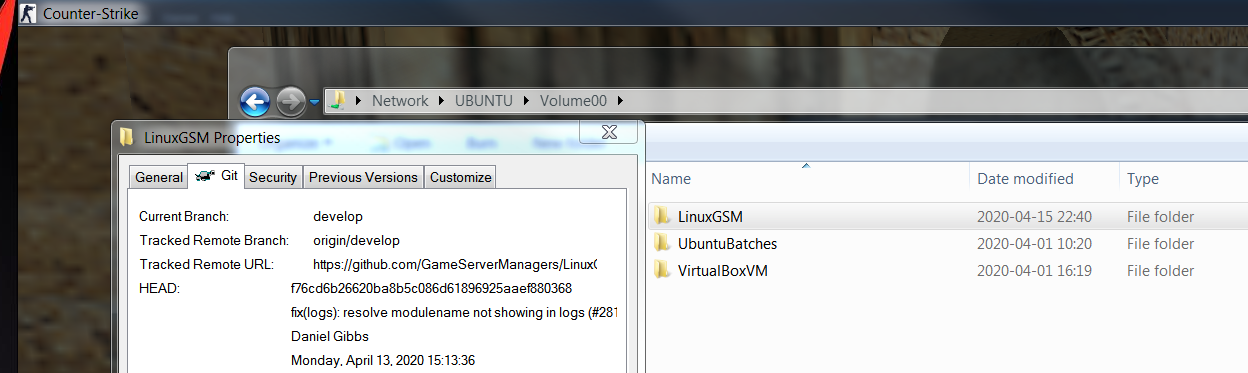
Your change persist here which is made in the develop branch :) I switched my repo to the DEV branch an voila ;) it works. Thank you very much ;) You can close the issue if you like ;)
dvdvideo1234
on 15 Apr 2020
Yes, I will likely upgrade it to Ubuntu 18.04, will just wait for the corona virus to pass out. :)
dvdvideo1234
on 15 Apr 2020
@dgibbs64 @gOOvER
I wonder though. Is it better for ${distroversion} to compare to some known threshold rather than 14.04 like ...
distroversion="14.04"

maj=$(echo "$distroversion" | grep -oE "^[+-]?[0-9]+")
min=$(echo "$distroversion" | grep -oE "[0-9]+$")

echo "$min" # prints 04
echo "$maj" # prints 14
And later compare minor/major as integers with if -lt
Is there any way for the Steam and .steam folders to be created in /var/Volume00/LinuxGSM$ instead of the current user home foder ?
The thing is that Volume00 mount point is a dedicated place for that purpose.
dvdvideo1234
on 16 Apr 2020
@dvdvideo1234 that probably is a better way. However, in this case, I did the quick way because of limited time and limited use case for this issue.
Secondly, steamcmd will always install itself in the ${HOME} directory no matter where steamcmd is downloaded. A symlobic will probably work
dgibbs64
on 16 Apr 2020
Related issues
 BlackYuzia
·
21Comments
BlackYuzia
·
21Comments
 jhg21
·
20Comments
jhg21
·
20Comments
 ToeiRei
·
23Comments
ToeiRei
·
23Comments
 UltimateByte
·
26Comments
UltimateByte
·
26Comments
 DasRene
·
61Comments
DasRene
·
61Comments
Most helpful comment
I had waited several years before using the steamcmd packages to ensure that the package we're available on all supported Ubuntu versions before deciding to use them. I did not anticipate people still using unsupported distros (14.04 has been out of support for a year at this point) especially since game servers regularly use the latest software.
What I will do is add a bypass for 14.04 so it will not look for the steamcmd package and instead, it will use the curl version. It will be ready for release 20.2.0. I do however highly recommend you upgrade at the next available opportunity.