Linuxgsm: [BUG] Don't restart server after update (duplicate)
@borzaka
In this update I get the same bug with didn't restart servers like in this issue: #2025
Issue was closed, but I can't reopen it, so I create this one...
Scripts logs:
Log with bug:
csgoserver-script.log
Log without bug:
csgoserver-script.log
I can give more logs with the same trouble after today update and without it.
Just say what logs do u need.
 BlackYuzia
All 15 comments
Issue-Label Bot is automatically applying the label type: bug to this issue, with a confidence of 0.99. Please mark this comment with :thumbsup: or :thumbsdown: to give our bot feedback!
Links: app homepage, dashboard and code for this bot.
![issue-label-bot[bot] picture](https://avatars2.githubusercontent.com/in/27079?v=4&s=40) issue-label-bot[bot]
on 7 Jan 2020
issue-label-bot[bot]
on 7 Jan 2020
Can you show us your cronjobs? My new guess is that you are running a job at every 5 to 10 minutes, and the update is not able to finish during this time period and therefore the break.
BTW, you should probably use https://github.com/GameServerManagers/LinuxGSM-Support for support, or the Discord channel for asking for help.
GitHub
LinuxGSM Support Forum for general game server issues - GameServerManagers/LinuxGSM-Support
 borzaka
on 7 Jan 2020
borzaka
on 7 Jan 2020
@borzaka
Can you show us your cronjobs?

On both servers (where have and didn't have this bug) crontabs the same.
My new guess is that you are running a job at every 5 to 10 minutes, and the update is not able to finish during this time period and therefore the break.
I think what LGSM have check, if update is didn't complete. Didn't do anything. No?
BlackYuzia
on 8 Jan 2020
In my opinion, you shouldn't monitor your csgoserver in every 5 minutes. No need to. Because they are rarely crashes, and if so, they automatically restart. I haven't setup a monitor command for my community csgoservers. And they are stable.
I'am almost sure, when an update happens, a monitor command kicks in, and starts the server with an unfinished update.
LGSM didn't know that an update is happening. monitor command just sees that a server is not running and starts is.
Correct me, if I'am wrong, but I'am sure, that the 5 minute monitor is unnecessary.
borzaka
on 10 Jan 2020
@borzaka monitor should detect when an update is happening and do nothing. If not then there may be a bug
 dgibbs64
on 10 Jan 2020
dgibbs64
on 10 Jan 2020
if so, they automatically restart.
two words about "always auto restart".
Is not true. I get second time trouble, when server just freeze and don't restart.
So, how I think, monitor functin is need. But ... maybe delay should be 10 min or more...
SETUP IT TO 1 MIN
BlackYuzia
on 10 Jan 2020
In my experience when a csgoserver crashes (segmentation fault for example), it auto restarts, and sometimes crashes again :) So it can stuck in restart loops. This can be because some update broke the games 3rd party plugins. Only way to fix this is to update the plugins, or disable them
Yes, probably it can freeze too for good.
If someone interested, this is my cronjobs for a csgoserver:
# #Counter-Strike: Global Offensive
@reboot su - csgoserver -c '/home/csgoserver/csgoserver monitor' > /dev/null 2>&1
30 3 * * * su - csgoserver -c '/home/csgoserver/csgoserver update' > /dev/null 2>&1
0 0 * * 0 su - csgoserver -c '/home/csgoserver/csgoserver update-functions' > /dev/null 2>&1
I don't use monitor frequently, because I'am afraid that if a monitor checks my instance, it will find that it's not running and tries to start it:
- during updates
- sometimes I have slow map changes, during this 1-2 minutes my server became unresponsive
borzaka
on 11 Jan 2020
@borzaka you can't open crontab for your user or what?)
If you like executing commands as root user, you should discover optional argument -user for crontab command. https://linux.die.net/man/1/crontab or man crontab in shell.
Crontab is the program used to install, remove or list the tables used to drive the cron(8) daemon. Each user can have their own crontab, and though these ...
 CrazyHackGUT
on 11 Jan 2020
CrazyHackGUT
on 11 Jan 2020
I have multiple game modes separated into different users, so it's easier to my me to handle the cronjobs in one place.
I got this from the official docs:
https://docs.linuxgsm.com/configuration/cronjobs#real-life-multiple-servers-example
How would you change my cronjobs according to your recommendation?
borzaka
on 11 Jan 2020
@borzaka @dgibbs64 today (01/29) csgo has been update.
How we can see, do not all servers get fully update. (actualy - restart)
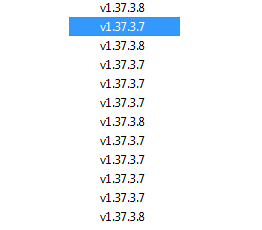
If we try check update by command: ./csgoserver u
We get message about already up to date:

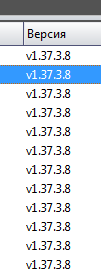
after restart server, version was changed.
This is Bug with a monitor? :thinking:
BlackYuzia
on 30 Jan 2020
After restart all servers (execute selected, he didn't update, I get different version of current build... maybe my fail) version of build was changed:
BlackYuzia
on 30 Jan 2020
@BlackYuzia looking at your logs in issue #2700 I think you may not be running the latest version of LinuxGSM for one for your servers that are having an issue. Please can you make sure your servers are fully up to date ./csgoserver update-lgsm.
dgibbs64
on 10 Mar 2020
Okey. I check (and update) all servers to latest (LGSM) vesrion (maybe again?).
Then, on update I will feedback again.
BlackYuzia
on 10 Mar 2020
@BlackYuzia thanks. I am unsure if that will help. But I am also not sure how best to resolve this problem.
It appears to me that the issue is that an update fails to complete but is reporting to LinuxGSM that it has updated. Meaning that when the update checks again it thinks the server has updated when it hasnt.
dgibbs64
on 10 Mar 2020
Work has been done on resolving issues with updating for multiple instances. This should hopefully be resolved now
dgibbs64
on 29 Jul 2020
Related issues
 Frisasky
·
3Comments
Frisasky
·
3Comments
 Audrik
·
3Comments
Audrik
·
3Comments
 metalowcom
·
3Comments
metalowcom
·
3Comments
 UltimateByte
·
4Comments
dgibbs64
·
3Comments
UltimateByte
·
4Comments
dgibbs64
·
3Comments