Linuxgsm: [BUG] SteamCMD Download Unnecessary Files
User Story
As a user, I want get update server, but I desired what LGSM (steamcmd) was download only updated files so that will require less space than now.
Basic info
- Distro: [Debian 9]
- Game: [CS:GO]
- Command: [Update]
Further Information
Sometimes (50/50), when (CSGO) server was start update.
SteamCMD download unneeded files (what didn't get updates)
For example: This is a full list of maps. 
Also, since it (SteamCMD) downloads these unnecessary files, if there is not enough space,
the servers may not update at all. This is bad.
To Reproduce
Steps to reproduce the behaviour:
- Download and setup server
- Wait update for server
- Start update for server
- Check
steamapps > downloading > 740 > csgo > mapsfolder // Sometimes, u will get unnecessary files what didn't update but downloaded.
Expected behaviour
I expected was on start update of server, LGSM (maybe this is trouble in SteamCMD, I don't sure) was download ONLY updated files. I didn't use validate option for download all files (example: maps or etc)
If u need more info - call me.
Maybe other users have the same troubles.
 BlackYuzia
All 21 comments
Issue-Label Bot is automatically applying the label type: bug to this issue, with a confidence of 0.84. Please mark this comment with :thumbsup: or :thumbsdown: to give our bot feedback!
Links: app homepage, dashboard and code for this bot.
![issue-label-bot[bot] picture](https://avatars2.githubusercontent.com/in/27079?v=4&s=40) issue-label-bot[bot]
on 27 Nov 2019
issue-label-bot[bot]
on 27 Nov 2019
I acknowledge this issue.
On my dedicated server, 5-7 gigabytes are free. I can’t update the server through ./csgoserver update because absolutely all the maps are downloaded to the folder csgoserver/serverfiles/steamapps/downloading/740
 Septembers
on 27 Nov 2019
Septembers
on 27 Nov 2019
This looks like the sort of issue that Valve need to address
 dgibbs64
on 27 Nov 2019
dgibbs64
on 27 Nov 2019
This looks like the sort of issue that Valve need to address
I hope it's not true.
Volvo and fixes... no, pls no...
BlackYuzia
on 27 Nov 2019
Looking at the build history of CS:GO the size of the server has recently increased 2.19GB 9 days ago ( #7226006)
https://steamdb.info/app/740/history/
I would suggest that this might be the cause of the issue. My understanding is that SteamCMD will first download the files it needs into the steamcmd directory then copies them across to the serverfiles directory. This would cause the size of the game server to temporarily increase. Normaly this would be fine if the change is relatively small. However, if a big change happens (say 2GB) all at once this could cause an issue with servers that have limited storage.
Steam Database
Steam Database record for Counter-Strike Global Offensive - Dedicated Server
 dgibbs64
on 27 Nov 2019
dgibbs64
on 27 Nov 2019
There are now three issues that appear to be the same. Please, can you post the output of ./csgoserver post-details
dgibbs64
on 29 Nov 2019
2624 #2623 #2619
dgibbs64
on 29 Nov 2019
BlackYuzia
on 29 Nov 2019
@BlackYuzia Looking at your output it appears you only have 2.7GB free space which would not be enough to handle any large update (as happened a few days ago). So basically there is not enough breathing room on your server to handle updates. I will wait the output of others and if there is a simular issue it may confirm that is the problem.
The problem only occurring on CSGO servers.
There are plans to record game server size to give recommendations on disk requirements in the future.
dgibbs64
on 29 Nov 2019
@BlackYuzia Looking at your output it appears you only have 2.7GB free space which would not be enough to handle any large update (as happened a few days ago). So basically there is not enough breathing room on your server to handle updates. I will wait the output of others and if there is a simular issue it may confirm that is the problem.
The problem only occurring on CSGO servers.
There are plans to record game server size to give recommendations on disk requirements in the future.
Hi. I had 6GB of free disk space, but I could not install the update, which took up 250 megabytes. Because with ./csgoserver update - absolutely all default maps were downloaded (which I do not need). because of this there is not enough disk space.
Is it possible to make a setting in which default (standart) maps will not load during the update?
There is simply a problem, sometimes the server updates normally, and sometimes it wants to download all the standard maps.
if the problem recurs, I will write to you.
sorry for my eng
Septembers
on 29 Nov 2019
@Septembers the update may have only taken up 250MB more in serverfiles but depending upon the files that have changed it may have meant SteamCMD needs to download several GB worth of files to replace existing files.
For example, if a map that's 300MB file has increased by 20MB SteamCMD will still have to download the whole 320MB updated file and _then_ replace it. If an update changes a whole bunch of files that are large SteamCMD may have to download several GB worth of files to replace the existing files. It appears that SteamCMD downloads the whole update into a cache before applying it to serverfiles. This would balloon the disk space required drastically while the update is being downloaded.
Looking at the recent update history of CS:GO it appears that most of the maps have been updated so I think the extra files you are seeing are actually required in this instance.
This is my understanding of how it works but I may be wrong about this. When we do start releasing recommendations or disk space I will be taking this sort of issue into account and add a % extra.
dgibbs64
on 29 Nov 2019
Обновление: фатально: update_steamcmd.sh выход с кодом: 1 #2623
./csgoserver postdetails
https://hastebin.com/utulazodaf
 CatRuby
on 29 Nov 2019
CatRuby
on 29 Nov 2019
I also decided to provide
./csgoserver postdetails
from a server that is updated without problems, it is on the same hard drive, on the same PC, but under a different user. There were no problems with automatic updating on this server, on all others there were
https://hastebin.com/xefitesada
CatRuby
on 29 Nov 2019
@Septembers the update may have only taken up 250MB more in serverfiles but depending upon the files that have changed it may have meant SteamCMD needs to download several GB worth of files to replace existing files.
For example, if a map that's 300MB file has increased by 20MB SteamCMD will still have to download the whole 320MB updated file and _then_ replace it. If an update changes a whole bunch of files that are large SteamCMD may have to download several GB worth of files to replace the existing files. It appears that SteamCMD downloads the whole update into a cache before applying it to serverfiles. This would balloon the disk space required drastically while the update is being downloaded.
Looking at the recent update history of CS:GO it appears that most of the maps have been updated so I think the extra files you are seeing are actually required in this instance.
This is my understanding of how it works but I may be wrong about this. When we do start releasing recommendations or disk space I will be taking this sort of issue into account and add a % extra.
I have 8 CS: GO servers. Somewhere normally updated, but somewhere not. Therefore, I am confused.
Septembers
on 30 Nov 2019
Today the error repeated, 1 out of 7 servers were updated (
On everyone else, here's a mistake
05: 03: 06.160 csgoserver: UPDATE: FATAL: Checking remote build
05: 03: 06.164 csgoserver: UPDATE: FATAL: update_steamcmd.sh exiting with code: 1
CatRuby
on 4 Dec 2019
I ran the ./csgoserver ul command now and saw that many functions had been updated over the past few days, including Monitor and update, maybe the problem has already been solved, but I'm not sure if I can somehow check without waiting for the valve to update?
CatRuby
on 4 Dec 2019
another update in cs go and again 1 out of 7 was updated, I ran the command ./csgoserver postdetails for both servers. Which is updated itself and for one that is not
A server that updates without problems
https://hastebin.com/peroyequqa
A server that is having problems updating
https://hastebin.com/keqequkebe
Hope this helps
CatRuby
on 5 Dec 2019
I decided to attach the csgoserver-script logs of two servers, 1vs1 which is updated without problems, Pub which is experiencing problems. Maybe someone will see a solution to the problem
logs 1vs1.log
logs pub.txt
CatRuby
on 6 Dec 2019
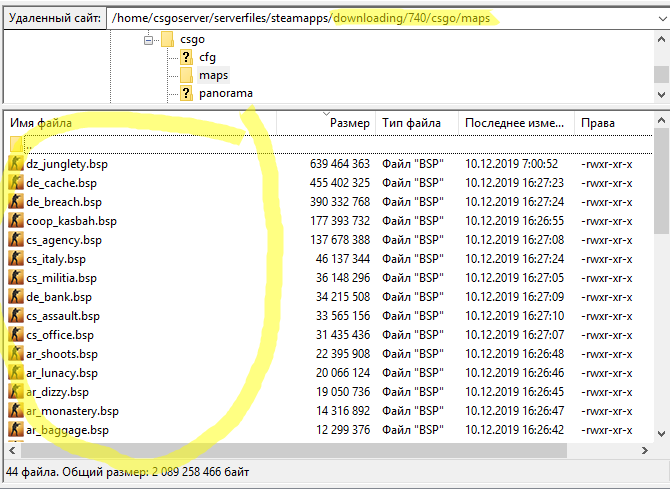
Again, with csgoserver update, all maps are loaded
Septembers
on 10 Dec 2019
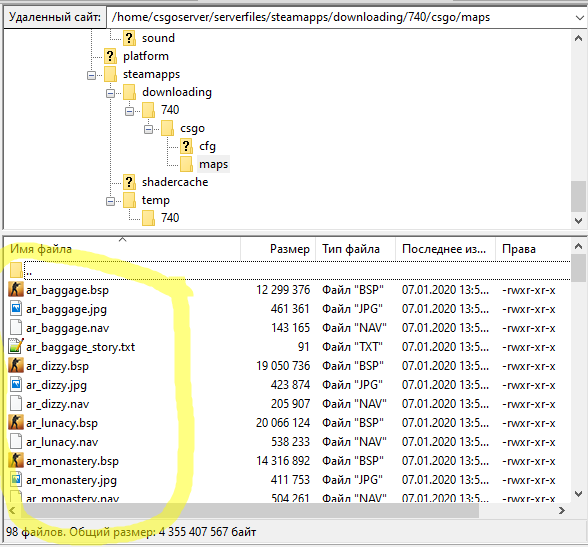
each update is the same. All default maps are uploaded to the server during the server update. on my other servers this is not what is wrong?
Septembers
on 7 Jan 2020
I am currently unsure on the solution apart from ensuring you have a large enough hard disk to handle this. There is nothing I can directly do as it is a bug with SteamCMD which is maintained by Valve
dgibbs64
on 10 Mar 2020
Related issues
 gingerbreadassassin
·
31Comments
gingerbreadassassin
·
31Comments
 nateberkopec
·
22Comments
nateberkopec
·
22Comments
 bobey6
·
19Comments
bobey6
·
19Comments
 UltimateByte
·
26Comments
UltimateByte
·
26Comments
UltimateByte
·
26Comments
UltimateByte
·
26Comments