Linuxbrew-core: gcc-7: command not found [Fedora 26]
Please always follow these steps:
- [x] Confirmed this is a problem with
brew installing one, specific formula and not every time you runbrew? If it's a generalbrewproblem please file this issue at https://github.com/Linuxbrew/brew/issues/new. - [x] If you have a macOS system and can replicate the problem on macOS with Homebrew, please report the issue to Homebrew/core and follow their issue template from your macOS system. If you are unsure, please report the issue to Linuxbrew.
- [x] Ran
brew updateand retried your prior step? - [x] Ran
brew doctor, fixed all issues and retried your prior step? - [x] Ran
brew gist-logs <formula>(where<formula>is the name of the formula that failed) and included the output link? - [x] If
brew gist-logsdidn't work: ranbrew configandbrew doctorand included their output with your issue?
https://gist.github.com/anonymous/aab41b4251cc948f7569403cb775933e
brew install pkg-config fails.
 chauncey-garrett
All 19 comments
Consider installing Linuxbrew in /home/linuxbrew/.linuxbrew/ if possible so that you can use precompiled binary packages (known as bottles) for non-relocatable formula like pkg-config.
Another possible workaround for you is brew install --force-bottle pkg-config, but no promises.
The precompiled binary bottles of non-relocatable bottles can only be used if you install in /home/linuxbrew/.linuxbrew, otherwise they have to be built from source. See the documentation below, but wherever it reads /usr/local, which is for macOS, read instead /home/linuxbrew/.linuxbrew.
- http://docs.brew.sh/Installation.html#alternative-installs
- http://docs.brew.sh/FAQ.html#why-do-you-compile-everything
- http://docs.brew.sh/Bottles.html#cellar-cellar
 sjackman
on 17 Aug 2017
sjackman
on 17 Aug 2017
gcc-7: command not found
https://gist.github.com/anonymous/aab41b4251cc948f7569403cb775933e#file-config-log-L68
Please report…
ls -l ~/.linuxbrew/bin/gcc-7 ~/.linuxbrew/bin/g++-7
which -a gcc-7 g++-7
gcc-7 --version
g++-7 --version
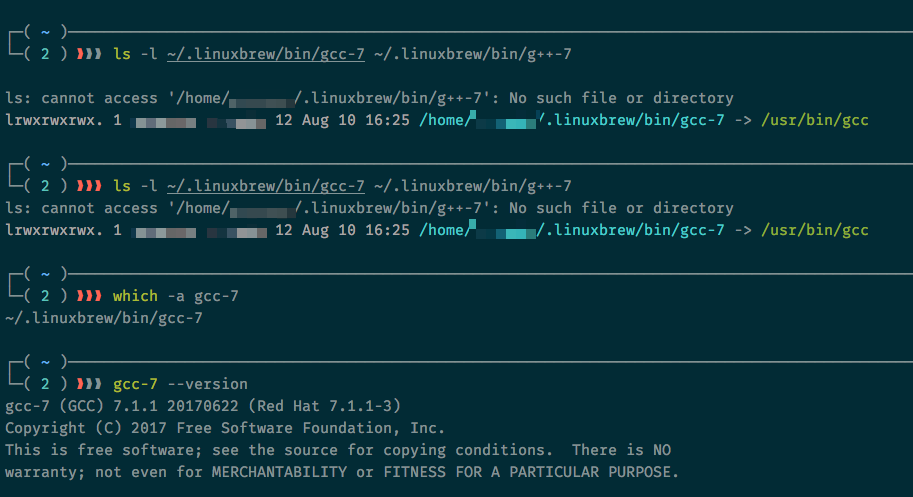
chauncey-garrett
on 17 Aug 2017
I did try brew reinstall gcc but it didn't fix things.
I may also start over with /home/linuxbrew as suggested -- that must be new since I started using linuxbrew a good while back -- but I can wait if you'd like to troubleshoot why it's not currently working as expected.
chauncey-garrett
on 17 Aug 2017
A new installation of Linuxbrew using the installer script at http://linuxbrew.sh/#install-linuxbrew will use /home/linuxbrew/.linuxbrew by default if you have sudo access. Let's see if that works for you.
sjackman
on 17 Aug 2017
Installed linuxbrew as suggested and was able to install most things but still having an issue with gcc.
Here, installation of nodenv failed from similar gcc failures:
https://gist.github.com/anonymous/da62e40db322b89f9366910b74ca5a18
But you can see it's available in my PATH:
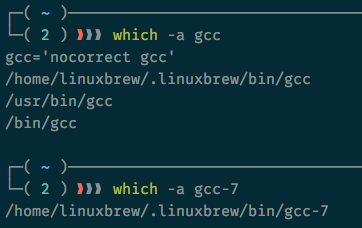
It also fails when installing hadolint, rust, and the_silver_searcher.
hadolint didn't provide any logs:
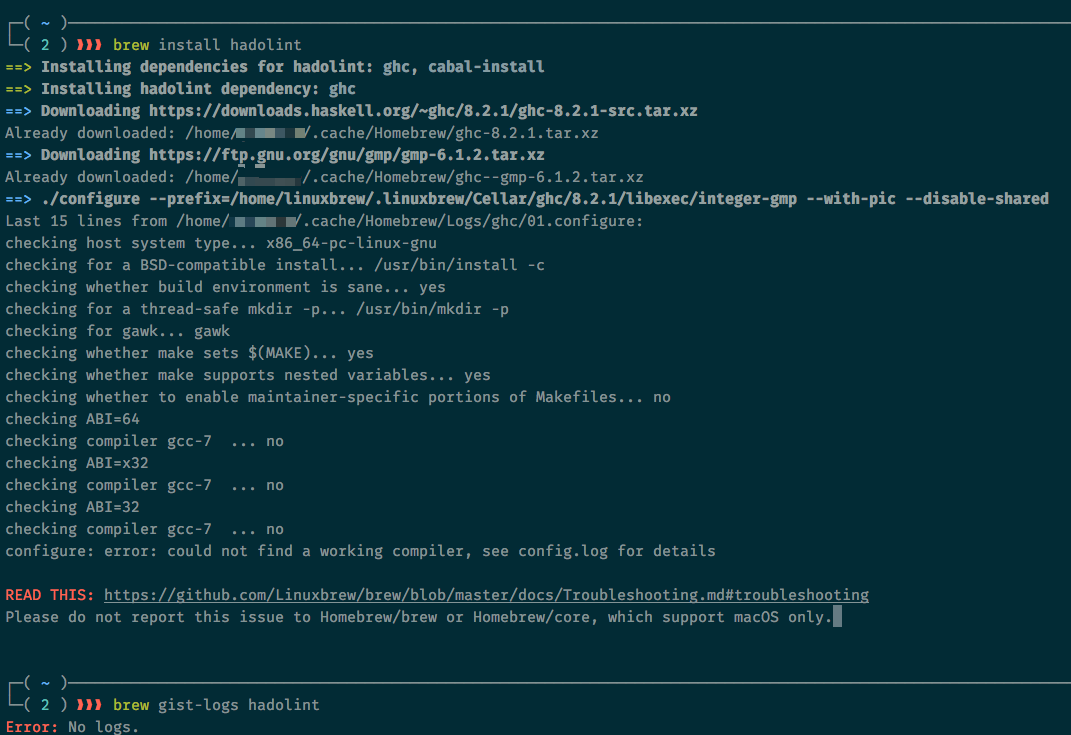
rust:
https://gist.github.com/anonymous/251aee8ad373dd79fa4b2d1367438896
the_silver_searcher:
https://gist.github.com/anonymous/3064a9c88d69480c62ac6e5ee9c777d0
chauncey-garrett
on 18 Aug 2017
I've opened PRs #3868 and #3869 to build bottles for hadolint and the_silver_searcher.
The last build of rust on CircleCI timed out, but I'm giving it another shot at PR #3870.
sjackman
on 18 Aug 2017
Please report the output of…
brew sh <<<'echo $PATH; which -a gcc-7'
hadolint and the_silver_searcher are bottled now. I didn't unfortunately have any luck with rust.
sjackman
on 18 Aug 2017
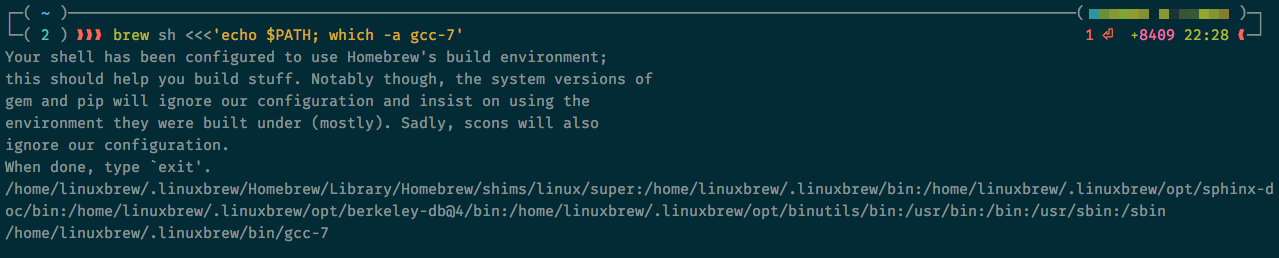
chauncey-garrett
on 18 Aug 2017
That looks as expected.
sjackman
on 18 Aug 2017
hadolint and the_silver_searcher work as expected. 👍
chauncey-garrett
on 18 Aug 2017
I've bottled rust for Linuxbrew. I had to build it in Docker on my local machine, because it exceeded CircleCI's memory limit of 4 GB.
sjackman
on 18 Aug 2017
+1 for docker! I downloaded rust but got a warning I've never seen before:
==> Downloading https://linuxbrew.bintray.com/bottles/rust-1.19.0.x86_64_linux.bottle.tar.gz
######################################################################## 100.0%
==> Pouring rust-1.19.0.x86_64_linux.bottle.tar.gz
warning: working around a Linux kernel bug by creating a hole of 2093056 bytes in ‘/home/linuxbrew/.linuxbrew/Cellar/rust/1.19.0/bin/rustc’
warning: working around a Linux kernel bug by creating a hole of 2093056 bytes in ‘/home/linuxbrew/.linuxbrew/Cellar/rust/1.19.0/bin/rustdoc’
🍺  /home/linuxbrew/.linuxbrew/Cellar/rust/1.19.0: 5,461 files, 373.3MB
Other than that, rust (and cargo) appear to be working.
chauncey-garrett
on 18 Aug 2017
From the original items I was trying to install, I think that leaves nodenv which still has the gcc-7 error.
chauncey-garrett
on 18 Aug 2017
As a workaround, the following should work.
brew install nodenv --without-bash-extension
Works! Thank you for the help!
chauncey-garrett
on 18 Aug 2017
This issue has been automatically marked as stale because it has not had recent activity. It will be closed if no further activity occurs.
![stale[bot] picture](https://avatars3.githubusercontent.com/in/1724?v=4&s=40) stale[bot]
on 8 Sep 2017
stale[bot]
on 8 Sep 2017
Should be resolved by https://github.com/Linuxbrew/brew/pull/484 when it's merged.
sjackman
on 14 Sep 2017
Related issues
 thedrow
·
6Comments
thedrow
·
5Comments
thedrow
·
6Comments
thedrow
·
5Comments
 hidvegin
·
6Comments
hidvegin
·
6Comments
 estraph
·
7Comments
estraph
·
7Comments
 kaeside
·
5Comments
kaeside
·
5Comments