Lint-staged: Output as plain text when running lint-staged through husky
Description
When using lint-staged through a pre-commit hook with Husky, the output is shown as plain text as such:
git commit

When I run lint-staged on the command line, the output is fine:
node .\node_modules\lint-staged\bin\lint-staged -r

I'm unsure what's causing this as I've tried it with both Powershell and Git Bash. Is it because of Husky or perhaps Git? I would like to have pretty output when committing.
Steps to reproduce
My config lint-staged.config.js:
module.exports = {
  'src/**/*.ts': files => {
    const convertedFiles = files.map(file => `--files ${file}`).join(' ');
    return `ng lint smart ${convertedFiles}`
  },
  'src/**/*.scss': 'stylelint'
};
My Husky config in packages.json:
"husky": {
  "hooks": {
    "pre-commit": "lint-staged -r"
  }
}
Debug Logs
PS C:\Users\wbeeftink\Projects\project> node .\node_modules\lint-staged\bin\lint-staged -rd
  lint-staged:bin Running `[email protected]` +0ms
  lint-staged Loading config using `cosmiconfig` +0ms   lint-staged Successfully loaded config from `C:\Users\wbeeftink\Projects\project\lint-staged.config.js`:
  lint-staged { 'src/**/*.ts': [Function: src/**/*.ts],
  lint-staged   'src/**/*.scss': 'stylelint' } +14ms  lint-staged:cfg Validating config +0msRunning lint-staged with the following config:{  'src/**/*.ts': files => {    const convertedFiles = files.map(file => `--files ${file}`).join(' ');    return `ng lint smart ${convertedFiles}`  },  'src/**/*.scss': 'stylelint'}
  lint-staged:run Running all linter scripts +0ms  lint-staged:git Running git command [ 'rev-parse', '--show-toplevel' ] +0ms   lint-staged:run Resolved git directory to be `C:\Users\wbeeftink\Projects\project` +99ms   lint-staged:git Running git command [ 'diff', '--staged', '--diff-filter=ACM', '--name-only' ] +91ms
  lint-staged:run Loaded list of staged files in git:
  lint-staged:run [ 'build.cake',
  lint-staged:run   'lint-staged.config.js',
  lint-staged:run   'package.json',
  lint-staged:run   'src/app/test1.scss',
  lint-staged:run   'src/app/test1.ts',
  lint-staged:run   'src/app/test2.scss',
  lint-staged:run   'src/app/test2.ts',
  lint-staged:run   'yarn.lock' ] +109ms
  lint-staged:gen-tasks Generating linter tasks +0ms
  lint-staged:gen-tasks Generated task:
  lint-staged:gen-tasks { pattern: 'src/**/*.ts',
  lint-staged:gen-tasks   commands: [Function: src/**/*.ts],
  lint-staged:gen-tasks   fileList: [ 'src\\app\\test1.ts', 'src\\app\\test2.ts' ] } +5ms
  lint-staged:gen-tasks Generated task:
  lint-staged:gen-tasks { pattern: 'src/**/*.scss',
  lint-staged:gen-tasks   commands: 'stylelint',
  lint-staged:gen-tasks   fileList: [ 'src\\app\\test1.scss', 'src\\app\\test2.scss' ] } +1ms
Stashing changes... [started]
  lint-staged:git Running git command [ 'status', '--porcelain' ] +126ms
Stashing changes... [skipped]
→ No partially staged files found...
Running tasks... [started]
Running tasks for src/**/*.ts [started]
Running tasks for src/**/*.scss [started]
  lint-staged:make-cmd-tasks Creating listr tasks for commands [Function: src/**/*.ts] +0ms
  lint-staged:make-cmd-tasks Creating listr tasks for commands 'stylelint' +17ms
ng lint smart --files src\app\test1.ts --files src\app\test2.ts [started]
stylelint [started]
  lint-staged:task cmd: ng +0ms
  lint-staged:task args: [ 'lint',
  'smart',
  '--files',
  'src\\app\\test1.ts',
  '--files',  'src\\app\\test2.ts' ] +0ms  lint-staged:task execaOptions: { preferLocal: true, reject: false, shell: false } +1ms
  lint-staged:task cmd: stylelint +28ms
  lint-staged:task args: [ 'src\\app\\test1.scss', 'src\\app\\test2.scss' ] +3ms
  lint-staged:task execaOptions: { preferLocal: true, reject: false, shell: false } +0ms
stylelint [failed]
→
Running tasks for src/**/*.scss [failed]
→
ng lint smart --files src\app\test1.ts --files src\app\test2.ts [failed]
→
Running tasks for src/**/*.ts [failed]
→
Running tasks... [failed]


✖ stylelint found some errors. Please fix them and try committing again.

src/app/test1.scss
3:21  ✖  Unexpected named color "red"   color-named

src/app/test2.scss
1:1  ✖  Unexpected empty source   no-empty-source


✖ ng lint smart --files src\app\test1.ts --files src\app\test2.ts found some errors. Please fix them and try committing again.
Linting "smart"...

ERROR: C:/Users/wbeeftink/Projects/project/src/app/test1.ts:1:12 - Type declaration of 'any' loses type-safety. Consider replacing it with a more precise type.
ERROR: C:/Users/wbeeftink/Projects/project/src/app/test2.ts:1:3 - missing whitespace

Option "files" was already specified with value ["src\\app\\test1.ts"]. The new value ["src\\app\\test1.ts","src\\app\\test2.ts"]
will override it.
Lint errors found in the listed files.
Environment
- OS: Windows 10
- Node.js: v10.15.3
lint-staged: v9.2.1
 wbeeftink
All 9 comments
I have the same issue.
Has anyone found a solution?
 carlocorradini
on 12 Oct 2019
carlocorradini
on 12 Oct 2019
I found this issue related to chalk not displaying colors in windows using husky https://github.com/typicode/husky/issues/350 and seems to work for adding the FORCE_COLOR=1 env var such as this:
"husky": {
"hooks": {
"pre-commit": "cross-env FORCE_COLOR=1 lint-staged"
}
},
By no means the best solution, but looks to be working as a temporary fix.
 vollmerr
on 23 Oct 2019
vollmerr
on 23 Oct 2019
We actually set it here https://github.com/okonet/lint-staged/blob/e879b6afbd0b922b5d5e950c52c01e95a6394b29/bin/lint-staged#L5-L10 but maybe isTTY is false on Windows? Can someone check and come up with a better fix for it?
 okonet
on 23 Oct 2019
okonet
on 23 Oct 2019
Checked and is set to true.
Simple Test:
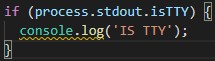
Output is correct:

The problem occurs when is used with Husky.
OS: Microsoft Windows 10 Pro
Version: 10.0.18362 Build 18362
carlocorradini
on 23 Oct 2019
@carlocorradini Thanks for testing this! I didn't have time to look into the suggestions myself. In the meantime I found this issue: https://github.com/typicode/husky/issues/350. Here two ways are mentioned to enable colors for Husky output:
Option 1: Create file ~/.huskyrc (source):
# ~/.huskyrc
export FORCE_COLOR=1
Option 2: Add FORCE_COLORS to your package.json, like this (source):
"husky": {
  "hooks": {
    "pre-commit": "env FORCE_COLOR=1 node  ./node_modules/lint-staged/bin/lint-staged -r"
  }
}
Both options worked for me and I now have colors in the output. This is great since it makes the output more readable.

However, the output from lint-staged is still being rendered as plain, static text:

When running lint-staged directly without Husky, the text is animated and with markup:

Any ideas if this can be solved as well? From what I can tell the animations are the output of listr but I'm unsure why the issue occurs.
wbeeftink
on 4 Nov 2019
Same issue here. When running lint-staged solo, colors run normally, but when running through husky, no colors..
 TGlide
on 30 Mar 2020
TGlide
on 30 Mar 2020
Hello,
we currently try to force colors in the cli here:
It would be helpful if somebody could debug the value of supportsColor, and supportsColor.level.toString().
Additionally, if manually setting it to 1 enables the pretty output.
 iiroj
on 11 Jun 2020
iiroj
on 11 Jun 2020
Looking at listr2's code here, it seems me might also have to override process.stdout.isTTY:
iiroj
on 11 Jun 2020
Looking at listr2's code here, it seems me might also have to override
process.stdout.isTTY:
Interesting. While doing a git commit in Powershell I get plain text and the debug values within isRendererSupported are:
process.stdout.isTTY: undefined,
renderer.nonTTY: false
When calling lint-staged directly, I get formatted output and the debug values are:
process.stdout.isTTY true
renderer.nonTTY false
If I hardcode isRendererSupported to always return true, my Powershell is spammed with listr's values. Instead of keeping the same 5-10 lines and updating them, it spams new lines continuously until the hook finishes.
wbeeftink
on 23 Jun 2020
Related issues
 hadrienl
·
8Comments
okonet
·
6Comments
hadrienl
·
8Comments
okonet
·
6Comments
 thedamon
·
3Comments
thedamon
·
3Comments
 jitenderchand1
·
3Comments
jitenderchand1
·
3Comments
 tnrich
·
7Comments
tnrich
·
7Comments
Most helpful comment
@carlocorradini Thanks for testing this! I didn't have time to look into the suggestions myself. In the meantime I found this issue: https://github.com/typicode/husky/issues/350. Here two ways are mentioned to enable colors for Husky output:
Option 1: Create file
~/.huskyrc(source):Option 2: Add
FORCE_COLORSto yourpackage.json, like this (source):Both options worked for me and I now have colors in the output. This is great since it makes the output more readable.
However, the output from lint-staged is still being rendered as plain, static text:
When running
lint-stageddirectly without Husky, the text is animated and with markup:Any ideas if this can be solved as well? From what I can tell the animations are the output of listr but I'm unsure why the issue occurs.