Lint-staged: Error:Current directory is not a git directory!
Description
There is an error in v8.2.0,Current directory is not a git directory!
Steps to reproduce
I have this problem when I installed the new version of lint-staged. I think it may be because my .git is in the upper level of the installation directory.
install path:/web-front/src-new/node_modules/lint-staged
.git path: /web-front/.git
Debug Logs

Environment
- OS: macOS High Sierra
- Node.js: v10.14.1
lint-staged: v8.2.0
Ps
This should be because you changed the way get the .git directory in the new version.
husky issue: https://github.com/typicode/husky/issues/500
your commit: https://github.com/okonet/lint-staged/commit/6ac666d
 AlfredMou
All 24 comments
@iiroj could you please check it out?
 okonet
on 11 Jun 2019
okonet
on 11 Jun 2019
I got the same problem with 8.2.0 on Linux Ubuntu 18.04, node 10.15.3.
 jmaczan
on 11 Jun 2019
jmaczan
on 11 Jun 2019
This is probably related to the change I made where the the git directory is determined by running git rev-parse --show-toplevel. It uses the current process.cwd() to spawn the git process through execa.
If it's not working, I’d assume CWD is outside git, or something with husky is messing it up.
Can you debug this by running something like console.log(process.cwd()) — and the git command above — using husky?
Unfortunately I’m not available to work on a fix until next week.
 iiroj
on 11 Jun 2019
iiroj
on 11 Jun 2019
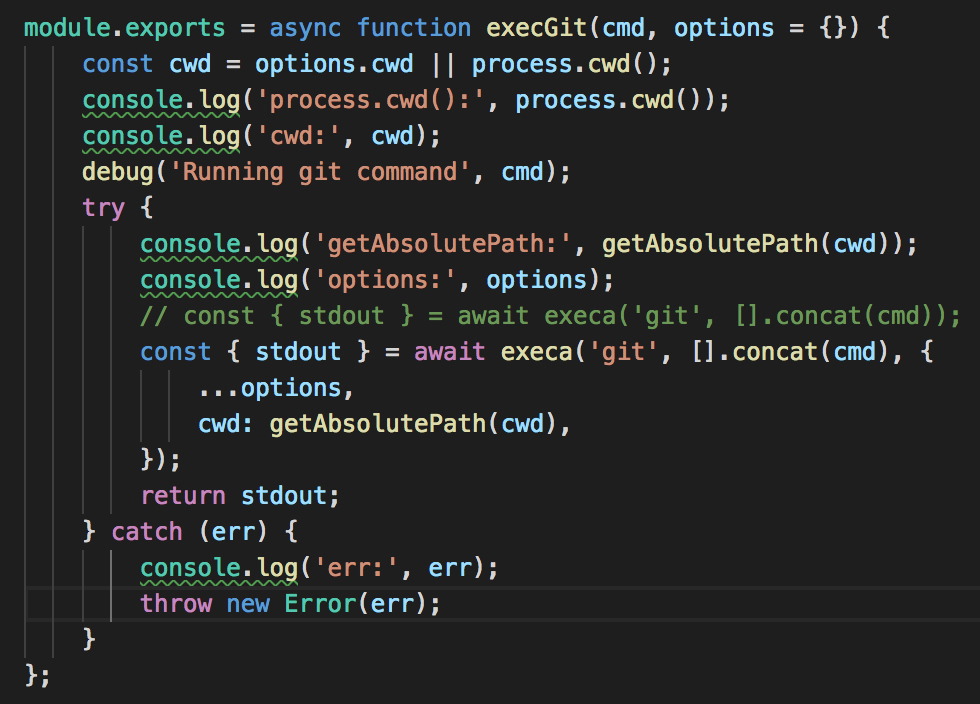
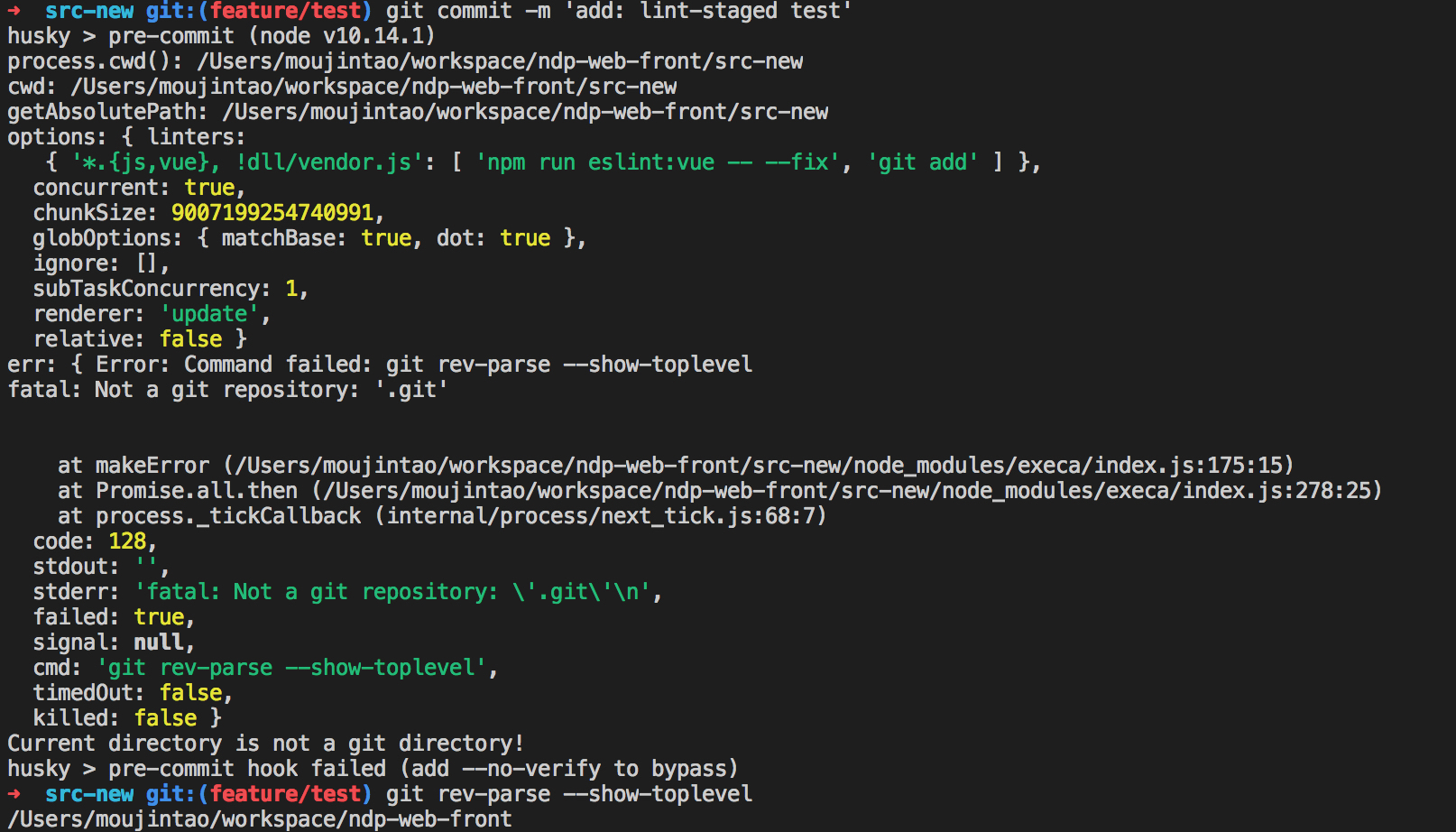
@iiroj execa error。 I do not know why, cwd and command is true, but execa will throw error.
AlfredMou
on 12 Jun 2019
Can you edit your husky’s pre-commit hook to print out the value of git rev-parse --show-toplevel and paste it here?
You could also edit execGit’s execa call to run ls instead of git, just to make sure execa isn’t running in the wrong directory.
One other debug is to print out process.env.GIT_DIR; this should match your git folder.
EDIT: if you run npx lint-staged manually, is the behaviour the same?
EDIT2: this might be related: https://github.com/DonJayamanne/gitHistoryVSCode/issues/233#issuecomment-375769718
iiroj
on 12 Jun 2019
@iiroj I used your note about https://github.com/DonJayamanne/gitHistoryVSCode/issues/233#issuecomment-375769718 to implement a potential fix. I've added a test case and tested it locally and it all seems to work. I hope I'm not being too presumptuous by opening the PR ;->
PR reference - https://github.com/okonet/lint-staged/pull/628
 carnun
on 12 Jun 2019
carnun
on 12 Jun 2019
@carnun did you test that resolveGitDir does indeed return an incorrect dir if GIT_DIR is set to that (incorrect) value? Would be nice if the fix was this simple. :)
iiroj
on 12 Jun 2019
@iiroj I added a console.log to resolveGitDir and checked what happened when I do
a git commit from the command line to trigger lint-staged. In this case I
see that process.env.GIT_DIR is set and then lint staged fails. Also note
that GIT_DIR is definitely not set in my console, so it must be the "git
commit" that sets the environment variable. If I run lint-staged from the
command line directly then this bug doesn't surface.
What actually happens is that the execa command fails since GIT_DIR is set to the wrong value. Hope this makes sense.
Not really sure how to encapsulate all of this in a unit test...
carnun
on 12 Jun 2019
@iiroj the only improvement I can think to add to my PR is to restore process.env.GIT_DIR after resolving the git root dir. I'm just not sure whether that may cause any other issues.
carnun
on 12 Jun 2019
@carnun execa supports an option extendEnv which is by default true: https://github.com/sindresorhus/execa/blob/master/readme.md#extendenv
Would setting this to false achieve the same effect (by not passing GIT_DIR)?
iiroj
on 12 Jun 2019
@iiroj I'll quickly try that and see if it resolves the issue
carnun
on 12 Jun 2019
@iiroj what you actually need to do is pass in env: { GIT_DIR: undefined } let me just check the unit tests and my environment and then I'll update the PR.
carnun
on 12 Jun 2019
That would be cleaner than mutating process.env! Did you @carnun experience this issue in an actual project? Maybe you could test this locally by linking this repo using yarn/npm link.
iiroj
on 12 Jun 2019
@iiroj yeah, I am experiencing this on an actual project - I use lint-staged along with yarn outdated to check whether what I'm pushing up to the project repo is up to date... and then again on CI/CD so this is causing my build pipeline to fail.
To debug it I just hacked node_modules/lint-staged.... I have updated the PR with the cleaner implementation and also (hack) tested this on my actual project.
I see your CI/CD also checks node 8/9 which I haven't checked...
carnun
on 12 Jun 2019
@iiroj for some reason my updated PR fails on node 8 and 9.
This works for node10, but fails on node8 and node9 - https://github.com/okonet/lint-staged/pull/628
    const gitDir = await execGit(['rev-parse', '--show-toplevel'], {
      ...options,
      env: { GIT_DIR: undefined }
    })
This works on node8, node9 and node10 - https://github.com/okonet/lint-staged/pull/629
    delete process.env.GIT_DIR
    const gitDir = await execGit(['rev-parse', '--show-toplevel'], options)
@carnun I commented directly on the PR #628; I’d prefer that to #629 if it works, but personally am fine with either.
iiroj
on 12 Jun 2019
@iiroj agreed, but unfortunately I can't spend more time trying to figure out why #628 fails on node8 and node9. Any chance this could be merged soonish so I can auto-deploy my project again?
carnun
on 12 Jun 2019
Updating git to latest version (2.21.0) resolve issue
 vadimka123
on 13 Jun 2019
vadimka123
on 13 Jun 2019
:tada: This issue has been resolved in version 8.2.1 :tada:
The release is available on:
Your semantic-release bot :package::rocket:
okonet
on 13 Jun 2019
btw, I get the same with:
~/project$ npx lint-staged
Current directory is not a git directory!

~/project$ node --version
v10.18.1

~/project$ uname -a
Linux a2fea1631017 4.15.0-1052-aws #54-Ubuntu SMP Tue Oct 1 15:43:26 UTC 2019 x86_64 GNU/Linux

~/project$ git status
On branch master
Your branch is up-to-date with 'origin/master'.
Changes to be committed:
  (use "git reset HEAD <file>..." to unstage)

    modified:   CHANGELOG.md
    modified:   package.json

~/project$ git --version
git version 2.11.0

~/project$ npx lint-staged --version
10.0.2
 tripodsan
on 25 Jan 2020
tripodsan
on 25 Jan 2020
@tripodsan that's a pretty old git version! Can you try updating it and see if that itself helps?
iiroj
on 25 Jan 2020
@tripodsan that's a pretty old git version! Can you try updating it and see if that itself helps?
it's running in a CI system....but after updating the image to a more recent version it passed:
$ cat /etc/os-release
PRETTY_NAME="Debian GNU/Linux 10 (buster)"

$ git --version
git version 2.20.1
I experience this issue with recent git and lint-staged, but lint-staged@9 and [email protected] works:
$ node --version
v12.16.2

$ yarn --version
1.22.4

$ git --version
git version 2.26.0

$ lint-staged --version
10.0.2

$ ls -d .git
.git/

$ lint-staged --debug
  lint-staged:bin Running `[email protected]` +0ms
  lint-staged:bin Options parsed from command-line: {
  allowEmpty: false,
  concurrent: true,
  configPath: undefined,
  debug: true,
  maxArgLength: 65536,
  quiet: false,
  relative: false,
  shell: false
} +2ms
  lint-staged Loading config using `cosmiconfig` +0ms
  lint-staged Successfully loaded config from `/home/led/Downloads/growshark/rpi/package.json`:
  lint-staged {
  lint-staged   '*.{js,jsx,ts,tsx}': [ 'cross-env NODE_ENV=development eslint --cache' ],
  lint-staged   '{*.json,.{babelrc,eslintrc,prettierrc,stylelintrc}}': [ 'prettier --ignore-path .eslintignore --parser json --write' ],
  lint-staged   '*.{css,scss}': [
  lint-staged     'stylelint --ignore-path .eslintignore --syntax scss --fix',
  lint-staged     'prettier --ignore-path .eslintignore --single-quote --write'
  lint-staged   ],
  lint-staged   '*.{html,md,yml}': [ 'prettier --ignore-path .eslintignore --single-quote --write' ]
  lint-staged } +17ms
  lint-staged:cfg Validating config +0ms
Running lint-staged with the following config:
{
  '*.{js,jsx,ts,tsx}': [
    'cross-env NODE_ENV=development eslint --cache'
  ],
  '{*.json,.{babelrc,eslintrc,prettierrc,stylelintrc}}': [
    'prettier --ignore-path .eslintignore --parser json --write'
  ],
  '*.{css,scss}': [
    'stylelint --ignore-path .eslintignore --syntax scss --fix',
    'prettier --ignore-path .eslintignore --single-quote --write'
  ],
  '*.{html,md,yml}': [
    'prettier --ignore-path .eslintignore --single-quote --write'
  ]
}
  lint-staged:run Running all linter scripts +0ms
  lint-staged:git Running git command [ 'rev-parse', '--show-toplevel' ] +0ms
  lint-staged:git Running git command [ 'rev-parse', '--show-superproject-working-tree' ] +14ms
  lint-staged:file Reading buffer from file `/home/led/Downloads/growshark/rpi/.git` +0ms
  lint-staged:file Done reading buffer from file `/home/led/Downloads/growshark/rpi/.git`! +1ms
Current directory is not a git directory!

$ npx lint-staged@9
npx: installed 144 in 7.719s
  ↓ Stashing changes... [skipped]
    → No partially staged files found...
  ✔ Running tasks...

$ git remote -v
origin  https://github.com/electron-react-boilerplate/electron-react-boilerplate.git (fetch)
origin  https://github.com/electron-react-boilerplate/electron-react-boilerplate.git (push)

$ git rev-parse HEAD
63cebabb467400c910acf51fa7a0b9285b7bff22 # master, but I've made some minor modifications
Note that I'm using Gentoo and I'm sure that I have some outdated packages, but git and the currently available lint-staged is not one of them
Edit: ./node_modules/.bin is in my path
 lezsakdomi
on 10 Apr 2020
lezsakdomi
on 10 Apr 2020
After further investigations, I found out that only the following versions fail:
- 10.0.1
- 10.0.2
- 10.0.3
- 10.0.4
10.0.0 and 10.0.5 works fine
Running yarn upgrade lint-staged resolved the issue for me.
lezsakdomi
on 10 Apr 2020
Related issues
 OriginUnknown
·
4Comments
OriginUnknown
·
4Comments
 tnrich
·
7Comments
tnrich
·
7Comments
 rrecaredo
·
7Comments
rrecaredo
·
7Comments
 jasonslyvia
·
3Comments
jasonslyvia
·
3Comments
 dialex
·
6Comments
dialex
·
6Comments
Most helpful comment
:tada: This issue has been resolved in version 8.2.1 :tada:
The release is available on:
Your semantic-release bot :package::rocket: