Linkerd2: Support for ARM based architectures?
Hi,
I'm experimenting with a Kubernetes cluster that runs on aarch64 architecture. I'm unable to install Conduit:
curl https://run.conduit.io/install | sh
  % Total    % Received % Xferd  Average Speed   Time    Time     Time  Current
                                 Dload  Upload   Total   Spent    Left  Speed
100  1353  100  1353    0     0   2142      0 --:--:-- --:--:-- --:--:--  2140
Downloading conduit-0.4.4-linux...
Conduit was successfully installed 🎉

Copy /root/.conduit/bin/conduit into your PATH.  Then run

    conduit install | kubectl apply -f -

to deploy Conduit to Kubernetes.  Once deployed, run

    conduit dashboard

to view the Conduit UI.
Visit conduit.io for more information.
[root@testserver home]# export PATH=$PATH:$HOME/.conduit/bin
[root@testserver home]# conduit
-bash: /root/.conduit/bin/conduit: cannot execute binary file
[root@testserver home]#
The binary that was installed seems to be for x64 architecture:
 readelf -h conduit
ELF Header:
  Magic:   7f 45 4c 46 02 01 01 00 00 00 00 00 00 00 00 00
  Class:                             ELF64
  Data:                              2's complement, little endian
  Version:                           1 (current)
  OS/ABI:                            UNIX - System V
  ABI Version:                       0
  Type:                              EXEC (Executable file)
  Machine:                           Advanced Micro Devices X86-64
  Version:                           0x1
  Entry point address:               0x456880
  Start of program headers:          64 (bytes into file)
  Start of section headers:          456 (bytes into file)
  Flags:                             0x0
  Size of this header:               64 (bytes)
  Size of program headers:           56 (bytes)
  Number of program headers:         7
  Size of section headers:           64 (bytes)
  Number of section headers:         13
  Section header string table index: 3
Are there plans to support other architectures besides x64?
 jeroenjacobs79
All 65 comments
It looks like you're only looking to have aarch64 support in the CLI? Or on the cluster side as well?
 grampelberg
on 25 Jun 2018
grampelberg
on 25 Jun 2018
Does this work for you?
grampelberg
on 25 Jun 2018
Hi,
Cluster-side was my intention. I only ran the conduit cli on the aarch64/arm64 machine which acts also as the Kubernetes master server (this was just out of convenience, as I had a kubectl connecting to localhost api server available). I'm perfectly happing with keeping conduit cli on x86.
My apologies, it should have made this more clear.
I would propose an additional parameter to conduit install, something like --target-arch. This could be "amd64" by default, so you don't break compatibility.
I assume additional docker images need to be created for those architectures as well, and probably for additional services (grafana, prometheus) too.
jeroenjacobs79
on 25 Jun 2018
This issue has been automatically marked as stale because it has not had recent activity. It will be closed in 14 days if no further activity occurs. Thank you for your contributions.
![stale[bot] picture](https://avatars3.githubusercontent.com/in/1724?v=4&s=40) stale[bot]
on 8 Oct 2018
stale[bot]
on 8 Oct 2018
Looks like this closed because of being stale - can we get a current status?
 vielmetti
on 5 Mar 2019
vielmetti
on 5 Mar 2019
Hi @vielmetti. I don't think anyone has actually done the work to enumerate what this change entails. It could possibly be as simple as running the docker builds on an appropriate host.
If someone in the community figures out how to build artifacts for the target platform, it may not be that hard for us to include those steps in the release process.
 olix0r
on 5 Mar 2019
olix0r
on 5 Mar 2019
Thanks @olix0r - just working on the dependencies right now, and it looks like the build environment depends on minikube, which in turn is blocked behind https://github.com/kubernetes/minikube/pull/2455 on arm64.
vielmetti
on 5 Mar 2019
@vielmetti minikube shouldn't be a hard requirement. If you can make bin/docker-build succeed on ARM, that should the majority of the work.
olix0r
on 5 Mar 2019
I added a bunch of labels to keep this one alive. If you're interested in looking into the details it'd be greatly appreciated @vielmetti !
grampelberg
on 6 Mar 2019
Hi all,
I came across this issue because I wanted to get Linkerd2 running on a Raspberry Pi cluster with k3s. So far I can see 2 different approaches to make bin/docker-build work for ARM:
Run the build directly on an ARM device and push the ARM images.
- This feels kind of natural but the major drawback is the current builder images are x86 based
- CI is hard without significant changes
Cross compile. Since Go and Rust both support cross compiling, we can stay on a x86 device for builds, reuse all builder images, but figure out a way to inject
GOARCH=arm(and the Rust equivalent for linkerd-proxy) into the builders. IIUC Linkerd does not depend on CGO which makes things much easier (in theory).- Grafana took a similar approach in 5.4.3 (the version Linkerd2 currently depends on 😃) to support ARM: https://github.com/grafana/grafana/pull/14617/files
Either way, integration/e2e testing for ARM still remains a question unless someone plays the pre-alpha-experimental-support card 😜
I will try and see if approach (2) works, if so, will send a PR for review.
Cheers,
Jimmy
 jjbubudi
on 13 Mar 2019
jjbubudi
on 13 Mar 2019
@jjbubudi -
Jimmy, this account of cross-compiling Rust on Travis CI might be useful reading:
https://mudge.name/2019/01/02/cross-compiling-rust-for-a-raspberry-pi-on-travis-ci.html
vielmetti
on 13 Mar 2019
Thank you @vielmetti !! That is very helpful
jjbubudi
on 13 Mar 2019
@jjbubudi any luck with it?
 teonivalois
on 24 Jun 2019
teonivalois
on 24 Jun 2019
Finally, after a few days and cross-compile here and there, I manage to run Linkerd in my Raspberry Pi.
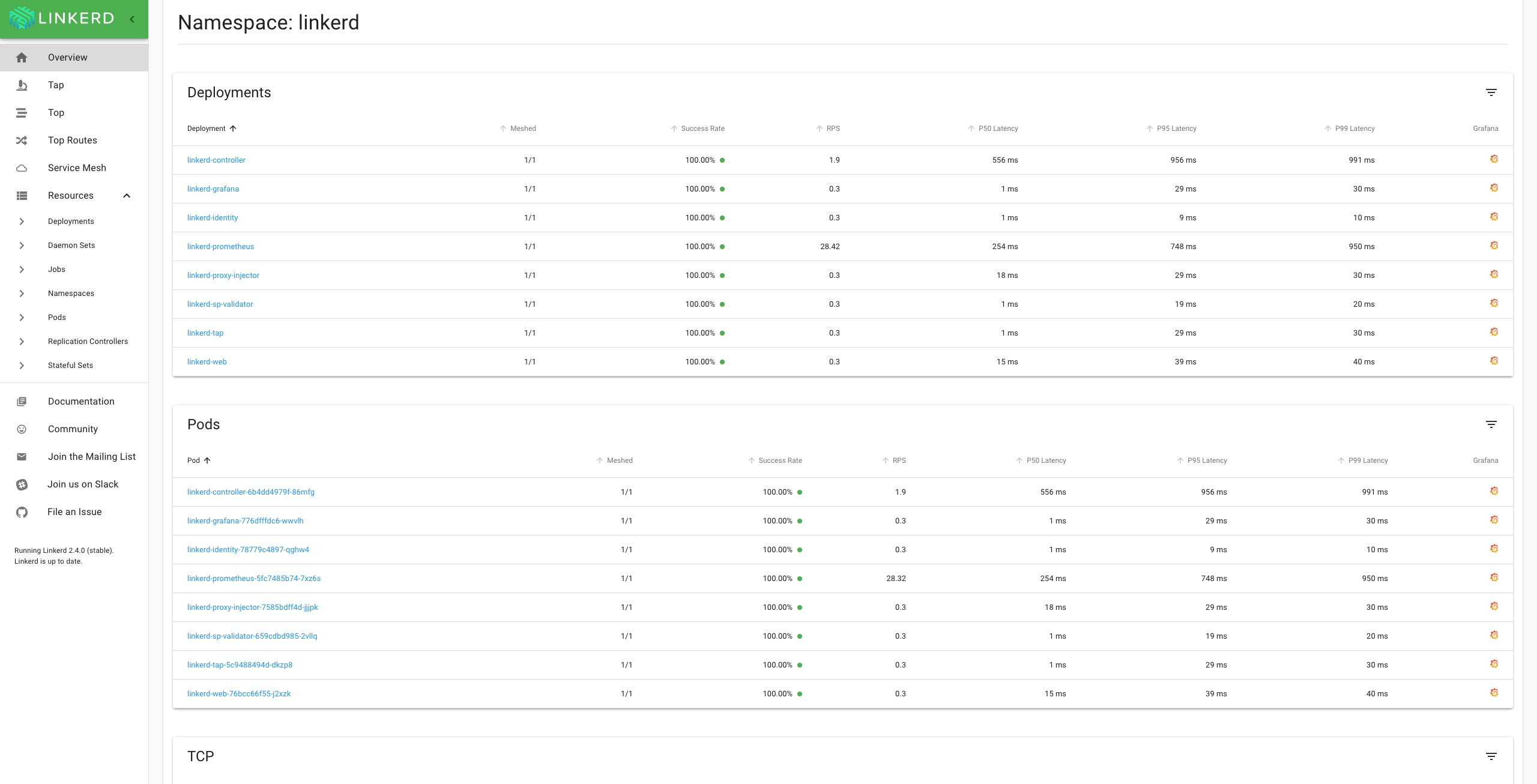
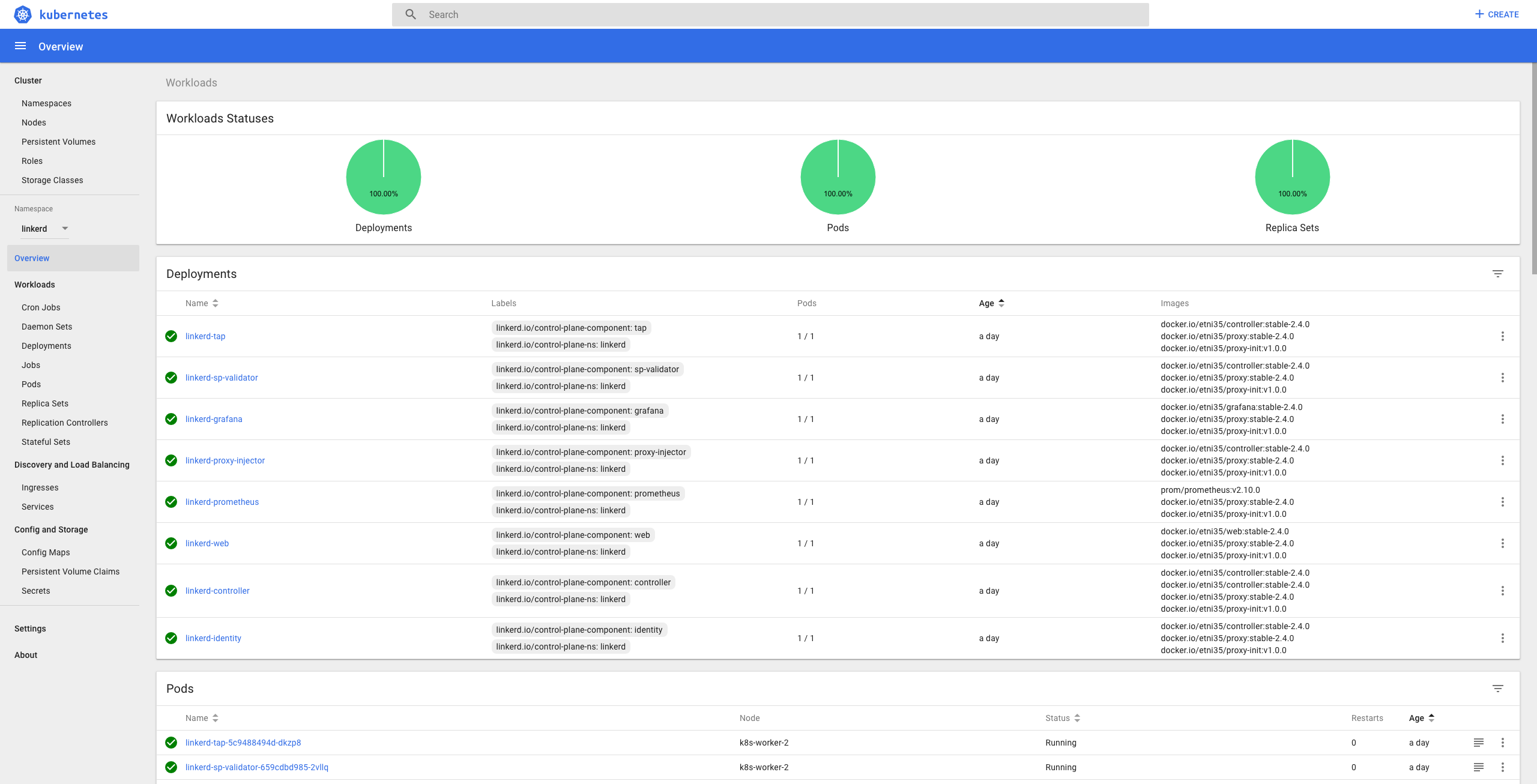
 aliariff
on 26 Jul 2019
aliariff
on 26 Jul 2019
@aliariff Wow! Nice work!
 wmorgan
on 26 Jul 2019
wmorgan
on 26 Jul 2019
@aliariff That’s awesome!! can you share a how-to so we could get it as well?
teonivalois
on 26 Jul 2019
Nice to see this. armhf (RPi) and arm64 (graviton)?
 alexellis
on 26 Jul 2019
alexellis
on 26 Jul 2019
@teonivalois I will create some tutorial about that in the next few weeks.
@alexellis RPi 3 model B and B+, so it just armhf
aliariff
on 26 Jul 2019
@aliariff very interested in seeing that tutorial - and I may be able to help provide resources to get the tutorial also adapted to arm64 builds.
vielmetti
on 26 Jul 2019
I would like to see ARM64 and armhf for server-side and client-side components. Also able to lend a hand if needed anywhere. @grampelberg
You may be able to cross compile everything needed without needing dedicated devices. I think @ibuildthecloud would also be interested in this use-case for the Rancher k3s/rio projects.
I believe that Rancher build ARM64 binaries on AWS Graviton.
@aliariff can you share your build commands / hacks / patches somewhere? Quick and dirty is fine, I don't need a tutorial or blog post.
alexellis
on 27 Jul 2019
Compile
3 parts need to be compiled.
linkerd2repo (Golang)linkerd2-proxyrepo (Rust)linkerd2-proxy-initrepo (Golang)
For the linkerd2:
- clone it, and
git checkout stable-2.4.0 - and change like what I did here https://github.com/aliariff/linkerd2/pull/1/files, use your docker hub id
- the
bin/fetch-proxyfile is a bit tricky because you need to upload your compiledlinkerd2-proxysomewhere on the internet and change that part accordingly. DOCKER_TRACE=1 BUILD_DEBUG=1 bin/docker-buildDOCKER_TRACE=1 BUILD_DEBUG=1 bin/docker-push-depsDOCKER_TRACE=1 BUILD_DEBUG=1 bin/docker-push stable-2.4.0
For linkerd2-proxy:
- clone the repo,
git checkout linkerd2/stable-2.4.0
Edit Makefile:
- Line 4 to:
TARGET = target/armv7-unknown-linux-gnueabihf/release - Line 20 to:
CARGO_BUILD = $(CARGO) build --frozen $(RELEASE) --target=armv7-unknown-linux-gnueabihf - Line 42 to:
arm-linux-gnueabihf-strip $(PKG_BASE)/bin/linkerd2-proxy
We will cross compile inside a container by docker run -it -v <the cloned folder>:/root/linkerd2-proxy rust:1.35.0
Inside the container:
cd /root/linkerd2-proxyapt-get updateapt-get install -y gcc-arm-linux-gnueabihfexport CARGO_TARGET_ARMV7_UNKNOWN_LINUX_GNUEABIHF_LINKER=arm-linux-gnueabihf-gccrustup target add armv7-unknown-linux-gnueabihfCARGO_RELEASE=1 make package- The result is in
target/armv7-unknown-linux-gnueabihf/release/package/ - Upload
linkerd2-proxy-05b012d.tar.gzsomewhere in internet, and change thebin/fetch-proxyin the first part accordingly
For linkerd2-proxy-init:
- clone the repo,
git checkout v1.0.0
Change the Dockerfile:
- Line 5 to:
RUN CGO_ENABLED=0 GOOS=linux GOARCH=arm go install -v - Line 8 to:
FROM docker.io/<your docker hub id>/base:2019-02-19.01 - Line 10 to:
COPY --from=golang /go/bin/linux_arm/linkerd2-proxy-init /usr/local/bin/proxy-init
Build & push images:
docker build -t docker.io/<your docker hub id>/proxy-init:v1.0.0 .docker push <your docker hub id>/proxy-init:v1.0.0
And now all the docker images are ready.
Install
Assuming you already have linkerd cli
linkerd install > arm.yml- edit the
arm.yml, replace allgcr.io/linkerd-iotodocker.io/<your docker hub id> kubectl apply -f arm.yml
Done!
NB:
If you want you can just use my images in docker.io/etni35 for the installation part
aliariff
on 27 Jul 2019
Will there be an update of this for the stable-2.6.0 version, because some things seems different?
Better yet: will this (arm support) at some point become an official part of linkerd?
 Sandyman
on 15 Oct 2019
Sandyman
on 15 Oct 2019
@Sandyman we'd love a contribution to get arm64 as a supported platform for Linkerd. The biggest blocker so far has been getting access to hardware that can be integrated into the CI pipeline. As this will be a pretty big contribution, please reach out to us on slack in #contributors first so that we can get a plan together.
grampelberg
on 15 Oct 2019
@grampelberg why the hardware required? Can we just do cross-compile?
I was trying to create a PR for the support it a few months ago, but it is no longer relevant and needs to be adjusted.
Ref: https://github.com/linkerd/linkerd2/pull/3115/files
aliariff
on 15 Oct 2019
@aliariff to be supported, we'll want to make sure that integration tests run.
grampelberg
on 15 Oct 2019
@grampelberg Out of curiosity, what kind of hardware are you talking about?
Sandyman
on 16 Oct 2019
@Sandyman something to run all the integration tests on as part of CI. We're using packet for the rest of build/testing, so it isn't impossible, just needs to get wired up =)
grampelberg
on 16 Oct 2019
@alexellis RPi 3 model B and B+, so it just armhf
I run both Raspbian (armhf) and Ubuntu 64 (aarch64) on RPi 3 model B, so that HW is good for testing both architectures.
 joakimr-axis
on 28 Oct 2019
joakimr-axis
on 28 Oct 2019
@Sandyman something to run all the integration tests on as part of CI. We're using packet for the rest of build/testing, so it isn't impossible, just needs to get wired up =)
I'm assuming that hardware would need to be available 24/7? I'm asking because I have a Pi4 cluster (4 nodes), but I can't guarantee that kind of uptime. :)
I read up about the testing too. I noticed a remark about "needs to be able to run 100s of pods". How big a cluster would that be?
Sandyman
on 29 Oct 2019
@Sandyman thank you for the offer! It'd have to be up 24/7 and have probably 32gb of memory total (to pull a number out of thin air). We can get access to some Packet ARM instances through CNCF, it just needs to get devops'd and all ready to go.
grampelberg
on 29 Oct 2019
Update on hardware resources. Since April this year AWS supports Arm A1 processors for EC2.
 lyndon160
on 3 Dec 2019
lyndon160
on 3 Dec 2019
@aliariff really cool. How did you manage to install a Kubernetes-Cluster on the Raspberry Pi?
 DhruvM1994
on 6 Feb 2020
DhruvM1994
on 6 Feb 2020
@aliariff really cool. How did you manage to install a Kubernetes-Cluster on the Raspberry Pi?
One quite easy way is to use k3s. Another, running Raspbian, is installing the kubectl (and eventually the kubeadm) package(s) and go from there. There are more ways, but personally that's where I normally start.
joakimr-axis
on 6 Feb 2020
@joakimr-axis I am trying to establish a cluster where an Ubuntu VM is the master and a Raspberry Pi 3 is a node. I was wondering whether that cluster or a cluster consisting (only) of three Raspberry Pi 3 (1 master 2 nodes) is able to host Kubernetes AND Linkerd.
I would be very grateful for further suggestions.
DhruvM1994
on 6 Feb 2020
@DhruvM1994
k3s is an option, you can also install Kubernetes on arm by following this tutorial.
And hybrid arch in a cluster is not a problem, so good luck.
aliariff
on 6 Feb 2020
Kubespray also works great for multi Arch clusters if ansible is suitable for you.
 kskewes
on 6 Feb 2020
kskewes
on 6 Feb 2020
@aliariff @kskewes Thanks for the information.
I was wondering about the compatibility between k8s and k3s. As per k3s, it is fully compatible to k8s. However, is it possible , for instance, that the Ubuntu VM (master) is on k8s and the Raspberry Pi 3 (node) on k3s and is linkerd able to be hosted in a k3s cluster only?
DhruvM1994
on 7 Feb 2020
is linkerd able to be hosted in a k3s cluster only?
Yes, I just deployed linkerd in a (amd64, but still) k3s cluster here and linkerd check passes with all the green ticks.
joakimr-axis
on 7 Feb 2020
What's the latest script or patch we need to get e2e? Does this cover the Rust proxy too?
alexellis
on 7 Feb 2020
@aliariff I would like to tryout your steps regarding the linkerd setup on the Raspberry Pi. However, I am not sure were to insert the following part:
DOCKER_TRACE=1 BUILD_DEBUG=1 bin/docker-buildDOCKER_TRACE=1 BUILD_DEBUG=1 bin/docker-push-depsDOCKER_TRACE=1 BUILD_DEBUG=1 bin/docker-push stable-2.4.0
DhruvM1994
on 17 Feb 2020
@DhruvM1994
that part you run it on terminal
aliariff
on 17 Feb 2020
@aliariff how did you get the linkerd dashboard on the Raspberry Pi?
Installation steps:
- I installed k3s cluster on the Raspberry Pi
- Downloaded the
linkerd2-cli-stable-2.4.0-windows.exefor Windows 10 - Created ".yml"-file via
linkerd install > arm.ymlas described above - Transferred the generated ".yml"-file to the Raspberry Pi via SCP
- Peformed
sudo kubectl apply -f arm.ymlon the Raspberry Pi
I was not sure how to install the CLI on the Raspberry Pi. Therefore, I installed it on my laptop to get the ".yml"-file and uploaded the adjusted version on the Raspberry Pi, afterwards. Now, I am wondering how to access the dashboard. There is no linkerd CLI on the Raspberry Pi, so the dashboard cannot be triggered via linkerd dashboard.
DhruvM1994
on 23 Feb 2020
@DhruvM1994
I suggest you make your host(in this case looks like a windows machine) to be able to connect with your raspi cluster. So you can run kubectl apply from your windows machine, without scp the yaml file etc. You just need to configure the config (ex: ~/.kube/config in the windows machine).
In that case, you will able to run linkerd dashboard from your windows machine.
aliariff
on 23 Feb 2020
I noticed that not all pods in the control plane become"ready". Is it possible that the Kubernetes-Version may lead to that? I am trying the installation with Kubernetes-Version 1.17.X.
Due to the newer version of Kubernetes I had to adjust the generated arm.yml as follows:
- Replaced the
apiVersionsfor all deployments fromextensions/v1beta1toapps/v1 - Adjusted
specof each deployment
...
apiVersion: apps/v1
kind: Deployment
metadata:
  annotations:
    linkerd.io/created-by: linkerd/cli stable-2.4.0
  creationTimestamp: null
  labels:
    linkerd.io/control-plane-component: [label_name]
    linkerd.io/control-plane-ns: linkerd
  name: linkerd-tap
  namespace: linkerd
spec:
  replicas: 1
  selector:
    matchLabels:
      linkerd.io/control-plane-component: [label_name]
  strategy: {}
  ...
DhruvM1994
on 23 Feb 2020
With an older version of k3s (0.5.0) that is based on kubernetes v1.14.1 no adjustments were required.
@aliariff Thanks for the great material.
DhruvM1994
on 2 Mar 2020
While we wait for an official solution, I have used the guidance from @aliariff to build the current version (2.7.1) for ARMv7.
Source modifications are:
- https://github.com/gazzyt/linkerd2/tree/arm-2.7.1
- https://github.com/gazzyt/linkerd2-proxy-init/tree/arm-1.3.2
- https://github.com/gazzyt/linkerd2-proxy/tree/arm-2.7.0
The built images are at docker.io/gazzyt if you just want to use them.
I have been using these on RPi4 running K3S and they have been working for me.
 gazzyt
on 24 Apr 2020
gazzyt
on 24 Apr 2020
All, many thanks for the useful information. Following this I have built linkerd and the docker images.
However, all the pods in linkerd ns are either in Error or CrashLoopBackOff state. I did see the controller running for a short while and captured the following log:
$ kubectl logs linkerd-controller-5b55dc95-9pz2z -n linkerd linkerd-proxy
time="2020-05-31T13:40:13Z" level=info msg="running version v2.98.0"
time="2020-05-31T13:40:13Z" level=info msg="Using with pre-existing key: /var/run/linkerd/identity/end-entity/key.p8"
time="2020-05-31T13:40:13Z" level=info msg="Using with pre-existing CSR: /var/run/linkerd/identity/end-entity/key.p8"
[ 0.7077790s] ERROR linkerd2_app::env: LINKERD2_PROXY_INBOUND_ORIG_DST_ADDR must be specified Invalid configuration: no destination service configured
Are there some additonal configuration settings I am missing?
The linkerd check --pre ran successfully.
 stevef1uk
on 31 May 2020
stevef1uk
on 31 May 2020
After a lot of support from @ aliariff I succeeded in running this on my RPis cluster running Rasbian. I used stable-2.7.1 tag of linkerd2 repo and release/v2.91.0 for linkerd2/proxy. I used the latest (1.3.3) verion of proxy-int.
The most important thing I learnt was doing all the build work on my mac and not the RPi itself.
stevef1uk
on 2 Jun 2020
@stevef1uk and @aliariff hey there. I'm also trying to setup Linkerd. I'm using a Kubernetes cluster with 4 Raspberry Pis (Raspberry Pi 4 Model B). The OS on the Raspis is Raspbian Buster Lite and I'm using the default 32Bit version. I already setup the Kubernetes cluster via kubeadm and it worked fine (I ran some sample applications without any trouble).
For the Linkerd setup I'm using the images with the stable-2.7.1 tag from @aliariff's docker hub (docker.io/etni35) since there is no need for me to compile Linkerd by myself. When I follow @aliariff's instructions on how to install Linkerd (last step: executing kubectl apply -f arm.yml) then I get the same problem that @stevef1uk described: the pods in linkerd namespace are ending up in state CrashLoopBackOff. Could you please help me and describe how you fixed that issue? Thank you :-)
 mklemann90
on 27 Jul 2020
mklemann90
on 27 Jul 2020
From memory I cross-compiled on my Mac to get it to work
stevef1uk
on 27 Jul 2020
@mklemann90
Hi, Could you please share the log from the pods?
aliariff
on 27 Jul 2020
Thank you guys for your quick response :-)
@stevef1uk I tried to use the images that @aliariff already had cross-compiled so that I avoid to do the cross-compiling again.
@aliariff when I have a look at all pods from the linkerd namespace I get something like this:
kubectl get pods -n linkerd:

NAME                                     READY   STATUS             RESTARTS   AGE
linkerd-controller-59959d6b94-krl8d      0/2     CrashLoopBackOff   8          11m
linkerd-destination-69dcd77d9-zhtmc      0/2     CrashLoopBackOff   7          11m
linkerd-grafana-6457c86947-j84db         1/2     Running            0          11m
linkerd-identity-5c88cfcf4-9rprt         0/2     CrashLoopBackOff   7          11m
linkerd-prometheus-59c64cd76b-49s6j      1/2     Running            0          11m
linkerd-proxy-injector-bd95f9467-qnkgd   0/2     CrashLoopBackOff   7          11m
linkerd-sp-validator-57665b7f56-pv5bx    0/2     CrashLoopBackOff   7          11m
linkerd-tap-64895d4fbc-9gq7c             0/2     CrashLoopBackOff   7          11m
linkerd-web-dcb78878c-cnpdp              0/2     CrashLoopBackOff   7          11m
When I execute kubectl -n linkerd describe pods linkerd-controller-59959d6b94-krl8d to get the log of the linkerd-controller pod (I hope that's what you mean with "log from the pods") I get this output:
Name:         linkerd-controller-59959d6b94-krl8d
Namespace:    linkerd
Priority:     0
Node:         raspi3-node3/192.168.1.13
Start Time:   Mon, 27 Jul 2020 22:51:46 +0200
Labels:       linkerd.io/control-plane-component=controller
              linkerd.io/control-plane-ns=linkerd
              linkerd.io/proxy-deployment=linkerd-controller
              pod-template-hash=59959d6b94
Annotations:  linkerd.io/created-by: linkerd/cli stable-2.7.1
              linkerd.io/identity-mode: default
              linkerd.io/proxy-version: stable-2.7.1
Status:       Running
IP:           10.44.0.3
IPs:
  IP:           10.44.0.3
Controlled By:  ReplicaSet/linkerd-controller-59959d6b94
Init Containers:
  linkerd-init:
    Container ID:  docker://7f20c4bb96bf6bc5fe67a410f1967f44513b4ad4f21788e99693d6369dfa7fac
    Image:         docker.io/mklemann90/proxy-init:v1.3.2
    Image ID:      docker-pullable://mklemann90/proxy-init@sha256:005ebb577af468f2c8ea05ed5ff57c2a5a7dd96848ae2aae5177c3aac1ee033e
    Port:          <none>
    Host Port:     <none>
    Args:
      --incoming-proxy-port
      4143
      --outgoing-proxy-port
      4140
      --proxy-uid
      2102
      --inbound-ports-to-ignore
      4190,4191
      --outbound-ports-to-ignore
      443
    State:          Terminated
      Reason:       Completed
      Exit Code:    0
      Started:      Mon, 27 Jul 2020 22:51:53 +0200
      Finished:     Mon, 27 Jul 2020 22:51:54 +0200
    Ready:          True
    Restart Count:  0
    Limits:
      cpu:     100m
      memory:  50Mi
    Requests:
      cpu:        10m
      memory:     10Mi
    Environment:  <none>
    Mounts:
      /var/run/secrets/kubernetes.io/serviceaccount from linkerd-controller-token-lqvmp (ro)
Containers:
  public-api:
    Container ID:  docker://fb8727d05694ddf40c762576524adb924986510490261801833cbbf9a7b13d54
    Image:         docker.io/mklemann90/controller:stable-2.7.1
    Image ID:      docker-pullable://mklemann90/controller@sha256:0dac14edfe7227c2480282776ed252d101f780a8ca3dd14da74fc1b7c540276b
    Ports:         8085/TCP, 9995/TCP
    Host Ports:    0/TCP, 0/TCP
    Args:
      public-api
      -prometheus-url=http://linkerd-prometheus.linkerd.svc.cluster.local:9090
      -destination-addr=linkerd-dst.linkerd.svc.cluster.local:8086
      -controller-namespace=linkerd
      -log-level=info
    State:          Waiting
      Reason:       CrashLoopBackOff
    Last State:     Terminated
      Reason:       Error
      Exit Code:    1
      Started:      Mon, 27 Jul 2020 23:01:32 +0200
      Finished:     Mon, 27 Jul 2020 23:02:02 +0200
    Ready:          False
    Restart Count:  8
    Liveness:       http-get http://:9995/ping delay=10s timeout=1s period=10s #success=1 #failure=3
    Readiness:      http-get http://:9995/ready delay=0s timeout=1s period=10s #success=1 #failure=7
    Environment:    <none>
    Mounts:
      /var/run/linkerd/config from config (rw)
      /var/run/secrets/kubernetes.io/serviceaccount from linkerd-controller-token-lqvmp (ro)
  linkerd-proxy:
    Container ID:   docker://531a9ad5ac027bd782aa6393b80ae1427ca77e01d956cf1bb01bfd8cf1f23f3a
    Image:          docker.io/mklemann90/proxy:stable-2.7.1
    Image ID:       docker-pullable://mklemann90/proxy@sha256:78a5b8fc2a0645060cb1e077ec57233ff6cf68cd1312a02bb08298a103e49dd7
    Ports:          4143/TCP, 4191/TCP
    Host Ports:     0/TCP, 0/TCP
    State:          Running
      Started:      Mon, 27 Jul 2020 22:51:56 +0200
    Ready:          False
    Restart Count:  0
    Liveness:       http-get http://:4191/metrics delay=10s timeout=1s period=10s #success=1 #failure=3
    Readiness:      http-get http://:4191/ready delay=2s timeout=1s period=10s #success=1 #failure=3
    Environment:
      LINKERD2_PROXY_LOG:                           warn,linkerd=info
      LINKERD2_PROXY_DESTINATION_SVC_ADDR:          linkerd-dst.linkerd.svc.cluster.local:8086
      LINKERD2_PROXY_CONTROL_LISTEN_ADDR:           0.0.0.0:4190
      LINKERD2_PROXY_ADMIN_LISTEN_ADDR:             0.0.0.0:4191
      LINKERD2_PROXY_OUTBOUND_LISTEN_ADDR:          127.0.0.1:4140
      LINKERD2_PROXY_INBOUND_LISTEN_ADDR:           0.0.0.0:4143
      LINKERD2_PROXY_DESTINATION_GET_SUFFIXES:      svc.cluster.local.
      LINKERD2_PROXY_DESTINATION_PROFILE_SUFFIXES:  svc.cluster.local.
      LINKERD2_PROXY_INBOUND_ACCEPT_KEEPALIVE:      10000ms
      LINKERD2_PROXY_OUTBOUND_CONNECT_KEEPALIVE:    10000ms
      _pod_ns:                                      linkerd (v1:metadata.namespace)
      LINKERD2_PROXY_DESTINATION_CONTEXT:           ns:$(_pod_ns)
      LINKERD2_PROXY_IDENTITY_DIR:                  /var/run/linkerd/identity/end-entity
      LINKERD2_PROXY_IDENTITY_TRUST_ANCHORS:        -----BEGIN CERTIFICATE-----
                                                    MIIBgzCCASmgAwIBAgIBATAKBggqhkjOPQQDAjApMScwJQYDVQQDEx5pZGVudGl0
                                                    eS5saW5rZXJkLmNsdXN0ZXIubG9jYWwwHhcNMjAwNzIyMTk0ODI2WhcNMjEwNzIy
                                                    MTk0ODQ2WjApMScwJQYDVQQDEx5pZGVudGl0eS5saW5rZXJkLmNsdXN0ZXIubG9j
                                                    YWwwWTATBgcqhkjOPQIBBggqhkjOPQMBBwNCAASiWG37g70eu7IuEvvw5zPV9/I4
                                                    b0GZvKFKASKMCItRNCdlcy88Tzg9scGfgtOtDKfLMPGoJPGrc1twpvfwKMWto0Iw
                                                    QDAOBgNVHQ8BAf8EBAMCAQYwHQYDVR0lBBYwFAYIKwYBBQUHAwEGCCsGAQUFBwMC
                                                    MA8GA1UdEwEB/wQFMAMBAf8wCgYIKoZIzj0EAwIDSAAwRQIhAKGvPryZOmWMDoEr
                                                    w5YVq6jT0S6xNoKNhKv8Cj0Odg67AiAsaqklZ0cqYzwQJCpybJ/MbW79mXS1NUpW
                                                    YS5EBS49IQ==
                                                    -----END CERTIFICATE-----

      LINKERD2_PROXY_IDENTITY_TOKEN_FILE:           /var/run/secrets/kubernetes.io/serviceaccount/token
      LINKERD2_PROXY_IDENTITY_SVC_ADDR:             linkerd-identity.linkerd.svc.cluster.local:8080
      _pod_sa:                                       (v1:spec.serviceAccountName)
      _l5d_ns:                                      linkerd
      _l5d_trustdomain:                             cluster.local
      LINKERD2_PROXY_IDENTITY_LOCAL_NAME:           $(_pod_sa).$(_pod_ns).serviceaccount.identity.$(_l5d_ns).$(_l5d_trustdomain)
      LINKERD2_PROXY_IDENTITY_SVC_NAME:             linkerd-identity.$(_l5d_ns).serviceaccount.identity.$(_l5d_ns).$(_l5d_trustdomain)
      LINKERD2_PROXY_DESTINATION_SVC_NAME:          linkerd-destination.$(_l5d_ns).serviceaccount.identity.$(_l5d_ns).$(_l5d_trustdomain)
      LINKERD2_PROXY_TAP_SVC_NAME:                  linkerd-tap.$(_l5d_ns).serviceaccount.identity.$(_l5d_ns).$(_l5d_trustdomain)
    Mounts:
      /var/run/linkerd/identity/end-entity from linkerd-identity-end-entity (rw)
      /var/run/secrets/kubernetes.io/serviceaccount from linkerd-controller-token-lqvmp (ro)
Conditions:
  Type              Status
  Initialized       True
  Ready             False
  ContainersReady   False
  PodScheduled      True
Volumes:
  config:
    Type:      ConfigMap (a volume populated by a ConfigMap)
    Name:      linkerd-config
    Optional:  false
  linkerd-identity-end-entity:
    Type:       EmptyDir (a temporary directory that shares a pod's lifetime)
    Medium:     Memory
    SizeLimit:  <unset>
  linkerd-controller-token-lqvmp:
    Type:        Secret (a volume populated by a Secret)
    SecretName:  linkerd-controller-token-lqvmp
    Optional:    false
QoS Class:       Burstable
Node-Selectors:  beta.kubernetes.io/os=linux
Tolerations:     node.kubernetes.io/not-ready:NoExecute for 300s
                 node.kubernetes.io/unreachable:NoExecute for 300s
Events:
  Type     Reason     Age                   From                   Message
  ----     ------     ----                  ----                   -------
  Normal   Scheduled  13m                   default-scheduler      Successfully assigned linkerd/linkerd-controller-59959d6b94-krl8d to raspi3-node3
  Normal   Pulled     13m                   kubelet, raspi3-node3  Container image "docker.io/mklemann90/proxy-init:v1.3.2" already present on machine
  Normal   Created    13m                   kubelet, raspi3-node3  Created container linkerd-init
  Normal   Started    13m                   kubelet, raspi3-node3  Started container linkerd-init
  Normal   Pulled     13m                   kubelet, raspi3-node3  Container image "docker.io/mklemann90/proxy:stable-2.7.1" already present on machine
  Normal   Created    13m                   kubelet, raspi3-node3  Created container linkerd-proxy
  Normal   Started    13m                   kubelet, raspi3-node3  Started container linkerd-proxy
  Warning  Unhealthy  13m                   kubelet, raspi3-node3  Readiness probe failed: Get http://10.44.0.3:9995/ready: net/http: request canceled (Client.Timeout exceeded while awaiting headers)
  Warning  Unhealthy  12m (x3 over 13m)     kubelet, raspi3-node3  Liveness probe failed: HTTP probe failed with statuscode: 502
  Normal   Killing    12m                   kubelet, raspi3-node3  Container public-api failed liveness probe, will be restarted
  Normal   Pulled     12m (x2 over 13m)     kubelet, raspi3-node3  Container image "docker.io/mklemann90/controller:stable-2.7.1" already present on machine
  Normal   Created    12m (x2 over 13m)     kubelet, raspi3-node3  Created container public-api
  Normal   Started    12m (x2 over 13m)     kubelet, raspi3-node3  Started container public-api
  Warning  Unhealthy  8m7s (x31 over 13m)   kubelet, raspi3-node3  Readiness probe failed: HTTP probe failed with statuscode: 503
  Warning  Unhealthy  3m14s (x21 over 12m)  kubelet, raspi3-node3  Readiness probe failed: HTTP probe failed with statuscode: 502
I guess the problem is caused by the failed HTTP probes that are displayed at the end of the log but I'm not sure what that means and how to fix it. The logs of the other pods look quite similar and all have the failed HTTP probes.
One additional information: I copied the images from your docker hub to mine. That is why the image in the log is "docker.io/mklemann90/controller:stable-2.7.1", but in fact that is the same image that you have on your own docker hub.
mklemann90
on 27 Jul 2020
Hi @mklemann90
Thanks for the information.
What I mean by logs is from this cmd
kubectl logs -n linkerd linkerd-controller-59959d6b94-krl8d public-apikubectl logs -n linkerd linkerd-controller-59959d6b94-krl8d linkerd-proxy
aliariff
on 27 Jul 2020
@aliariff thanks again for the quick response.
Okay my fault. Here are the logs you are asking for:
kubectl logs -n linkerd linkerd-controller-59959d6b94-krl8d public-api:
time="2020-07-27T21:13:23Z" level=info msg="running version stable-2.7.1"
time="2020-07-27T21:13:53Z" level=fatal msg="Failed to initialize K8s API: Post https://10.96.0.1:443/apis/authorization.k8s.io/v1/selfsubjectaccessreviews: dial tcp 10.96.0.1:443: i/o timeout"
kubectl logs -n linkerd linkerd-controller-59959d6b94-krl8d linkerd-proxy:
time="2020-07-27T20:51:57Z" level=info msg="running version stable-2.7.1"
[     0.444908498s]  INFO linkerd2_proxy: Admin interface on 0.0.0.0:4191
[     0.444939331s]  INFO linkerd2_proxy: Inbound interface on 0.0.0.0:4143
[     0.444950461s]  INFO linkerd2_proxy: Outbound interface on 127.0.0.1:4140
[     0.444960479s]  INFO linkerd2_proxy: Tap interface on 0.0.0.0:4190
[     0.444970294s]  INFO linkerd2_proxy: Local identity is linkerd-controller.linkerd.serviceaccount.identity.linkerd.cluster.local
[     0.444981053s]  INFO linkerd2_proxy: Identity verified via linkerd-identity.linkerd.svc.cluster.local:8080 (linkerd-identity.linkerd.serviceaccount.identity.linkerd.cluster.local)
[     0.444993127s]  INFO linkerd2_proxy: Destinations resolved via linkerd-dst.linkerd.svc.cluster.local:8086 (linkerd-destination.linkerd.serviceaccount.identity.linkerd.cluster.local)
[     0.536976683s]  INFO inbound: linkerd2_app_inbound: Serving listen.addr=0.0.0.0:4143
[     9.454788854s]  WARN inbound:accept{peer.addr=10.44.0.0:57570}:source{target.addr=10.44.0.3:9995}: linkerd2_app_core::errors: Failed to proxy request: request timed out
[    11.206061748s]  WARN inbound:accept{peer.addr=10.44.0.0:57616}:source{target.addr=10.44.0.3:9995}: linkerd2_app_core::errors: Failed to proxy request: error trying to connect: Connection refused (os error 111)
[    18.453648180s]  WARN inbound:accept{peer.addr=10.44.0.0:57772}:source{target.addr=10.44.0.3:9995}: linkerd2_app_core::errors: Failed to proxy request: error trying to connect: Connection refused (os error 111)
[    21.206180504s]  WARN inbound:accept{peer.addr=10.44.0.0:57854}:source{target.addr=10.44.0.3:9995}: linkerd2_app_core::errors: Failed to proxy request: error trying to connect: Connection refused (os error 111)
[    28.453324308s]  WARN inbound:accept{peer.addr=10.44.0.0:57984}:source{target.addr=10.44.0.3:9995}: linkerd2_app_core::errors: Failed to proxy request: error trying to connect: Connection refused (os error 111)
[    31.207207934s]  WARN inbound:accept{peer.addr=10.44.0.0:58050}:source{target.addr=10.44.0.3:9995}: linkerd2_app_core::errors: Failed to proxy request: error trying to connect: Connection refused (os error 111)
[    38.454112925s]  WARN inbound:accept{peer.addr=10.44.0.0:58194}:source{target.addr=10.44.0.3:9995}: linkerd2_app_core::errors: Failed to proxy request: error trying to connect: Connection refused (os error 111)
[    48.453957982s]  WARN inbound:accept{peer.addr=10.44.0.0:58382}:source{target.addr=10.44.0.3:9995}: linkerd2_app_core::errors: Failed to proxy request: error trying to connect: Connection refused (os error 111)
[    51.207425679s]  WARN inbound:accept{peer.addr=10.44.0.0:58450}:source{target.addr=10.44.0.3:9995}: linkerd2_app_core::errors: Failed to proxy request: error trying to connect: Connection refused (os error 111)
[    58.454603666s]  WARN inbound:accept{peer.addr=10.44.0.0:58592}:source{target.addr=10.44.0.3:9995}: linkerd2_app_core::errors: Failed to proxy request: error trying to connect: Connection refused (os error 111)
[    61.212574565s]  WARN inbound:accept{peer.addr=10.44.0.0:58660}:source{target.addr=10.44.0.3:9995}: linkerd2_app_core::errors: Failed to proxy request: error trying to connect: Connection refused (os error 111)
[    68.455463443s]  WARN inbound:accept{peer.addr=10.44.0.0:58804}:source{target.addr=10.44.0.3:9995}: linkerd2_app_core::errors: Failed to proxy request: error trying to connect: Connection refused (os error 111)
[    79.453645365s]  WARN inbound:accept{peer.addr=10.44.0.0:58998}:source{target.addr=10.44.0.3:9995}: linkerd2_app_core::errors: Failed to proxy request: request timed out
[    81.207606588s]  WARN inbound:accept{peer.addr=10.44.0.0:59052}:source{target.addr=10.44.0.3:9995}: linkerd2_app_core::errors: Failed to proxy request: error trying to connect: Connection refused (os error 111)
[    88.455059977s]  WARN inbound:accept{peer.addr=10.44.0.0:59202}:source{target.addr=10.44.0.3:9995}: linkerd2_app_core::errors: Failed to proxy request: error trying to connect: Connection refused (os error 111)
[    98.454180497s]  WARN inbound:accept{peer.addr=10.44.0.0:59396}:source{target.addr=10.44.0.3:9995}: linkerd2_app_core::errors: Failed to proxy request: error trying to connect: Connection refused (os error 111)
[   108.454547815s]  WARN inbound:accept{peer.addr=10.44.0.0:59594}:source{target.addr=10.44.0.3:9995}: linkerd2_app_core::errors: Failed to proxy request: error trying to connect: Connection refused (os error 111)
[   111.205798487s]  WARN inbound:accept{peer.addr=10.44.0.0:59660}:source{target.addr=10.44.0.3:9995}: linkerd2_app_core::errors: Failed to proxy request: error trying to connect: Connection refused (os error 111)
[   118.454501439s]  WARN inbound:accept{peer.addr=10.44.0.0:59800}:source{target.addr=10.44.0.3:9995}: linkerd2_app_core::errors: Failed to proxy request: error trying to connect: Connection refused (os error 111)
[   121.205627680s]  WARN inbound:accept{peer.addr=10.44.0.0:59866}:source{target.addr=10.44.0.3:9995}: linkerd2_app_core::errors: Failed to proxy request: error trying to connect: Connection refused (os error 111)
[   159.454774599s]  WARN inbound:accept{peer.addr=10.44.0.0:60534}:source{target.addr=10.44.0.3:9995}: linkerd2_app_core::errors: Failed to proxy request: request timed out
[   168.452652701s]  WARN inbound:accept{peer.addr=10.44.0.0:60712}:source{target.addr=10.44.0.3:9995}: linkerd2_app_core::errors: Failed to proxy request: error trying to connect: Connection refused (os error 111)
[   171.209922296s]  WARN inbound:accept{peer.addr=10.44.0.0:60778}:source{target.addr=10.44.0.3:9995}: linkerd2_app_core::errors: Failed to proxy request: error trying to connect: Connection refused (os error 111)
[   178.453124929s]  WARN inbound:accept{peer.addr=10.44.0.0:60916}:source{target.addr=10.44.0.3:9995}: linkerd2_app_core::errors: Failed to proxy request: error trying to connect: Connection refused (os error 111)
[   188.454137810s]  WARN inbound:accept{peer.addr=10.44.0.0:32876}:source{target.addr=10.44.0.3:9995}: linkerd2_app_core::errors: Failed to proxy request: error trying to connect: Connection refused (os error 111)
[   198.452780723s]  WARN inbound:accept{peer.addr=10.44.0.0:33056}:source{target.addr=10.44.0.3:9995}: linkerd2_app_core::errors: Failed to proxy request: error trying to connect: Connection refused (os error 111)
[   201.215920567s]  WARN inbound:accept{peer.addr=10.44.0.0:33110}:source{target.addr=10.44.0.3:9995}: linkerd2_app_core::errors: Failed to proxy request: error trying to connect: Connection refused (os error 111)
[   208.454145504s]  WARN inbound:accept{peer.addr=10.44.0.0:33256}:source{target.addr=10.44.0.3:9995}: linkerd2_app_core::errors: Failed to proxy request: error trying to connect: Connection refused (os error 111)
[   211.205888594s]  WARN inbound:accept{peer.addr=10.44.0.0:33312}:source{target.addr=10.44.0.3:9995}: linkerd2_app_core::errors: Failed to proxy request: error trying to connect: Connection refused (os error 111)
[   269.454592710s]  WARN inbound:accept{peer.addr=10.44.0.0:34278}:source{target.addr=10.44.0.3:9995}: linkerd2_app_core::errors: Failed to proxy request: request timed out
[   271.217198544s]  WARN inbound:accept{peer.addr=10.44.0.0:34330}:source{target.addr=10.44.0.3:9995}: linkerd2_app_core::errors: Failed to proxy request: error trying to connect: Connection refused (os error 111)
[   278.454529795s]  WARN inbound:accept{peer.addr=10.44.0.0:34444}:source{target.addr=10.44.0.3:9995}: linkerd2_app_core::errors: Failed to proxy request: error trying to connect: Connection refused (os error 111)
[   288.455162798s]  WARN inbound:accept{peer.addr=10.44.0.0:34612}:source{target.addr=10.44.0.3:9995}: linkerd2_app_core::errors: Failed to proxy request: error trying to connect: Connection refused (os error 111)
[   379.453649050s]  WARN inbound:accept{peer.addr=10.44.0.0:36166}:source{target.addr=10.44.0.3:9995}: linkerd2_app_core::errors: Failed to proxy request: request timed out
[   388.455439094s]  WARN inbound:accept{peer.addr=10.44.0.0:36332}:source{target.addr=10.44.0.3:9995}: linkerd2_app_core::errors: Failed to proxy request: error trying to connect: Connection refused (os error 111)
[   391.213821609s]  WARN inbound:accept{peer.addr=10.44.0.0:36384}:source{target.addr=10.44.0.3:9995}: linkerd2_app_core::errors: Failed to proxy request: error trying to connect: Connection refused (os error 111)
[   398.454822999s]  WARN inbound:accept{peer.addr=10.44.0.0:36498}:source{target.addr=10.44.0.3:9995}: linkerd2_app_core::errors: Failed to proxy request: error trying to connect: Connection refused (os error 111)
[   401.212736869s]  WARN inbound:accept{peer.addr=10.44.0.0:36550}:source{target.addr=10.44.0.3:9995}: linkerd2_app_core::errors: Failed to proxy request: error trying to connect: Connection refused (os error 111)
[   579.454880135s]  WARN inbound:accept{peer.addr=10.44.0.0:39498}:source{target.addr=10.44.0.3:9995}: linkerd2_app_core::errors: Failed to proxy request: request timed out
[   588.454843549s]  WARN inbound:accept{peer.addr=10.44.0.0:39658}:source{target.addr=10.44.0.3:9995}: linkerd2_app_core::errors: Failed to proxy request: error trying to connect: Connection refused (os error 111)
[   591.209290003s]  WARN inbound:accept{peer.addr=10.44.0.0:39710}:source{target.addr=10.44.0.3:9995}: linkerd2_app_core::errors: Failed to proxy request: error trying to connect: Connection refused (os error 111)
[   598.455134389s]  WARN inbound:accept{peer.addr=10.44.0.0:39824}:source{target.addr=10.44.0.3:9995}: linkerd2_app_core::errors: Failed to proxy request: error trying to connect: Connection refused (os error 111)
[   919.454895423s]  WARN inbound:accept{peer.addr=10.44.0.0:45134}:source{target.addr=10.44.0.3:9995}: linkerd2_app_core::errors: Failed to proxy request: request timed out
[   928.452945816s]  WARN inbound:accept{peer.addr=10.44.0.0:45302}:source{target.addr=10.44.0.3:9995}: linkerd2_app_core::errors: Failed to proxy request: error trying to connect: Connection refused (os error 111)
[   931.205830441s]  WARN inbound:accept{peer.addr=10.44.0.0:45354}:source{target.addr=10.44.0.3:9995}: linkerd2_app_core::errors: Failed to proxy request: error trying to connect: Connection refused (os error 111)
[   938.454018091s]  WARN inbound:accept{peer.addr=10.44.0.0:45468}:source{target.addr=10.44.0.3:9995}: linkerd2_app_core::errors: Failed to proxy request: error trying to connect: Connection refused (os error 111)
[   941.205985673s]  WARN inbound:accept{peer.addr=10.44.0.0:45520}:source{target.addr=10.44.0.3:9995}: linkerd2_app_core::errors: Failed to proxy request: error trying to connect: Connection refused (os error 111)
[  1259.454116540s]  WARN inbound:accept{peer.addr=10.44.0.0:50766}:source{target.addr=10.44.0.3:9995}: linkerd2_app_core::errors: Failed to proxy request: request timed out
[  1268.454413710s]  WARN inbound:accept{peer.addr=10.44.0.0:50948}:source{target.addr=10.44.0.3:9995}: linkerd2_app_core::errors: Failed to proxy request: error trying to connect: Connection refused (os error 111)
[  1271.206934758s]  WARN inbound:accept{peer.addr=10.44.0.0:51008}:source{target.addr=10.44.0.3:9995}: linkerd2_app_core::errors: Failed to proxy request: error trying to connect: Connection refused (os error 111)
[  1278.455016470s]  WARN inbound:accept{peer.addr=10.44.0.0:51134}:source{target.addr=10.44.0.3:9995}: linkerd2_app_core::errors: Failed to proxy request: error trying to connect: Connection refused (os error 111)
[  1288.454822562s]  WARN inbound:accept{peer.addr=10.44.0.0:51312}:source{target.addr=10.44.0.3:9995}: linkerd2_app_core::errors: Failed to proxy request: error trying to connect: Connection refused (os error 111)
[  1298.455274240s]  WARN inbound:accept{peer.addr=10.44.0.0:51482}:source{target.addr=10.44.0.3:9995}: linkerd2_app_core::errors: Failed to proxy request: error trying to connect: Connection refused (os error 111)
[  1301.215922534s]  WARN inbound:accept{peer.addr=10.44.0.0:51534}:source{target.addr=10.44.0.3:9995}: linkerd2_app_core::errors: Failed to proxy request: error trying to connect: Connection refused (os error 111)
[  1308.454614215s]  WARN inbound:accept{peer.addr=10.44.0.0:51646}:source{target.addr=10.44.0.3:9995}: linkerd2_app_core::errors: Failed to proxy request: error trying to connect: Connection refused (os error 111)
[  1311.208224627s]  WARN inbound:accept{peer.addr=10.44.0.0:51700}:source{target.addr=10.44.0.3:9995}: linkerd2_app_core::errors: Failed to proxy request: error trying to connect: Connection refused (os error 111)
[  1473.729954257s]  INFO linkerd2_proxy::signal: received SIGTERM, starting shutdown
ok, at least we know this is not the exec format error issue.
Could you please remove the linkerd first kubectl delete ...
and then use the linkerd CLI v2.7.1 to check linkerd check --pre
Ref: https://linkerd.io/2/getting-started/#step-2-validate-your-kubernetes-cluster
aliariff
on 28 Jul 2020
@aliariff I already ran the linkerd check --pre command before I executed the Linkerd installation via kubectl apply -f arm.yml. The pre installation checks was fine except for the warning that I'm using Linkerd CLI v2.7.1 instead of the newest version, but that is intended since the Linkerd version I tried to install is v2.7.1 too. Here is the output from the pre installation check (I copied it from from my terminal's history):
kubernetes-api
--------------
√ can initialize the client
√ can query the Kubernetes API

kubernetes-version
------------------
√ is running the minimum Kubernetes API version
√ is running the minimum kubectl version

pre-kubernetes-setup
--------------------
√ control plane namespace does not already exist
√ can create non-namespaced resources
√ can create ServiceAccounts
√ can create Services
√ can create Deployments
√ can create CronJobs
√ can create ConfigMaps
√ can create Secrets
√ can read Secrets
√ no clock skew detected

pre-kubernetes-capability
-------------------------
√ has NET_ADMIN capability
√ has NET_RAW capability

linkerd-version
---------------
√ can determine the latest version
‼ cli is up-to-date
    is running version 2.7.1 but the latest stable version is 2.8.1
    see https://linkerd.io/checks/#l5d-version-cli for hints

Status check results are √
One additional information about my setup: I'm using my Raspi cluster in an own network which is separated from my home LAN by a Router. I configured kubectl on my MacBook to control the Raspi cluster via port forwarding, but I don't think that this can cause the problems since the problem occurs if I'm running kubectl apply -f arm.yml from my Mac as well as if I'm running it directly on the Raspi cluster's master node.
mklemann90
on 28 Jul 2020
@mklemann90
I just tried your image on my RPi cluster, and it's working fine. So this is likely a problem with your cluster config, but I am not sure what.
aliariff
on 28 Jul 2020
@aliariff thank you for the information and your testing!
As I can see in your previous comments you are using a cluster of RPis 3B/B+ and K3s. My setup is working with RPis 4B (1 Master and 3 Workers) and K8s (installed via kubeadm and using the Weave Net network driver). Do you think that one of those differences in our setups may cause the problems?
For setting up K8s I followed this tutorial: https://medium.com/nycdev/k8s-on-pi-9cc14843d43
Here is a short summary of the comments I ran on the Master node:
sudo kubeadm config images pull -v3
sudo kubeadm init --token-ttl=0 --apiserver-cert-extra-sans=192.168.178.45
mkdir -p $HOME/.kube
sudo cp -i /etc/kubernetes/admin.conf $HOME/.kube/config
sudo chown $(id -u):$(id -g) $HOME/.kube/config
kubectl apply -f "https://cloud.weave.works/k8s/net?k8s-version=$(kubectl version | base64 | tr -d '\n')"
sudo sysctl net.bridge.bridge-nf-call-iptables=1
Do you have any idea what can cause the problem? Otherwise I would try to switch to K3s and see if this will fix the problem.
mklemann90
on 28 Jul 2020
@mklemann90
Actually I use k8s on my RPi cluster, and I don't think your RPi version an issue.
Are you on https://linkerd.slack.com/ ? Maybe we can discuss more on chat.
aliariff
on 28 Jul 2020
@aliariff currently I'm not in the linkerd slack workspace. Could you please add me?
To all others: If I find a solution for my problem I will come back and post it here.
mklemann90
on 28 Jul 2020
@mklemann90 you can invite yourself here https://slack.linkerd.io/
aliariff
on 28 Jul 2020
After a few days of debugging with a lot of help from @aliariff I finally fixed my problem. What I basically did was executing the following commands on each of my Raspberry Pis:
sudo sysctl net.bridge.bridge-nf-call-iptables=1
sudo update-alternatives --set iptables /usr/sbin/iptables-legacy
sudo update-alternatives --set ip6tables /usr/sbin/ip6tables-legacy
sudo update-alternatives --set ebtables /usr/sbin/ebtables-legacy
I'm using Raspbian Buster Lite and on this OS there can be some problems with the IP tables when using Kubernetes. The 4 commands mentioned above can solve these problems. After I executed these commands I reset Kubernetes and recreated my cluster. Afterwards I was able to install Linkerd.
Two additional information:
I also changed the the value of the
static domain_name_serversin file/etc/dhcpcd.confto8.8.8.8. I do not think that this change had any effect on my issue, but since I do not tested it in detail I wanted to let you know about it. Maybe it also had something to do with the problem.When you reset a Kubernetes cluster it is not done by executing
sudo kubeadm reseton each node. To ensure a complete reset you should also runsudo iptables --flush,sudo rm -rf /etc/cni/net.dandrm -rf $HOME/.kube. Otherwise a new setup of Kubernetes could cause trouble (especially when you try to change your network driver).
mklemann90
on 3 Aug 2020
Hi
I have a setup base on this guide: https://opensource.com/article/20/6/kubernetes-raspberry-pi
So far only a master(RP4 8G) and one work(RP4 2G).
What is the best way I can help in testing?
 oganga
on 8 Aug 2020
oganga
on 8 Aug 2020
Since https://github.com/linkerd/linkerd2/releases/tag/edge-20.8.1
Linkerd now officially supports ARM architecture.
Feel free to try it out.
aliariff
on 13 Aug 2020
Thanks to the great work from @aliariff I think we can finally close this issue! I've got linkerd edge-20.8.1 running in my RPi cluster on k3s
@oganga @mklemann90 @stevef1uk please open a new issue if you find any unexpected behavior during your testing.
 cpretzer
on 13 Aug 2020
cpretzer
on 13 Aug 2020
Related issues
 trevex
·
42Comments
trevex
·
42Comments
 StupidScience
·
25Comments
StupidScience
·
25Comments
 jurgengrech
·
39Comments
jurgengrech
·
39Comments
 klingerf
·
37Comments
klingerf
·
37Comments
 bjoernhaeuser
·
57Comments
bjoernhaeuser
·
57Comments
Most helpful comment
Finally, after a few days and cross-compile here and there, I manage to run Linkerd in my Raspberry Pi.