Linaria: [website] Replace ESLint with Prettier
Do you want to request a feature or report a bug?
Feature (Build tools)
What is the current behavior?
ESLint rules are so annoying and slow down the development.
If the current behavior is a bug, please provide the steps to reproduce and a minimal repository on GitHub that we can yarn install and yarn test.
N/A
What is the expected behavior?
Prettier is the standard currently and so many popular projects use it and makes you write the code without being worried about one less semicolon or on which line close which tag :(
Please provide your exact Babel configuration and mention your Linaria, Node, Yarn/npm version and operating system.
Not related.
 morajabi
All 19 comments
Feel free to hook callstack-io config there, same as in the project's root :)
 thymikee
on 18 Dec 2017
thymikee
on 18 Dec 2017
ESLint config? ESLint is annoying no matter the config :) Why not prettier?
morajabi
on 18 Dec 2017
It's a config with Prettier already hooked up – it displays as ESLint auto-fixable errors. You just run eslint --fix or setup your IDE and be done with it (e.g. with format on save or on keystroke).
thymikee
on 18 Dec 2017
_Prettier is an opinionated code formatter. It enforces a consistent style_
_ESLint is (..) linting utility for JavaScript and JSX._
Formater !== linter.
 zamotany
on 18 Dec 2017
zamotany
on 18 Dec 2017
@zamotany Thanks for being so nice and friendly :|
morajabi
on 18 Dec 2017
Prettier will format the code, but it can't catch the mistakes in the code that a linter can. For example, trying to use a variable which is not defined and many more other rules that ESLint has. That's why it's important to use both ESLint and prettier together.
In our ESLint config we have only enabled rules which can catch potential errors and disabled all code style related rules which are handled by prettier. But since our config is based on Airbnb's config, some rules could be annoying as the Airbnb config is unnecessary restrictive. If you are annoyed by a specific rule, please mention it and we can discuss disabling it in the config.
 satya164
on 18 Dec 2017
satya164
on 18 Dec 2017
I know that. I basically meant the code style linting part, sorry if I said it wrong. But that way of commenting and closing the issue right after that, is not inline with for example this:
If you are annoyed by a specific rule, please mention it and we can discuss disabling it in the config.
Anyway, it's your project and thanks for open sourcing it 👏, but what's the point then! @zamotany
morajabi
on 18 Dec 2017
@satya164 @zamotany seeing that this issue specifically relates to the website, the way forward here seems to just reuse the same eslint config for it from the root of the project as @thymikee suggests.
Could be worth reopening maybe? 😬
 kitten
on 18 Dec 2017
kitten
on 18 Dec 2017
I second what @satya164 said. I assumed that website is using our Callstack config as well. In case it's using Airbnb one, I suggest we get rid of that. I think it's a bit too restrictive as well and I always end up being annoyed by the amount of rules I have to remove.
@morajabi I am really sorry that it sounded like this in the comment. Trust me, no one meant to be rude. We will work on improving the quality of comments over time so that it works out better for the future. We appreciate your feedback and that said, would be happy to help you with landing a PR for that particular update.
Please feel free to join linaria channel on slack.callstack.com where we can chat directly, which again, improves the messaging a bit 👍
 grabbou
on 18 Dec 2017
grabbou
on 18 Dec 2017
As expressed in other comments and to elaborate a bit on the previous comments, we use eslint everywhere throughout all the projects that we do. It has numerous benefits that go beyond just the ability to report issues related to the code we write (e.g. undefined variables).
One of them is the ability to use prettier as a eslint rule. That way, we get the ability to report code styling issues as a part of eslint . step running. One less executable to run (as opposed to having run eslint . && prettier separately).
Another great benefit is the ability to automatically fix code formatting issues by running eslint . --fix (--fix flag). Apart from fixing regular issues with our code, it will format code with prettier under the hood. Optimised.
And the last benefit is that many of us have eslint integration turned on by default. No need to go and open Visual Studio Code and set up prettier config separately. Again, thanks to using eslint, we get prettier code formatting issues inline within our source code, just like we get for any other rule that gets affected.
grabbou
on 18 Dec 2017
Let me tell you the thing that happened to me for a single ~10 line file with ESLint. I copied an SVG code as wanted to export it as a component, this is the error:
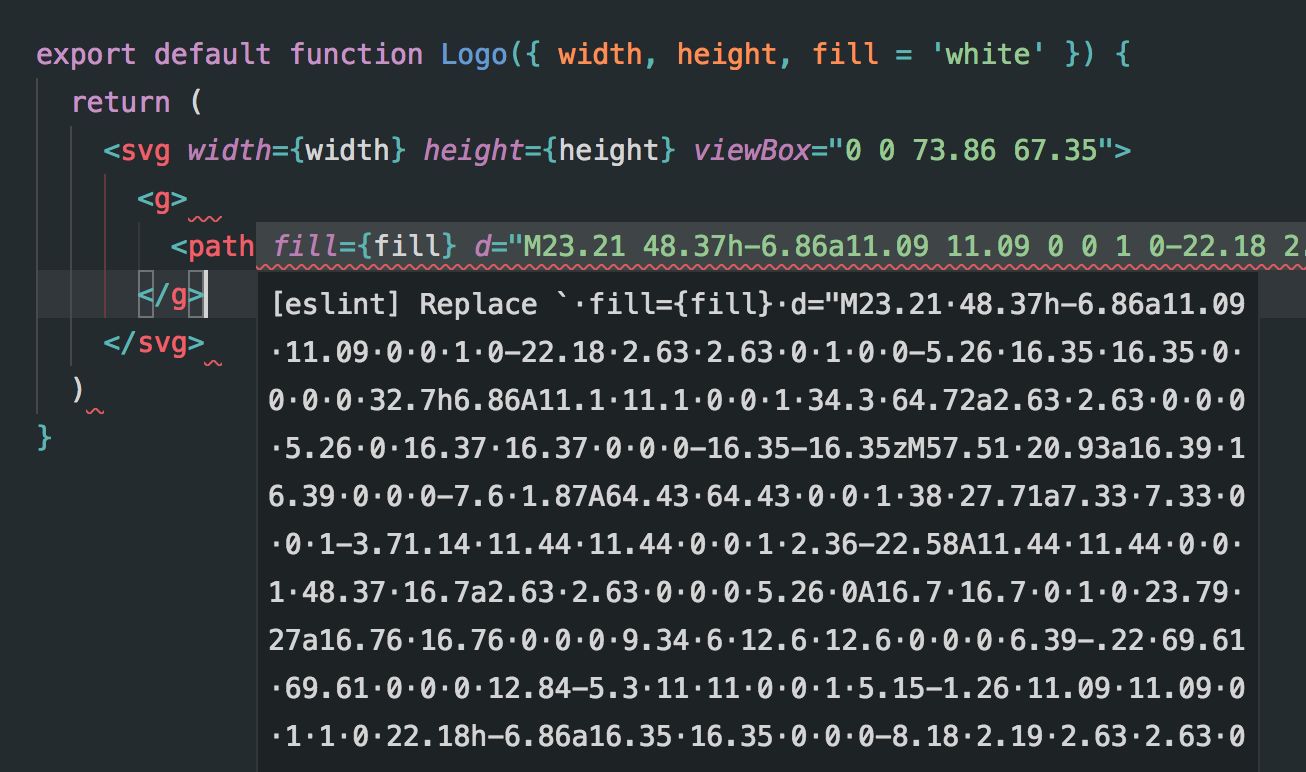
What the hell! I don't know what it's saying, took me a couple of minutes to figure out I need to prettify it myself 😄 Then I wanted to export it, "prefer export default"! Fuck I want to export multiple components from this, why is that! Then some other issues. That's why I created this issue.
... if it's using Airbnb one, I suggest we get rid of that. I think it's a bit too restrictive as well and I always end up being annoyed by the amount of rules I have to remove.
It's using these and yes we need to change it:
["linaria", "react", "react-dom"]
Trust me, no one meant to be rude.
Of course, I know it, thanks for mentioning tho! 💖 One tip, since it's not a huge project with thousands of issues, you don't need to close them this fast, leave the room for discussion on Github. ✌️
Please feel free to join linaria channel on slack.callstack.com where we can chat directly
I joined 🙌
(as opposed to having run eslint . && prettier separately).
Another great benefit is the ability to automatically fix code formatting issues by running eslint . --fix (--fix flag).
It's pretty common to use these together even Kent wrote a package https://github.com/prettier/prettier-eslint for this which is pretty handy :)
no need to open Visual Studio Code and set up prettier config separately.
That's not needed you can simply have a config file and setup prettier with lint staged and huskey.
Even you're using flow in the project so it's another check on top of them. Thanks for the explanation @grabbou! 👌😊
morajabi
on 18 Dec 2017
I want to export multiple components from this, why is that
Yes, the rule is annoying and unnecessary for utilities. For components, we follow the convention of exporting a single component from a file at callstack.
It's using these and yes we need to change it
The ESLint config gets merged with the one in the root. The one inside website/ are just for overrides.
It's pretty common to use these together even Kent wrote a package prettier/prettier-eslint
prettier-eslint has a different purpose, i.e. format code with prettier then override some code style with custom ones from ESLint.
That's not needed you can simply have a config file and setup prettier with lint staged and huskey.
Having ESLint together with Prettier has the advantage of not having to setup multiple tools everytime. For example, for callstack projects we use a common ESLint config which sets up both ESLint and prettier for us. One less thing to configure.
Also if code is not formatted with prettier, ESLint will error, which is what we want since we want to prevent non-formatted code from being pushed or merged to master.
Regarding running prettier with lint-staged, we don't do it because it makes it impossible to commit stuff partially (with git add -p), which I think is an important use case.
satya164
on 18 Dec 2017
Regarding running prettier with lint-staged, we don't do it because it makes it impossible to commit stuff partially (with git add -p), which I think is an important use case.
This is def a deal breaker for you then!
prettier-eslint has a different purpose, i.e. format code with prettier then override some code style with custom ones from ESLint.
@grabbou said it's a good thing and I mentioned this package. That's exactly what he mentioned with eslint --fix, isn't it?
morajabi
on 18 Dec 2017
Regarding running prettier with lint-staged, we don't do it because it makes it impossible to commit stuff partially (with git add -p), which I think is an important use case.
It's also a pain while rebasing.
Wrapping it up – this is the workflow we worked out after many tries and it serves us really well in multiple projects (also outside Callstack). However, if you feel that ESLint with Prettier is annoying or slowing you down, just disable it while development:
// website/.eslintrc.json
{
  "settings": {
    "import/core-modules": ["linaria", "react", "react-dom"]
  },
+  "rules": {
+    "prettier/prettier": 0
+  }
}
...and run yarn lint --fix from project root before committing (or after you see the CI failure), to fix the formatting issues.
Hope we can close it now :)
thymikee
on 18 Dec 2017
That's exactly what he mentioned with eslint --fix
It's different:
prettier-eslint- format code with prettier, then override some style rules with eslint (for examplearray-bracket-spacing), like runningprettier, theneslint --fix.eslintwitheslint-plugin-prettier- disable all of the style related rules from eslint and always use the prettier for formatting, equivalent to runningeslint --fixthenprettier
satya164
on 18 Dec 2017
BTW I have autofix on save enabled for eslint in my editor, which makes it much easier.
satya164
on 18 Dec 2017
Although what about those annoying rules I mentioned with the SVG example? What is your plan to deal with them?
morajabi
on 18 Dec 2017
I can only find one, export default. Do you have more? Can you comment the list so we can scan easily? :)
About what to do with them, I'd let @grabbou and @thymikee decide
satya164
on 18 Dec 2017
- export default
- Unreadable styling errors
morajabi
on 18 Dec 2017
Related issues
 hemlok
·
6Comments
hemlok
·
6Comments
 krvikash35
·
6Comments
satya164
·
3Comments
krvikash35
·
6Comments
satya164
·
3Comments
 secretlifeof
·
6Comments
secretlifeof
·
6Comments
secretlifeof
·
6Comments
secretlifeof
·
6Comments
Most helpful comment
Prettier will format the code, but it can't catch the mistakes in the code that a linter can. For example, trying to use a variable which is not defined and many more other rules that ESLint has. That's why it's important to use both ESLint and prettier together.
In our ESLint config we have only enabled rules which can catch potential errors and disabled all code style related rules which are handled by prettier. But since our config is based on Airbnb's config, some rules could be annoying as the Airbnb config is unnecessary restrictive. If you are annoyed by a specific rule, please mention it and we can discuss disabling it in the config.