Liipimaginebundle: Formats and extensions
I know that this issue been already discussed many times, but it's 2019th and all issues are set to closed while bug is still there. Steps to reproduce:
liip_imagine:
    driver: "gd"
    filter_sets:
        cover_full:
            data_loader:           cover
            format:                jpeg
            jpeg_quality:          100
            filters:
                auto_rotate: ~
                strip: ~

                thumbnail:
                    size:          [835, 470]
                    mode:          outbound
                    allow_upscale: true
Given a PNG image with '.png' extension, say "123.png", imagine_filter produces a link to "media/cache/.../123.png" which is not OK because it is really a JPEG file.
"liip/imagine-bundle": "dev-master",
 danaki
All 6 comments
Thanks! This should definitely be looked at.
 michellesanver
on 4 Oct 2019
michellesanver
on 4 Oct 2019
I've been debugging this issue lately and it seems that the library handles to conversion correctly. But it generates the filename from the initial input file instead of the newly created binary.
Line 91 above, uses $path which for example is images/image_test.jpg. While the $binary is the converted image with the correct info.
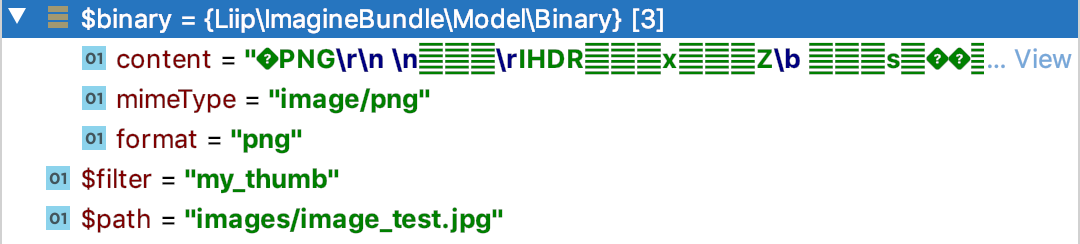
The same goes for the resolve part, if you path the store method the file is correctly saved. But the resulting url will still contain the incorrect extension.
 acrobat
on 1 Jun 2020
acrobat
on 1 Jun 2020
If someone is looking for a solution at the moment, we acted as follows:
Create your own CacheManager:
<?php declare(strict_types=1);

namespace App\Service;

use Liip\ImagineBundle\Binary\BinaryInterface;
use Liip\ImagineBundle\Imagine\Cache\CacheManager;

class ImageCacheManager extends CacheManager
{
    public function getResultPath($path, $filter)
    {
        $config = $this->filterConfig->get($filter);
        $extension = pathinfo($path, PATHINFO_EXTENSION);
        $targetExtension = $config['format'] ?? $extension;
        if (
            $extension &&
            $targetExtension &&
            mb_strtolower($targetExtension, 'UTF-8') !== mb_strtolower($extension, 'UTF-8')
        ) {
            $path = mb_substr($path, 0, -mb_strlen($extension, 'UTF-8'), 'UTF-8') . $targetExtension;
        }
        return $path;
    }

    public function store(BinaryInterface $binary, $path, $filter, $resolver = null)
    {
        $path = $this->getResultPath($path, $filter);
        parent::store($binary, $path, $filter, $resolver);
    }

    public function resolve($path, $filter, $resolver = null)
    {
        $path = $this->getResultPath($path, $filter);
        return parent::resolve($path, $filter, $resolver);
    }

    public function isStored($path, $filter, $resolver = null)
    {
        $path = $this->getResultPath($path, $filter);
        return parent::isStored($path, $filter, $resolver);
    }
}
Setup your services:
services:
    liip_imagine.cache.manager:
        class: App\Service\ImageCacheManager
        arguments:
            - '@liip_imagine.filter.configuration'
            - '@router'
            - '@liip_imagine.cache.signer'
            - '@event_dispatcher'
            - '%liip_imagine.cache.resolver.default%'
Add format to your configuration:
liip_imagine:

    # ... your configuration

    filter_sets:
        my_thumb:
            format: webp
Most usable with picture tag and multiple formats.
I’ve been working with Symfony for a couple of days, I can be mistaken in something.
 AntonOkulov
on 14 Jul 2020
AntonOkulov
on 14 Jul 2020
Changing the extension could lead to race conditions.
if you have 123.jpg and 123.png, both cached files will be named 123.webp.
This may be handled like in the WebP support which adds a .webp after the complete original filename.
 fbourigault
on 4 Jan 2021
fbourigault
on 4 Jan 2021
+1, same issue here. I have JPGs that needs to be converter to PNG on-the-fly in order to apply mask.
 Warxcell
on 18 Jan 2021
Warxcell
on 18 Jan 2021
I have the same problem than convert a large JPG image to a small preview with format: png, saves file with the jpg extension. But the file format seems to be correct.
 nickicool
on 22 Feb 2021
nickicool
on 22 Feb 2021
Related issues
 lebadapetru
·
6Comments
lebadapetru
·
6Comments
 TELLO0815
·
4Comments
TELLO0815
·
4Comments
 fabianbartsch
·
3Comments
fabianbartsch
·
3Comments
 sebastianblum
·
6Comments
sebastianblum
·
6Comments
 ghost
·
5Comments
ghost
·
5Comments
Most helpful comment
+1, same issue here. I have JPGs that needs to be converter to PNG on-the-fly in order to apply mask.