Lightline.vim: Lightline should be able to be disabled for a specific window
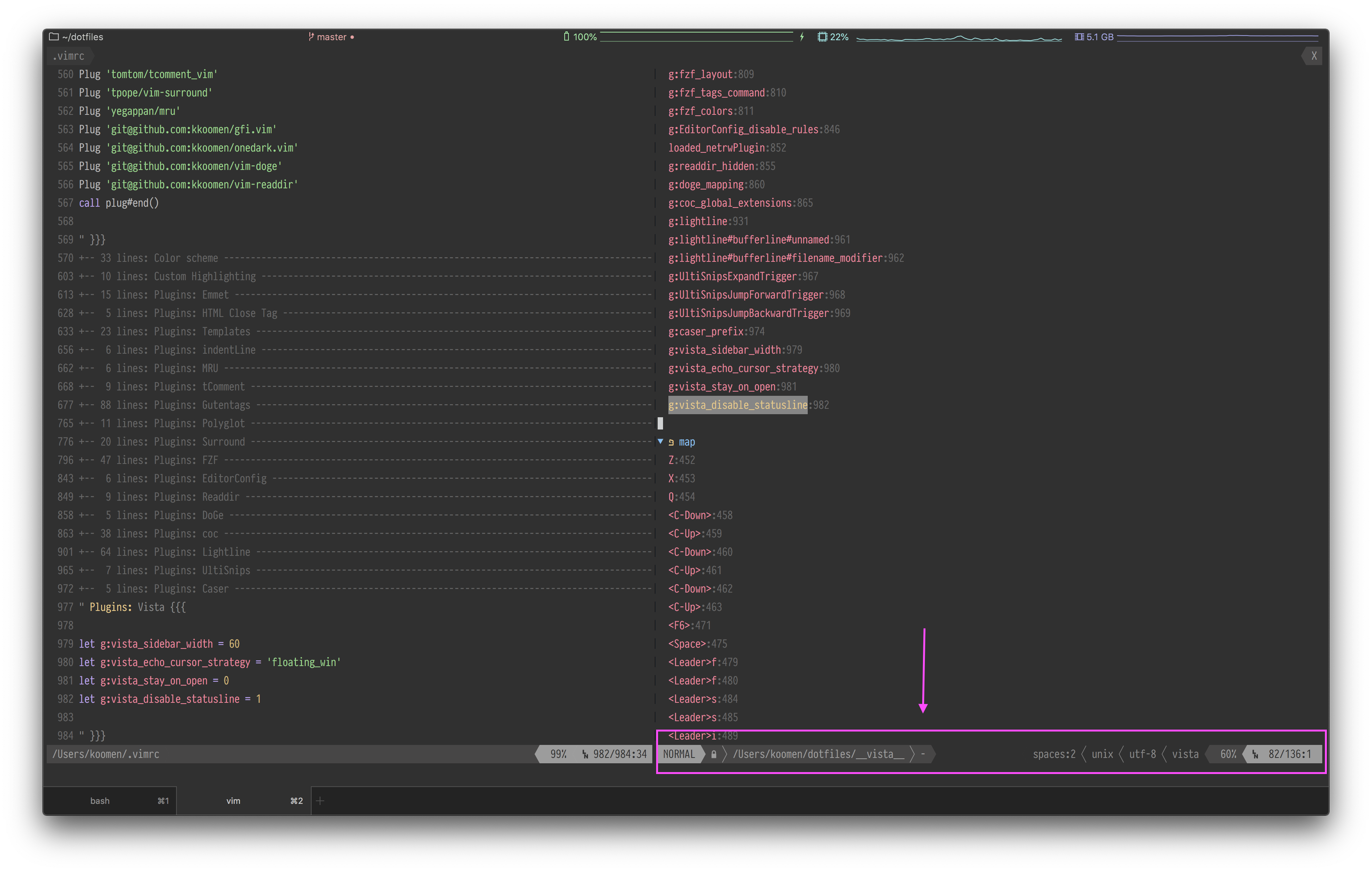
I want to use tagbar or vista.vim and both of these plugins have trouble to hide the statusline, because it's always being updated by lightline. Can I myself in my vimrc or these plugins disable the lightline for their window only?
See screenshot below (using vista.vim, the vista window still has the statusline because lightline keeps updating it)
 kkoomen
All 7 comments
This is not supported by design. Instead, you can create your component to show the information of these plugins by integrating with lightline.
- for vista.vim: https://github.com/liuchengxu/vista.vim#lightlinevim
- for tagbar: use
tagbar#currenttag('[%s] ','')https://github.com/majutsushi/tagbar/blob/524aa93372dabafd5ee53b9f6f222cf71d0f6bb8/doc/tagbar.txt#L910
 itchyny
on 10 Jan 2020
itchyny
on 10 Jan 2020
Why is it not supported by design? There have been multiple issues who asked about this. Are there situations that are hard to deal with? I'm open to help implementing it.
kkoomen
on 10 Jan 2020
It's hard to decide the way to configure (by filename pattern or filetype or buffer variable?) and is too complex. Second, appearance consistency matters and it is reasonable to show the plugin status within lightline component. Also, the check introduces performance regression while most of the users do not use. Sorry but I don't include the feature, it is a design decision.
itchyny
on 10 Jan 2020
You don't have to make it work for all the plugins that are rendered in a window, such as vista or tagbar. You should allow people to hide things by themselves, but even this is not an option.
For example, this is part of what I have locally:
let g:lightline = {
\  'colorscheme': 'onedark',
\  'active': {
\    'left': [
\      ['mode', 'paste'],
\      ['gitbranch', 'readonly', 'filename', 'modified'],
\    ],
\    'right': [
\      ['lineinfo'],
\      ['percent'],
\      ['gutentags', 'indent', 'fileformat', 'fileencoding', 'filetype'],
\    ],
\  },
\}
but why is this not possible?
let g:lightline = {
\  'colorscheme': 'onedark',
\  'active': {
\    'left': isTagBarWindow() ? [] : [
\      ['mode', 'paste'],
\      ['gitbranch', 'readonly', 'filename', 'modified'],
\    ],
\    'right': isTagBarWindow() ? [] : [
\      ['lineinfo'],
\      ['percent'],
\      ['gutentags', 'indent', 'fileformat', 'fileencoding', 'filetype'],
\    ],
\  },
\}
This would already solve all of those problems I believe. Would this be possible to configure?
kkoomen
on 10 Jan 2020
The plugin only has two statuslines, active or inactive. It is too complex to allow per-window statuslines and this is out of this plugin scope. The g:lightline configuration is static and read only once (at lightline#init). The core concept of lightline encourages users to create a component within lightline to show the plugin informations. This is a design policy and I can't change anyway.
itchyny
on 10 Jan 2020
And what about if the left and right key support a function as well? Letting the user do whatever he/she wants, expecting the input comes from the user. For example:
let g:lightline = {
\  'active': {
\    'left': 'LightLineLeft',
\    'right': 'LightLineRight',
\  },
\}
as soon as it's a function, you let the user return the content, otherwise if it's a list, lightline will create it for you, where as the functions might look like this for the user:
function! LightLineLeft() abort
  if l:is_vista_window
    " ...
    return ...
  endif

  return lightline#render()
endfunction
It's free to think the configuration api, but it's only a part of creating software. Implementation, performance regression, code complexity and users' demand. Anyway, the api and features of lightline is already fixed and only accept bug fixes. If you want, you can create a new statusline plugin or create your own fork. Good luck.
itchyny
on 10 Jan 2020
Related issues
 mrbig033
·
4Comments
mrbig033
·
4Comments
 JIAKanghao
·
4Comments
JIAKanghao
·
4Comments
 xeho91
·
4Comments
xeho91
·
4Comments
 dongsibo
·
4Comments
dongsibo
·
4Comments
 codepushr
·
3Comments
codepushr
·
3Comments
Most helpful comment
Why is it not supported by design? There have been multiple issues who asked about this. Are there situations that are hard to deal with? I'm open to help implementing it.