Lightline.vim: component_type not setting the color of items? (lightline + ALE linting)
I'm trying to colorize some status items using component_type. I'd like lint errors to be red and warnings to be orange, but this doesn't seem to work -- the status items are just the default text color:
let g:lightline = {
\ 'colorscheme': 'wombat',
\ 'active': {
\   'left': [['mode', 'paste'], ['filename', 'modified']],
\   'right': [['lineinfo'], ['percent'], ['readonly', 'linter_warnings', 'linter_errors', 'linter_ok']]
\ },
\ 'component_function': {
\   'linter_warnings': 'LightlineLinterWarnings',
\   'linter_errors': 'LightlineLinterErrors',
\   'linter_ok': 'LightlineLinterOK'
\ },
\ 'component_type': {
\   'readonly': 'error',
\   'linter_warnings': 'warning',
\   'linter_errors': 'error',
\   'linter_ok': 'ok'
\ },
\ }

function! LightlineLinterWarnings() abort
  let l:counts = ale#statusline#Count(bufnr(''))
  let l:all_errors = l:counts.error + l:counts.style_error
  let l:all_non_errors = l:counts.total - l:all_errors
  return l:counts.total == 0 ? '' : printf('%d ▲', all_non_errors)
endfunction

function! LightlineLinterErrors() abort
  let l:counts = ale#statusline#Count(bufnr(''))
  let l:all_errors = l:counts.error + l:counts.style_error
  let l:all_non_errors = l:counts.total - l:all_errors
  return l:counts.total == 0 ? '' : printf('%d ✗', all_errors)
endfunction

function! LightlineLinterOK() abort
  let l:counts = ale#statusline#Count(bufnr(''))
  let l:all_errors = l:counts.error + l:counts.style_error
  let l:all_non_errors = l:counts.total - l:all_errors
  return l:counts.total == 0 ? '✓' : ''
endfunction
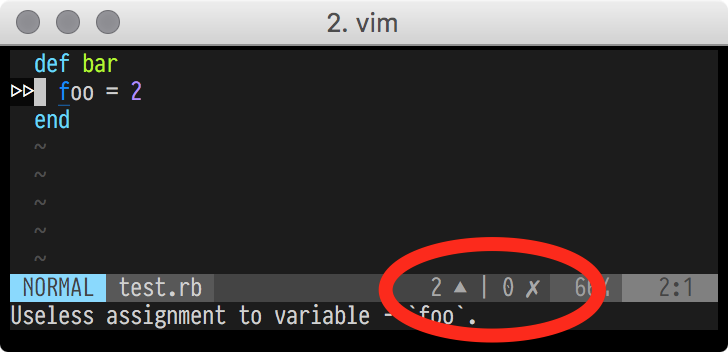
What am I doing wrong?
(And thank you for making this plugin. It's awesome.)
 statico
All 12 comments
There are three types of components in lightline, g:lightline.component, component_function, component_expand. The configuration of component_type applies to component_expand, not component_function. So short answer is, use component_expand and update the statusline with lightline#update() if necessary.
\ 'component_expand': {
\   'linter_warnings': 'LightlineLinterWarnings',
\   'linter_errors': 'LightlineLinterErrors',
\   'linter_ok': 'LightlineLinterOK'
\ },

autocmd User ALELint call lightline#update()
(Sorry but I'm not familiar with ale vim and I didn't test the config)
Detailed explanation. The statusline of lightline is updated as follows.
- Initialize the internal state, read configuration from
g:lightlineif not yet. - Initialize the internal colorscheme palette if not yet.
- On switching/creating windows, lightline calculates the
&statuslinevalue for all the windows (lightline#update).
- In this procedure, _expanded components_ are evaluated and color them red/yellow if they are error/warning types (
component_type).
- In this procedure, _expanded components_ are evaluated and color them red/yellow if they are error/warning types (
- The statusline are updated on every cursor motions. The functions of
component_functionare evaluated many many times.
Calculation for building &statusline costs a lot so it's be done only on switching windows. Setting highlights like error/warning components costs too. We can use component_expand to color the parts of the statusline but they are only updated on lightline#update. The components of component_function are updated on cursor motions (so we have to pay attention to the performance of the functions) and we cannot configure the colors.
 itchyny
on 13 Jul 2017
itchyny
on 13 Jul 2017
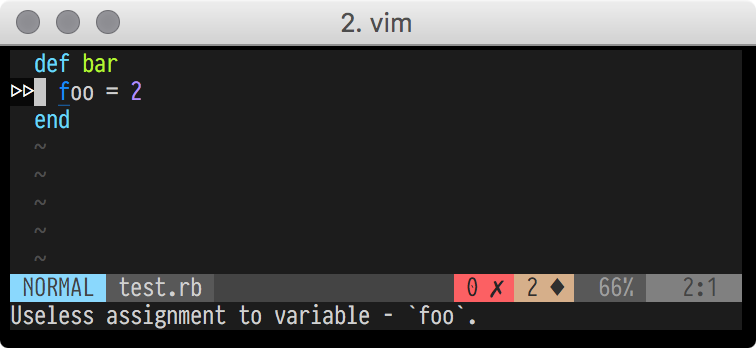 statico
on 13 Jul 2017
statico
on 13 Jul 2017
The previous comment's link was to the master branch, which has changed in the meantime. Here's a permanent link to @statico's solution: https://github.com/statico/dotfiles/blob/45aa1ba59b275ef72d8e5cc98f8d6aa360518e00/.vim/vimrc#L412
 john-kurkowski
on 4 Nov 2017
john-kurkowski
on 4 Nov 2017
I add the codes to init.vim (neovim), however, it does not work, only shows a check icon in the status line of lightline.
I have to manually type :syntax on, then suddently, it could show all indications on errs and warnings.
However, a ever bigger issue is that, the warning and error does not update automtically.
i.e., the indicatiosn of warning or erros are updated only after I reopen the files.
How to fix it?
 ccshao
on 1 Mar 2019
ccshao
on 1 Mar 2019
@ccshao You mean, you want to update status before / after linting / fixing? Then User autocommand events make good.
augroup LightLineOnALE
  autocmd!
  autocmd User ALEFixPre   call lightline#update()
  autocmd User ALEFixPost  call lightline#update()
  autocmd User ALELintPre  call lightline#update()
  autocmd User ALELintPost call lightline#update()
augroup end
See :h ALELintPre, etc.
( https://github.com/itchyny/lightline.vim/issues/236#issuecomment-315203103 shows ALELint, but this is old and removed before. )
 delphinus
on 7 Mar 2019
delphinus
on 7 Mar 2019
Great, thanks for the tips.
ccshao
on 7 Mar 2019
@itchyny I have pretty much the same situation here but I can't get it working.
When I put LightlineAleX functions to component_function it works but there is no colors (which is fine) but when I put it in component_expand it doesn't show anything in the statusline. Although if I do :echo LightlineAleWarnings() it shows the result.
Here is the config. What do I do wrong?
""""""""""""""""""""""
" Lightline components
let s:indicator_warnings = g:ale_sign_warning
let s:indicator_errors = g:ale_sign_error
let s:indicator_ok = " "
let s:indicator_checking = " "
function! LightlineAleWarnings() abort
if !LightlineAleLinted()
return ''
endif
let l:counts = ale#statusline#Count(bufnr(''))
let l:all_errors = l:counts.error + l:counts.style_error
let l:all_non_errors = l:counts.total - l:all_errors
return l:all_non_errors == 0 ? '' : s:indicator_warnings . all_non_errors
endfunction
function! LightlineAleErrors() abort
if !LightlineAleLinted()
return ''
endif
let l:counts = ale#statusline#Count(bufnr(''))
let l:all_errors = l:counts.error + l:counts.style_error
return l:all_errors == 0 ? '' : s:indicator_errors . all_errors
endfunction
function! LightlineAleOk() abort
if !LightlineAleLinted()
return ''
endif
let l:counts = ale#statusline#Count(bufnr(''))
return l:counts.total == 0 ? s:indicator_ok : ''
endfunction
function! LightlineAleChecking() abort
return ale#engine#IsCheckingBuffer(bufnr('')) ? s:indicator_checking : ''
endfunction
function! LightlineAleLinted() abort
return get(g:, 'ale_enabled', 0) == 1
\ && getbufvar(bufnr(''), 'ale_linted', 0) > 0
\ && ale#engine#IsCheckingBuffer(bufnr('')) == 0
endfunction
let g:lightline = {
\ 'colorscheme': $NVIM_COLORSCHEME,
\ 'active': {
\ 'left': [
\ [ 'mode', 'paste' ],
\ [ 'fugitive', 'filename' ]
\ ],
\ 'right': [
\ [ 'percent', 'lineinfo' ],
\ ['fileformat'],
\ [ 'linter_checking', 'linter_errors', 'linter_warnings', 'linter_ok' ],
\ ]
\ },
\ 'tabline': {
\ 'left': [['tabs']],
\ 'right': [],
\ },
\ 'tab': {
\ 'active': ['filename', 'fticon'],
\ 'inactive': ['tabnum', 'filename'],
\ },
\ 'component_function': {
\ 'fugitive': 'LightlineFugitive',
\ 'mode': 'LightlineMode',
\ 'fileformat': 'LighlineFileformat',
\ 'filename': 'LightlineFilenameExtended',
\ 'lineinfo': 'LightlineLineInfo',
\ 'percent': 'LightlinePercent',
\ },
\ 'tab_component_function': {
\ 'fticon': 'LightlineTabFiletypeIcon',
\ 'filename': 'LightlineTabname',
\ },
\ 'component_expand': {
\ 'tabs': 'lightline#tabs',
\ 'linter_checking': 'LightlineAleChecking',
\ 'linter_warnings': 'LightlineAleWarnings',
\ 'linter_errors': 'LightlineAleErrors',
\ 'linter_ok': 'LightlineAleOk',
\ },
\ 'component_type': {
\ 'tabs': 'tabsel',
\ 'linter_checking': 'left',
\ 'linter_warnings': 'warning',
\ 'linter_errors': 'error',
\ 'linter_ok': 'raw'
\ },
\ 'separator': {
\ 'left': '',
\ 'right': ''
\ },
\ 'subseparator': {
\ 'left': '',
\ 'right': ''
\ },
\ 'tabline_separator': {
\ 'left': '',
\ 'right': ''
\ },
\ 'tabline_subseparator': {
\ 'left': '|',
\ 'right': ''
\ },
\ }
 horseinthesky
on 8 Jan 2020
horseinthesky
on 8 Jan 2020
@horseinthesky You mean call lightline#update() does not solve the problem, right?
itchyny
on 8 Jan 2020
Hm, it actually does solve it. But where do I need to put this call to make it happen automatically?
horseinthesky
on 8 Jan 2020
Please read this thread carefully, can you try this configuration https://github.com/itchyny/lightline.vim/issues/236#issuecomment-470427359?
itchyny
on 8 Jan 2020
Ah sorry. Couldn't get what it does. It works. Thank you. Will read ALE help for the details.
horseinthesky
on 8 Jan 2020
Can we add simplified information on how to integrate ALE in the readme or wiki pages ?
I think it's only a matter of moving https://github.com/itchyny/lightline.vim/issues/236#issuecomment-470427359 into the wiki :)
 aemonge
on 18 Feb 2020
aemonge
on 18 Feb 2020
Related issues
 JIAKanghao
·
4Comments
JIAKanghao
·
4Comments
 Char-Aznable
·
4Comments
Char-Aznable
·
4Comments
 ayutheos
·
4Comments
ayutheos
·
4Comments
 linus345
·
3Comments
linus345
·
3Comments
 mrbig033
·
4Comments
mrbig033
·
4Comments
Most helpful comment
That works perfectly. Thank you!
https://github.com/statico/dotfiles/blob/master/.vim/vimrc#L412