Lightline.vim: Change background color of status bar only (to make it match the background of the terminal)
Hi,
I use base16, and would want the statusbar to have same color, or to appear transparent. Now it has a dark tint to it. Tried to find anything related in the docs, or issue. But came up empty.

Using Tmuxline, and managed to remove the background. And would love to do the same with Vim :-)
Thank you for the plugin though :-)
 ghost
ghost
All 6 comments
How about this configuration?
let s:palette = g:lightline#colorscheme#{g:lightline.colorscheme}#palette
let s:palette.normal.middle = [ [ 'NONE', 'NONE', 'NONE', 'NONE' ] ]
let s:palette.inactive.middle = s:palette.normal.middle
let s:palette.tabline.middle = s:palette.normal.middle
 itchyny
on 12 Jul 2016
itchyny
on 12 Jul 2016

You're the boss man! :-D Much appreciated!
ghost
on 13 Jul 2016
I never thought I'd find an answer for this, thanks man.
 kutacoder
on 22 Jan 2017
kutacoder
on 22 Jan 2017
I'm getting Undefined variable: g:lightline#colorscheme#wombat#palette
has anything changed or am I just missing something?
 jonmackenzie
on 13 Jul 2018
jonmackenzie
on 13 Jul 2018
@jonmackenzie just tried to solve the same issue,
for me the combination of this code, and the one from https://github.com/itchyny/lightline.vim/issues/381#issuecomment-523529581 worked.
autocmd VimEnter * call SetupLightlineColors()
function SetupLightlineColors() abort
  " transparent background in statusbar
  let l:palette = lightline#palette()

  let l:palette.normal.middle = [ [ 'NONE', 'NONE', 'NONE', 'NONE' ] ]
  let l:palette.inactive.middle = l:palette.normal.middle
  let l:palette.tabline.middle = l:palette.normal.middle

  call lightline#colorscheme()
endfunction
 syphar
on 31 Dec 2019
syphar
on 31 Dec 2019
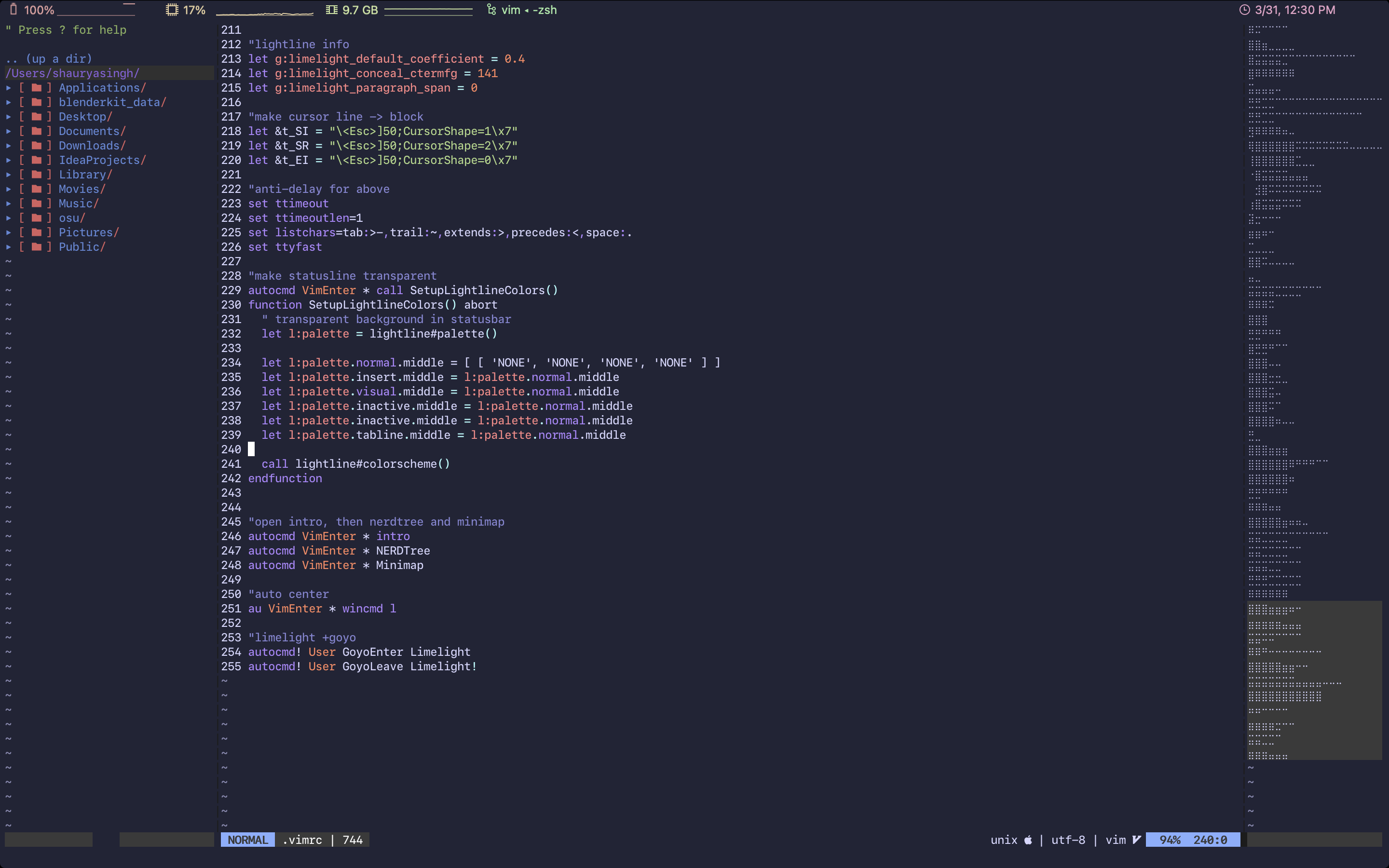
even after putting the above block in my .vimrc, parts of the status line remain colored (specifically the grey parts)

Is there any way to make these parts transparent? I tried to set the grey color to same color as my background, but it produces this weird looking light blue instead, I assume it uses 16-colors instead of 256
 shaunsingh
on 31 Mar 2021
shaunsingh
on 31 Mar 2021
Related issues
 kbc8090
·
3Comments
kbc8090
·
3Comments
 yunlingz
·
4Comments
yunlingz
·
4Comments
 linus345
·
3Comments
linus345
·
3Comments
 codepushr
·
3Comments
codepushr
·
3Comments
 mrbig033
·
4Comments
mrbig033
·
4Comments
Most helpful comment
How about this configuration?