Lighthouse: Performance trace vs Lighthouse Report
Hey guys! First I want to thank you for all your work. I've been using Lighthouse a lot the last year and a half and I'm just grateful of your work. So, straight to the question:
- Why the numbers/timings of a trace (generated using
--save-assets) are different from the numbers in the Lighthouse report?
Example:

- FCP: 592.1
- LCP: 722.9

- FCP: 3800
- LCP: 6700
In this case FCP 6.4x is and LCP is 9.2x the trace value.
I suspect this might be linked to throttling (the trace is unthrottled?). If that is the case, is there a way to transform the unthrottled trace to a throttled trace?
The problem for us now is that we are seeing a high variance in the metrics over time.

And we are not sure why the scores in lighthouse change. When we compare the trace of a good result with a bad one, the main difference I see that FCP and LCP happens at the same time:

Other details
- Lighthouse v6.4.1 running in a docker container
- Docker Host is a Mac Mini
- Docker image based in debian:
node:12-buster-slim - Using puppeteer v5.5.0 (Chrome 88)
- BenchmarkIndex very consistent in the 900 range
- CPU Slowdown Multiplier of 2.2x
 dvelasquez
All 9 comments
I have the same issue. Chrome dev-tools shows FCP 256.5 ms, but Lighthouse shows FCP 900 ms on desktop and 2900 ms on mobile. How does it work and why so much difference?
 varog-norman
on 29 Nov 2020
varog-norman
on 29 Nov 2020
Thanks for filing @dvelasquez!
I suspect this might be linked to throttling (the trace is unthrottled?). If that is the case, is there a way to transform the unthrottled trace to a throttled trace?
You're correct. You can look at the simulated throttled traces but running the CLI with the environment flag LANTERN_DEBUG=1 and the --save-assets flag. Warning: there will be a lot of them :)
And we are not sure why the scores in lighthouse change. When we compare the trace of a good result with a bad one, the main difference I see that FCP and LCP happens at the same time:
This is a common underlying problem related to the browser non-determinism element described in the variability docs. It's unfortunately the one place where simulated throttling can exacerbate variance instead of mitigating it. You can see if this is a problem affecting you by temporarily switching to applied throttling (use --throttling-method=devtools).
@varog-norman that's working as intended and answered in the FAQs.
 patrickhulce
on 30 Nov 2020
patrickhulce
on 30 Nov 2020
Thanks @patrickhulce for the info! Do you know if those traces are accessible programmatically?
Currently I'm saving the traces of each run that are available in result.artifacts.traces (even with the LANTERN_DEBUG=1) but it seems that this traces are not available there.
Also, by looking at the trace, it seems that sometimes, the LCP is moved after the hydration process of NextJS (or at least the main chunk is loaded). But this is not always happening or reflecting in the results.
Another thing, I've found that the main difference between simulated and devtools are that the FCP, LCP and SI are consistently better, but the TTI and TBT are worst (TBT is almost twice).
┌─────────┬─────────────────────────────────┬─────────────┬────────────┬──────────┬────────────┬─────────┬────────┐
│ (index) │              alias              │ performance │ speedIndex │   tti    │    tbt     │   lcp   │   bi   │
├─────────┼─────────────────────────────────┼─────────────┼────────────┼──────────┼────────────┼─────────┼────────┤
│    0    │ 'wh:motor:resultlist:simulated' │    0.39     │  '3.3 s'   │ '11.7 s' │ '1,470 ms' │ '6.8 s' │ 2628.5 │
│    1    │ 'wh:motor:resultlist:devtools'  │    0.58     │  '3.3 s'   │ '12.9 s' │ '2,540 ms' │ '2.5 s' │  2598  │
└─────────┴─────────────────────────────────┴─────────────┴────────────┴──────────┴────────────┴─────────┴────────┘

┌─────────┬─────────────────────────────────┬─────────────┬────────────┬──────────┬────────────┬─────────┬──────┐
│ (index) │              alias              │ performance │ speedIndex │   tti    │    tbt     │   lcp   │  bi  │
├─────────┼─────────────────────────────────┼─────────────┼────────────┼──────────┼────────────┼─────────┼──────┤
│    0    │ 'wh:motor:resultlist:simulated' │    0.41     │  '4.0 s'   │ '12.1 s' │ '1,310 ms' │ '5.6 s' │ 2599 │
│    1    │ 'wh:motor:resultlist:devtools'  │    0.58     │  '3.3 s'   │ '12.7 s' │ '2,650 ms' │ '2.5 s' │ 2619 │
└─────────┴─────────────────────────────────┴─────────────┴────────────┴──────────┴────────────┴─────────┴──────┘

┌─────────┬─────────────────────────────────┬─────────────┬────────────┬──────────┬────────────┬─────────┬────────┐
│ (index) │              alias              │ performance │ speedIndex │   tti    │    tbt     │   lcp   │   bi   │
├─────────┼─────────────────────────────────┼─────────────┼────────────┼──────────┼────────────┼─────────┼────────┤
│    0    │ 'wh:motor:resultlist:simulated' │    0.42     │  '4.2 s'   │ '11.7 s' │ '1,250 ms' │ '5.4 s' │  2599  │
│    1    │ 'wh:motor:resultlist:devtools'  │    0.59     │  '3.3 s'   │ '12.7 s' │ '2,370 ms' │ '2.5 s' │ 2630.5 │
└─────────┴─────────────────────────────────┴─────────────┴────────────┴──────────┴────────────┴─────────┴────────┘
Any recommendation on how to mitigate/stabilise this?
dvelasquez
on 1 Dec 2020
Coming back again, in this case I think I'm having the same issue described here: https://github.com/GoogleChrome/lighthouse/issues/11460#issuecomment-695211106
This is the URL I'm testing: https://www.willhaben.at/iad/gebrauchtwagen/auto/gebrauchtwagenboerse
So it seems that the fonts are (sometimes) pushing back the LCP even tho, the LCP is an image.
dvelasquez
on 1 Dec 2020
Do you know if those traces are accessible programmatically?
Currently I'm saving the traces of each run that are available in result.artifacts.traces (even with the LANTERN_DEBUG=1) but it seems that this traces are not available there.
They're not really. They get dumped to the filesystem with --save-assets flag but not available easily programmatically (fs.readdir the output directory I guess?).
Any recommendation on how to mitigate/stabilise this?
I'm not sure what you're asking to mitigate. devtools throttling method doesn't make everything better, it's just a tradeoff of different inaccuracies :)
patrickhulce
on 1 Dec 2020
Thanks very much @patrickhulce for taking the time to answer.
Currently, I'm running lighthouse from a NodeJS application and controlling the browser using puppeteer. On each run, I'm storing the traces, devtoolslog and the lighthouse reports. Since I'm running the application in this way, there are not files generated, instead I have the response of calling the lighthouse(...) function with the LH.RunnerResult type like this:
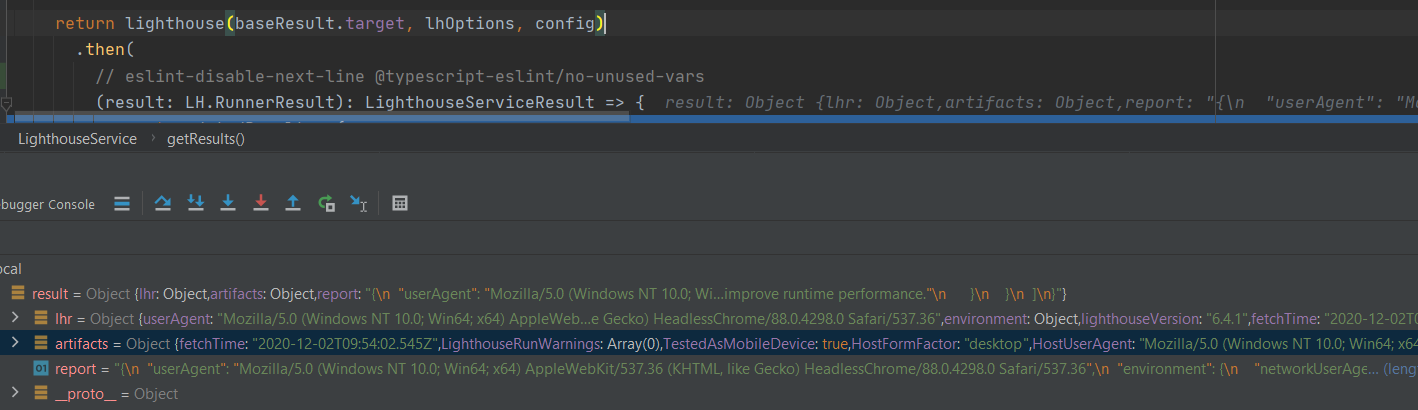
Do you know if there is a way to get those debug traces here?
Or also, there is a way to generate these traces with the original trace located in result.artifacts.traces or result.artifacts.devtoolsLogs. What would I need to be able to create those traces?
dvelasquez
on 2 Dec 2020
@dvelasquez you can copy/paste and modify this function from the codebase to give yourself the traces instead. They're effectively saved in global scope to the Simulator class.
patrickhulce
on 2 Dec 2020
Great! Thanks @patrickhulce
I manage to call the function and sending the artifacts of the lighthouse run. Thanks very much!
dvelasquez
on 13 Dec 2020
Great! I'll consider this closed then but feel free to chime in if you have further issues :)
patrickhulce
on 13 Dec 2020
Related issues
 shellscape
·
3Comments
shellscape
·
3Comments
 motiejuss
·
3Comments
motiejuss
·
3Comments
 mbparvezme
·
3Comments
mbparvezme
·
3Comments
 johnfrancisli
·
3Comments
johnfrancisli
·
3Comments
 nl-igor
·
3Comments
nl-igor
·
3Comments