Lighthouse: Gzip is enabled and reported correctly on LH but not via PageSpeed Insights
We are in the process of benchmarking our SDK scripts across sites. LH shows our scripts are gzip enabled and text compression audits are passed but PageSpeed Insights reports an opportunity to compress files.
Provide the steps to reproduce
- Run LH on https://test-site.topherwenceslaus.now.sh/
- Run https://developers.google.com/speed/pagespeed/insights/?url=https%3A%2F%2Ftest-site.topherwenceslaus.now.sh%2F
What is the current behavior?
The discrepancy in LH vs PageSpeed Insights audits.
What is the expected behavior?
Both should show the same audits.
Environment Information
- Affected Channels: Page Speed Insights
- Lighthouse version:
- Chrome version: 81.0.4044.113
- Node.js version:
- Operating System: Mac OS Catalina 10.15.3
Related issues
 topherMOE
All 13 comments
Thanks for filing @topherMOE! I'm not able to reproduce this issue on PSI :/
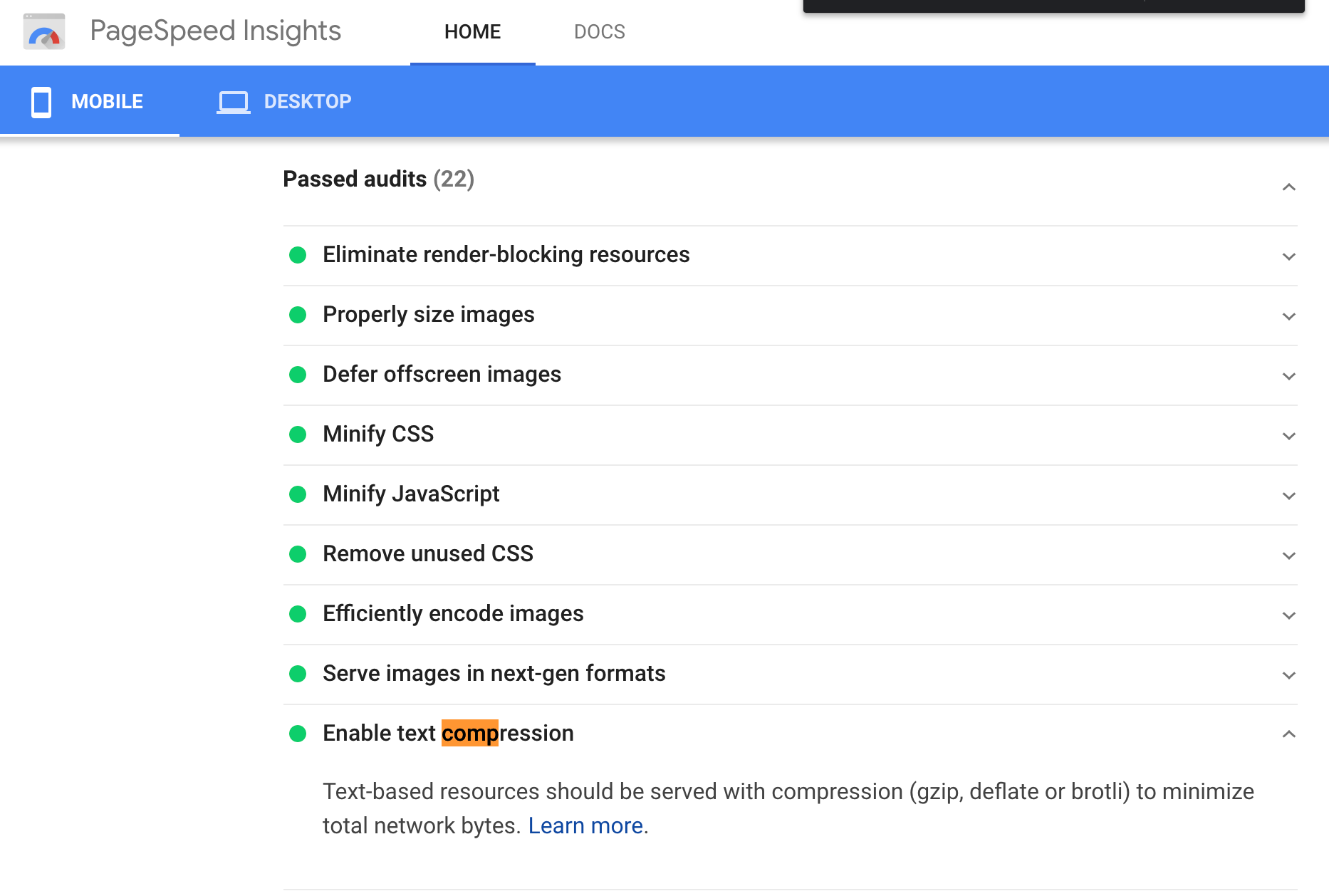
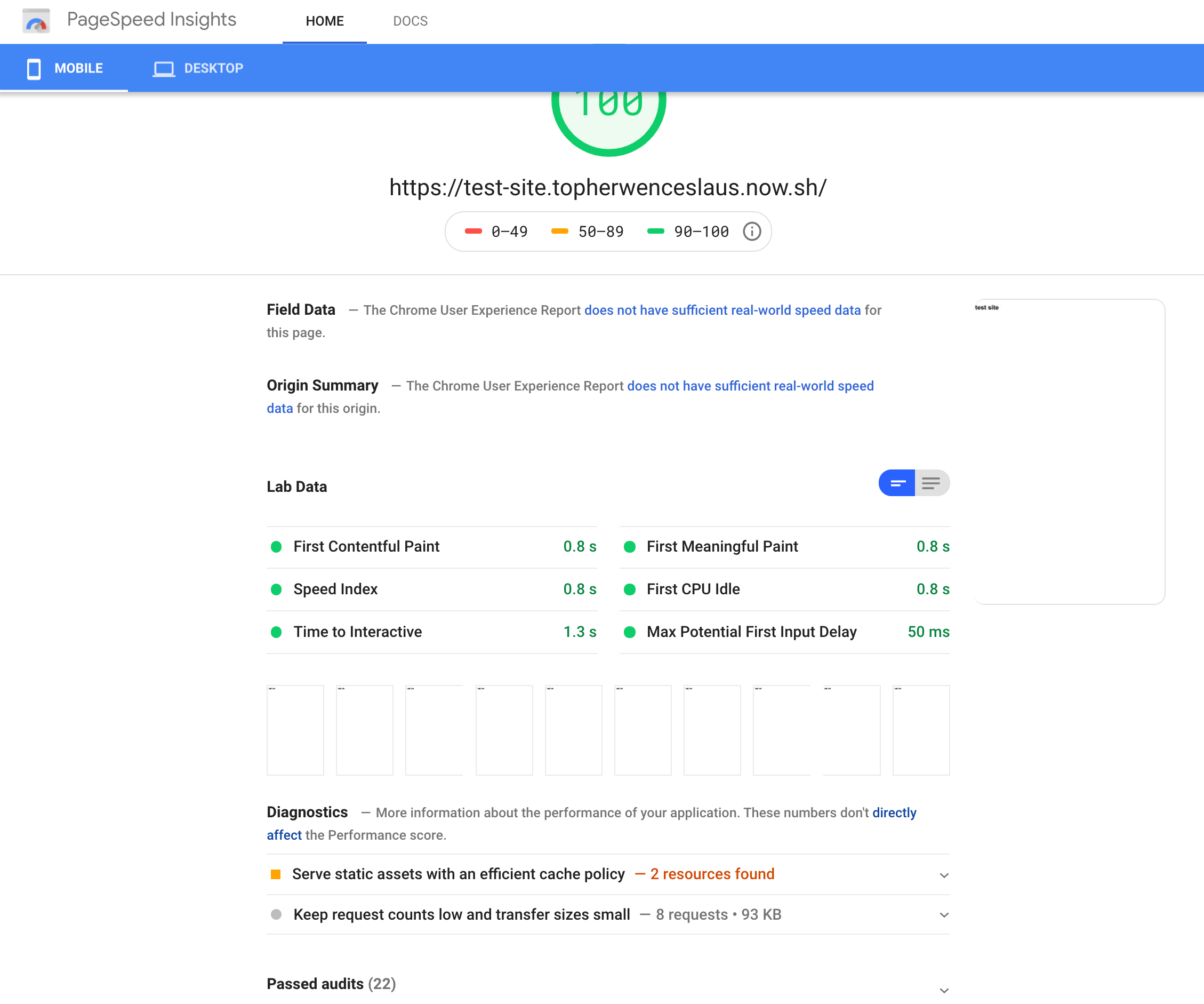
Is it still happening for you?
 patrickhulce
on 20 Apr 2020
patrickhulce
on 20 Apr 2020
Hey @patrickhulce, Thanks for looking at this issue.
Yes. I still see the failed audit. I tired in Incognito mode as well.

topherMOE
on 20 Apr 2020
Thanks @topherMOE! Can I ask which rough geographic area of the world you're requesting from? That's the only obvious answer I can see left.
I'm requesting from North America, central US.
patrickhulce
on 20 Apr 2020
Otherwise I give up and cede further guesses here to @exterkamp and @jazyan
patrickhulce
on 20 Apr 2020
Hey @patrickhulce. I'm testing this from Bangalore, India.
topherMOE
on 20 Apr 2020
We are experiencing the same thing.
In the US we are getting single-digit scores due to a supposed lack of compression. In Japan and Europe we don't see that complaint, and get a much higher score.
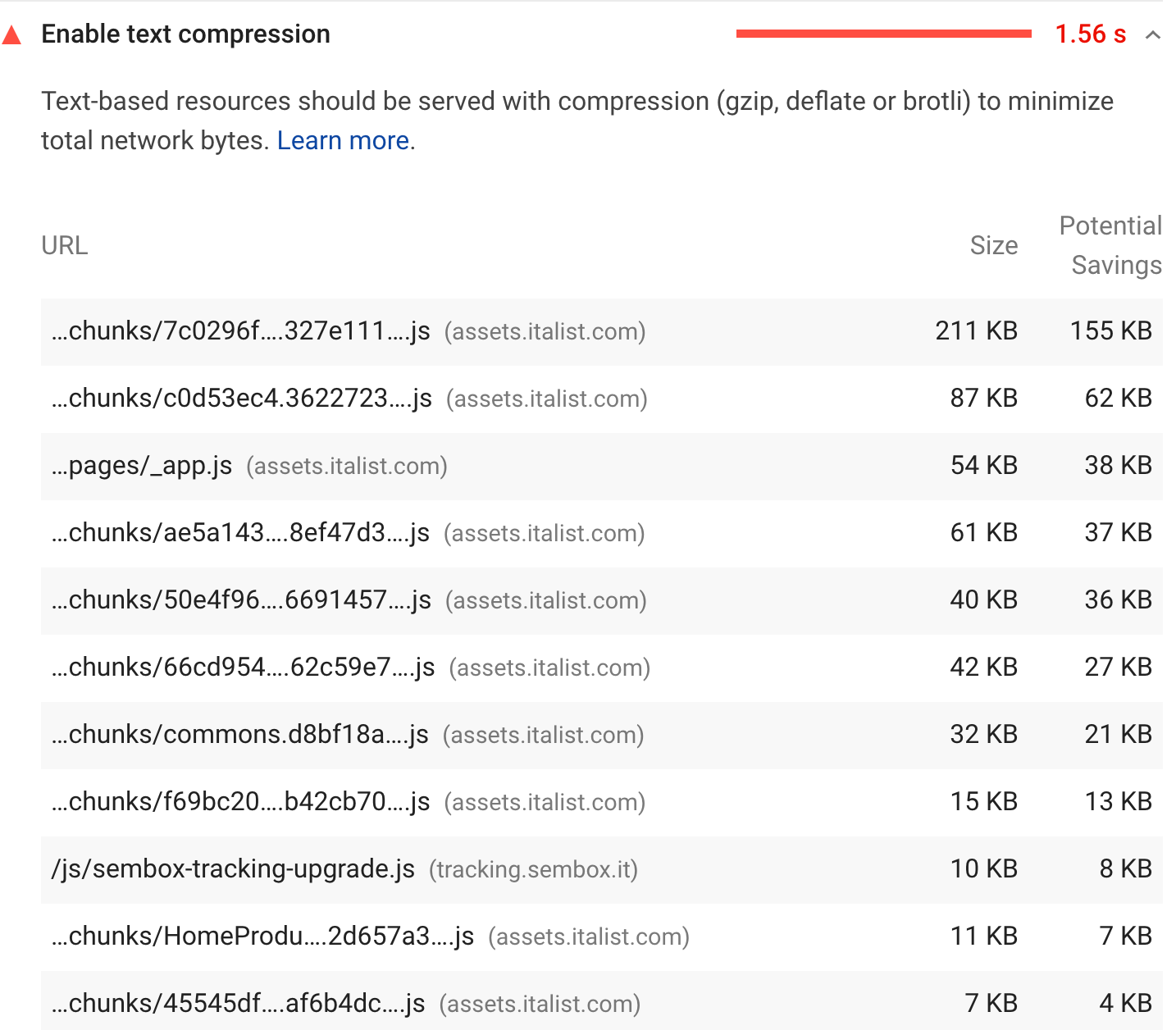
This just started happening a couple weeks ago, with no relevant change on our side.
Example URL:
https://assets.italist.com/_next/static/chunks/7c0296fdd31104af5291b130c9b8da225d1f4dda.327e111592818b54d7c9.js
Chrome developer tools Network tab shows that these static resources are definitely arriving from AWS Cloudfront properly gzipped, including the correct response header.
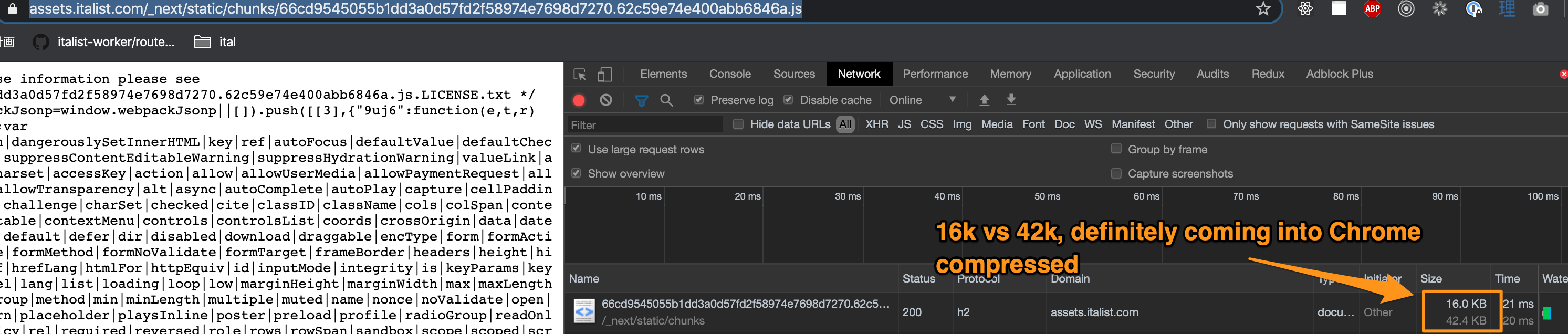
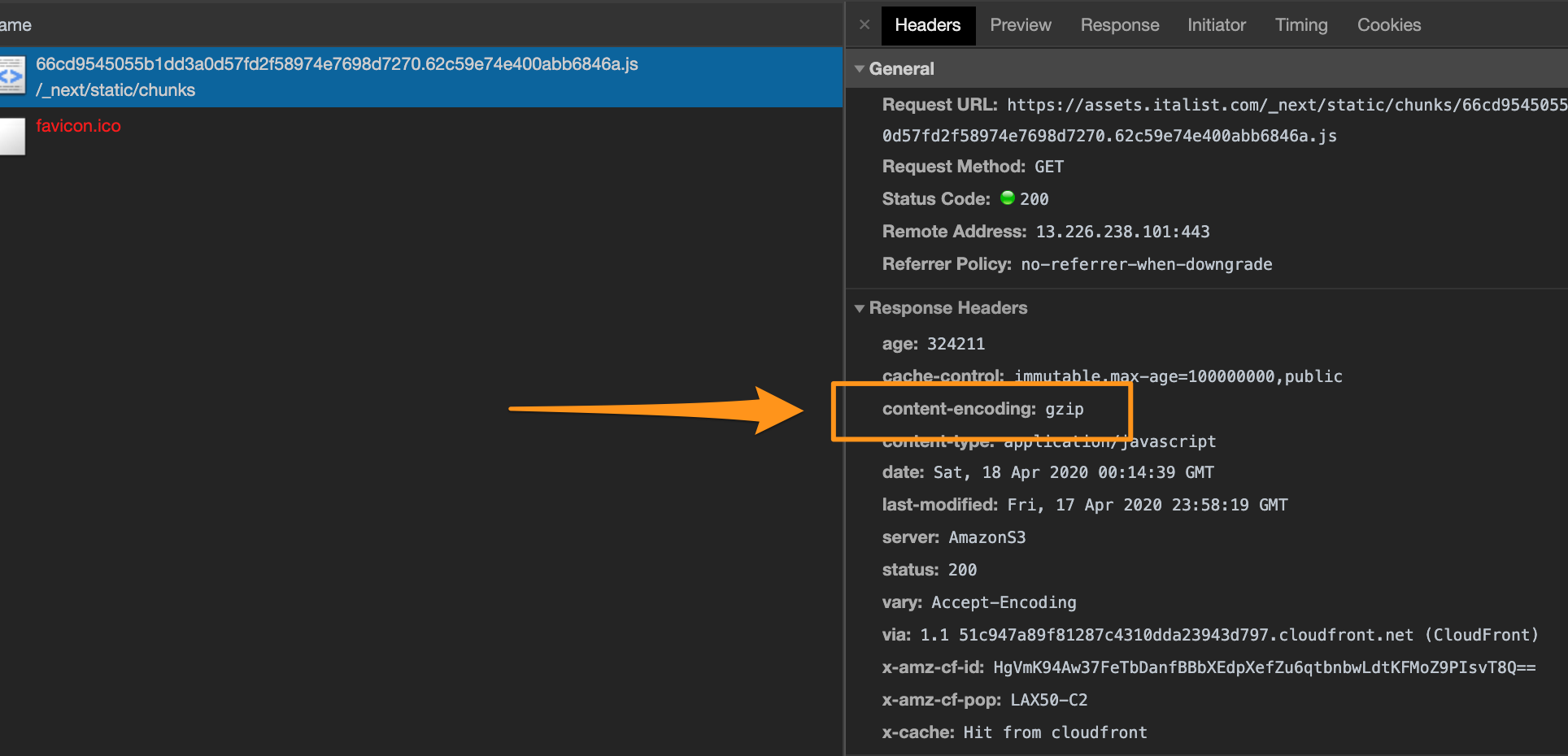
Also if I issue a curl and send the proper accept-encoding header, I always get the correct content-encoding response header back, with "gzip".
$ curl -H "Accept-Encoding: gzip" -I https://assets.italist.com/_next/static/chunks/c0d53ec4.3622723325877400fbf7.js
HTTP/2 200
content-type: application/javascript
date: Sat, 18 Apr 2020 00:14:05 GMT
last-modified: Fri, 17 Apr 2020 23:58:19 GMT
cache-control: immutable,max-age=100000000,public
server: AmazonS3
content-encoding: gzip
vary: Accept-Encoding
x-cache: Hit from cloudfront
via: 1.1 b837267595110a1135bf4fb036d71e1f.cloudfront.net (CloudFront)
x-amz-cf-pop: LAX50-C1
x-amz-cf-id: 6IVRCfFP4Xlpkgkq1zkXcb06XQtCOV0Of1gZqUgnn2OGDa8GXwzCZg==
age: 328731
I ran the above repeatedly inside a "watch" command for a while and it always is gzipped.
I have run Google Page Speed on this site a bunch of times over the past few days, and it keeps reporting various scripts as not being gzipped... but which ones it reports as not being compressed is quite random. Sometimes it only mentions 4 scripts, sometimes it's 6, sometimes it's 9.
@patrickhulce @exterkamp @jazyan
 manzoid
on 22 Apr 2020
manzoid
on 22 Apr 2020
@manzoid i took a quick look and i am seeing different results depending on which servers make the network request
Here's a diff. On the left is a request made from central-mid US. On the right is a request made from the Southeastern coast of the US.
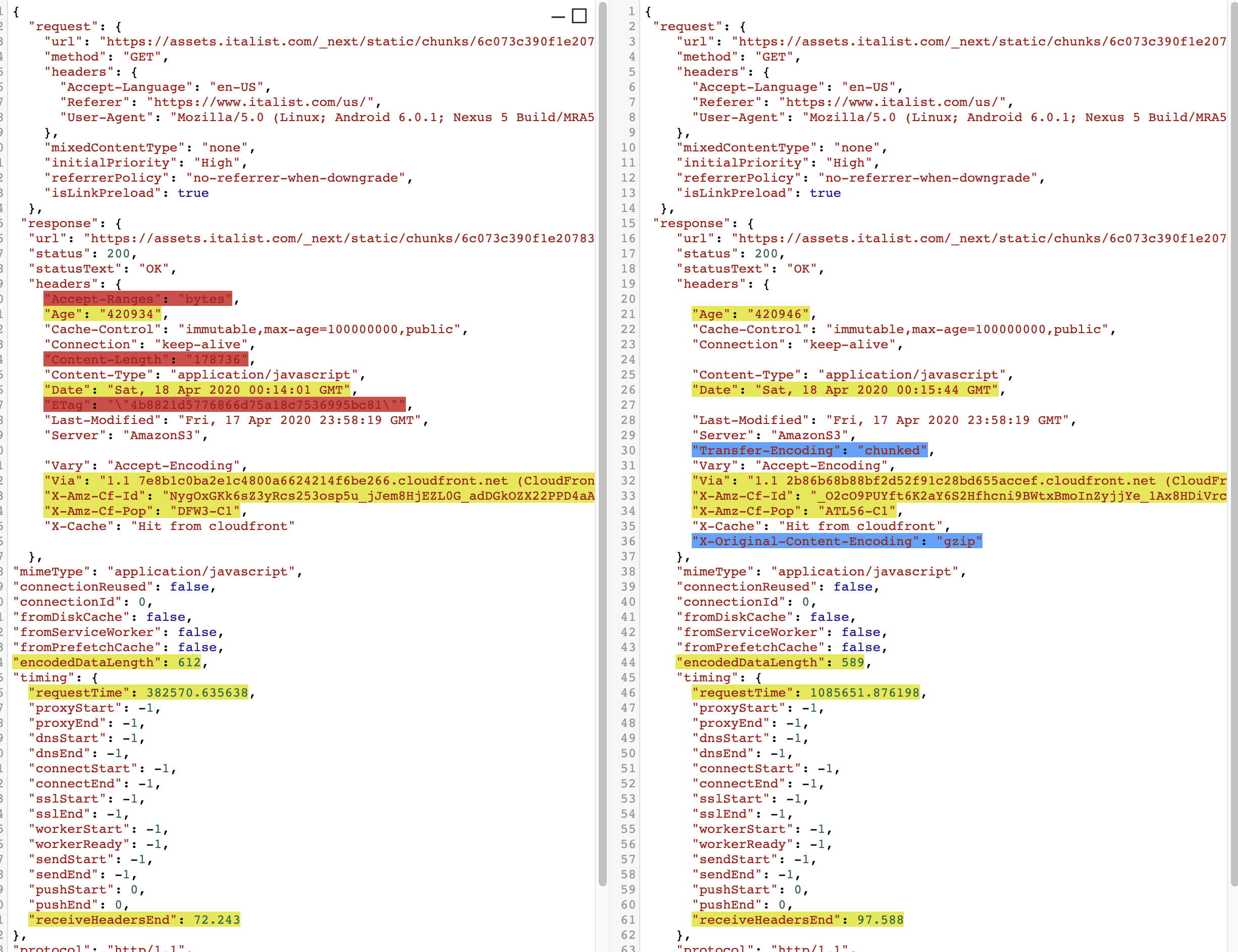
The requests look identical to me. But you can see the differences in the response headers. The "chunked" encoding is the weirdest thing. That doesn't make much sense for JS, so perhaps whatever config is behind that is causing these problems?
 paulirish
on 22 Apr 2020
paulirish
on 22 Apr 2020
The "chunked" encoding is the weirdest thing.
this may be a problem on the PSI side... requires some investigation.
paulirish
on 23 Apr 2020
@paulirish thank you, please let me know if there's any investigation our team can contribute. As this appears to be regional, we can check anything you recommend from various spots around the world, and if it helps, I can open a ticket with AWS/Cloudfront about this as well. I'm just not currently sure what to ask them to do, as Chrome itself in actual use doesn't seem to demonstrate the problem in any region.
manzoid
on 23 Apr 2020
Thanks, @manzoid for pitching in more insights to this issue. As @manzoid said please let us know in case of any contribution from our side to fix this sooner. @paulirish
topherMOE
on 23 Apr 2020
hi @paulirish @exterkamp this particular problem seems to have mostly gone away. Is this expected? Did something change-- thank you
manzoid
on 29 May 2020
Do you happen to know when it went away? We updated PSI in the last few days.
 connorjclark
on 29 May 2020
connorjclark
on 29 May 2020
hi @connorjclark Only anecdotal as I wasn't re-checking every single day but it seems to have been right around when v6 was released? like ~10d or ~2w ago or so
manzoid
on 29 May 2020
Related issues
 shellscape
·
3Comments
shellscape
·
3Comments
 wizardnet972
·
3Comments
wizardnet972
·
3Comments
 dkajtoch
·
3Comments
dkajtoch
·
3Comments
 workjalexanderfox
·
3Comments
workjalexanderfox
·
3Comments
 codepodu
·
3Comments
codepodu
·
3Comments
Most helpful comment
We are experiencing the same thing.
https://developers.google.com/speed/pagespeed/insights/?url=https%3A%2F%2Fwww.italist.com%2Fus%2F&tab=mobile
In the US we are getting single-digit scores due to a supposed lack of compression. In Japan and Europe we don't see that complaint, and get a much higher score.
This just started happening a couple weeks ago, with no relevant change on our side.
Example URL:
https://assets.italist.com/_next/static/chunks/7c0296fdd31104af5291b130c9b8da225d1f4dda.327e111592818b54d7c9.js
Chrome developer tools Network tab shows that these static resources are definitely arriving from AWS Cloudfront properly gzipped, including the correct response header.
Also if I issue a curl and send the proper accept-encoding header, I always get the correct content-encoding response header back, with "gzip".
I ran the above repeatedly inside a "watch" command for a while and it always is gzipped.
I have run Google Page Speed on this site a bunch of times over the past few days, and it keeps reporting various scripts as not being gzipped... but which ones it reports as not being compressed is quite random. Sometimes it only mentions 4 scripts, sometimes it's 6, sometimes it's 9.
@patrickhulce @exterkamp @jazyan