Lighthouse: Chrome 80 - Desktop throttling profile not using lr-desktop-config
Provide the steps to reproduce
- Run LH on http://www.ideacasaimmobiliare.it/web/ with this options flagged:
- Performance
- Best practices
- Accessibility
- SEO
- Desktop
- Clear storage
Simulated Throttling
LH runs correctly but loading web site resources take very long time
What is the current behavior?
All the web site weights about 3 Mb but LH takes about 8.4 seconds for FMP and score 10.2s for speed index!
What is the expected behavior?
This is a very strange behaviour because in Italy, for desktop sites (DSL home line) a web site loads in about 2 secs!
Removing throttling and leaving clear cache flagged gave me same results.
I can't show my customers a report showing that a 3 Mb site loads in 10 seconds!
Take a look at the report
Environment Information
- Affected Channels: LH
- Lighthouse version: 5.7.0
- Chrome version: 80.0.3987.87 - 64 bit
- Operating System: Win 10 Pro
 Rombecchi
All 13 comments
Thanks for filing! This is the expected behavior of throttling. Learn more
Simulated throttling reports the load times as if it were loaded on a slower mobile device and network. If you're interested in the load times on a powerful desktop with a broadband connection, then running without simulated throttling is what you would do to get those numbers.
 patrickhulce
on 10 Feb 2020
patrickhulce
on 10 Feb 2020
How do you disable throttling? Right now I cant disable throttling in my Lighthouse tests via the Chrome extension. Instead with throttling unchecked, a 4xCPU and a ~1.5 MBps downstream throttle is applied:
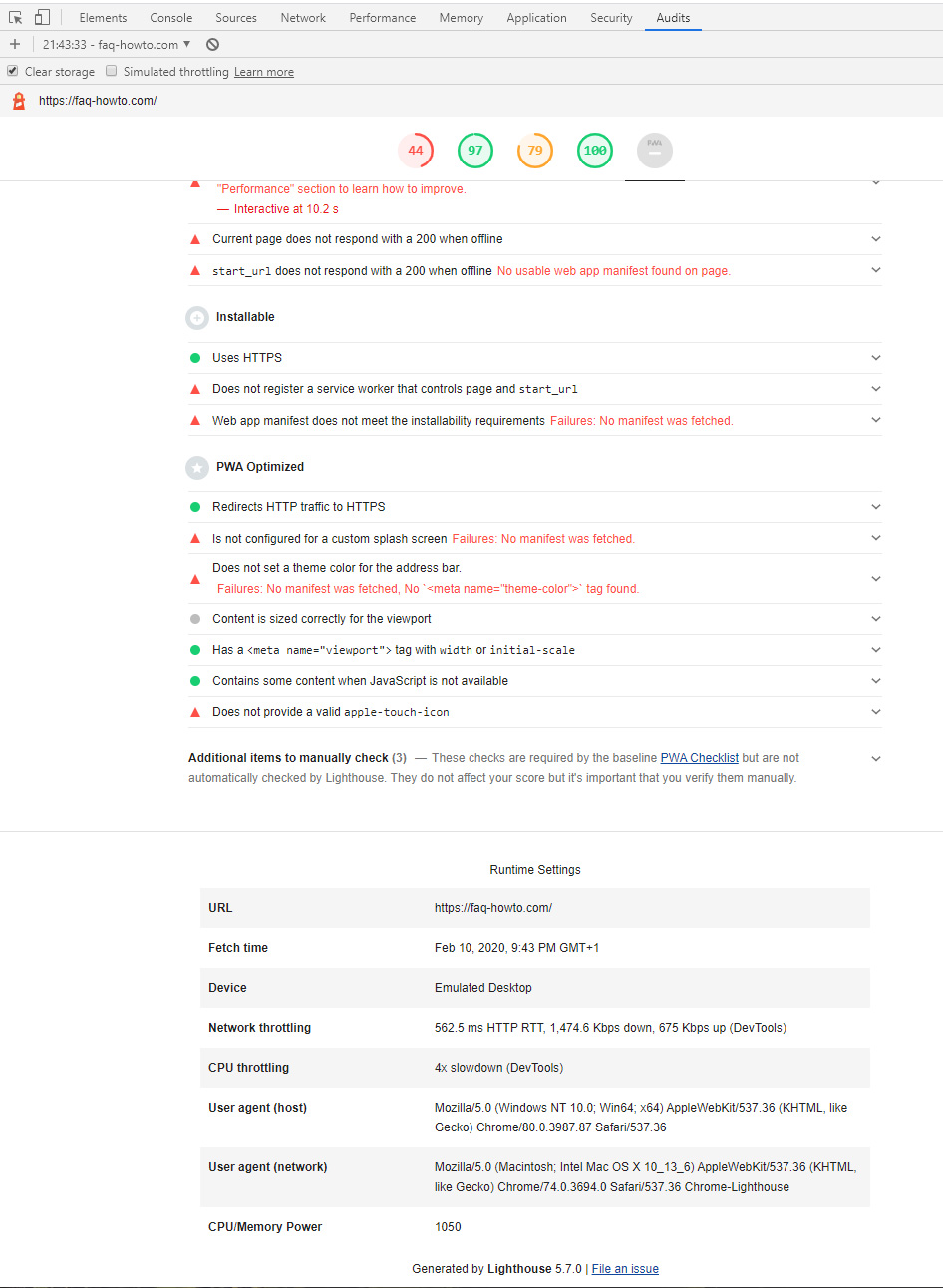
This is totally out of whack here in Germany since in 2020 4G is the absolute minimum as a mobile standard. To put this in perspective some performance kpi's:
- TTFB < 38ms,
- DOMContentLoaded 151ms
- Onload-Event 251ms on an unthrottled connection
And before you ask: no, the server is not local, but its a CDN edge server, which retrieves the html from a datacenter webserver from somewhere compeltely else on each pull. For an optimized 1MB payload webpage that isnt slow at all - far from it. But for the new LH test its a 44/100.
Here the FF DevTool values:
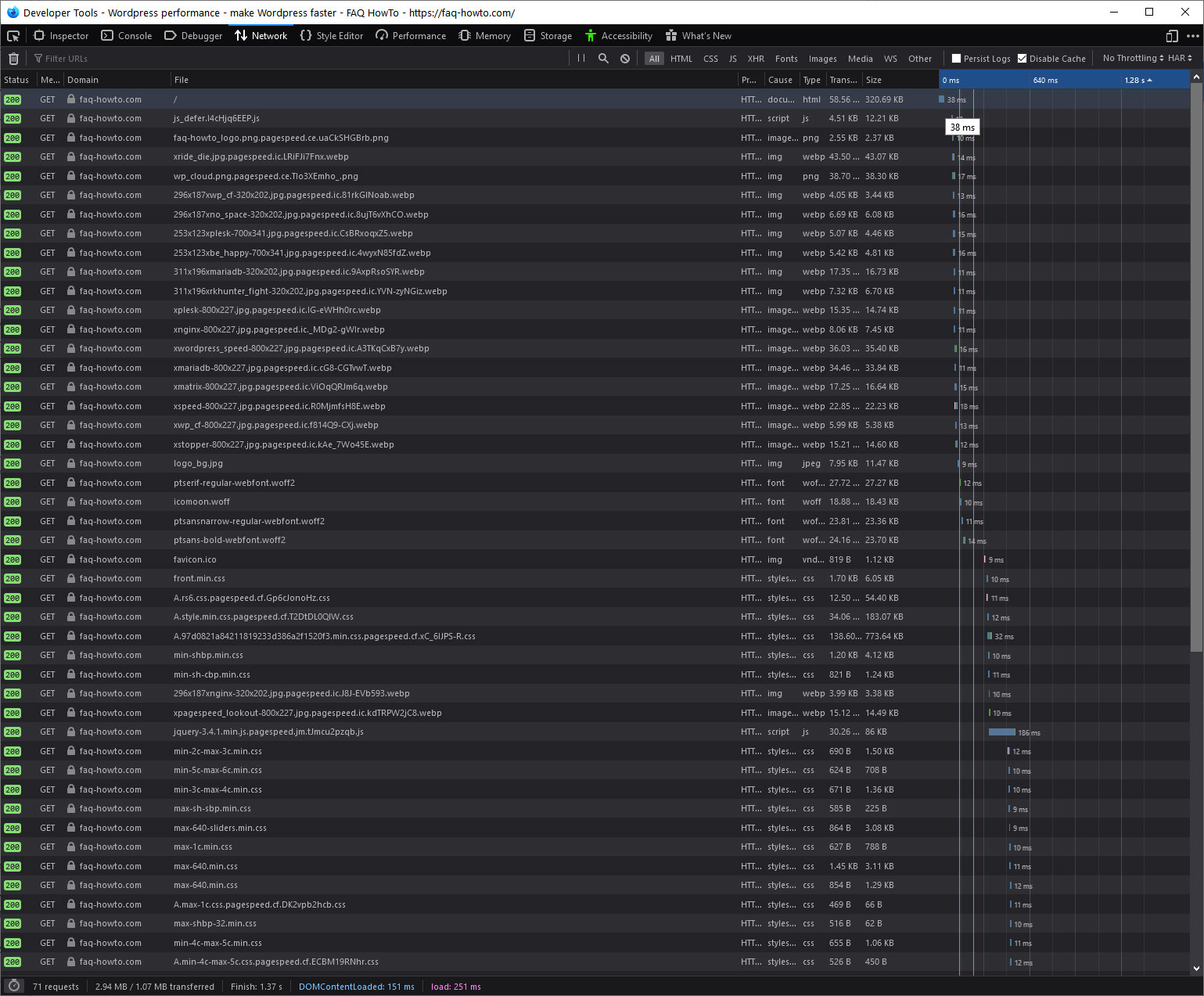
So either there is a wild setting somewhere else I didnt see in Chrome or somethign from a previous audit was set as default (and cant be changed by me?). Anyways Id suggest you also add 3G and 4G as standard in LH tests. Where an Android/iphone 2-3 generations ago is the standard and not a Nexus 5 (which stopped in 2015 - thats stone age).
 kbi-user
on 10 Feb 2020
kbi-user
on 10 Feb 2020
Thanks for filing! This is the expected behavior of throttling. Learn more
Simulated throttling reports the load times as if it were loaded on a slower mobile device and network. If you're interested in the load times on a powerful desktop with a broadband connection, then running without simulated throttling is what you would do to get those numbers.
This isn't an acceptable answer. The bug (and it isn't specific to Italy) is that you have removed the "No throttling" feature, which for Desktop would be appropriate. Desktop versions of pages should not be scored as if they were running on median mobile devices.
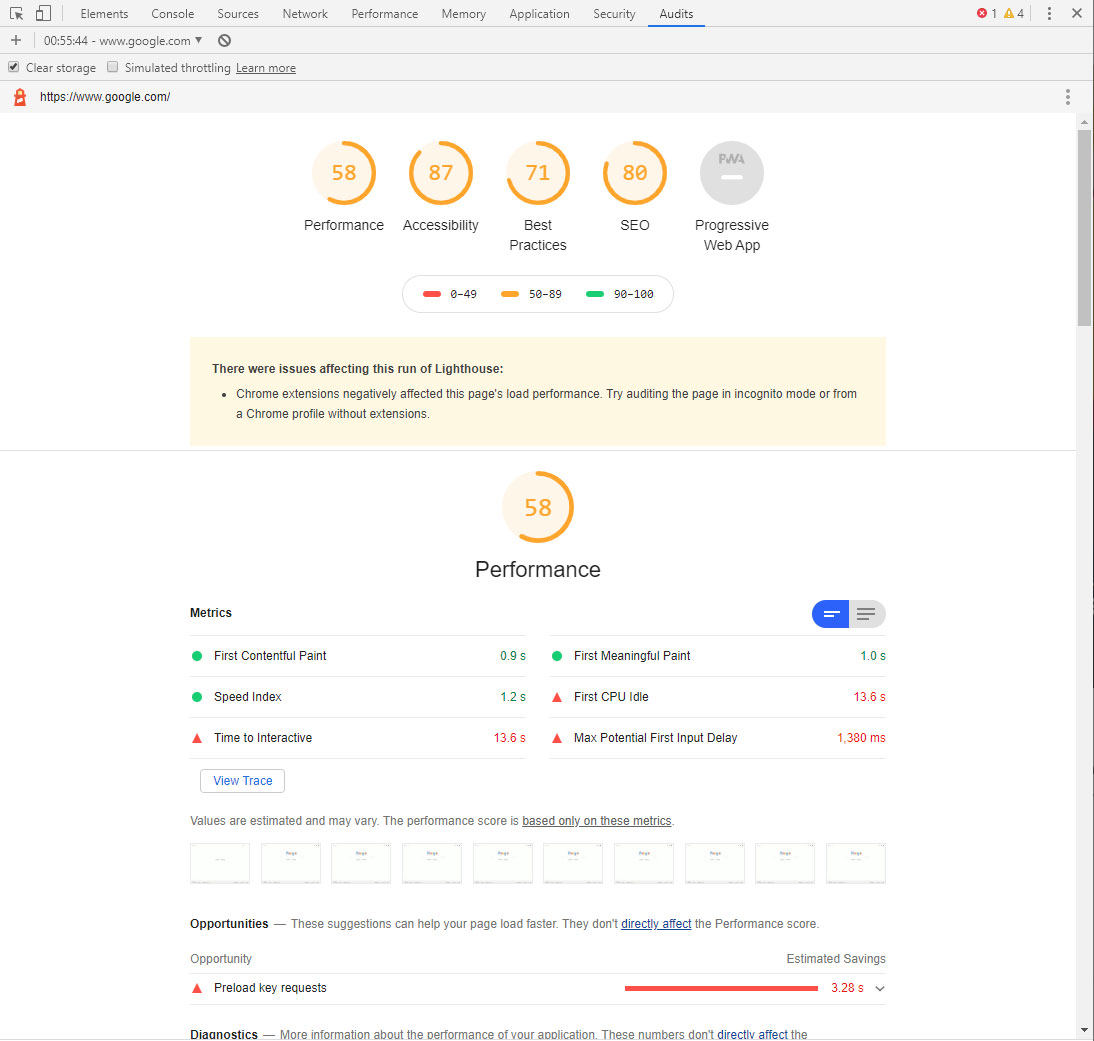
For further evidence that this isn't working as intended, compare the following:
1) Lighthouse audit from the Audit tab in Chrome 80, with "Desktop" selected, on https://www.google.com
2) https://developers.google.com/speed/pagespeed/insights/?url=https%3A%2F%2Fwww.google.com&tab=desktop
The chrome audit gives it an 84, and the PSI audit gives it 100 (note that traditionally, Lighthouse scores on PSI are worse than Chrome audits).
 patrick-minton
on 11 Feb 2020
patrick-minton
on 11 Feb 2020
Who tells Google, that their Lighthouse score sucks? @patrick-minton that was a good one ;)
kbi-user
on 11 Feb 2020
Thanks for the additional information everyone!
Lots of different issues here, but the most pressing that seems to have sparked everyone's interest first...
Chrome DevTools Specific Bug
Most of followup comments seem to be related to the Chrome DevTools channel. Yes, "No throttling" was removed from Chrome DevTools to attempt to align more directly with PSI, but it looks like the modified multipliers for the desktop form factor are not working (I'm actually see worse performance numbers for desktop than mobile 🤔). We'll investigate.
cc @connorjclark my theory here is that the lr-desktop-config isn't getting applied when "Desktop" is selected, but that doesn't totally explain how I'm seeing worse stats on example.com for desktop.
How do you disable throttling?
While this bug is being sorted out, the CLI and --throttling-method=provided is the best way to achieve the previous results of "No throttling" in DevTools.
Anyways Id suggest you also add 3G and 4G as standard in LH tests.
The mobile throttling preset is indeed modeled after the 85th percentile 4G latency which is also roughly the 25th percentile 3G latency, so Slow 4G/Fast 3G.
Where an Android/iphone 2-3 generations ago is the standard and not a Nexus 5 (which stopped in 2015 - thats stone age)
Yes you're right and while this has already been updated to a slightly newer phone UA for 6.0, the spirit of the CPU performance is largely unchanged. Not to get too lost in the weeds in the philosophy behind this but the budget phone is getting cheaper, but not much faster. That being said we're always considering how the throttling profiles align with real global usage and making adjustments where necessary.
patrickhulce
on 11 Feb 2020
@patrickhulce pheww thx, previous comments sounded as if this is expected behaviour. Apart from that it seems that behaviour has also been rolled out to PSI - at least partially. Some websites without field data also behave worse than 5 days ago, while other website with existing field data even improved compared to 5 days ago.
On throttling I'd suggest you really standardize:
- create complete packages of phone (CPU) and bandwidth/latency, some sort of "virtual machine" totally standardized.
- maybe add "standard containers" on PSI for selection
Why? Right now there are no viable testing standards form a trustworthy instance while offering viable peer points (network wise) to check sites.
- Standard test and machines would fill an existing need to have comparable and reliable kpis
- The ability to check standardized would improve new sites by enablign site owners to check kpis with their designers
- standardized testbeds provide viable data for the future
_PS: the lack of standard tests is actually the reason why you'll probably see more "uspet" users. Because people started to use the LH (at least PSI) as a standard proof for quality of website infrastructure and design service. So changing that standard without a chance to setup the previous ones for comparison does lead to problems - actually more than you are probably aware of._
kbi-user
on 11 Feb 2020
Hm, I'm not aware of any PSI-related changes that would be associated with this nor am I able to reproduce the Chrome DevTools behavior on PSI. If you're able to share reproduction steps for how desktop settings are not being used in PSI Desktop tab, a separate issue would be very much appreciated.
patrickhulce
on 11 Feb 2020
@patrickhulce Thank you for your support.
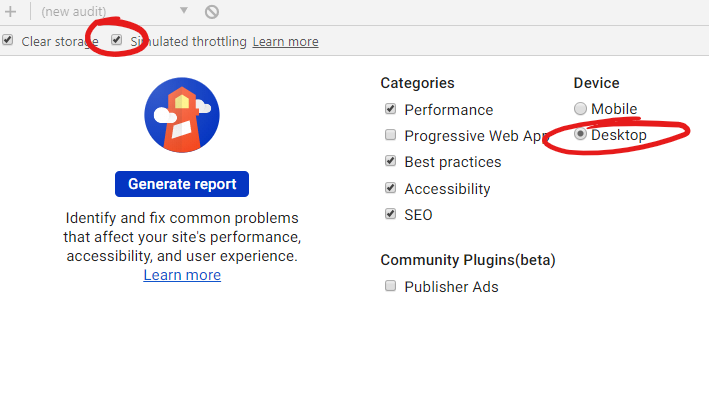
Keep in mind that if I want to analyze the Desktop profile the "simulated throttling" must be unckecked by default.
Rombecchi
on 11 Feb 2020
@patrickhulce Thank you for your support.
Keep in mind that if I want to analyze the Desktop profile the "simulated throttling" must be unckecked by default.
yeah but your issue can be seen too in my screenshot, where throtling is tucked off and that was a desktop check:
https://user-images.githubusercontent.com/15234613/74201349-c8102600-4c69-11ea-8f3a-d68c07d30679.jpg
kbi-user
on 11 Feb 2020
Hi, sorry to reopen this bug but I'm not sure if this is in prod or not. Currently, with version 83.0.4103.116 I'm testing various sites and keeping getting very low scores. At the bottom of the result page I see that simulated throttling and CPU are enabled by default and desktop version is using very limited bandwith, so:
- is it not possible to remove the throttling/cpu limitations?
- shouldn't desktop test use a no throttling config?
I'm also testing with the lighthouse CLI removing all limitations and for the same sites I get 100% as a score.
thanks
 dsozzi
on 6 Jul 2020
dsozzi
on 6 Jul 2020
@dsozzi the fix for this isn't in Chrome 83. Use Chrome Canary until Chrome 84 (Lighthouse 6.0) becomes Chrome Stable.
patrickhulce
on 6 Jul 2020
@dsozzi the fix for this isn't in Chrome 83. Use Chrome Canary until Chrome 84 (Lighthouse 6.0) becomes Chrome Stable.
That's great thanks, does this also affect the pagespeed insight website results that you might know?
thx
dsozzi
on 6 Jul 2020
does this also affect the pagespeed insight website results that you might know?
No it does not. PSI never had this issue for desktop results.
patrickhulce
on 6 Jul 2020
Related issues
 mbparvezme
·
3Comments
mbparvezme
·
3Comments
 mjara74
·
3Comments
mjara74
·
3Comments
 sanprieto
·
3Comments
sanprieto
·
3Comments
 nl-igor
·
3Comments
nl-igor
·
3Comments
 workjalexanderfox
·
3Comments
workjalexanderfox
·
3Comments
Most helpful comment
This isn't an acceptable answer. The bug (and it isn't specific to Italy) is that you have removed the "No throttling" feature, which for Desktop would be appropriate. Desktop versions of pages should not be scored as if they were running on median mobile devices.
For further evidence that this isn't working as intended, compare the following:
1) Lighthouse audit from the Audit tab in Chrome 80, with "Desktop" selected, on https://www.google.com
2) https://developers.google.com/speed/pagespeed/insights/?url=https%3A%2F%2Fwww.google.com&tab=desktop
The chrome audit gives it an 84, and the PSI audit gives it 100 (note that traditionally, Lighthouse scores on PSI are worse than Chrome audits).