Lighthouse: PWA, Unable to fetch start URL via service worker.
Provide the steps to reproduce
- Run LH (only PWA) on https://game.edendepot.com/code-lab-demo/
What is the current behavior?
Unable to fetch start URL via service worker.
What is the expected behavior?
use the start_url https://game.edendepot.com/code-lab-demo/index.html?launcher=true
or /
or /code-lab-demo/
Environment Information
User agent (host): Mozilla/5.0 (Windows NT 10.0; Win64; x64) AppleWebKit/537.36 (KHTML, like Gecko) Chrome/74.0.3729.157 Safari/537.36
User agent (network): Mozilla/5.0 (Linux; Android 6.0.1; Nexus 5 Build/MRA58N) AppleWebKit/537.36 (KHTML, like Gecko) Chrome/74.0.3694.0 Mobile Safari/537.36 Chrome-Lighthouse
Related issues
I followed https://medium.com/coderlist/introductio-e521ad99ff89 and forked to test with GitHub pages using my own (sub) domain (master is published).
Source code is at https://github.com/j2l/code-lab-demo
It couldn't find https://game.edendepot.com/code-lab-demo/manifest.json before I changed path in index.html to <link rel="manifest" href="/code-lab-demo/manifest.json"> so I guess there's a path issue.
I tried multiple ways but I'm stuck.
Thanks for your help.
PS: I don't plan to change the project path https://game.edendepot.com/code-lab-demo/ or switch hosting. I just need the right path.
 j2l
j2l
All 9 comments
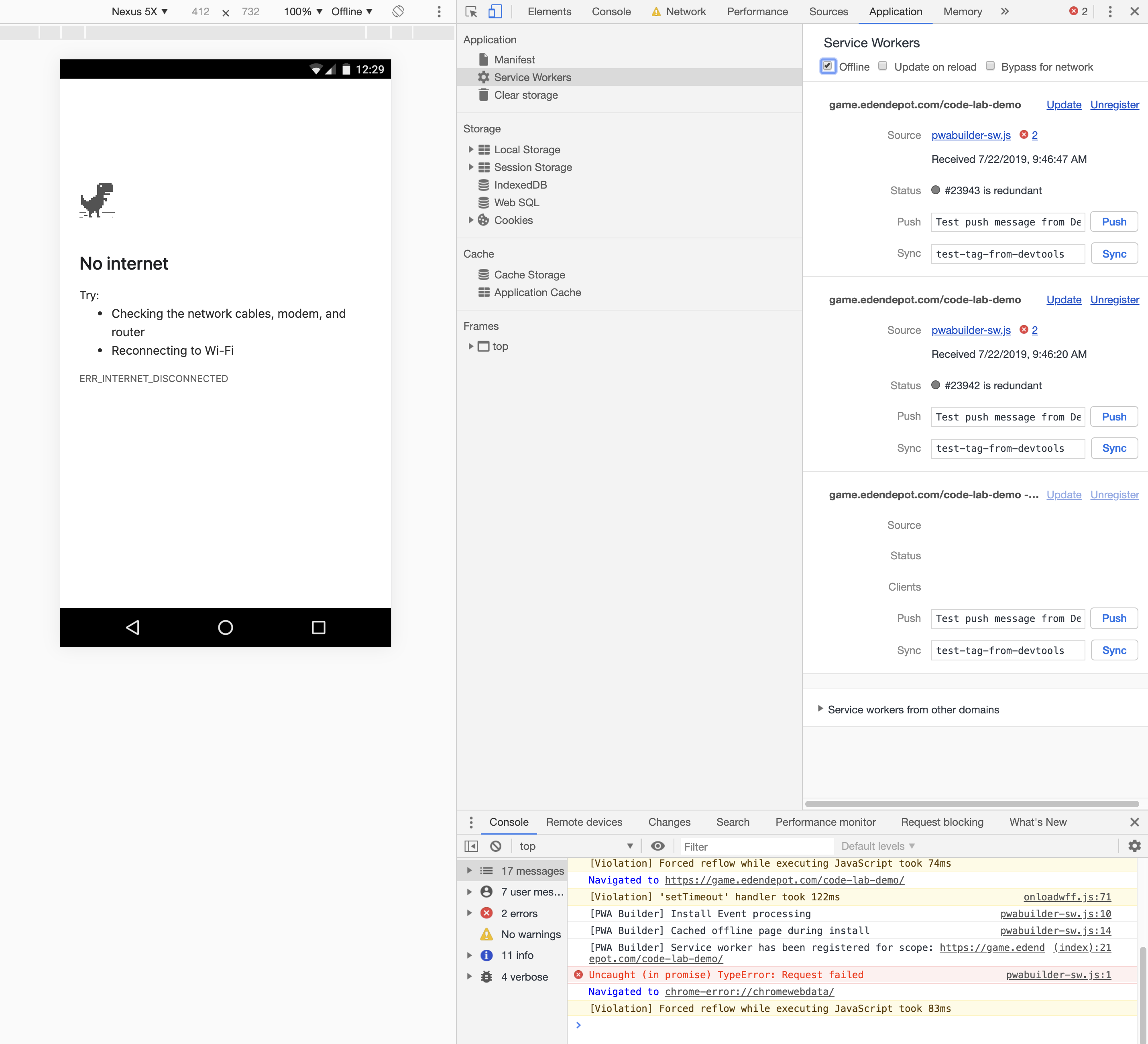
The app at that URL doesn't seem like a working PWA. When I load the page in Chrome and go offline, nothing loads. The service worker just errors and nothing in the cache is populated.
 patrickhulce
on 22 Jul 2019
patrickhulce
on 22 Jul 2019
Thanks @patrickhulce
I know the service worker is not seen, despite being present, that's the problem.
As you can see in the code, I tried with 2 service workers, one with manifest.json and service-worker.js (see the medium article I followed) and the other using PWA-builder.
None worked so far.
https://game.edendepot.com/code-lab-demo/service-worker.js
https://game.edendepot.com/code-lab-demo/pwabuilder-sw.js
both exist
j2l
on 22 Jul 2019
It's beyond the scope of Lighthouse GitHub issues to debug generic PWA/service worker issues. You might have better luck on Stack Overflow seeking this sort of help.
If you get to a place where the developer tools can recognize your service worker and it works as expected offline for a normal user yet Lighthouse does not reflect this, then please feel free to come back to file a new issue here :)
patrickhulce
on 22 Jul 2019
Wow, First time denial of service. Congrats Google.
BTW, this pwa installs on mobile so it's definitely a LH issue. But I guess
you didn't check.
On Jul 22, 2019 7:10 PM, "Patrick Hulce" notifications@github.com wrote:
Closed #9429 https://github.com/GoogleChrome/lighthouse/issues/9429.
—
You are receiving this because you authored the thread.
Reply to this email directly, view it on GitHub
https://github.com/GoogleChrome/lighthouse/issues/9429?email_source=notifications&email_token=AAAP6LMIM4T4K3OENKVNRF3QAXSURA5CNFSM4IFWRBF2YY3PNVWWK3TUL52HS4DFWZEXG43VMVCXMZLOORHG65DJMZUWGYLUNFXW5KTDN5WW2ZLOORPWSZGOSUFCVHY#event-2500471455,
or mute the thread
https://github.com/notifications/unsubscribe-auth/AAAP6LOCBBHV3UKR7CJXSULQAXSURANCNFSM4IFWRBFQ
.
j2l
on 22 Jul 2019
@j2l when Lighthouse is not involved at all, that URL fails to load offline in latest Chrome after just the first visit. That is what the screenshot in https://github.com/GoogleChrome/lighthouse/issues/9429#issuecomment-513824234 demonstrates. If Chrome cannot load the page after the first visit offline, neither will Lighthouse.
Your service worker fails installation because there are errors in the console, I'd suggest you start there.
cache.add(new Response("TODO: Update the value of the offlineFallbackPage constant in the serviceworker.")); // <-- this is not what you want
@patrickhulce, I copy pasted pwabuilder-sw.js and you tested just before I started testing URLs.
Your screenshot shows error on the first line (a comment line) of the pwabuilder-sw.js
BTW, the initial problem was with manifest.json and service-worker.js
So I just removed all PWABuilder.com scripts to get back to the initial problem.
"ticket closed" = 'solved issue" is a terrible mental shortcut for everyone.
Microsoft should add a "ticket is now closed, is issue solved?" button on github issues for ticket author's view only, to get a real KPI.
j2l
on 23 Jul 2019
The issue you've encountered seems to relate to the guide you followed, so consider following up with the author in the comments section of the medium article you posted. If LH's advice is wrong or could be more impactful, we'd be happy to hear the specifics.
I just tried looking at the URL you shared in the OP, but I don't see a service worker being registered at all. I suppose that may be because you've modified the page since filing this report.
@patrickhulce
The app at that URL doesn't seem like a working PWA. When I load the page in Chrome and go offline, nothing loads. The service worker just errors and nothing in the cache is populated.
Do we collect logs from service workers (idk if console-messages picks them up, I think we may need to manually listen to the SW target when it attaches)? Maybe we could display errors from the SW target in the PWA section of the report?
"ticket closed" = 'solved issue" is a terrible mental shortcut for everyone.
We're optimizing for managing the actionable backlog for problems pertaining to Lighthouse, not for providing general support, which other places like Stackoverflow are much better suited for. You haven't offered a _specific_ problem, just a debugging story, which is not very actionable.
 connorjclark
on 23 Jul 2019
connorjclark
on 23 Jul 2019
Do we collect logs from service workers? Maybe we could display errors from the SW target in the PWA section of the report?
We don't currently but this is a good idea!
patrickhulce
on 23 Jul 2019
Is it not possible there is a problem with Lighthouse, because I got 6 AMP sites working with an AMP preconfigured service worker. Plus another 2 sites regular WordPress with a WorkBox service worker. They were also working fine, but now Lighthouse is saying they don't return a 200 when offline.
Seen as though it was as while when I first configured them, I checked everything over. Still getting the 200 error.
However, when I turn my network off the 2 x PWAs still launch from my desktop as if everything is okay. Could the 200 error be a false flag?
 Hoodlum-Z
on 6 Dec 2019
Hoodlum-Z
on 6 Dec 2019
Related issues
 codepodu
·
3Comments
codepodu
·
3Comments
 wizardnet972
·
3Comments
wizardnet972
·
3Comments
 mohanrohith
·
3Comments
mohanrohith
·
3Comments
 dkajtoch
·
3Comments
dkajtoch
·
3Comments
 etelai
·
3Comments
etelai
·
3Comments