Lighthouse: Blocking Google Analytics tracking for Lighthouse tests
Feature request summary
Hey guys, is it possible to block Google Analytics script while running the tests? I'm trying to use Lighthouse on scale, to perform multiple tests on n-number of pages, which results in enormous amount of recorded visits in Google Analytics.
What is the motivation or use case for changing this?
For example, if I'm testing a site with 2000 monthly visitors, and I run 5 tests on 100 pages, i'll get 500 new visits which will skew the GA data. When I'm performing the tests against my clients that won't be a problem since i can filter that in Analytics dashboard, but when I'm doing website audits for potential clients, I will mess up their data.
How is this beneficial to Lighthouse?
It will allow Lighthouse to remain great testing tool, without giving marketer a headache.
 goranculibrk
All 8 comments
Thanks for filing @goranculibrk! This seems more appropriate for a Google Analytics based solution. I believe it's a best practice to filter out internal traffic anyhow regardless of Lighthouse usage, so my recommendation would be to add whichever machines you're running Lighthouse on to this list. See the guide.
From Lighthouse perspective, we won't want to do anything that alters the performance characteristics of the page (like blocking GA requests would).
 patrickhulce
on 10 Apr 2019
patrickhulce
on 10 Apr 2019
@patrickhulce Yeah, I've actually implemented the filtering on my GA accounts, but the problem is, how to test website of some potential client, without messing with their GA data, when I don't have access to their Analytics account.
The only solution, for now, is to limit the number of tests to a small sample (10 to 15 pages) which won't affect which will then be close to the statistical errors.
I thought it's possible to add some extension like ad block to chrome driver which would then block only GA scripts.
Thanks anyway :)
goranculibrk
on 11 Apr 2019
Ah I see, so you don't control the page in question :)
We do have a blocked-url-patterns flag you could use that would block the script from loading. Note that this will be accompanied by the corresponding performance change, but would do in a pinch like this.
patrickhulce
on 11 Apr 2019
Yes, I would like to do the SEO, performance etc. audits and generate the report as part of the sales process. :)
I don't mind about the performance report as much as I need SEO audits actually so blocking GA.js won't be too big of an issue to me. :) I'll look into blocked-url-patterns to see if it will fit my needs. Thanks @patrickhulce
goranculibrk
on 11 Apr 2019
This issue also occurs when you use https://developers.google.com/speed/pagespeed/insights/ which is pretty annoying. I haven't found any solution yet. A possible solution could be to skip GA.js when the user agent contains "Chrome-Lighthouse" inside the user-agent.
Example from my access.log: Mozilla/5.0 (Linux; Android 6.0.1; Nexus 5 Build/MRA58N) AppleWebKit/537.36 (KHTML, like Gecko) Chrome/74.0.3694.0 Mobile Safari/537.36 Chrome-Lighthouse"
 steve-buri
on 8 May 2019
steve-buri
on 8 May 2019
The only problem on my page;
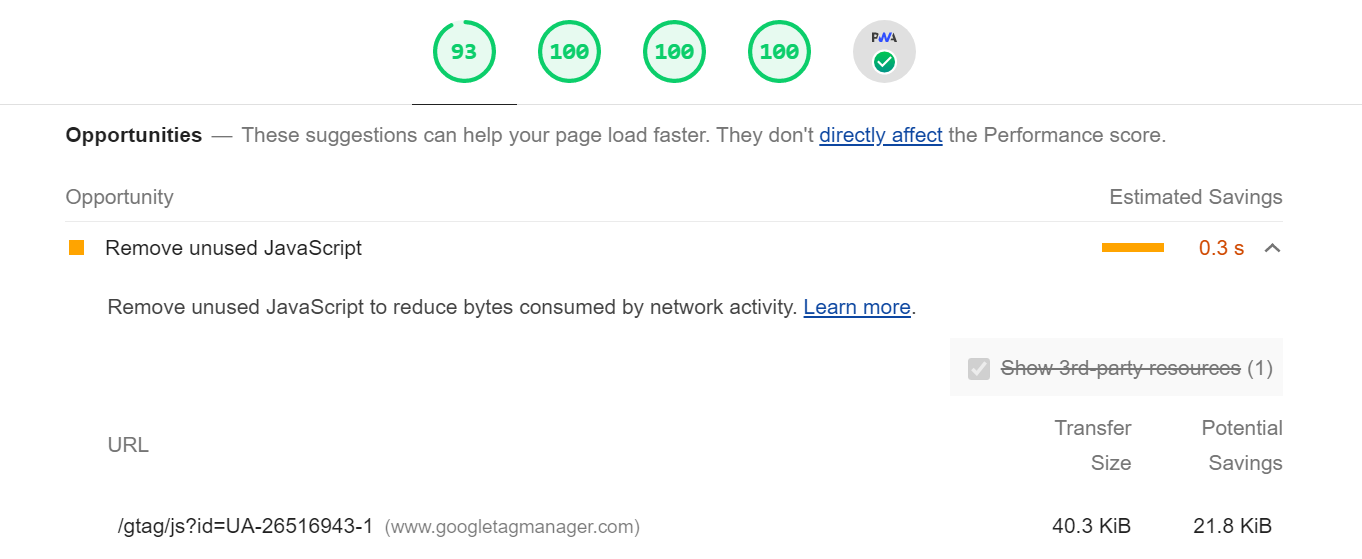
It's kinda frustrating knowing my page isn't 100% performance because Goggle Analytics has 21Kb of useless code, specially when I used vanilla JS + CSS and the total size for both is 8.5Kb.
My OCD is yelling me to remove Goggle Analytics 😬
 promatik
on 5 Nov 2020
promatik
on 5 Nov 2020
@promatik You can load Google Analytics directly instead of using GTM that might help. Also a reminder that the opportunities don't actually have any direct impact on the score, so just because you see something there doesn't mean it's preventing you from getting 100, it might be on a metric where you already have a 100 :)
patrickhulce
on 5 Nov 2020
@patrickhulce what kind of sorcery was this? 😂

Loading Google Analytics directly just brought my score back near 100%. Didn't know about this.
Let's hope more people find out about this trick.
Thank you!
promatik
on 5 Nov 2020
Related issues
 Simply007
·
3Comments
Simply007
·
3Comments
 bitttttten
·
3Comments
bitttttten
·
3Comments
 mohanrohith
·
3Comments
mohanrohith
·
3Comments
 shellscape
·
3Comments
shellscape
·
3Comments
 workjalexanderfox
·
3Comments
workjalexanderfox
·
3Comments
Most helpful comment
@promatik You can load Google Analytics directly instead of using GTM that might help. Also a reminder that the opportunities don't actually have any direct impact on the score, so just because you see something there doesn't mean it's preventing you from getting 100, it might be on a metric where you already have a 100 :)