Lighthouse: UL access-ability and classes
I've noticed something odd about one of the accessibility opportunities...
On a webpage I'm testing, I get the warning of:
List items (<li>) are not contained within <ul> or <ol> parent elements.
However, when looking at said list, they do have a parent
- element... But, it's
<ul class="categoryName"
We've sectioned this list to only appear on product pages of that category - Is there a major reason why Lighthouse doesn't accept UL parent elements with classes assigned to them? Does this cause a genuine problem for TTS services, or perhaps this is a bug?
Thanks-
 Meggu
Meggu
All 10 comments
Thanks for filing. Do you have a URL for this page you're talking about so we can take a look?
 patrickhulce
on 23 Jan 2019
patrickhulce
on 23 Jan 2019
Can confirm same error. I am getting in my Laravel project where I am using Laravel standard pagination and Lighthouse flag it
not within being within a UL or OL but it is. Other lists on page do not get flagged and they have class attributes the only difference I can see is the role attribute.
<ul class="pagination" role="navigation">
<li class="page-item disabled" aria-disabled="true" aria-label="« Previous">
<span class="page-link" aria-hidden="true">‹</span>
</li>
<li class="page-item active" aria-current="page">
<span class="page-link">1</span>
</li>
<li class="page-item">
<a class="page-link" href="http://shop.littleworksstudio.com?page=2">2</a>
</li>
<li class="page-item">
<a class="page-link" href="http://shop.littleworksstudio.com?page=3">3</a>
</li>
<li class="page-item">
<a class="page-link" href="http://shop.littleworksstudio.com?page=2" rel="next" aria-label="Next »">›</a>
</li>
</ul>
 jonathannlittle
on 26 Feb 2019
jonathannlittle
on 26 Feb 2019
The role of that list element is something other than list which is why this audit fails.
https://github.com/dequelabs/axe-core/blob/68417b40879cfb87e10f99611adacbcb2a197c05/lib/checks/lists/listitem.js#L14
I'm not an a11y expert, but the MDN example has the role="navigation" attribute on a div that wraps the list rather than directly on it.
https://developer.mozilla.org/en-US/docs/Web/Accessibility/ARIA/Roles/Navigation_Role#Examples
patrickhulce
on 26 Feb 2019
Hmm, need to let Taylor know... Using latest version for framework and for example the simple pagination blade template starts:
@if ($paginator->hasPages())
<ul class="pagination" role="navigation">
{{-- Previous Page Link --}}
@if ($paginator->onFirstPage())
<li class="disabled" aria-disabled="true"><span>@lang('pagination.previous')</span></li>
@else
<li><a href="{{ $paginator->previousPageUrl() }}" rel="prev">@lang('pagination.previous')</a></li>
@endif
...
I guess I should make use of custom pagination
jonathannlittle
on 26 Feb 2019
Seems like this is relatively resolved. Closing for now, but please comment if more is needed and we can always reopen.
 brendankenny
on 26 Apr 2019
brendankenny
on 26 Apr 2019
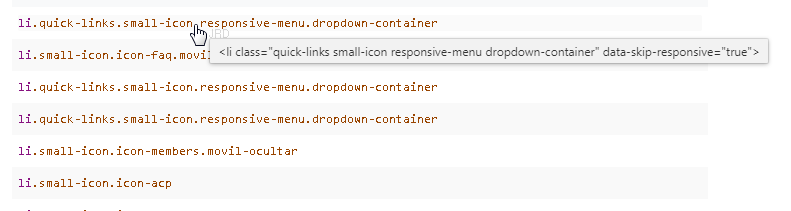
No está resuelto, me aparece en la última versión de Google. Lo pueden comprobar en mi web https://metanodo.com
 MetaNodo
on 23 Jul 2019
MetaNodo
on 23 Jul 2019
Please reopen
 davidglezz
on 25 Nov 2019
davidglezz
on 25 Nov 2019
@davidglezz why do you want to re-open? This is not a bug in Lighthouse, and we have yet to see a legit issue where the underlying HTML was not misconfigured. If you think you found a bug in the behavior of this audit, I'd suggest filing an issue with a reproducible page in axe-core
patrickhulce
on 25 Nov 2019
I'm having the same issue with the following markup:
<ul class="control-list decision" id="branch__options" role="radiogroup" aria-labelledby="branch__options_label" aria-describedby="branch__description">
<li>
<div class="radio"><label><input id="branch_3" type="radio" name="decision" onclick="javascript:ClickDecision('./flow.aspx?uniquenodeident=TKExamples.kdt.2&nextnode=3&action=nxt','branch_3');"><span id="branch_3_description">CRM</span></label></div>
</li>
<li>
<div class="radio"><label><input id="branch_4" type="radio" name="decision" onclick="javascript:ClickDecision('./flow.aspx?uniquenodeident=TKExamples.kdt.2&nextnode=4&action=nxt','branch_4');"><span id="branch_4_description">User interface</span></label></div>
</li>
<li>
<div class="radio"><label><input id="branch_5" type="radio" name="decision" onclick="javascript:ClickDecision('./flow.aspx?uniquenodeident=TKExamples.kdt.2&nextnode=5&action=nxt','branch_5');"><span id="branch_5_description">Documents</span></label></div>
</li>
<li>
<div class="radio"><label><input id="branch_14" type="radio" name="decision" onclick="javascript:ClickDecision('./flow.aspx?uniquenodeident=TKExamples.kdt.2&nextnode=14&action=nxt','branch_14');"><span id="branch_14_description">JavaScript</span></label></div>
</li>
<li>
<div class="radio"><label><input id="branch_6" type="radio" name="decision" onclick="javascript:ClickDecision('./flow.aspx?uniquenodeident=TKExamples.kdt.2&nextnode=6&action=nxt','branch_6');"><span id="branch_6_description">Others</span></label></div>
</li>
</ul>
Seems to be a false-positive as other tools such as Firefox, JAWS and NVDA don't seem to have trouble with the markup.
 jimitndiaye
on 19 Feb 2020
jimitndiaye
on 19 Feb 2020
@jimitndiaye as explained above axe flags any list where the role is other than list, if you believe this is a mistake, could you please file an issue with a reproducible page in axe-core? We will adopt whatever they consider to be the a11y best practice here.
Given that there's an MDN example very similar to your markup. I'm inclined to agree that should be handled better. Maybe that can help support the case over there.
patrickhulce
on 19 Feb 2020
Related issues
 mohanrohith
·
3Comments
mohanrohith
·
3Comments
 devrsi0n
·
3Comments
devrsi0n
·
3Comments
 asistapl
·
3Comments
asistapl
·
3Comments
 johnfrancisli
·
3Comments
johnfrancisli
·
3Comments
 muuvmuuv
·
3Comments
muuvmuuv
·
3Comments
Most helpful comment
Please reopen