Lighthouse: Lighthouse DevTools ignores flags in m71+
Summary
I had generated an audit report in Chrome 70.xxx which is fine. But the TTI in report is much longer than previous one which is generated by latest chrome 71.0.3578.80 in same page(without any code update). Then i try to audit gmail web site, it generated similar bad performance report while web should perform better in real world.
gmail web site in chrome 71.0.3578.80 lighthouse:

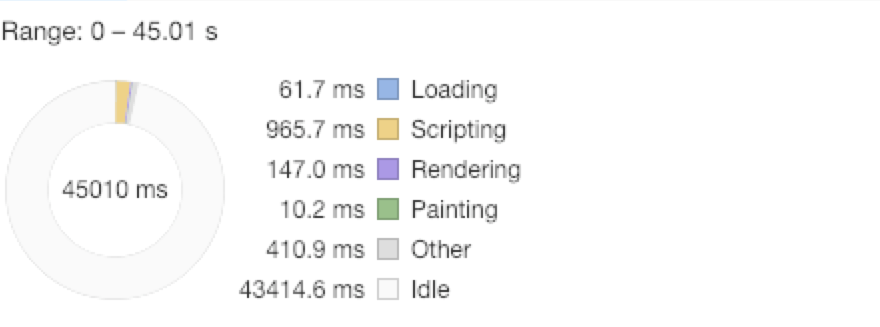
Could anyone help? Thx in advance.
 LeonDWong
All 22 comments
Thanks for filing @LeonDWong! Do you have a URL for your page you're willing to share?
A few things to note:
- The metrics are computed by simulating a user's typical hardware (a Nexus 5X on slow 4G is our standard target). From your Runtime Settings I can see you're running the audit on a pretty fast Mac, so it's expected that the metrics reported will be higher than what you get loading the page yourself.
- I don't see any page screenshots in the filmstrip of the report you shared. Are you sure the page is loading correctly/fully?
 patrickhulce
on 11 Dec 2018
patrickhulce
on 11 Dec 2018
In Chrome 71 audit used a mobile user agent even if i chose Desktop as device. It works fine with the previous 70 version.
 hueyhe
on 12 Dec 2018
hueyhe
on 12 Dec 2018
@patrickhulce Hello, thx for your reply. Then page i test is gmail, just login needed.
And for the things you noted, the time for simulating a user's typical hardware (a Nexus 5X on slow 4G is our standard target) in chrome 70 version is much shorter than 10s. And the page is loading correctly thought the screen i share first shows empty.
And i find out that fetching time takes 6s, is there any problem in network simulation in chrome 71 version ?

LeonDWong
on 12 Dec 2018
In Chrome 71 audit used a mobile user agent even if i chose
Desktopas device. It works fine with the previous 70 version.
+1
LeonDWong
on 12 Dec 2018
I am currently experiencing same issue.
 Erbenos
on 12 Dec 2018
Erbenos
on 12 Dec 2018
I also experiencing the same issue on Chrome 71. Even on dev (72) and canary (73) channels.
And also Mobile agent used even when I choose desktop.
My performance score was 100 on Chrome 70 and speed index was about 1.2 sec.
On Chrome 71 now performance score is about 50 and speed index is about 5 seconds.
There were no changes in the code.
Although, network shows that DOMContentLoad event fires after around 1.3s.
 AlexMoore94
on 12 Dec 2018
AlexMoore94
on 12 Dec 2018
Thanks all! I can confirm the Desktop issue as well. If the page is loading different content this is likely the explanation for the jump in scores.
We'll look into it.
patrickhulce
on 12 Dec 2018
We've found the culprit, but it'll require a Chrome-side fix.
Note that it's not just Mobile/Desktop, but the throttling settings and clear storage options are also being ignored at the moment which would explain all of the performance score differences.
patrickhulce
on 12 Dec 2018
Upstream bug: https://bugs.chromium.org/p/chromium/issues/detail?id=914387
It's fixed on ToT and we're working on getting a merge to 71 and 72.
 paulirish
on 14 Dec 2018
paulirish
on 14 Dec 2018
Any idea when the update will be merged into 71, or when chrome 72 will be released with the fix in place?
 woodsba
on 18 Dec 2018
woodsba
on 18 Dec 2018
The desktop audit runs mobile emulation. even the tooltip says it will run mobile emulation.
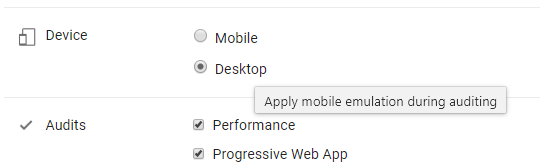
 FarhanSolaiman
on 10 Jan 2019
FarhanSolaiman
on 10 Jan 2019
@FarhanSolaiman that's actually a separate UX confusion item we're working on that doesn't affect the functionality here. The labels only apply to the entire <input> group which is the "Device"
patrickhulce
on 10 Jan 2019
What the status of this issue?
- Fixed?
When is the next version expected to be released?
 dryleaf
on 21 Jan 2019
dryleaf
on 21 Jan 2019
@dryleaf yes it's been fixed. You can use Canary or Beta today for the fix. 72 should hit stable in roughly 8 days
patrickhulce
on 21 Jan 2019
@patrickhulce still receiving errors in Canary. Here's an attached screen shot from www.yahoo.com site audit. Tested on Version 73.0.3681.0 (Official Build) canary (64-bit). The error message says "Something went wrong with recording the trace over your page load. Please run Lighthouse again. (NO_TRACING_STARTED)", in case that helps.

 mssodhi
on 24 Jan 2019
mssodhi
on 24 Jan 2019
@mssodhi that is a different error best described by https://github.com/GoogleChrome/lighthouse/issues/1091. This issue was about the options/checkboxes being silently ignored.
patrickhulce
on 24 Jan 2019
@patrickhulce thanks! Appreciate it!
mssodhi
on 24 Jan 2019
Fix is in stable Chrome. If you still see this, make sure you are on 72+ (chrome://settings/help). If you are and the issue persists, please open a new issue.
 connorjclark
on 6 Feb 2019
connorjclark
on 6 Feb 2019
Running lighthouse (Chrome Audit) switches into mobile emulation automatically #6772
 zihad7
on 8 Feb 2019
zihad7
on 8 Feb 2019
this issue still occurs, any network throttling selections or clear storage selection made is overrided and report applies throttling regardless of selection made
 jkeappock
on 14 Feb 2019
jkeappock
on 14 Feb 2019
@jkeappock can't repro. you on latest chrome? chrome://version/
connorjclark
on 14 Feb 2019
@Hoten thanks I see it has been resolved with version 72
jkeappock
on 14 Feb 2019
Related issues
 devrsi0n
·
3Comments
devrsi0n
·
3Comments
 timj2
·
3Comments
timj2
·
3Comments
 mohanrohith
·
3Comments
mohanrohith
·
3Comments
 wizardnet972
·
3Comments
wizardnet972
·
3Comments
 sanprieto
·
3Comments
sanprieto
·
3Comments
Most helpful comment
In Chrome 71 audit used a mobile user agent even if i chose
Desktopas device. It works fine with the previous 70 version.