Lighthouse: LH3: does not register a service worker on first report.
Bug report
Provide the steps to reproduce
- Run LH on https://kinoseed.com/
What is the current behavior?
LH does not register site's service worker on the first run ("generate report").
Running "Generate report" after the first run, performs as expected.
What is the expected behavior?
LH should register site's service worker on the first run.
Environment Information
- Affected Channels:
- Lighthouse version: Lighthouse 3.0.0-beta.0
- Node.js version:
- Operating System:
Runtime settings
URL: https://kinoseed.com/
Fetch time: Jun 20, 2018, 11:54 AM GMT+3
Device: Emulated Nexus 5X
Network throttling: 150 ms TCP RTT, 1,638.4 Kbps throughput (Simulated)
CPU throttling: 4x slowdown (Simulated)
User agent: Mozilla/5.0 (Windows NT 6.2; Win64; x64) AppleWebKit/537.36 (KHTML, like Gecko) Chrome/66.0.3359.139 Safari/537.36
Generated by Lighthouse 3.0.0-beta.0
Related issues
Since LH does not register the service worker, PWA checklist fails. Extract from the "report":
Progressive Web App
These checks validate the aspects of a Progressive Web App, as specified by the baseline PWA Checklist.
1
Does not register a service worker
2
Does not respond with a 200 when offline
3
User will not be prompted to Install the Web App
Failures: Site does not register a service worker.
 kscm
kscm
All 19 comments
I'm not able to reproduce this behavior. On the first run, LH found a service worker.
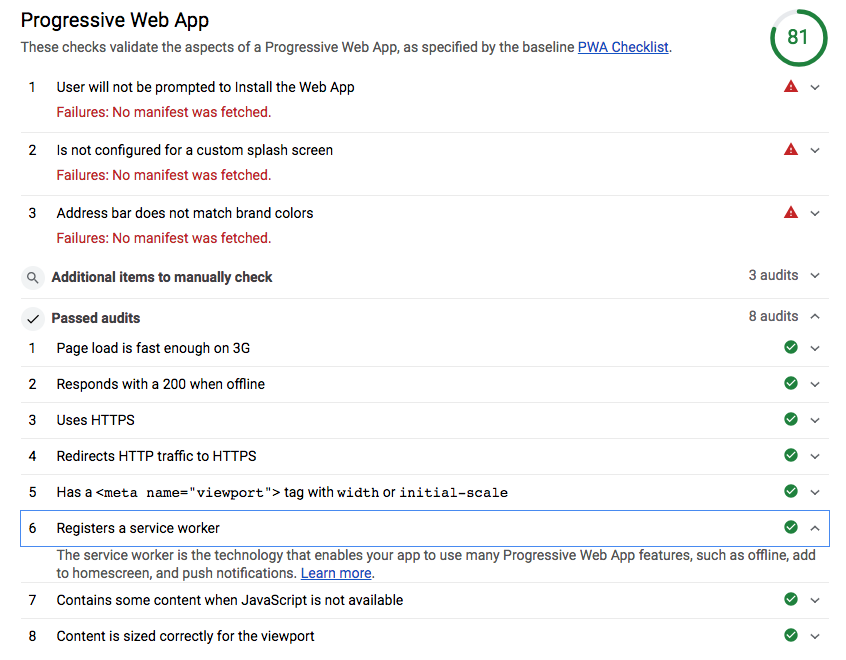
If you wait a while to register a service worker, then it could be flaky based on if your registration happened yet before we moved on.
 patrickhulce
on 21 Jun 2018
patrickhulce
on 21 Jun 2018
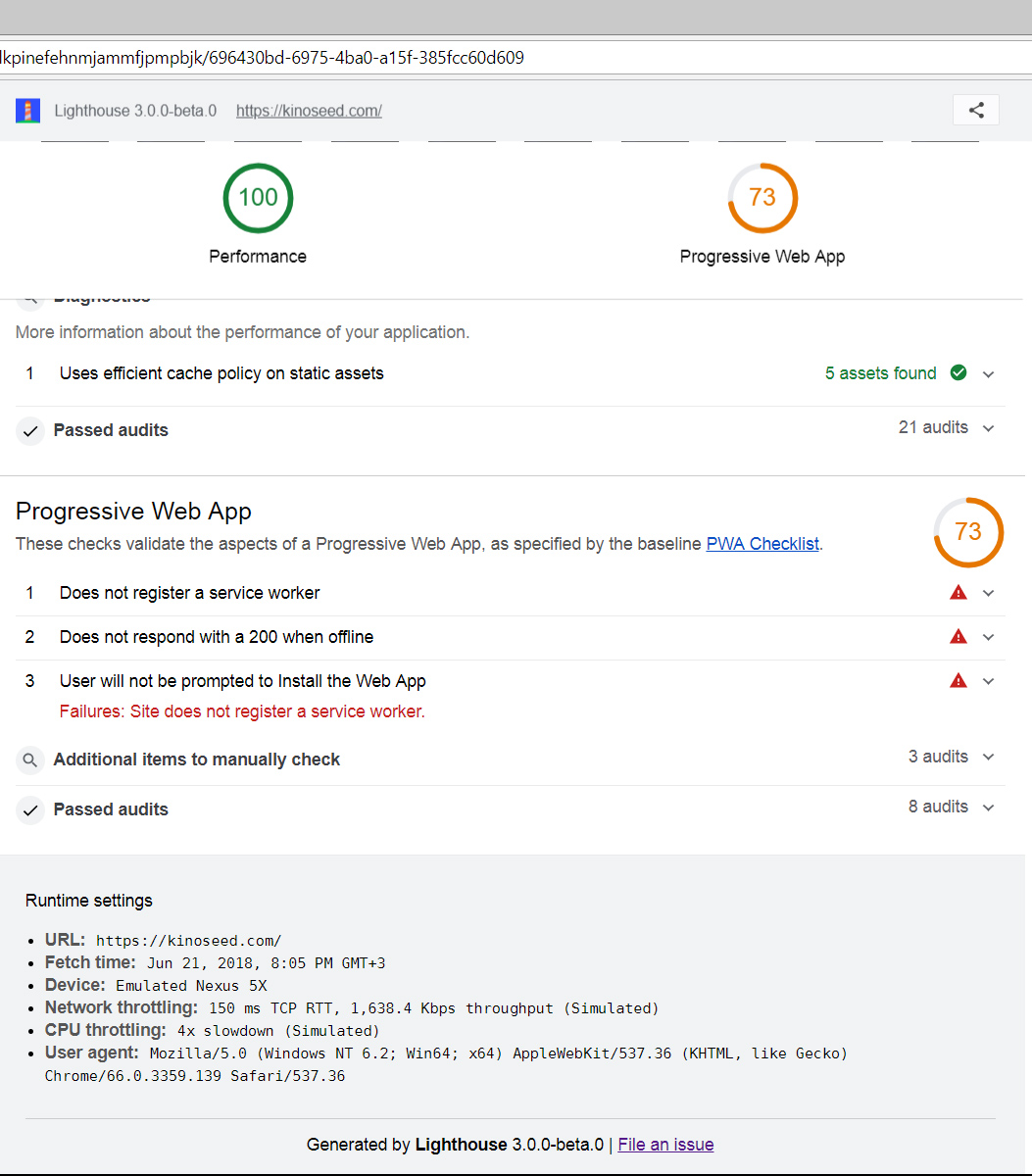
@patrickhulce , in your case the "manifest" is missing?
I'm not sure what is going on, but this is what I get:
kscm
on 21 Jun 2018
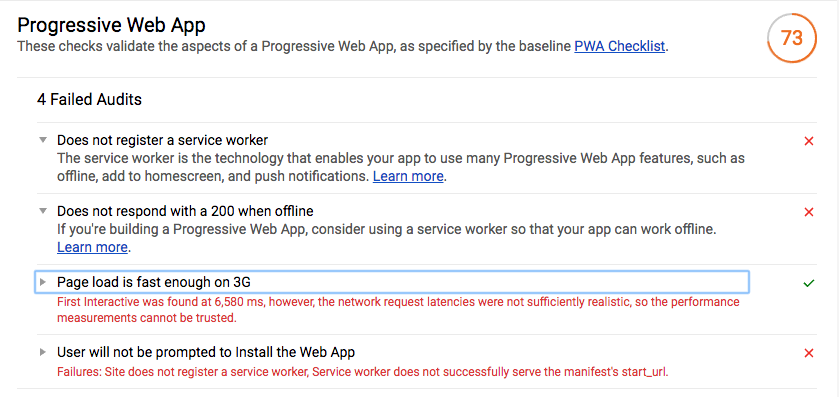
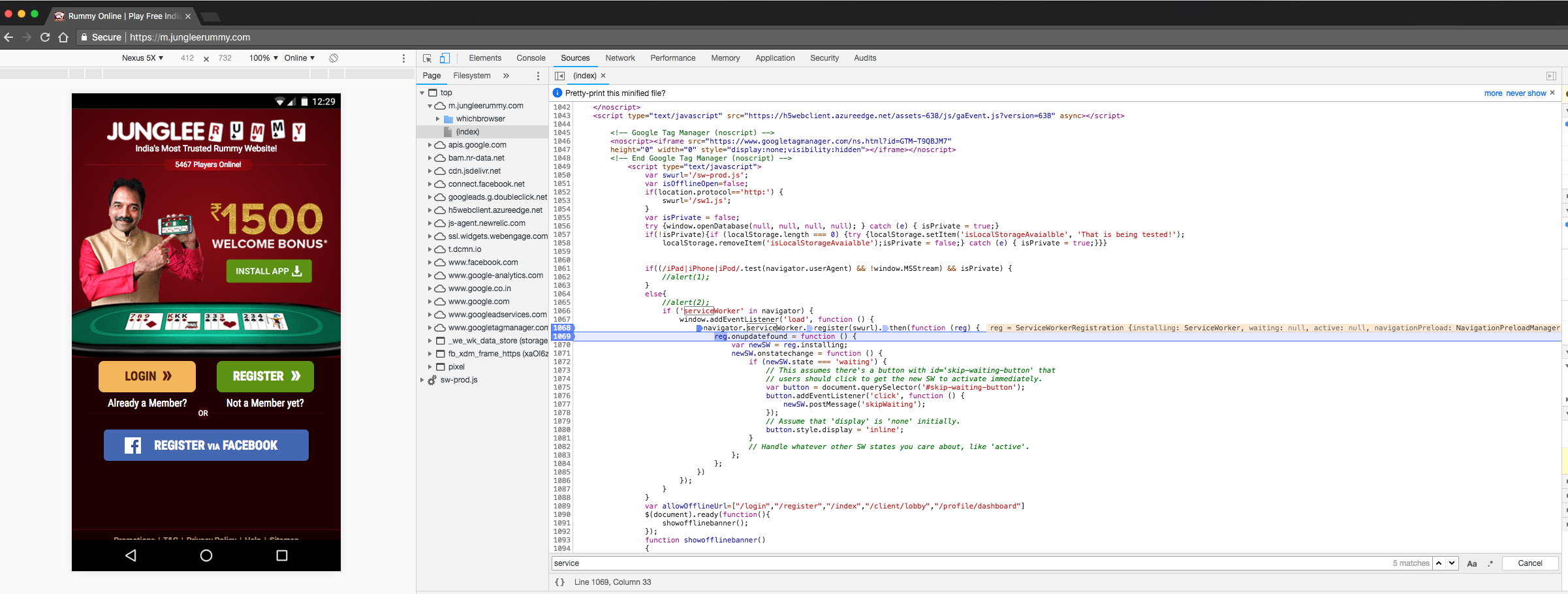
+1 for this issue. Finding the same with https://m.jungleerummy.com/ . Lighthouse is reporting that the site doesn't register service worker, but in-fact it does on the landing page load itself. Attached the lighthouse report and SW registration registration screenshots.
 prash-mi
on 28 Jun 2018
prash-mi
on 28 Jun 2018
I'm having the same issue when I run Lighthouse on https://thesession.org (using the Audit tab in Chrome).
But interestingly, this problem only occurs if throttling is set to the default "Simulated Fast 3G, 4x CPU Slowdown".
If I choose "Applied fast 3G, 4x CPU Slowdown", the service worker is registered just fine.
And looking at #5782, it seems that the problem doesn't happen with the command line interface.
So it seems that the issue is isolated to:
- Lighthouse running from the Audit panel in Chrome's dev tools, with
- Throttling set to "Simulated Fast 3G, 4x CPU Slowdown".
 adactio
on 18 Aug 2018
adactio
on 18 Aug 2018
Same issue, and I confirm @adactio diagnostic. Using Chrome Canary 71 with Lighthouse 3.0.3, on the same app, the "no service worker is registered" error happens with default audit options (Simulated fast 3G...), while it's OK when using option "No throttling". It's also OK in Chrome stable (v68 and Lighthouse 3.0.0-beta.0).
 cyrilletuzi
on 6 Sep 2018
cyrilletuzi
on 6 Sep 2018
This issue is now in Chrome stable (70). Any plans on fixing it?
cyrilletuzi
on 25 Nov 2018
The behavior you're describing then @cyrilletuzi and @adactio is #599/#2924. The difference between those throttling options is how long we wait for the page to "settle" and in those cases it seems that the service worker doesn't have complete time to register.
patrickhulce
on 25 Nov 2018
@patrickhulce Do you mean the problem is on the app side (wrong service worker)?
Because my app is just using the official Angular service-worker, so if the problem is on the app side, an issue should be reported as soon as possible in Angular.
cyrilletuzi
on 25 Nov 2018
@cyrilletuzi not really, it's something on the LH side we'll need to figure out how to handle, just an explanation for why. We're not failing to detect, we're just not waiting long enough to detect it.
patrickhulce
on 25 Nov 2018
@patrickhulce OK. For info, the app I'm auditing is a small Angular app, so if it's already a problem in a small app, maybe there is something on the Angular side to manage better about the service worker?
cyrilletuzi
on 25 Nov 2018
Related #6626
 connorjclark
on 26 Nov 2018
connorjclark
on 26 Nov 2018
FWIW, we started running into this on angular.io. It happens intermittently on the locally served app (using http-server) - i.e. it doesn't happen when testing the app on Firebase hosting - and it happens much more often on CI than on my machine. (We are tracking this in angular/angular#29910.)
angular.io is using the Angular SW (obviously :grin:), which is intentionally waiting for the app to stabilize (as far as Angular in concerned) before registering.
#
Is there a way to specify a larger timeout for Lighthouse or something?
 gkalpak
on 16 Apr 2019
gkalpak
on 16 Apr 2019
Update: For us, it turned out to be related to the old Chrome version used on CI (v70). Switching to a new version of Chrome/Chromium (v75), via [email protected], makes the SW be reliably detected by Lighthouse. 👇
gkalpak
on 16 Apr 2019
Update (2): Or maybe not: https://github.com/angular/angular/pull/29921#issuecomment-483609596 😞
gkalpak
on 16 Apr 2019
I have put any info I have in angular/angular#29910 (although it's mostly specific to the Angular repo/CI).
Any help debugging this would be very much appreciated :grin:
gkalpak
on 16 Apr 2019
Is there a way to specify a larger timeout for Lighthouse or something?
@gkalpak yes! You can use a custom config that increases pauseAfterLoadMs in the defaultPass, the default is only 1s.
Run Lighthouse with custom config
lighthouse --config-path=./foo-config.js <url>
foo-config.js
```js
module.exports = {
extends: 'lighthouse:default',
passes: [
{passName: 'defaultPass', pauseAfterLoadMs: 10000},
]
}
patrickhulce
on 16 Apr 2019
Thx, @patrickhulce ❤️
It worked for us 🎉
(Is this documented somewhere? If not, it totally should, because I suspect most of the many similar issues reported about SW not being detected would be solved by this.)
_NVM, I found out it is documented in docs/configuration.md, which is linked to from README,md. No idea why I didn't find it on my own_ 😇
gkalpak
on 17 Apr 2019
Anytime @gkalpak! :)
Yeah we might want to consider raising those specific docs up to a FAQ level of some sort as I've seen this fairly often with angular apps.
patrickhulce
on 17 Apr 2019
Original URL (kinoseed.com) works in Chrome stable now.
https://www.jungleerummy.com/ (from @prash-mi) seems to no longer have a SW.
https://thesession.org/ (from @adactio) works in Chrome stable now.
https://angular.io/ works in Chrome (but the issue was only reported for local dev / CI).
Since the URLs provided work now, we can close this issue. Please open a new issue if LH fails to detect your SW.
@patrickhulce think we could detect angular on the page -> use a higher timeout for pauseAfterLoadMs? or is that crazy
connorjclark
on 22 May 2019
Related issues
 wizardnet972
·
3Comments
wizardnet972
·
3Comments
 nl-igor
·
3Comments
nl-igor
·
3Comments
 Simply007
·
3Comments
Simply007
·
3Comments
 devrsi0n
·
3Comments
devrsi0n
·
3Comments
 johnfrancisli
·
3Comments
johnfrancisli
·
3Comments
Most helpful comment
@gkalpak yes! You can use a custom config that increases
pauseAfterLoadMsin thedefaultPass, the default is only 1s.Run Lighthouse with custom config
foo-config.js
```js
module.exports = {
extends: 'lighthouse:default',
passes: [
{passName: 'defaultPass', pauseAfterLoadMs: 10000},
]
}