Lighthouse: no obvious way to print/save human readable version of report
Feel like I must missing something but I've been using this tool to audit a site and an obvious scenario is to capture the output, annotate it, and email it to someone. But I can't find a way to extract a nice, human readable version. I see a download button but that results in an extension-less file that looks like it contains a json version of the report. I don't see an obvious way to download or print a text or static html version. Am I missing it? If so, maybe the feature could be displayed more prominently. If not, consider this a feature request.
 marcacohen
All 20 comments
Ah, I see the docs describe how to share reports (https://developers.google.com/web/tools/lighthouse/), so this was me not RTFMing, sorry.
I would add that I think it would be good to make the sharing functionality more apparent in the main UI flow, because I think it's a pretty common use case.
marcacohen
on 14 Oct 2017
Thanks for the feedback! We'll take a look and prioritize this feature request accordingly :)
EDIT: it appears that printing to PDF is supported across mac & linux. yay.
 vinamratasingal-zz
on 14 Oct 2017
vinamratasingal-zz
on 14 Oct 2017
Discussed with Paul: let's move forward and do a simple Save to PDF option for now. Marc, let me know if this doesn't work for you.
vinamratasingal-zz
on 11 Dec 2017
Plan: Add the icon and two top menu items to devtools.
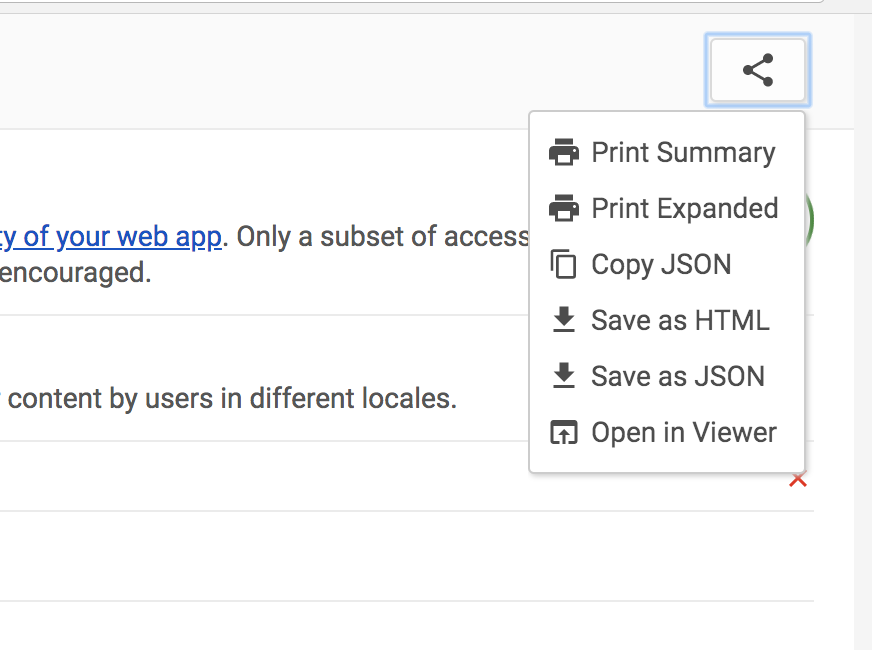
 paulirish
on 8 Jan 2018
paulirish
on 8 Jan 2018
Alright, so unfortunately this is not trivial.
- If devtools is docked (it usually is), you cannot print it. Chrome doesn't support bringing up the print dialog for that docked pane.
- Regardless, you don't want to print the audits panel, because you get the rest of the devtools UI, and its not scrollable.
- We can open a popup window, toss the report in there, and then trigger the print dialog.
- However, it currently includes ALL devtools HTML, whereas we only want it to include the report HTML. Unfortunately splitting that out, handling the CSS, etc.. will be a week of work. Even then, I fear it will be too unmaintainable to commit to.
One alternative here is using the lighthouse viewer. We can easily "open in viewer" from devtools. Printing there is no problem at all.
But there are product concerns with going the viewer route we should discuss.
paulirish
on 13 Feb 2018
Let's discuss this in the next Lighthouse sync.
vinamratasingal-zz
on 13 Feb 2018
Will need to discuss if we want to pursue the Viewer approach.
However we can add "save as HTML" pretty painlessly.
paulirish
on 22 Feb 2018
No plans to do this, as there's little demand
paulirish
on 27 Aug 2018
+1 for demand. I see little use if I can't show a client. And they don't speak JSON. Using the viewer worked but I expected the solution to be right there. I can use this method if it's not accepted but I'm putting it out there that there might be demand.
 uglyeoin
on 1 Oct 2018
uglyeoin
on 1 Oct 2018
I'm working on a Python project that will convert a Lighthouse report output into Markdown. You don't need to know Python to use it, just have Python 2.7 running on your computer and know a little CLI.
It might be ready by the end of the week or next week if you want to be an alpha tester. Its not ready for prime time yet. PM on Twitter or something and I will share a link.
 joelhsmith
on 1 Oct 2018
joelhsmith
on 1 Oct 2018
I'm working on a Python project that will convert a Lighthouse report output into Markdown. You don't need to know Python to use it, just have Python 2.7 running on your computer and know a little CLI.
It might be ready by the end of the week or next week if you want to be an alpha tester. Its not ready for prime time yet. PM on Twitter or something and I will share a link.
Good effort. But if I do that I may as well use Lighthouse Viewer.
uglyeoin
on 1 Oct 2018
The viewer cannot be edited. We are converting to markdown so we can augment the content and add in screenshots of failing elements.
joelhsmith
on 1 Oct 2018
Hi @uglyeoin , My Lighthouse to Markdown project is getting close to an alpha release. It is much better than Lighthouse Viewer because it also takes screenshots of failing elements. And you can template it to display any data available in the Lighthouse JSON file. It is primarily focused on Accessibility stuff, but templates can be made for any audit.
https://github.com/OpenAssessItToolkit/openassessit
I'd love to get some feedback on it. I added a Dockerfile, so if you have Docker installed it would only take you 2 minutes to spin it up and see if it would help you.
joelhsmith
on 18 Jan 2019
@joelhsmith thank you for remembering me and coming back on this one. I'm a bit busy now but I will try to find some time later. I haven't used Docker - for my sins - but I definitely should have by now!
uglyeoin
on 21 Jan 2019
np. I'd appreciate the feedback. Docker can even be installed with a GUI with the links in the Readme.md file. You don't need to know how to use Docker to use it. If you or any people who find this thread try it out, ping me!
joelhsmith
on 22 Jan 2019
One alternative here is using the lighthouse viewer. We can easily "open in viewer" from devtools.
Lighthouse Viewer works really well for me, thank you!
 jbdoster
on 7 Mar 2019
jbdoster
on 7 Mar 2019
No plans to do this, as there's little demand
Increasing demand...
 jorangreef
on 16 Aug 2019
jorangreef
on 16 Aug 2019
@jorangreef I have built something to do this, It converts it to Markdown or HTML. It is command line only at the moment, but has a Docker version so you do not need to install anything other than Docker to try it. I'd love to get more people to test it and make feature requests.
joelhsmith
on 19 Aug 2019
BTW, the audits panel in DevTools now supports printing. In Canary. Will be released in Chrome 77.
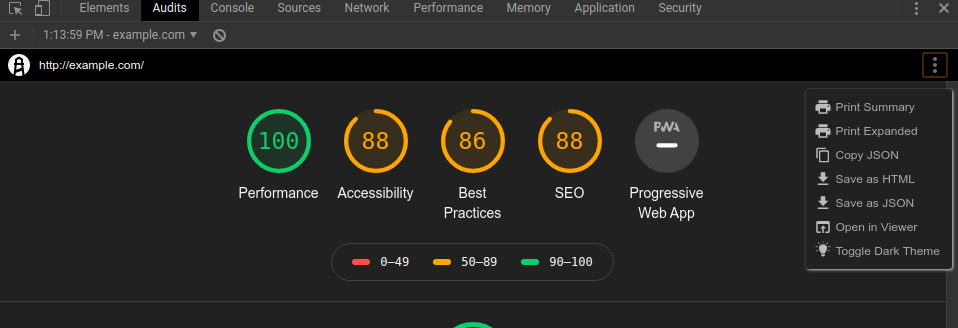
 connorjclark
on 19 Aug 2019
connorjclark
on 19 Aug 2019
@connorjclark awesome! Then we can print to PDF :)
uglyeoin
on 20 Aug 2019
Related issues
 mjara74
·
3Comments
mjara74
·
3Comments
 devrsi0n
·
3Comments
devrsi0n
·
3Comments
 timj2
·
3Comments
timj2
·
3Comments
 johnfrancisli
·
3Comments
johnfrancisli
·
3Comments
 mbparvezme
·
3Comments
mbparvezme
·
3Comments
Most helpful comment
Plan: Add the icon and two top menu items to devtools.